
Entwodiksyon
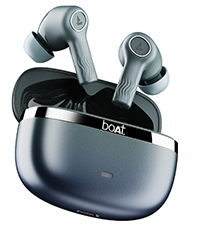
Welcome to the user manual for your boAt Nirvana Ion ANC Pro True Wireless Stereo (TWS) Earbuds. These earbuds are designed to provide a high-quality audio experience with advanced features such as Hi-Res Audio with LDAC, Active Noise Cancellation, and extended battery life. Please read this manual carefully to ensure proper use and optimal performance of your device.

Image: boAt Nirvana Ion ANC Pro TWS Earbuds and charging case.
Ki sa ki nan bwat la
- 1 x TWS ekoutè
- 1 x ka chaje
- 1 x kat garanti
- 1 x manyèl itilizatè
- 1 x Kab Chaje (Kalite-C)
Enstalasyon
1. Premye Chajman
Anvan premye itilizasyon an, chaje ekoutè yo ak bwat chaje a nèt. Konekte kab chaje Kalite-C ki vini ak ekoutè a nan pò chaje ki sou bwat la ak yon sous kouran. Limyè endikatè ki sou bwat la ap montre eta chaj la.
2. Konekte ak aparèy ou an
- Louvri kouvèti bwat chaje a. Ekoutè yo ap antre otomatikman nan mòd koneksyon.
- Sou telefòn entelijan ou oswa lòt aparèy ki gen Bluetooth, ale nan paramèt Bluetooth yo.
- Chèche pou "Nirvana Ion ANC Pro" in the list of available devices.
- Chwazi li pou konekte. Yon fwa konekte, ou pral tande yon envit odyo.
The earbuds support Bluetooth v5.3 for stable and efficient wireless connectivity.
3. Enstalasyon aplikasyon boAt Hearables la
Enhance your experience by installing the boAt Hearables App. This app allows for customization of EQ settings, firmware updates, and other advanced controls.
Scan this QR code to download the boAt Hearables App. Alternatively, visit l.ead.me/bdAX6k.

Image: boAt Hearables App interface for sound customization and ANC control.
Enstriksyon Operasyon
1. Touche Kontwòl
The earbuds feature intuitive touch controls for various functions. Specific gestures may vary; refer to the app for customization options.
- Jwe/Poz: Tape yon sèl sou chak ekoutè.
- Pwochen Track: Tape de fwa sou ekoutè dwat la.
- Track Previous: Tape de fwa sou ekoutè gòch la.
- Reponn/Fen Apèl: Tape yon sèl sou chak ekoutè.
- Rejte apèl: Peze lontan sou nenpòt ekoutè.
- Aktive Asistan Vwa: Tape twa fwa sou nenpòt ekoutè.
- Chanje Mòd ANC yo: Peze lontan sou nenpòt ekoutè (ou ka pèsonalize li atravè aplikasyon an).
2. Mòd Anilasyon Bri Aktif (ANC)
The Nirvana Ion ANC Pro offers up to 32dB Active Noise Cancellation to reduce ambient noise. You can switch between different modes:
- Mòd ANC: Redui bri ekstèn pou yon eksperyans koute imersif.
- Mòd transparans: Pèmèt ou tande anviwònman ou pandan w ap koute odyo, sa ki amelyore konsyans sitiyasyon an.
- Mòd nòmal: Lekti odyo estanda san anilasyon bri oswa transparans.

Image: Demonstrating 32dB Active Noise Cancellation.
3. Dual EQ Modes with Crystal Bionic Sound
Experience high-fidelity audio with 10mm drivers and choose between two distinct sound profiles:
- Crystal Bionic Sound: Powered by HiFi, this mode delivers enhanced clarity and detail.
- boAt Signature Sound: Provides a balanced and dynamic audio experience, characteristic of boAt products.

Image: Visual representation of Dual EQ Modes.
4. BEAST™ Mode (Low Latency for Gaming)
Activate BEAST™ Mode for an ultra-low latency experience, ideal for gaming. This mode reduces audio delay to approximately 60ms, ensuring synchronized sound with on-screen action.

Image: BEAST™ Mode for low latency gaming.
5. Koneksyon plizyè pwen
Connect your earbuds to two devices simultaneously and seamlessly switch between them. For example, you can listen to music on your laptop and instantly answer a call on your phone without re-pairing.

Image: Multipoint Connectivity feature.
6. Crystal Clear Calling with ENx™ Technology
The earbuds are equipped with 4 microphones and ENx™ Technology to ensure your voice is transmitted clearly during calls, even in noisy environments.

Image: Crystal Clear Calling with ENx™ Technology.
7. Chaje ak Dire Batri
The earbuds offer an impressive total playback time of up to 120 hours with the charging case. The ASAP™ Charge feature provides 4 hours of playback from just 10 minutes of charging.

Image: 120 Hours Playback and ASAP™ Charge.
Antretyen
- Netwayaj: Sèvi ak yon twal mou epi sèk pou netwaye ekoutè yo ak bwat chaje a. Pa sèvi ak pwodui chimik ki agresif oswa materyèl abrazif.
- Depo: Sere ekoutè yo nan ka chaje yo lè yo pa itilize pou pwoteje yo epi kenbe yo chaje.
- Rezistans dlo: The earbuds are not water resistant. Avoid exposure to water, sweat, or moisture.
- Pò chaje: Kenbe pò chaje Kalite-C a pwòp de pousyè ak debri.
Depanaj
| Pwoblèm | Solisyon |
|---|---|
| Ekoutè pa asosye | Ensure earbuds are charged. Turn off and on Bluetooth on your device. Place earbuds back in case, close, then reopen to re-enter pairing mode. |
| Se yon sèl ekoutè k ap travay | Place both earbuds back in the case, close the lid, then open again. Check battery levels for both earbuds. Try resetting the earbuds (refer to app or support for specific reset instructions). |
| Volim ki ba oswa kalite son ki pa bon | Adjust volume on your device and through touch controls. Ensure earbuds are clean and properly seated in your ears. Check EQ settings in the boAt Hearables App. |
| Pwoblèm chaje | Ensure the charging cable is securely connected. Try a different charging cable or power adapter. Clean the charging port on the case. |
| ANC pa efikas | Ensure earbuds are properly sealed in your ear canal. Switch between ANC modes using touch controls or the app. |
Espesifikasyon
| Karakteristik | Detay |
|---|---|
| Non modèl | Nirvana Ion ANC Pro |
| Mak | bato |
| Plasman Zòrèy | Nan Zòrèy |
| Bluetooth vèsyon | 5.3 |
| Gamme Bluetooth | 15 mèt |
| Kontwòl bri | Anilasyon Bri Aktif (jiska 32dB) |
| Gwosè Chofè Audio | 10 Milimèt |
| Odyo Codec | LDAC (Hi-Res Audio) |
| Dire Batri (Total) | Jiska 120 èdtan |
| Chaj rapid | ASAP™ Charge (10 mins = 4 Hrs playback) |
| Metòd kontwòl | Touche, Kontwòl Vwa |
| Mikwofòn | 4 (with ENx™ Technology) |
| Nivo rezistans dlo | Pa reziste dlo |
| Aparèy konpatib | Telefòn entelijan, Tablèt, Laptop, Odinatè Desktop |
| Pwa | 45 gram (apeprè) |
Garanti ak sipò
Your boAt Nirvana Ion ANC Pro TWS Earbuds come with a 1 ane garanti soti nan dat acha a.
For product-related queries, technical support, or warranty claims, please contact boAt customer support:
- Kontakte sipò: +91 (022) 69181920
- Imèl: info@imaginemarketingindia.com
- Manifakti: Imajine Maketing Ltd.
- Adrès manifakti: Unit no. 204 & 205, 2nd floor, D-wing & E-wing, Corporate Avenue, Andheri Ghatkopar Link Road, Mumbai, Maharashtra-400093, India.
Tanpri konsève resi acha ou a pou validasyon garanti a.