
Arikasen A6
Arikasen A6 Bluetooth Headset User Manual
Model: A6 | Wireless On-Ear Earphones
Entwodiksyon
Welcome to the user manual for your Arikasen A6 Bluetooth On-Ear Headset. This manual provides detailed instructions on how to set up, operate, maintain, and troubleshoot your new wireless earphones. Designed for comfort and superior sound, the A6 headset features Bluetooth 5.0 for stable connections, deep bass, and 3D stereo sound. Please read this manual carefully to ensure optimal performance and longevity of your device.
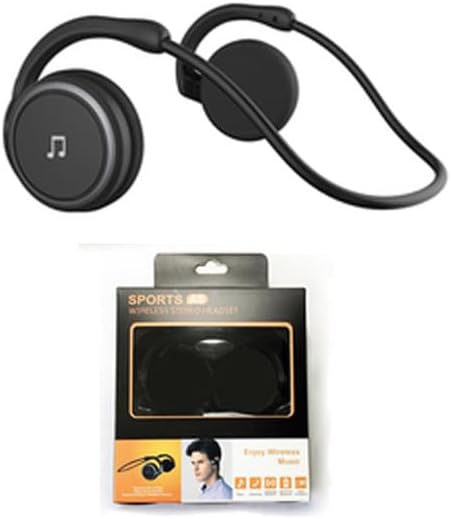
Figure 1: Arikasen A6 Bluetooth Headset. This image displays the overall design of the black on-ear headset, highlighting its lightweight and ergonomic form factor.
Enstalasyon ak Premye Itilizasyon
1. Chaje Headset la
Before first use, fully charge your Arikasen A6 headset. The headset charges via a cable connection.
- Konekte kab chaje a nan pò chaje kas ekoutè a.
- Konekte lòt bout kab la nan yon sous kouran USB (pa egzanp, yon pò USB òdinatè, yon adaptè miray).
- Limyè endikatè a ap montre eta chaj la (gade aparèy la pou konpòtman espesifik limyè a).
- A full charge provides approximately 11 hours of music playback time.

Figure 2: Battery Life Indication. This image illustrates the headset's capability to provide up to 11 hours of continuous music playback on a single charge.
2. Pè Bluetooth
To connect your headset to a device (smartphone, tablet, computer), follow these steps:
- Asire w ke kas ekoutè a chaje epi li etenn.
- Press and hold the power button on the headset until the indicator light flashes, indicating pairing mode.
- Sou aparèy ou an, ale nan paramèt Bluetooth yo epi aktive Bluetooth la.
- Chèche pou available devices. The headset should appear as "Arikasen A6" or similar.
- Select "Arikasen A6" to connect. Once connected, the indicator light will change (e.g., solid blue or off).
- Si yo mande w yon modpas, antre "0000".

Figure 3: Bluetooth 5.0 Connectivity. This image highlights the headset's Bluetooth 5.0 capabilities, ensuring stable and swift connections for both audio and voice calls.
Enstriksyon Operasyon
Kontwòl souview
The Arikasen A6 headset features intuitive controls located on the earcup. Familiarize yourself with these buttons for easy operation.
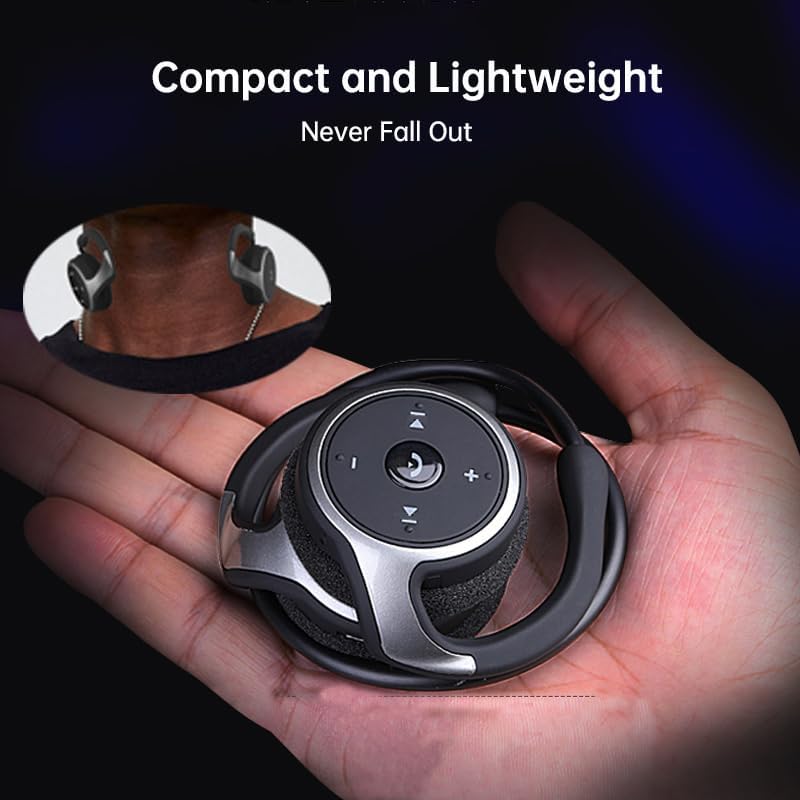
Figure 4: Headset Controls. This image provides a close-up view of the control panel on the headset's earcup, detailing the button layout for music and call management.
- Bouton pouvwa (bouton milti-fonksyon):
- Press and hold to Power ON/OFF.
- Peze yon fwa pou jwe/mete mizik la sou poz.
- Peze yon fwa pou reponn/fini apèl yo.
- Peze epi kenbe pou rejte apèl yo.
- Volim moute (+): Peze ogmante volim.
- Volim desann (-): Peze diminye volim.
- Pwochen Moso (>>|): Peze pou ale nan pwochen chante a.
- Tras anvan an (|<<): Peze pou ale nan chante anvan an.
Mete Headset la
The Arikasen A6 is designed for ultra-comfort, balancing stress on the ear. Its lightweight and compact design ensures it stays securely in place.

Figure 5: Ultra Comfort Design. This image demonstrates the ergonomic design of the headset, emphasizing its comfortable fit for extended wear, particularly beneficial for sensitive ears.
Antretyen ak Swen
Proper maintenance ensures the longevity and optimal performance of your Arikasen A6 headset.
- Netwayaj: Use a soft, dry cloth to wipe the headset. Do not use abrasive cleaners, solvents, or strong chemicals.
- Depo: Lè w pa ap itilize kas ekoutè a, sere l nan yon kote ki fre epi sèk, lwen limyè solèy dirèk ak tanperati ekstrèm.
- Evite imidite: Pa mete kas ekoutè a nan dlo oswa imidite twòp. Li pa enpèmeyab.
- Manyen ak Swen: Evite lage kas ekoutè a oswa sibi gwo enpak.
- Chaje: Only use the provided charging cable or a certified equivalent. Do not overcharge the battery.
Depanaj
If you encounter issues with your Arikasen A6 headset, refer to the following common problems and solutions:
| Pwoblèm | Kòz posib | Solisyon |
|---|---|---|
| Kas ekoutè a pa limen. | Batri ki ba. | Chaje kas ekoutè a nèt. |
| Pa ka konekte ak aparèy la. | Kas ekoutè a pa nan mòd koneksyon; Bluetooth la etenn sou aparèy la; aparèy la twò lwen. | Ensure headset is in pairing mode (flashing light). Turn on Bluetooth on your device. Move headset closer to device (within 10 meters). |
| Pa gen son oswa volim nan ba. | Volim nan twò ba sou kas ekoutè a oswa aparèy la; kas ekoutè a pa byen konekte. | Increase volume on both headset and connected device. Re-pair the headset. |
| Koneksyon tanzantan. | Entèferans; aparèy twò lwen; batri fèb. | Move away from other wireless devices. Ensure headset is within range. Charge the headset. |
Si pwoblèm nan pèsiste, tanpri al gade seksyon Garanti ak Sipò a pou plis asistans.
Espesifikasyon
The following are the technical specifications for the Arikasen A6 Bluetooth Headset:
- Modèl: A6
- Mak: Generic (Arikasen)
- Koneksyon: Bluetooth 5.0
- Earcups Type: Semi-louvri
- Sound Isolating: Non
- Sòti pouvwa: 50mW
- Kantite Chofè: 2
- Gwosè Chofè: 18mm (for superior sound and deeper bass)
- Metòd chaje: Kab
- Headphone Pads Material: Mou kim
- Kalite leman: Neyodim
- Materyèl: Plastik
- Koulè: Black (without box)
- Approximate Music Playback Time: 11 èdtan

Figure 6: Driver Technology. This image illustrates the internal components of the earcup, highlighting the 18mm driver responsible for delivering superior sound quality and deep bass.
Garanti ak sipò
Your Arikasen A6 headset comes with dedicated customer support.
If you encounter any issues with your product, such as a damaged product or receiving incorrect items, please contact us directly through the Amazon platform. We are committed to providing the best solution to resolve any issues promptly.
For further assistance or inquiries, please reach out to our customer service team via the Amazon messaging system.
Ask a question about this manual
Ask about setup, troubleshooting, compatibility, parts, safety, or missing instructions. Manuals+ will review the question and use this page’s manual context to help answer it.