
Entwodiksyon
This manual provides detailed instructions for the proper use and maintenance of your ACEFAST H2 Wireless Headset. Designed with advanced Active Noise Cancelling (ANC) technology and Bluetooth 5.3 connectivity, these headphones offer a high-quality audio experience. Please read this manual thoroughly before using the product to ensure optimal performance and longevity.
Kontni pake
- ACEFAST H2 Wireless Headset
- USB-C Chaje Kab
- 3.5mm Aux kab
- Manyèl Itilizatè (dokiman sa a)
Pwodwi souview
Familiarize yourself with the components and controls of your ACEFAST H2 headset.
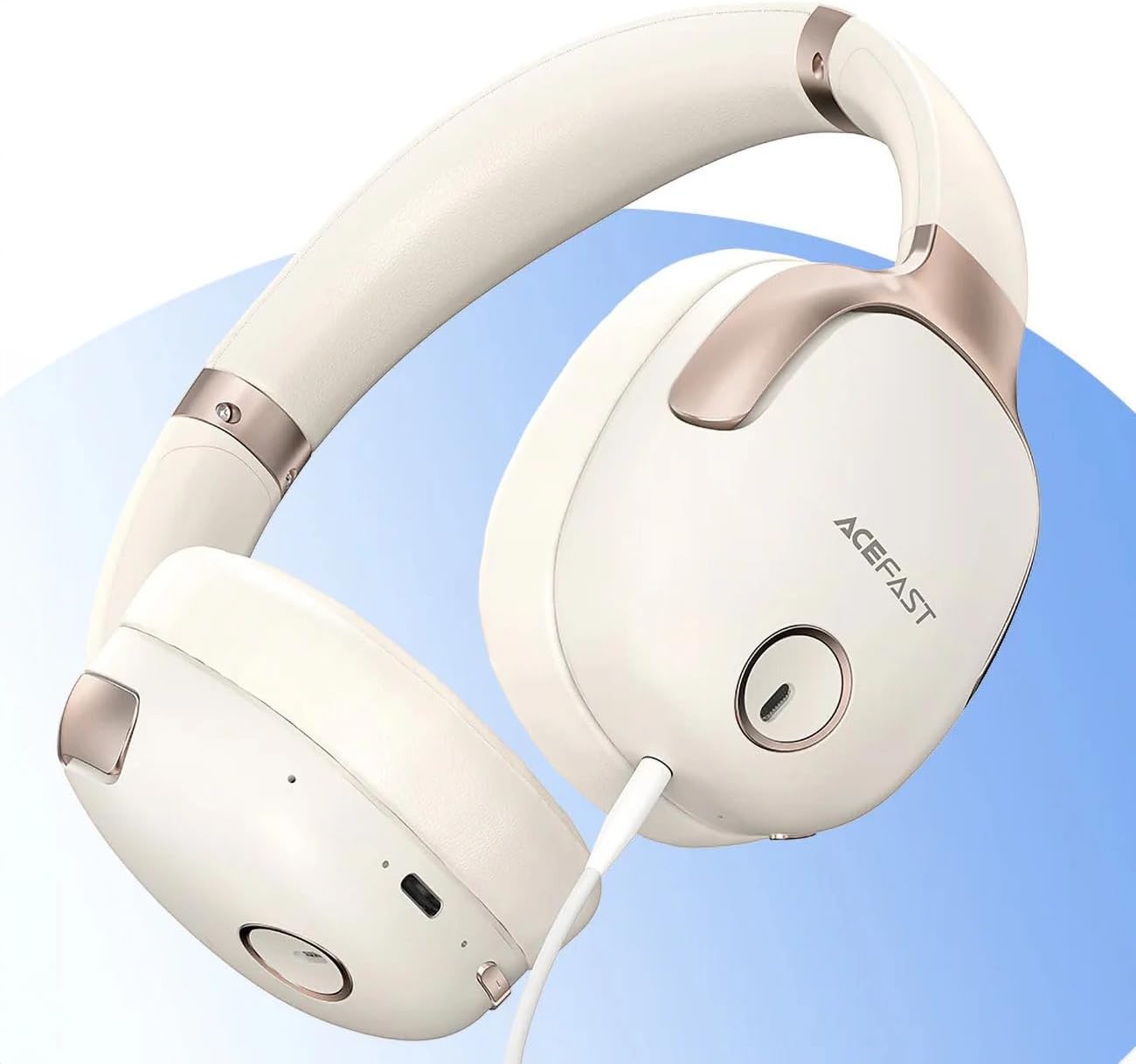
Figi 1: ACEFAST H2 Headset showing USB-C charging port, 3.5mm audio jack, and control buttons.
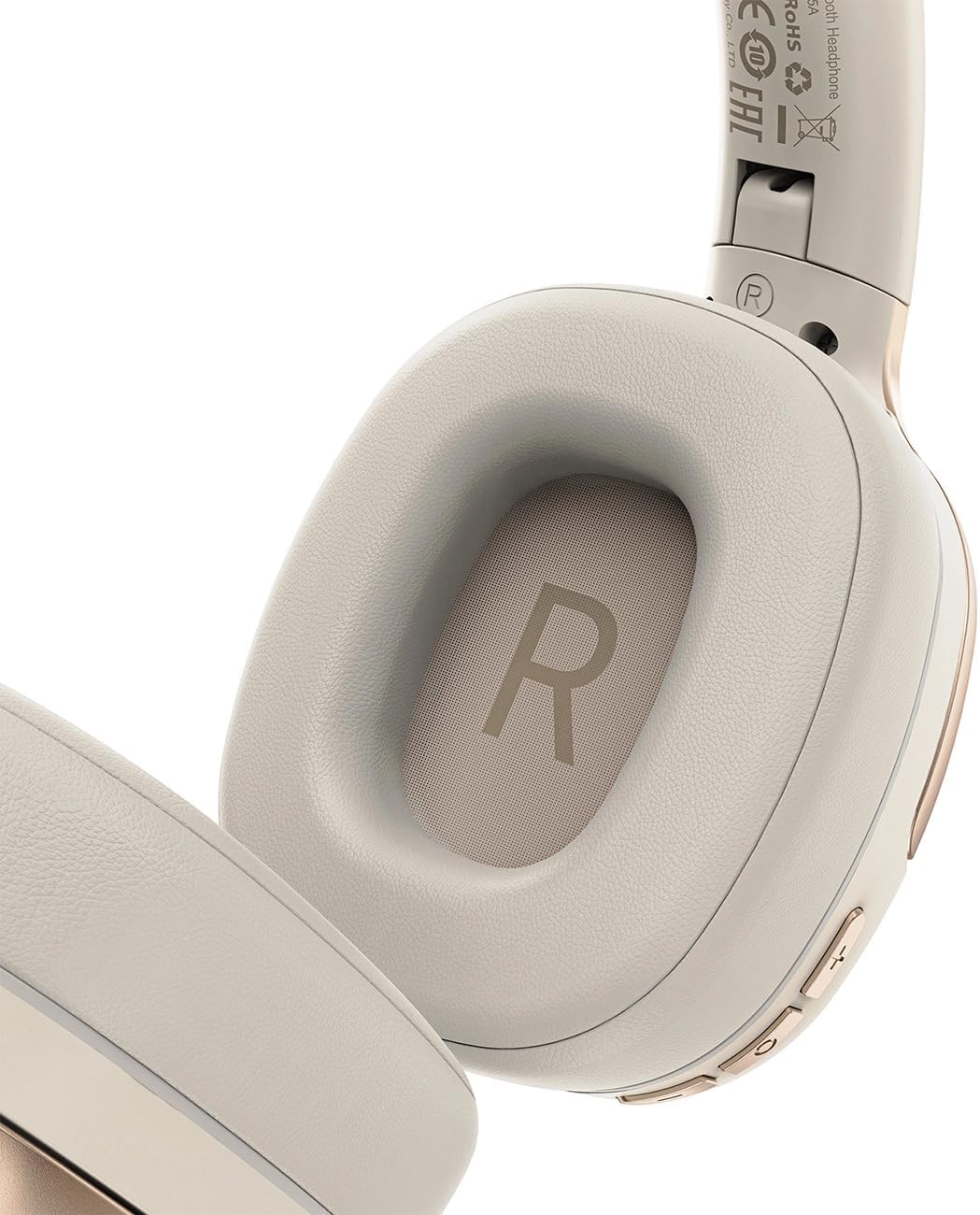
Figi 2: Interior of the right earcup, indicating proper orientation for wearing.

Figi 3: Headband adjustment mechanism and ear cup swivel for comfortable fit.

Figi 4: The foldable design of the headset for easy storage and transport.
Konpozan kle:
- Bouton pouvwa/milti-fonksyon: Used for power on/off, play/pause, answer/end calls.
- Bouton Volim Monte/Pwochen Mizik: Peze pou ogmante volim, kenbe pou pwochen track.
- Bouton Diminye Volim/Mizik Presedan: Peze pou volim desann, kenbe pou tras anvan an.
- Bouton ANC: Aktive oswa dezaktive Anilasyon Bri Aktif la.
- USB-C chaje pò: Pou chaje headset la.
- 3.5mm Audio Jack: For wired connection using the Aux cable.
- Mikwofòn: Entegre pou apèl.
- Endikatè ki ap dirije: Montre pouvwa, chaj, ak estati koneksyon.
Enstalasyon
1. Chaje Headset la
- Connect the provided USB-C charging cable to the headset's USB-C port.
- Konekte lòt bout kab la nan yon adaptè kouran USB (pa enkli) oubyen nan yon pò USB òdinatè.
- The LED indicator will show charging status (e.g., red while charging, blue when fully charged).
- A full charge takes approximately 2 hours and provides up to 80 hours of music playback.
2. Powering On / Off
- Pou limen: Press and hold the Power/Multi-function button for approximately 3 seconds until the LED indicator flashes.
- Pou etenn: Press and hold the Power/Multi-function button for approximately 5 seconds until the LED indicator turns off.
3. Pè Bluetooth
- Asire ekoutè a koupe.
- Press and hold the Power/Multi-function button for about 5-7 seconds until the LED indicator flashes red and blue alternately, indicating pairing mode.
- Sou aparèy ou an (telefòn entelijan, tablèt, òdinatè), aktive Bluetooth epi chèche aparèy ki disponib yo.
- Select "ACEFAST H2" from the list of found devices.
- Yon fwa li konekte, endikatè LED la ap flache ble dousman.
- The headset will automatically connect to the last paired device when powered on, if within range.
4. Koneksyon filaire (Aux Mode)
- Connect one end of the 3.5mm Aux cable to the headset's 3.5mm audio jack.
- Connect the other end to your audio source's 3.5mm audio output.
- In wired mode, the headset functions passively, and Bluetooth features are disabled. ANC may still be active if powered on.
Enstriksyon Operasyon
Lèktur Klas Mizik
- Jwe/Poz: Peze bouton Pouvwa/Milti-fonksyon an yon ti tan.
- Volim moute: Peze bouton Volim Monte a yon ti tan.
- Volim desann: Peze bouton Diminye Volim nan yon ti tan.
- Pwochen Track: Peze bouton Volim Monte a pandan lontan.
- Track Previous: Peze bouton Diminye Volim nan pandan lontan.
Apèl Telefòn
- Reponn/Fen Apèl: Peze bouton Pouvwa/Milti-fonksyon an yon ti tan.
- Rejte apèl: Peze bouton Pouvwa/Milti-fonksyon an pandan lontan.
- Asistan vwa: Double-press the Power/Multi-function button (if supported by your device).
Anilasyon bri aktif (ANC)
- Aktive/Dezaktive ANC: Press the dedicated ANC button. The LED indicator will change to confirm status.
- ANC reduces ambient noise up to -40dB, providing a quieter listening environment.
Antretyen
- Netwayaj: Sèvi ak yon twal mou epi sèk pou netwaye kas ekoutè a. Pa sèvi ak pwodui netwayaj abrazif oswa solvan.
- Depo: Store the headset in a cool, dry place away from direct sunlight and extreme temperatures. When not in use, it is recommended to fold the headset for compact storage.
- Rezistans dlo: The headset is IPX4 water-resistant, meaning it is protected against splashing water from any direction. It is not designed for submersion or exposure to heavy rain. Avoid exposing the charging port and audio jack to moisture.
- Swen batri: To preserve battery life, charge the headset fully before long periods of storage and recharge it at least once every three months.
Depanaj
| Pwoblèm | Kòz posib | Solisyon |
|---|---|---|
| Kas ekoutè a pa limen. | Batri ki ba. | Chaje kas ekoutè a nèt. |
| Pa ka konekte ak aparèy la. | Headset not in pairing mode; device Bluetooth off; too far from device. | Ensure headset is in pairing mode (flashing red/blue). Turn on device Bluetooth. Move headset closer to device (within 10 meters). |
| Pa gen son oswa bon jan kalite odyo a pa bon. | Volume too low; headset not connected; interference; incorrect audio output selected. | Adjust volume on headset and device. Re-pair headset. Move away from sources of interference. Check device's audio output settings. |
| ANC a pa fonksyone byen. | ANC pa aktive; li pa anfòm byen. | Press the ANC button to activate. Adjust headset for a snug fit over your ears. |
Espesifikasyon
| Non modèl | H2 |
| Koneksyon Teknoloji | Wireless (Bluetooth 5.3) / Wired (3.5mm Aux) |
| Gamme Bluetooth | Jiska 10 mèt |
| Kontwòl bri | Active Noise Cancellation (ANC) up to -40dB, Environmental Noise Cancelling (ENC) for microphone |
| Lavi batri | Jiska 80 èdtan (lèktur mizik) |
| Tan pou chaje | Apeprè 2 èdtan (via USB-C) |
| Rezistans dlo | IPX4 (rezistan ak pwojeksyon) |
| Plasman Zòrèy | Sou Zòrèy |
| Materyèl | Akrilonitrile butadien stirèn (ABS) |
| Koulè | Bèj |

Figi 5: Illustration of the dynamic HiFi audio driver components.
Enfòmasyon sou Garanti
The ACEFAST H2 Wireless Headset comes with a Garanti manifakti 6 mwa apati dat acha a. Garanti sa a kouvri domaj fabrikasyon ak atizan konn fè nan itilizasyon nòmal. Li pa kouvri domaj ki koze pa move itilizasyon, aksidan, modifikasyon san otorizasyon, oswa mete ak chire nòmal. Tanpri konsève prèv acha ou pou reklamasyon garanti.
Sipò
For further assistance, technical support, or warranty inquiries, please refer to the contact information provided by your retailer or visit the official ACEFAST website. Ensure you have your product model number (H2) and proof of purchase ready when contacting support.