
Ergear EGESD7W-CA
Manyèl Itilizatè Biwo Kanpe Elektrik ErGear
Model: EGESD7W-CA | Brand: ErGear
Entwodiksyon
Thank you for choosing the ErGear Electric Standing Desk. This manual provides detailed instructions for assembly, operation, maintenance, and troubleshooting to ensure optimal performance and longevity of your desk. Please read this manual thoroughly before installation and use, and retain it for future reference.
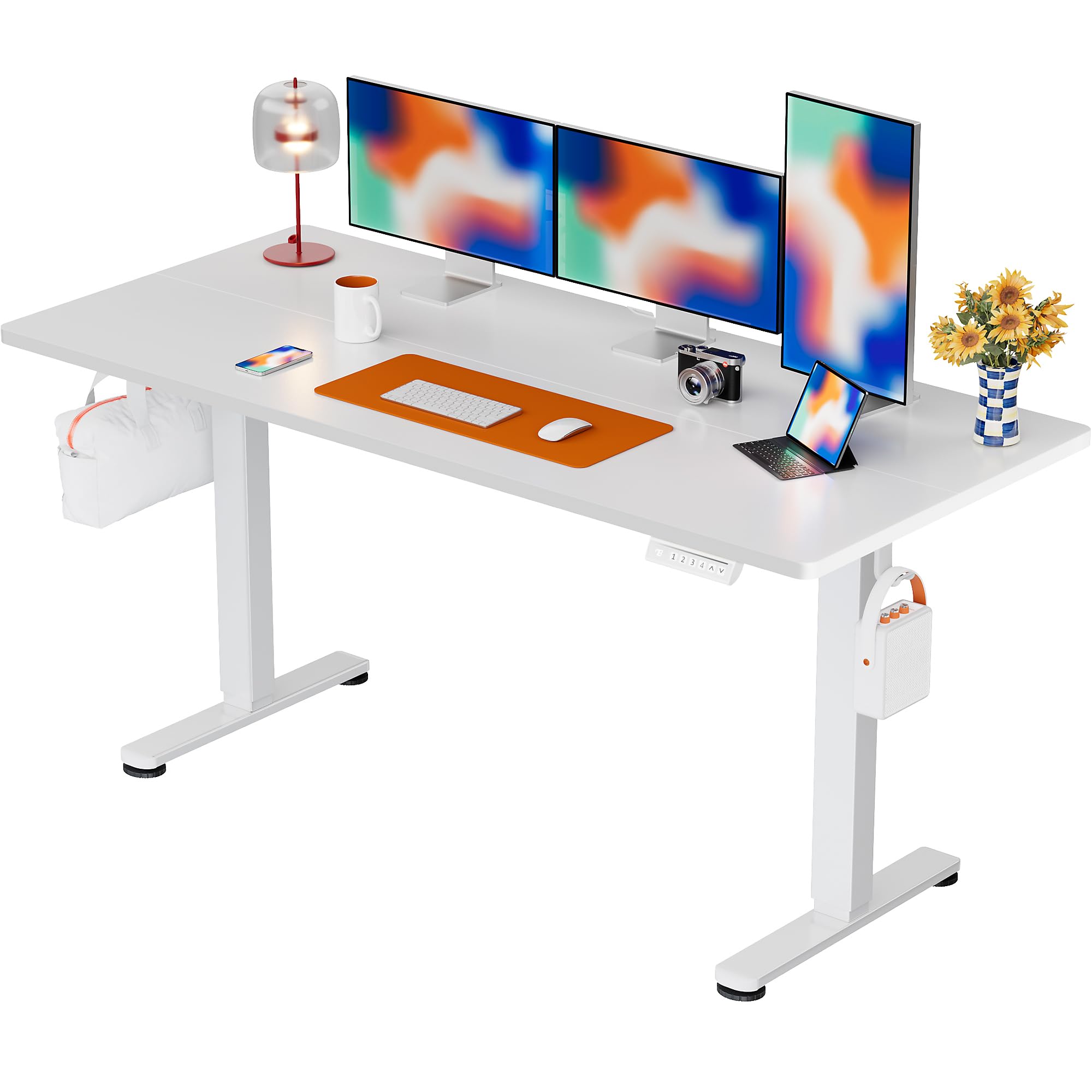
The ErGear Electric Standing Desk, 63x28 inch, in a white finish, featuring a spacious desktop and electric height adjustment capabilities.
Enfòmasyon sou Sekirite
- Asire w tout konpozan yo prezan epi yo pa domaje anvan ou asanble. Pa sèvi ak li si gen nenpòt pyès ki manke oswa ki defektye.
- Kenbe timoun ak bèt kay lwen biwo a pandan w ap opere pou evite blesi.
- Pa twò chaje biwo a. Pwa maksimòm rekòmande a se 176 liv (80 kg).
- Ensure the power cord is not pinched or damaged. Connect to a grounded outlet.
- Evite mete likid dirèkteman sou panèl kontwòl la oswa toupre konpozan elektrik yo.
- Tcheke tout vis ak koneksyon yo regilyèman pou asire yo sere epi byen fèm.
- Biwo sa a fèt pou itilize andedan kay la sèlman.
Kontni pake
Anvan ou kòmanse asanblaj la, tanpri verifye si tout konpozan sa yo enkli nan pake a:
- Desktop Boards ×2
- Leg with Motor ×1
- Janm × 1
- Leg Bases ×2
- Crossbar & Transmission Rod
- Controller & Power Cable
- Tout zouti asanble ak pyès ki nan konpitè ki nesesè yo
Enstriksyon Asanble
Follow these steps carefully to assemble your ErGear Electric Standing Desk. An assembly video is also provided for visual guidance.
Official ErGear Electric Standing Desk Assembly Video. This video demonstrates the step-by-step process for setting up your desk.
Etap 1: Rasanble pye biwo yo
Attach the leg bases to the desk legs using the provided screws. Ensure they are securely fastened.

The stable T-shaped desk legs provide a sturdy foundation for the electric standing desk.
Etap 2: Mete plak bò yo ak baton transmisyon an
Connect the side plates to the desk legs. Insert the transmission rod fully into the left leg and secure it. If the two desk legs are not at the same height, insert the rod into the left leg and turn to adjust.
Step 3: Assemble and Attach the Desktop
Place the two desktop boards together, aligning the dowels. Secure the desktop to the assembled frame using the provided screws and brackets. Ensure all connections are tight.
Etap 4: Konekte kab yo
Connect the motor and control panel cables to the main control box. Ensure all connections are firm and correctly oriented.
Step 5: Install Cable Hole Covers
Place the cable hole covers into the designated openings on the desktop to manage wires neatly.

Ergonomic guidelines for using the standing desk, showing optimal monitor and arm positions for both sitting and standing.
Enstriksyon Operasyon
Kontwòl Panel Plis paseview
The desk features an intuitive control panel with height adjustment buttons and memory presets.
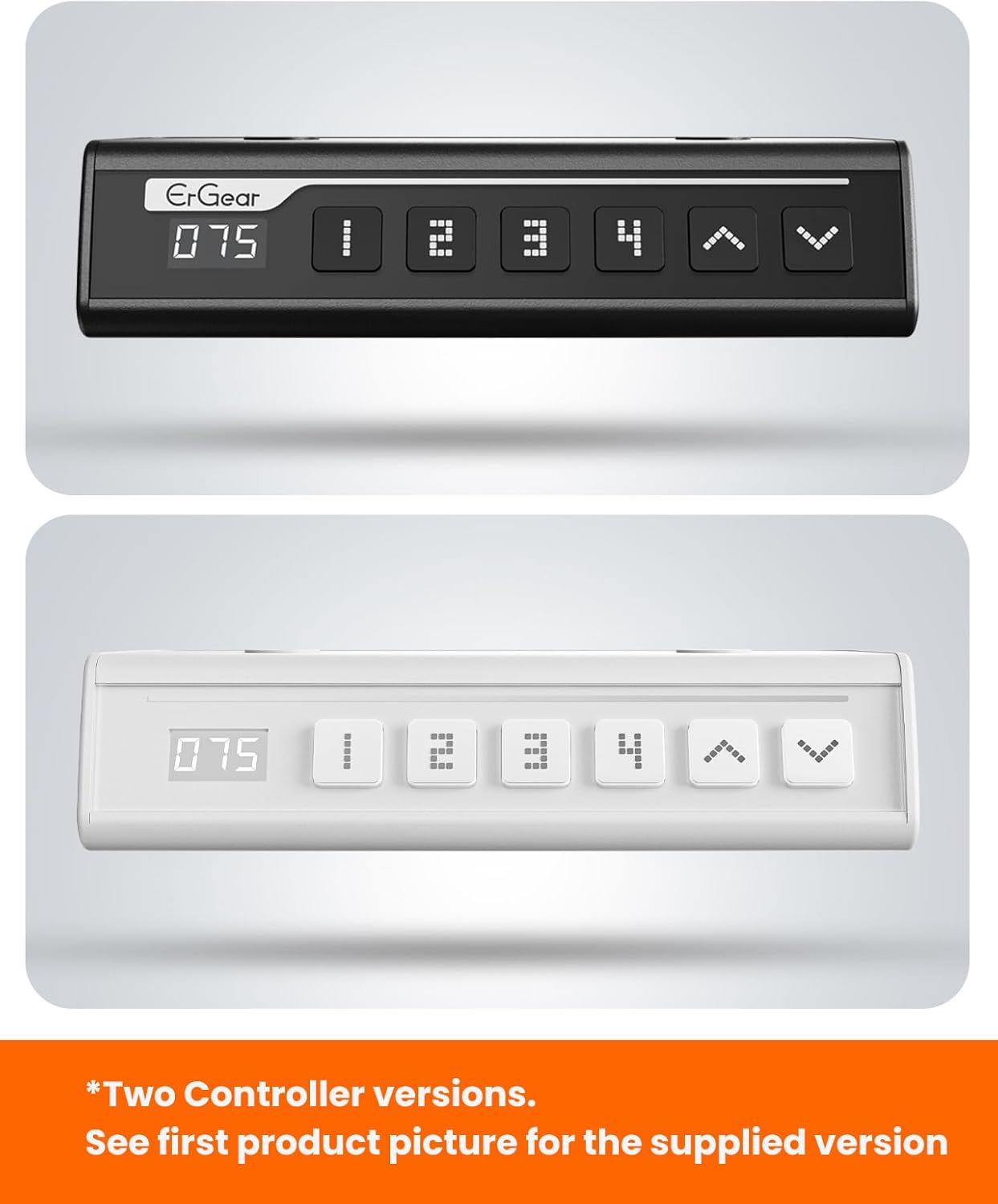
The ErGear control panel, available in two versions, features a digital height display and four programmable memory settings.
Ajisteman Wotè
- Sèvi ak la Anlè (^) epi Desann (v) arrows to smoothly adjust the desk height between 28.35 inches and 46.46 inches.
- Lage bouton an nan wotè ou vle a.
Prereglaj memwa
The desk allows you to save up to 4 preferred height settings.
- Ajiste biwo a nan wotè ou vle a avèk flèch Anwo/Anba yo.
- Peze a M button (or equivalent memory set button). The display will flash.
- Press one of the numbered preset buttons (1, 2, 3, oswa 4) within 3 seconds to save the current height to that preset.
- To recall a saved height, simply press the corresponding numbered preset button. The desk will automatically move to the saved position.
This video demonstrates the smooth and quiet operation of the ErGear Electric Standing Desk, showcasing its height adjustment and memory preset features.
Antretyen
- Netwayaj: Siye biwo a ak ankadreman an avèk yon twal mou.amp twal. Evite pwodui chimik ki agresif oswa pwodui netwayaj abrazif.
- Enspeksyon: Periodically check all screws and connections for tightness. Re-tighten if necessary.
- Jesyon kab: Ensure cables are neatly organized and not tangled or pinched to prevent damage.
Depanaj
If you encounter any issues with your ErGear Electric Standing Desk, please refer to the following common problems and solutions:
| Pwoblèm | Kòz posib | Solisyon |
|---|---|---|
| Biwo a pa deplase | Power cable disconnected, motor error, overloaded desk. | Check power connections. Unplug for 30 seconds and plug back in. Reduce weight on the desk. |
| Wotè inegal | Transmission rod not fully inserted or adjusted. | Refer to Step 2 of assembly to ensure the transmission rod is correctly installed and adjusted. |
| Bri pandan operasyon an | Normal operation sound, loose screws. | A slight motor sound is normal. Check and tighten any loose screws on the frame. |
| Prereglaj memwa yo pa fonksyone | Pwosedi pou sove ki pa kòrèk. | Follow the memory preset instructions carefully (press M, then the number within 3 seconds). |
Espesifikasyon
| Karakteristik | Detay |
|---|---|
| Mak | ErGear |
| Nimewo Modèl | EGESD7W-CA |
| Konsepsyon biwo | Kanpe Biwo |
| Fòm | Rektangilè |
| Dimansyon pwodwi (D x W x H) | 71.1P x 160W x 118H Santimèt |
| Gwosè | 63 * 28 pous |
| Koulè | Blan |
| Wotè Minimòm | 28.35 pous |
| Wotè maksimòm | 46.46 pous |
| Epesè Tabletop | 1.5 santimèt |
| Materyèl de baz | Alloy Steel |
| Kalite Materyèl Top | Engineered Wood (Walnut Wood finish) |
| Karakteristik espesyal | Wotè reglabl, elektrik, ergonomik |
| Rekòmandasyon pwa maksimòm | 176 liv (80 kg) |
| Asanble obligatwa | Yes (Includes all assembly tools) |
Garanti ak sipò
ErGear is committed to providing high-quality products and customer satisfaction. This product comes with:
- Pwoteksyon 5 zan on the desktop and desk frame.
- Pwoteksyon 2 zan on motors and electrical components.
For any questions, concerns, or warranty claims, please contact ErGear customer support. You can typically find contact information on the product packaging or the official ErGear website. Please have your model number (EGESD7W-CA) and purchase details ready when contacting support.

The ErGear Electric Standing Desk seamlessly integrates into various home office environments.
Ask a question about this manual
Ask about setup, troubleshooting, compatibility, parts, safety, or missing instructions. Manuals+ will review the question and use this page’s manual context to help answer it.