
MEGA MOTION HY-A03
MEGA MOTION Hoverboard User Manual
Modèl: HY-A03
1. Entwodiksyon
Welcome to the world of MEGA MOTION! This manual provides essential information for the safe and optimal operation of your new 6.5-inch Two-Wheel Self Balancing Electric Scooter. Please read this manual thoroughly before first use to ensure proper handling, maintenance, and to prevent injury or damage.
Your MEGA MOTION Hoverboard is designed for fun and efficient personal transportation, featuring a robust design, intelligent balancing system, Bluetooth speaker, and vibrant LED lights.
2. Enfòmasyon sou Sekirite
WARNING: Riding a hoverboard can be dangerous. Always wear appropriate safety gear, including a helmet, knee pads, and elbow pads. Adult supervision is recommended for children.
- Always wear a helmet and protective gear (knee pads, elbow pads, wrist guards) when riding.
- Pa monte anba enfliyans alkòl oswa dwòg.
- Ensure the hoverboard is fully charged before each use.
- Pa depase kapasite pwa maksimòm 100 kg.
- Avoid riding on wet, slippery, or uneven surfaces.
- Be aware of your surroundings and other people/obstacles.
- Do not make sudden turns or rapid accelerations/decelerations.
- Do not attempt stunts or jumps.
- Keep fingers and all body parts clear of moving parts.
- Store the hoverboard in a cool, dry place away from direct sunlight and extreme temperatures.

Image: Children demonstrating safe riding practices with helmets and protective gear.
3. Ki sa ki nan bwat la
Upon opening your MEGA MOTION Hoverboard package, you should find the following items:
- 1 x MEGA MOTION Hoverboard
- 1 x Chargeur
- 1 x Manyèl Enstriksyon (dokiman sa a)
4. Pwodwi souview ak Karakteristik
The MEGA MOTION Hoverboard is a 6.5-inch self-balancing electric scooter designed for stability and enjoyment. Key features include:
- Konstriksyon dirab: Made from high-quality ABS+PC material with 6.5-inch aluminum alloy wheels.
- Pedal ki pa glise: Unique non-slip pedal design for enhanced grip and safety.
- Sistèm pwoteksyon entèlijan: Features anti-shake, anti-fall, and anti-tilt mechanisms.
- Limyè devan LED klere: Provides improved visibility and safety during night riding.
- Doub motè: Ensures full power and stable performance.
- Bluetooth Oratè: Connect your smartphone to play music while riding.
- Karakteristik sekirite: Built-in battery overload protection, intelligent fault detection, low battery reminder, intelligent weight sensing, balance assist, explosion-proof tires, and overspeed warning.

Imaj: Devan view of the MEGA MOTION Hoverboard, highlighting its LED lights and sleek design.

Image: Product information diagram detailing the hoverboard's dimensions and main parts.

Image: Illustration of the dual motor intelligent drive system, highlighting its power and climbing capacity.
5. Enstalasyon
5.1 Chaje Hoverboard la
Before first use, fully charge your hoverboard. The charging time is approximately 2-3 hours.
- Asire w ke hoverboard la etenn.
- Konekte plato a nan yon priz kouran.
- Plug the charging cable into the charging port on the hoverboard.
- Limyè endikatè ki sou plato a ap chanje (pa egzanp, soti nan wouj pou vin vèt) lè chaj la fini.
- Dekonekte plato a yon fwa konplètman chaje.

Image: Battery and charging information, showing key specifications.
6. Operasyon Enstriksyon
6.1 First Ride and Balancing
The MEGA MOTION Hoverboard is designed for ease of learning, controlled by your center of gravity. Users can typically master the hoverboard in minutes.
- Mete hoverboard la sou yon sifas plat e nivo.
- Step onto one footpad, ensuring the hoverboard is stable.
- Quickly step onto the other footpad with your second foot.
- Stand upright and relax. Use slight shifts in your body weight to control movement.
- Lean slightly forward to move forward, and lean backward to slow down or move backward.
- To turn, apply more pressure to the footpad on the side you wish to turn away from.
- Pou desann, desann yon pye alafwa, epi asire w ke hoverboard la rete stab.
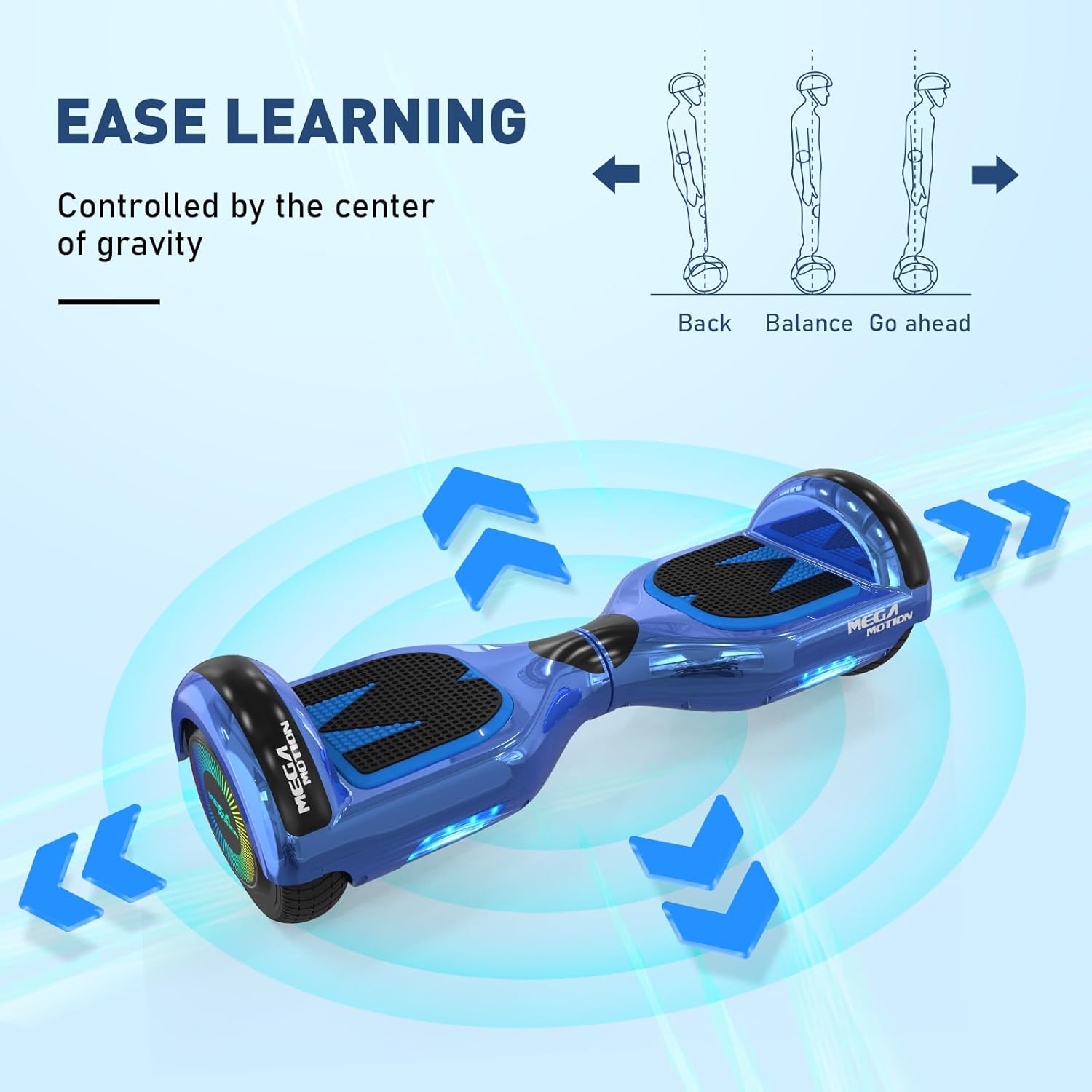
Image: Visual guide on how to control the hoverboard by shifting your center of gravity.
6.2 Fonksyonalite Oratè Bluetooth
Your hoverboard is equipped with a built-in Bluetooth speaker, allowing you to enjoy music while riding.
- Ensure the hoverboard is powered on.
- Aktive Bluetooth sou smartphone ou oswa lòt aparèy konpatib.
- Chèche pou available Bluetooth devices and select the hoverboard (usually named 'Bluetooth' or similar).
- Once paired, you can play audio through the hoverboard's speaker.

Image: The hoverboard's integrated Bluetooth speaker feature.
6.3 Riding on Various Surfaces
The hoverboard is suitable for various road surfaces, but optimal performance and safety are achieved on smooth, flat ground.

Image: The hoverboard's adaptability to different road surfaces.
7. Antretyen
Proper maintenance will extend the life of your MEGA MOTION Hoverboard.
- Netwayaj: Sèvi ak yon mou, damp cloth to wipe down the hoverboard. Do not use harsh chemicals or abrasive cleaners. Do not wash with water directly.
- Depo: Store the hoverboard in a cool, dry place when not in use. Avoid direct sunlight and extreme temperatures.
- Swen batri: To avoid affecting battery life, charge the hoverboard at least once a month, even if it is not used for long periods of time.
- Enspeksyon kawotchou: Tcheke kawotchou yo regilyèman pou wè si yo mete ak chire.
- Enspeksyon jeneral: Before each use, check the status of the hoverboard for any loose parts or damage.
NAN. Depanaj
If you encounter issues with your hoverboard, refer to the following common problems and solutions:
| Pwoblèm | Kòz posib | Solisyon |
|---|---|---|
| Hoverboard not turning on | Batri fèb; Bouton pouvwa a pa byen peze | Charge the hoverboard; Press and hold the power button firmly. |
| Hoverboard shaking uncontrollably | Calibration issue; Faulty sensor | Recalibrate the hoverboard (refer to manufacturer's specific calibration steps, usually involves powering off, placing on level ground, and holding power button); If issue persists, contact support. |
| Bluetooth pa konekte | Bluetooth not enabled; Device too far; Interference | Ensure Bluetooth is on for both devices; Move closer to the hoverboard; Try pairing in a different location. |
| Kout lavi batri | Battery not fully charged; Old battery; Improper charging habits | Ensure full charge; Follow monthly charging recommendation; Contact support if battery life significantly degrades. |
| Bwi etranj pandan operasyon an | Loose components; Internal damage | Sispann itilize imedyatman epi kontakte sipò kliyan. |
9. Espesifikasyon
| Spesifikasyon | Detay |
|---|---|
| Nimewo Modèl | HY-A03 |
| Gwosè wou | 6.5 pous |
| Chaje Range | 20-100 KG |
| Vitès maksimòm | <15 km/h (Based on factory test) |
| Tan pou chaje | 2-3 èdtan |
| Kalite batri | Lityòm Polymè (1 obligatwa) |
| Kalite Materyèl | ABS+PC, Aluminum Alloy, Non-slip material |
| Dimansyon pwodwi | 58.5 x 19 x 17 cm |
| Pwa atik | 6.83 kg |
| Karakteristik espesyal | Light Up Wheel, LED Light, Non-Slip Deck, Built-In Bluetooth speaker, Long Battery Life |
10. Garanti ak sipò
For any questions during purchase or use, please contact MEGA MOTION customer support. Our team is dedicated to providing professional answers and assistance.
Tanpri gade dokiman acha ou a oswa dokiman vandè a. websit la pou kondisyon garanti espesifik ak enfòmasyon pou kontakte yo.
Ask a question about this manual
Ask about setup, troubleshooting, compatibility, parts, safety, or missing instructions. Manuals+ will review the question and use this page’s manual context to help answer it.