
1. Entwodiksyon
Thank you for choosing the S25HH0 WTS01 Waterproof Humidity Sensor. This device is designed to accurately measure humidity levels in various environments, offering reliable performance with its waterproof construction and RJ9 4P4C connector for easy integration into compatible systems. This manual provides essential information for the safe and effective use of your sensor.
2. Enfòmasyon sou Sekirite
Please read and understand all safety instructions before operating this device. Failure to do so may result in damage to the product or personal injury.
- Do not expose the sensor to extreme temperatures beyond its specified operating range.
- Ensure the RJ9 4P4C connector is properly seated and secured to prevent intermittent connections or damage.
- Avoid applying excessive force to the sensor probe or cable.
- This device is waterproof; however, avoid submerging the connector end unless it is specifically designed for such conditions and properly sealed.
- Do not attempt to disassemble or modify the sensor. This will void the warranty and may cause malfunction.
3. Pwodwi Features
- Konsepsyon ki enpèmeyab: Suitable for use in humid or wet environments.
- Deteksyon imidite: Provides accurate humidity measurements.
- RJ9 4P4C Connector: Standardized connector for easy integration.
- Konpatibilite aparèy entelijan: Designed for integration with smart systems (Is Smart Device: YES).
- Sètifikasyon: FCC, CE certified for quality and safety.
- Rating aktyèl: 160A.
- Materyèl: Konstriksyon plastik dirab.
4. Pake kontni
- 1 x S25HH0 WTS01 Waterproof Humidity Sensor with RJ9 4P4C Connector
5. Enstalasyon ak Enstalasyon
The S25HH0 WTS01 sensor is designed for straightforward installation. Follow these steps to connect your sensor:
- Identify Connection Port: Locate the compatible RJ9 4P4C input port on your monitoring device or smart system.
- Konekte Capteur: Carefully insert the RJ9 4P4C connector of the WTS01 sensor into the designated port until it clicks into place. Ensure a firm connection.
- Capteur Pozisyon: Place the sensor probe in the area where humidity measurement is required. Ensure the waterproof probe is exposed to the environment you wish to monitor.
- Kab sekirite: Route the sensor cable to prevent accidental disconnections or damage.
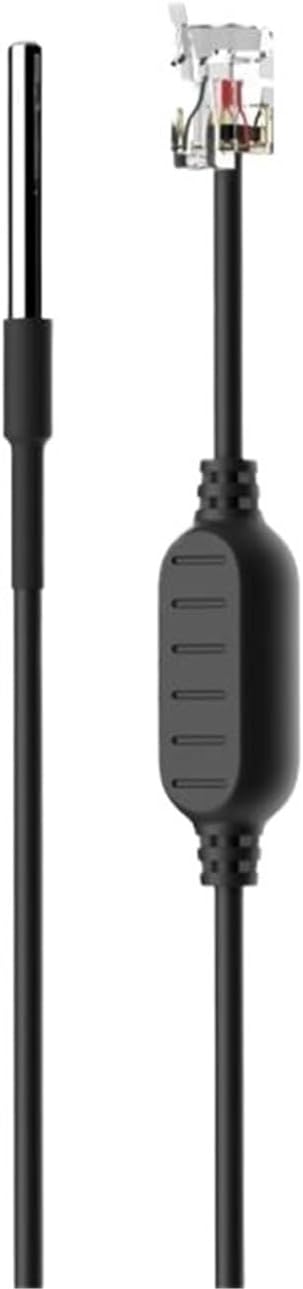
Description for Figure 1: This image displays the S25HH0 WTS01 Waterproof Humidity Sensor. On the left, a slender, metallic sensor probe is visible, connected to a black cable. On the right, the same black cable terminates in an RJ9 4P4C connector, which is a small, clear plastic plug with four metal contacts, typically used for telephone handsets or similar low-data connections. A small, black, rectangular housing is visible along the cable near the connector, likely containing internal circuitry.
6. Operasyon
Once connected to a compatible device, the S25HH0 WTS01 sensor will begin to measure ambient humidity. The specific operation and display of humidity data will depend on the monitoring device or smart system it is connected to.
- Akizisyon Done: The sensor continuously collects humidity data from its environment.
- Entegrasyon sistèm: Data is transmitted via the RJ9 4P4C connection to the connected system. Refer to your monitoring device's manual for instructions on how to view and interpret the sensor data.
- Smart kontwòl: If integrated with a smart device, the sensor may trigger automated actions (e.g., activating a humidifier or dehumidifier) based on programmed humidity thresholds.
7. Antretyen
The S25HH0 WTS01 sensor requires minimal maintenance due to its robust design.
- Netwayaj: If the sensor probe becomes dirty, gently wipe it with a soft, damp twal. Pa sèvi ak pwodui netwayaj abrazif oswa solvang.
- Enspeksyon: Periodically inspect the cable and connector for any signs of wear or damage. Replace the sensor if any damage is observed.
- Depo: When not in use, store the sensor in a clean, dry environment away from direct sunlight and extreme temperatures.
NAN. Depanaj
If you encounter issues with your S25HH0 WTS01 sensor, consider the following troubleshooting steps:
- No Reading/Incorrect Reading:
- Ensure the RJ9 4P4C connector is securely plugged into the compatible port.
- Verify that the monitoring device or smart system is powered on and configured correctly to receive data from the sensor.
- Tcheke pou wè si gen nenpòt domaj fizik nan kab detèktè a oswa sond lan.
- Ensure the sensor probe is not obstructed and is exposed to the environment it is intended to measure.
- Koneksyon tanzantan:
- Unplug and re-plug the RJ9 4P4C connector to ensure a proper connection.
- Inspect the connector pins for bends or corrosion.
Si pwoblèm yo pèsiste apre ou fin eseye etap sa yo, kontakte sèvis kliyan pou plis asistans.
9. Espesifikasyon
| Nimewo Modèl | S25HH0 (WTS01) |
| Kalite atik | Chanje |
| Kouran | 160A |
| Materyèl | Plastik |
| Se yon aparèy entelijan | WI |
| Sètifikasyon | FCC, CE |
| Dimansyon pake | 1.18 x 0.79 x 0.39 pous |
| Pwa atik | 1.76 ons |
| Kantite moso | 1 |
| Manifakti | S25HH0 |
10. Garanti ak sipò
This product comes with a standard manufacturer's warranty. For specific warranty terms and conditions, please refer to the documentation provided with your purchase or contact the retailer. For technical support or inquiries, please reach out to your product vendor or the manufacturer, S25HH0.