
Entwodiksyon
This manual provides comprehensive instructions for the CASEKOO Patented 360° Spin Magnetic Stand Case designed for the Samsung Galaxy S25 Ultra. This innovative case integrates multiple functionalities including a 360° spin stand, ring holder, magnetic compatibility, and military-grade drop protection, while supporting wireless charging.

Figi 1: Plis paseview of the CASEKOO Patented 360° Spin Magnetic Stand Case.
Enstalasyon ak Enstalasyon
To ensure proper fit and protection, follow these steps for installing your CASEKOO case:
- Preparasyon: Ensure your Samsung Galaxy S25 Ultra is clean and free of dust or debris.
- Enstalasyon: Gently align your Samsung Galaxy S25 Ultra with the case. Insert one side of the phone into the case, then carefully press the other side until the phone is fully seated within the case. Ensure all edges are securely covered.
- Verifikasyon: Check that all ports, buttons, and camera cutouts align correctly with your phone.

Figure 2: Proper handling and fit of the case on the Samsung Galaxy S25 Ultra.
Enstriksyon Operasyon
The CASEKOO case offers several integrated features for enhanced usability:
360° Spin Stand and Ring Holder
The patented 360° rotating stand and ring holder provide versatile viewing angles and a secure grip. The ring can be adjusted horizontally and vertically within a 0-170° range.
- To use as a stand: Pull out the integrated ring from the back of the case. Rotate the ring to achieve your desired viewing angle for horizontal or vertical orientation.
- To use as a ring holder: Slide your finger through the ring for a secure grip, reducing the risk of accidental drops, especially with large-screen devices.

Figure 3: Demonstrating the 360° spin stand and ring holder functionality.

Figure 4: Horizontal adjustment of the stand for optimal viewing.

Figure 5: Longitudinal adjustment of the stand for various uses, including S Pen interaction.
Magnetic Compatibility (MagSafe)
The case features a patented Halbach array for enhanced magnetic force, making it compatible with all MagSafe accessories and third-party Qi-certified wireless chargers.
- Chaje san fil: Place your phone with the case onto a compatible MagSafe or Qi wireless charger. The magnetic alignment ensures efficient charging.
- MagSafe Accessories: Attach MagSafe wallets, power banks, car mounts, or other compatible accessories directly to the back of the case.

Figure 6: Demonstrating MagSafe compatibility with various accessories.
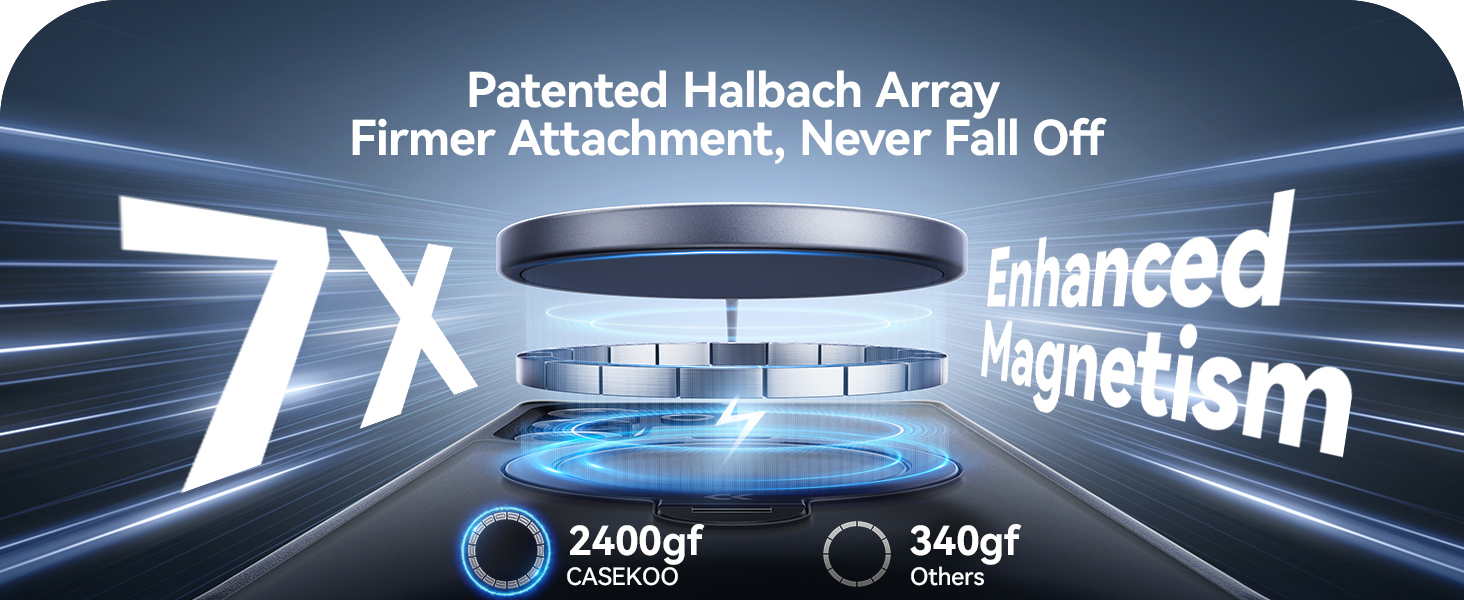
Figure 7: Enhanced magnetism for secure attachment.

Figure 8: Use with car mounts and MagSafe wallets.

Figure 9: Wireless charging and magnetic attachment for convenience.
Antretyen
To maintain the appearance and functionality of your CASEKOO case:
- Netwayaj: Siye bwat la regilyèman avèk yon twal mou,amp cloth to remove dust and fingerprints. For tougher stains, a mild soap solution can be used, followed by wiping with a clean, dry cloth.
- Evite pwodwi chimik piman bouk: Do not use abrasive cleaners, solvents, or strong chemicals, as these can damage the case material and finish.
- Depo: When not in use, store the case in a cool, dry place away from direct sunlight.
Depanaj
If you encounter any issues with your CASEKOO case, consider the following common solutions:
| Pwoblèm | Kòz posib | Solisyon |
|---|---|---|
| Ka a pa anfòm byen. | Modèl telefòn ki pa kòrèk oswa move enstalasyon. | Ensure you have the correct case for Samsung Galaxy S25 Ultra. Re-install the case, ensuring all corners are snapped into place. |
| Magnetic accessories do not attach securely. | Accessory not MagSafe compatible or foreign objects interfering. | Verify that your accessory is MagSafe compatible. Remove any debris or foreign objects between the case and the accessory. |
| Chaje san fil la ralanti oswa li pa fonksyone. | Misalignment on charger or charger not Qi-certified. | Ensure the phone with the case is centered on the wireless charger. Use a Qi-certified wireless charger. |
| Stand feels loose or stiff. | Normal wear or minor debris. | The stand is designed for durability (30,000+ folds). If stiff, gently work it back and forth. Ensure no debris is lodged in the hinge mechanism. |
Espesifikasyon
Key specifications for the CASEKOO Patented 360° Spin Magnetic Stand Case:
- Dimansyon pwodwi: 6.65 x 3.23 x 0.52 pous
- Pwa atik: 3.52 ons
- Modèl telefòn konpatib: Samsung Galaksi S25 Ultra
- Materyèl: Silicone, Synthetic Rubber, Metal, Polycarbonate
- Karakteristik espesyal: Wireless charging compatible, Slim Fit, Heavy Duty Protection (18FT Military Drop Protection), Kickstand (360° Spin), Anti-Slip, Magnetic (MagSafe compatible)
- Koulè: Black (for this specific model variant)

Figure 10: Illustration of the case's military-grade drop protection.

Figi 11: Detaye view of protective features and ergonomic design.
Garanti ak sipò
CASEKOO is committed to providing high-quality products and customer satisfaction. For any product-related inquiries, issues, or warranty claims, please contact the CASEKOO after-sales service center.
- Enfòmasyon pou kontakte: Refer to the packaging or the official CASEKOO websit la pou jwenn enfòmasyon kontak ki pi resan yo.
- Resous sou entènèt: Visit the CASEKOO store on Amazon or their official website for FAQs, product registration, and additional support.
Note: Specific warranty terms and conditions may vary. Please retain your proof of purchase for warranty purposes.