
1. Entwodiksyon
This manual provides detailed instructions for the setup, operation, and maintenance of your Topping D50 III DAC Preamplifier and KGUSS Mini Audio Component Rack. Please read this manual thoroughly before using the products to ensure proper functionality and to maximize your audio experience. Keep this manual for future reference.
2. Pwodwi souview
2.1 Topping D50 III DAC Preamplifier
The Topping D50 III is a high-performance Digital-to-Analog Converter (DAC) and preamplifier designed for superior audio reproduction. It features dual ES9039Q2M DAC chips, LDAC Bluetooth 5.1, and supports high-resolution audio formats up to DSD512 and PCM768kHz. The device includes a remote control and offers PEQ adjustment capabilities.
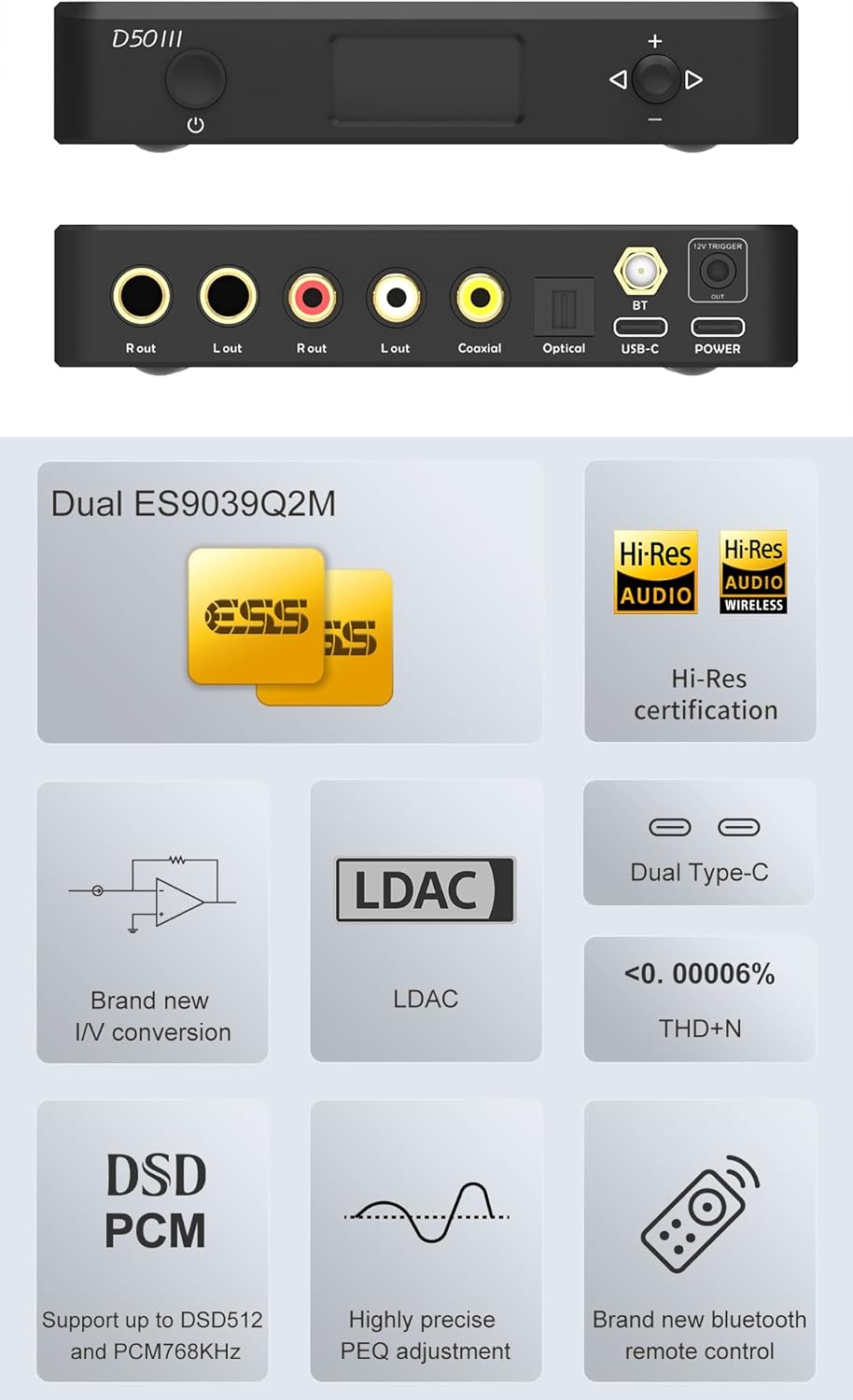
Imaj: Devan ak dèyè views of the Topping D50 III DAC Preamplifier, showing the display, control buttons, and various input/output ports including USB-C, Coaxial, Optical, Bluetooth antenna, and RCA/TRS outputs.
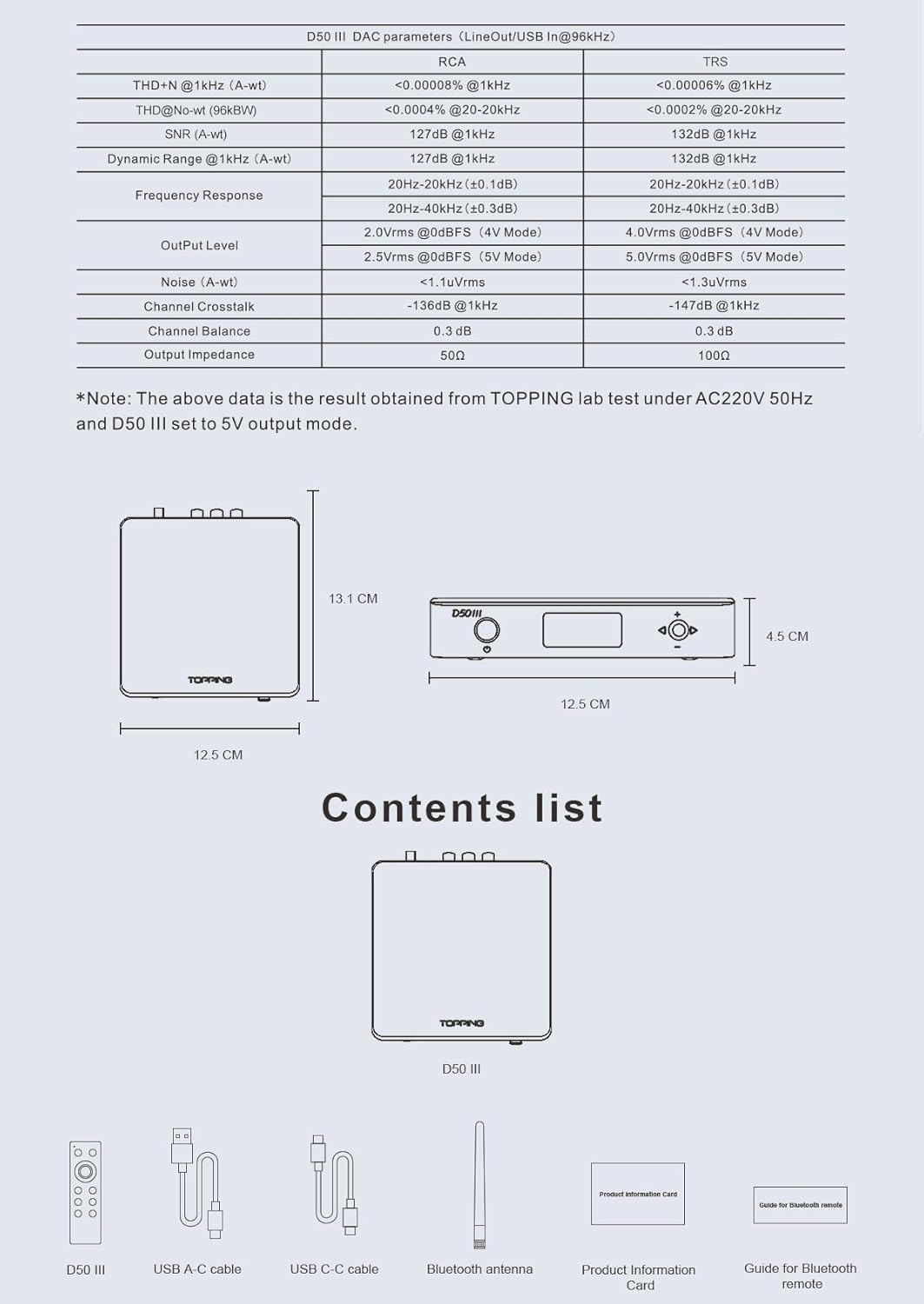
Imaj: Yon souview of the Topping D50 III's key features, including Dual ES9039Q2M DACs, Hi-Res Audio certification, LDAC support, dual Type-C ports, low THD+N, DSD512/PCM768kHz support, precise PEQ adjustment, and a new Bluetooth remote control. Also includes a table of DAC parameters.
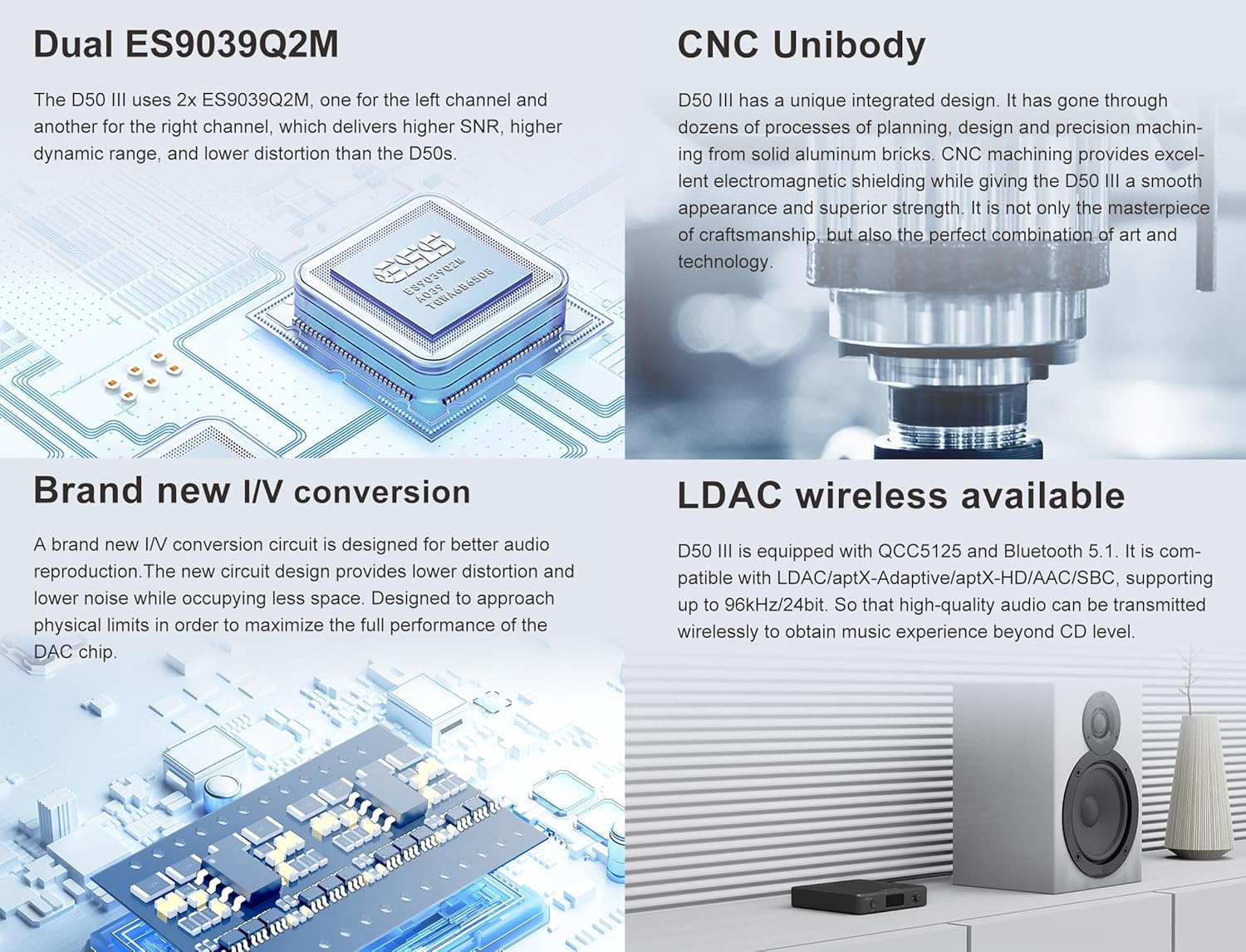
Imaj: Detailed explanation of the Topping D50 III's advanced features: Dual ES9039Q2M DACs for improved SNR and dynamic range, CNC Unibody construction for electromagnetic shielding, brand new I/V conversion for lower distortion, and LDAC wireless capability for high-quality audio transmission.

Imaj: A visual representation of the Topping D50 III's package contents, including the D50 III unit, USB A-C cable, USB C-C cable, Bluetooth antenna, product information card, and a guide for the Bluetooth remote.
2.2 KGUSS Mini Audio Component Rack
The KGUSS Mini Audio Component Rack is a compact and modular storage solution for small HiFi amplifiers, kas ekoutè amps, DACs, and other audio components. It features an acrylic board and aluminum structure, offering a sturdy design with a weight capacity of up to 3kg per shelf.

Imaj: Detailed dimensions of the KGUSS Mini Audio Component Rack, showing its height, width, and depth, along with individual shelf spacing. Note that the rack panel is made of acrylic material and has a maximum weight capacity of 3kg per shelf.

Imaj: The KGUSS Mini Audio Component Rack displayed with various audio components, highlighting its function as a desktop organizer and its modular, stackable design. It also emphasizes ease of cleaning.

Imaj: A breakdown of the KGUSS Mini Audio Component Rack's assembly components: four pieces of component A (top caps), four pieces of component B (threaded posts), eight pieces of component C (support tubes), and three pieces of component D (acrylic shelves).
3. Enstalasyon
3.1 Topping D50 III DAC Preamplifier Enstalasyon
- Koneksyon pouvwa: Connect the D50 III to a suitable power source using the provided USB-C power cable.
- Koneksyon sous odyo:
- USB: Connect your computer or audio source to the D50 III's USB-C input using the supplied USB cable. For Windows users, install the dedicated Thesycon driver for optimal performance (available on the Topping official website). macOS, Linux, iOS, and Android devices are plug-and-play.
- Coaxial/Optical: Connect your digital audio source (e.g., CD player, TV) to the D50 III's Coaxial or Optical input ports.
- Bluetooth: Attach the provided Bluetooth antenna to the designated port on the rear panel.
- Koneksyon Sòti odyo: Connect the D50 III's RCA or TRS outputs to your amplifier, active speakers, or other audio receiving equipment. Ensure correct left and right channel connections.
3.2 KGUSS Mini Audio Component Rack Assembly
- Depake konpozan: Carefully unbox all components (A, B, C, D) and verify against the contents list.
- First Layer Assembly: Take one acrylic shelf (D). Screw four threaded posts (B) into the designated holes on the underside of the shelf.
- Add Support Tubes: Place four support tubes (C) onto the threaded posts (B).
- Dezyèm Kouch: Place another acrylic shelf (D) on top of the support tubes (C). Screw the remaining four threaded posts (B) into the holes of this second shelf, securing it to the support tubes below.
- Final Layer: Place the last four support tubes (C) onto the threaded posts (B) of the second shelf. Then, place the final acrylic shelf (D) on top. Secure it by screwing the four top caps (A) into the holes of the top shelf.
- Plasman: Position the assembled rack on a stable, level surface. Ensure adequate ventilation around your audio components.
4. Operasyon Enstriksyon
4.1 Topping D50 III DAC Preamplifier Operasyon
- Limen/Etenyen: Peze bouton pouvwa a sou panèl devan an oswa sou kontwòl remote la pou limen oswa etenn aparèy la.
- Seleksyon Antre: Use the input selection button on the front panel or the remote to cycle through available inputs (USB, Coaxial, Optical, Bluetooth). The selected input will be displayed on the screen.
- Kontwòl Volim: Adjust the volume using the knob on the front panel or the volume buttons on the remote control.
- Bluetooth mak: Select Bluetooth input. The D50 III will enter pairing mode. On your device (phone, tablet, etc.), search for "Topping D50 III" and connect.
- PEQ Adjustment: Refer to the detailed instructions in the separate D50 III user manual for advanced PEQ (Parametric Equalizer) adjustments. This feature allows fine-tuning of the audio frequency response.
5. Antretyen
5.1 Netwayaj jeneral
To maintain the appearance and performance of both the Topping D50 III and the KGUSS Mini Audio Component Rack, follow these guidelines:
- Disconnect power before cleaning any electronic components.
- Sèvi ak yon twal mou, sèk, ki pa gen pousyè pou siye sifas yo.
- Pou mak ki difisil pou retire, pase yon ti krasampen the cloth with water. Avoid harsh chemicals, abrasive cleaners, or solvents, as these can damage finishes.
5.2 KGUSS Rack Specific Care
The acrylic shelves of the KGUSS rack are susceptible to scratches. Use only soft cloths and avoid excessive pressure when cleaning. Do not place excessively heavy or sharp objects directly on the acrylic surfaces.
NAN. Depanaj
6.1 Topping D50 III DAC Preamplifier Depanaj
- Pa gen Sòti Son:
- Check all cable connections (source, D50 III, amplifier/speakers).
- Ensure the correct input is selected on the D50 III.
- Verify the volume level on the D50 III and your amplifier/oratè.
- If using USB, ensure the correct driver is installed (for Windows) and selected as the audio output device on your computer.
- Pwoblèm koneksyon Bluetooth:
- Asire w antèn Bluetooth la byen tache.
- Make sure the D50 III is in Bluetooth input mode and pairing mode.
- Delete previous pairings on your source device and try pairing again.
- Reduce the distance between the D50 III and your Bluetooth device.
- Aparèy la pa limen:
- Check the power cable connection and ensure the power adapter is functioning.
- Eseye yon lòt sous kouran USB oswa yon lòt kab.
7. Espesifikasyon
7.1 Topping D50 III DAC Preamplifier
| Paramèt | RCA Sòti | TRS Output |
|---|---|---|
| THD+N @ 1kHz (A-wt) | <0.00008% @ 1kHz | <0.00006% @ 1kHz |
| THD+N @ No-wt (90kBw) | <0.00008% @ 20-20kHz | <0.00007% @ 20-20kHz |
| SNR (A-wt) | 127dB @ 1kHz | 132dB @ 1kHz |
| Dynamic Range @ 1kHz (A-wt) | 127dB @ 1kHz | 132dB @ 1kHz |
| Repons Frekans | 20Hz-40kHz (±0.3dB) | 20Hz-40kHz (±0.3dB) |
| Nivo Sòti | 2.0Vrms @0dBFS (4V mòd) 2.5Vrms @0dBFS (5V mòd) | 4.0Vrms @0dBFS (4V mòd) 5.0Vrms @0dBFS (5V mòd) |
| Bri (A-wt) | <1.1uVrms | <1.3uVrms |
| Chanèl Crosstalk | -136dB @ 1kHz | -147dB @ 1kHz |
| Balans chanèl | 0.3 dB | 0.3 dB |
| Enpedans Sòti | 50Ω | 100Ω |
Note: The above data is the result obtained from TOPPING lab test under AC220V 50Hz and D50 III set to 5V output mode.
- DAC Chip: Dual ES9039Q2M
- Bluetooth vèsyon: 5.1 (QCC5125)
- Kodèk Bluetooth: LDAC, aptX-Adaptive, aptX-HD, AAC, SBC
- USB Antre: XMOS XU316, supports PCM up to 768kHz/32bit, DSD512 Native
- Antre koaksyal/optik: Supports PCM up to 192kHz/24bit, DSD64 (DoP)
- Dimansyon: Apeprè 12.5 cm (lajè) x 13.1 cm (pwofondè) x 4.5 cm (wotè)
7.2 KGUSS Mini Audio Component Rack
- Materyèl: Acrylic board and Aluminum structure
- Kapasite pwa: Approximately 3kg per shelf
- Dimansyon jeneral: Apeprè 24 cm (lajè) x 20 cm (pwofondè) x 16 cm (wotè)
- Shelf Spacing: Approximately 4.8 cm (1.89 inches) between shelves
8. Garanti ak sipò
This product is covered by a manufacturer's warranty. Please refer to the warranty card included in the packaging for specific terms and conditions. For technical support, troubleshooting assistance, or warranty claims, please contact the retailer where you purchased the product or visit the official KGUSS/Topping support websit.
Resous sou entènèt:
- For Topping D50 III drivers and firmware updates, visit the official Topping websit.
- For KGUSS product information, visit the official KGUSS brand store or websit.