
1. Entwodiksyon
Mèsi pou acha aasing the Generic APAYADO-M70 Wired Mini Low Profile Keyboard. This manual provides essential information for setting up, operating, and maintaining your new keyboard. Please read this manual thoroughly before use to ensure proper function and longevity of your device.
2. Pwodwi souview
2.1 Karakteristik kle
- Gwosè kontra enfòmèl ant: Slim and lightweight design (29×12×3.5cm; 220g) with a 78-key mini layout, saving desk space and enhancing portability.
- Low Profile Konsepsyon: Keys feature a short travel distance for responsive keystrokes and a comfortable typing experience.
- Kle Chokola: Alphanumeric translucent keycaps ensure letters and numbers are clearly visible.
- Ekleraj RGB: Integrated LED backlighting for enhanced visibility and aesthetics.
- Kle trankil: Bass buttons are designed for quiet operation, reducing typing noise.
2.2 Kontni pake a
Tanpri tcheke pake a pou atik sa yo:
- APAYADO-M70 Wired Mini Low Profile Klavye
- Kab USB (entegre)
- Manyèl Itilizatè (dokiman sa a)
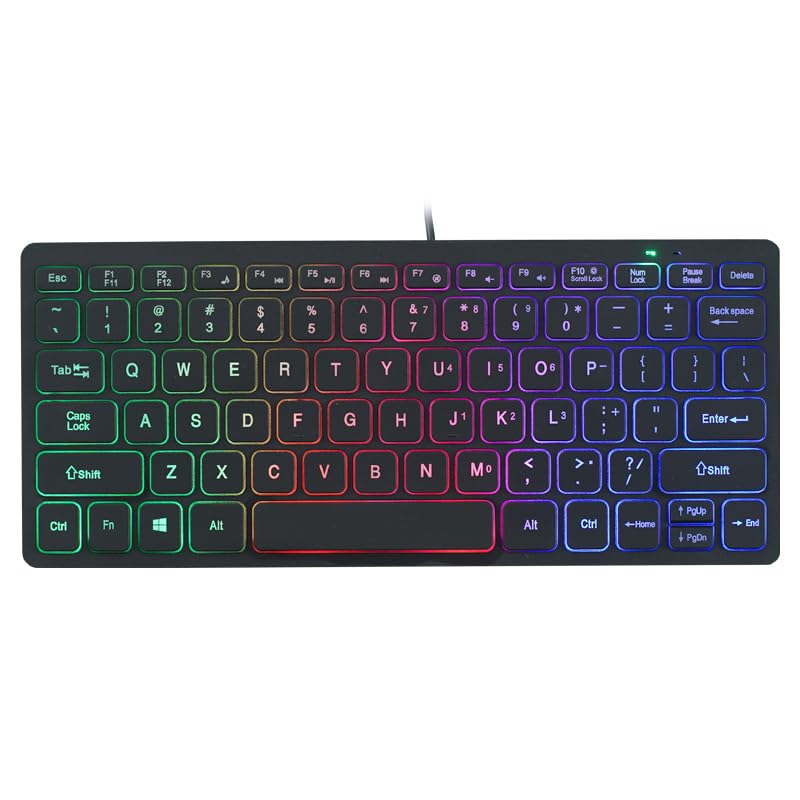
Image: The APAYADO-M70 Wired Mini Low Profile Keyboard, illustrating its compact form factor and illuminated keys.
3. Enstriksyon Enstalasyon
- Depake klavye a: Retire klavye a nan anbalaj li avèk prekosyon.
- Konekte ak òdinatè: Locate an available USB port on your computer (PC or Laptop). Insert the USB connector of the keyboard into the USB port.
- Enstalasyon chofè: The keyboard is plug-and-play. Your operating system (Windows, macOS, Linux) should automatically detect and install the necessary drivers. No additional software installation is typically required.
- Verifye Fonksyonalite: Open a text editor or word processor and type to ensure the keyboard is functioning correctly.
4. Operasyon Enstriksyon
4.1 Tape debaz
The APAYADO-M70 functions as a standard US English layout keyboard. Simply press the desired keys to input characters.
4.2 Kontwòl ekleraj dèyè RGB
The keyboard features integrated RGB backlighting. To control the backlighting:
- Turn On/Off Backlighting: Peze a FN kle a an menm tan ak la F10 kle (FN + F10) to toggle the LED lights on or off.
- Note: Specific RGB modes or brightness adjustments are not detailed in the product information. The FN+F10 combination is for basic on/off functionality.
5. Antretyen
Bon antretyen asire lonjevite ak pèfòmans klavye ou a.
- Netwayaj:
- Dekonekte klavye a nan òdinatè w la anvan ou netwaye li.
- Sèvi ak yon ti moso twal mou, ki san pèl dampRense avèk dlo oswa yon solisyon netwayaj dou pou siye bouchon kle yo ak sifas la.
- Evite itilize pwodui chimik ki fò, pwodui netwayaj abrazif, oswa solvan.
- Sèvi ak lè konprese pou retire pousyè ak debri ki ant kle yo.
- Depo: Sere klavye a nan yon anviwònman pwòp epi sèk, lwen tanperati ekstrèm ak limyè solèy dirèk.
- Manyen: Evite lage klavye a oswa ekspoze li a likid. Pa eseye demonte klavye a, paske sa ap anile nenpòt garanti.
NAN. Depanaj
| Pwoblèm | Kòz posib | Solisyon |
|---|---|---|
| Klavye pa reponn | Koneksyon USB ki lach, pò USB ki defektye, pwoblèm chofè. |
|
| Ekleraj dèyè a pa fonksyone | Limyè dèyè a etenn, pwoblèm kouran. |
|
| Kle yo kole oswa yo pa reponn | Debri anba bouchon kle yo, likid gaye. |
|
7. Espesifikasyon
| Modèl | APAYADO-M70 |
| Manifakti | APAYADO |
| Mak | Jenerik |
| Koneksyon Teknoloji | Fil USB |
| Deskripsyon klavye | Membrane, Low-Profile |
| Karakteristik espesyal | Backlit, Lightweight, Low-Profile Kle |
| Dimansyon (L x W x H) | 29 × 12 × 3.5 cm (approx.) |
| Pwa | 220 g (apeprè) |
| Aparèy konpatib | Laptop, PC |
| Color/Backlight | Mixed Light (RGB) |
8. Garanti ak sipò
This product is covered by a standard manufacturer's warranty. Please refer to the retailer's return policy or contact the seller for specific warranty terms and conditions. For technical support or inquiries, please contact your point of purchase or the manufacturer directly.
Kenbe resi acha ou a kòm prèv acha pou reklamasyon garanti.