
1. Entwodiksyon
This manual provides detailed instructions for the setup, operation, maintenance, and troubleshooting of your VOCOlinc Air Card Tag Wallet Tracker, Model VT2202T-1P. This device is designed to help you locate your personal items using the Apple Find My network.
Nòt enpòtan: This product is compatible only with iOS devices and does not support Android devices. It does not include Ultra-Wideband (UWB) functionality.
2. Pwodwi souview
The VOCOlinc Air Card is an ultra-thin item tracker designed to fit seamlessly into wallets, bags, and other personal items. It leverages the Apple Find My network for precise location tracking.

Image 2.1: VOCOlinc Air Card Tag Wallet Tracker. This image displays the sleek, black card-shaped tracker with the VOCOlinc logo and wireless signal icons.
Karakteristik kle:
- Konsepsyon ultra-mens: Measures 1.6mm, ideal for wallets and slim compartments.
- Apple MFi sètifye: Ensures compatibility and secure integration with the Apple Find My network.
- Bluetooth Tracking: Provides a local tracking range of up to 200 feet (60 meters).
- Alèt odib: Features a built-in speaker that emits a loud sound (80-100 dB) to help locate items nearby.
- Global Find My Network: Utilizes millions of iOS devices worldwide to help locate items outside Bluetooth range, ensuring privacy and encryption.
- Alèt pou Moun Kite Dèyè: Notifies you instantly if the tracker disconnects from your iOS device's Bluetooth, preventing loss.
- IP67 Water-Resistant: Designed to withstand splashes and dust.
- Batri ki dire lontan: Built-in battery provides up to 3 years of usage.

Image 2.2: Key features of the VOCOlinc Air Card. This graphic highlights compatibility with Apple Find My, built-in privacy, up to 3 years of battery life, and Siri integration for finding items.
3. Enstalasyon ak Koneksyon
Follow these steps to pair your VOCOlinc Air Card with your iOS device:
- Ensure your iOS device's Bluetooth is turned on.
- Press the power button on the VOCOlinc Air Card to turn it on. Place the card near your iOS device.
- Louvri a Jwenn mwen app sou aparèy iOS ou.
- Navige nan Atik tab.
- Tape Ajoute atik, Lè sa a, chwazi Lòt Atik Sipòte.
- Follow the on-screen instructions within the Find My app to complete the pairing process.
For subsequent pairing with other items, tap the '+' icon and then 'Add Other Item' in the Find My app.

Image 3.1: Visual guide for pairing the VOCOlinc Air Card. This image shows a four-step process: turning on Bluetooth, pressing the card's power button, opening the Find My app to add an item, and selecting 'Other Supported Item' to complete pairing.
4. Operasyon Enstriksyon
4.1. Finding Items Nearby
When your VOCOlinc Air Card is within Bluetooth range (up to 200 feet/60 meters) of your iOS device, you can use the Find My app to play a sound on the card. This helps you pinpoint its exact location.
- Louvri a Jwenn mwen app.
- Select the VOCOlinc Air Card from your list of items.
- Tape Jwe son. The card will emit a loud beeping sound (80-100 dB).

Image 4.1: Locating a nearby item using the Find My app. A user's phone displays the Find My interface with a 'Play Sound' option, while the VOCOlinc Air Card, placed in a wallet, emits sound waves to indicate its location near a bed.
4.2. Finding Items Far Away
If your VOCOlinc Air Card is outside the Bluetooth range of your iOS device, the Apple Find My network can still help you locate it. This network anonymously and securely uses millions of iOS devices worldwide to detect your item's location and report it back to you.
- Louvri a Jwenn mwen app.
- Select the VOCOlinc Air Card from your list of items.
- The app will display the last known location on a map or provide directions to its current location if detected by the Find My network.

Image 4.2: Locating an item far away using the Find My network. A user's phone displays a map with directions to the last known location of the VOCOlinc Air Card, which is shown in a wallet.
4.3. Left-Behind Alerts
The Left-Behind Alerts feature notifies you if you accidentally leave your VOCOlinc Air Card behind. If your item disconnects from your iOS device's Bluetooth, you will receive an instant notification.
- Ensure Left-Behind Alerts are enabled for your VOCOlinc Air Card in the Find My app settings.
- You will receive a notification on your iOS device if the card is no longer detected nearby.

Imaj 4.3: Egzanpample of a left-behind alert. A user receives a notification on their phone stating that their item (e.g., keys) has been left behind, with the VOCOlinc Air Card visible in a wallet.
4.4. Share This Item (iOS 17 and above)
With iOS 17 or newer, you can share the location of your VOCOlinc Air Card with up to 5 other individuals. This allows them to view the item's location on a map. Borrowers will not receive tracking notifications as the item moves with them.
- Ensure your iOS device is updated to iOS 17 or a later version.
- Nan la Jwenn mwen app, select your VOCOlinc Air Card.
- Look for the option to Pataje atik sa a and follow the prompts to add contacts.
5. Antretyen
5.1. Enfòmasyon sou batri
The VOCOlinc Air Card features a built-in, non-replaceable Lithium Metal battery designed to last up to 3 years. No user maintenance or battery replacement is required during its lifespan.
5.2. Rezistans dlo
The device is IP67 water-resistant, meaning it can withstand immersion in up to 1 meter of water for up to 30 minutes. It is protected against dust and splashes, making it suitable for everyday use. However, it is not recommended for prolonged submersion or use in extreme water conditions.

Image 5.1: The VOCOlinc Air Card submerged in water, illustrating its IP67 water-resistant capability.
NAN. Depanaj
- Aparèy la pa konekte:
Ensure your iOS device's Bluetooth is enabled and the VOCOlinc Air Card is powered on and placed close to your device. Verify that your iOS device is running a compatible version of iOS. Try restarting both your iOS device and the Air Card.
- Cannot Hear Sound:
Confirm the Air Card is within Bluetooth range. Check for any obstructions that might muffle the sound. The sound level is 80-100 dB, which should be audible in most indoor environments.
- Kote ki pa egzak:
Location accuracy depends on the density of the Apple Find My network. In areas with fewer iOS devices, location updates might be less frequent or precise. Ensure your iOS device has a stable internet connection for accurate map display.
- Alèt pou Moun Kite Dèyè Pa Ap Fonksyone:
Verify that Left-Behind Alerts are enabled for your Air Card in the Find My app settings. Ensure your iOS device's Bluetooth remains active.
- Resetting the Air Card:
If experiencing persistent issues, you may need to reset the Air Card. Refer to the manufacturer's specific instructions for resetting, usually involving a combination of button presses or a prolonged press of the power button. This can help resolve connectivity problems.
7. Espesifikasyon
| Nimewo Modèl | VT2202T-1P |
| Dimansyon (L x W x H) | 3.35 x 2.13 x 0.06 pous (85.5 x 54 x 1.6 mm) |
| Pwa atik | 0.353 ons |
| Kalite batri | 1 Lithium Metal battery (included, non-replaceable) |
| Lavi batri | Jiska 3 ane |
| Evalyasyon rezistans dlo | IP67 |
| Gamme Bluetooth | Jiska 200 pye (60 mèt) |
| Nivo son | 80-100 dB |
| Aparèy konpatib | Aparèy iOS sèlman |
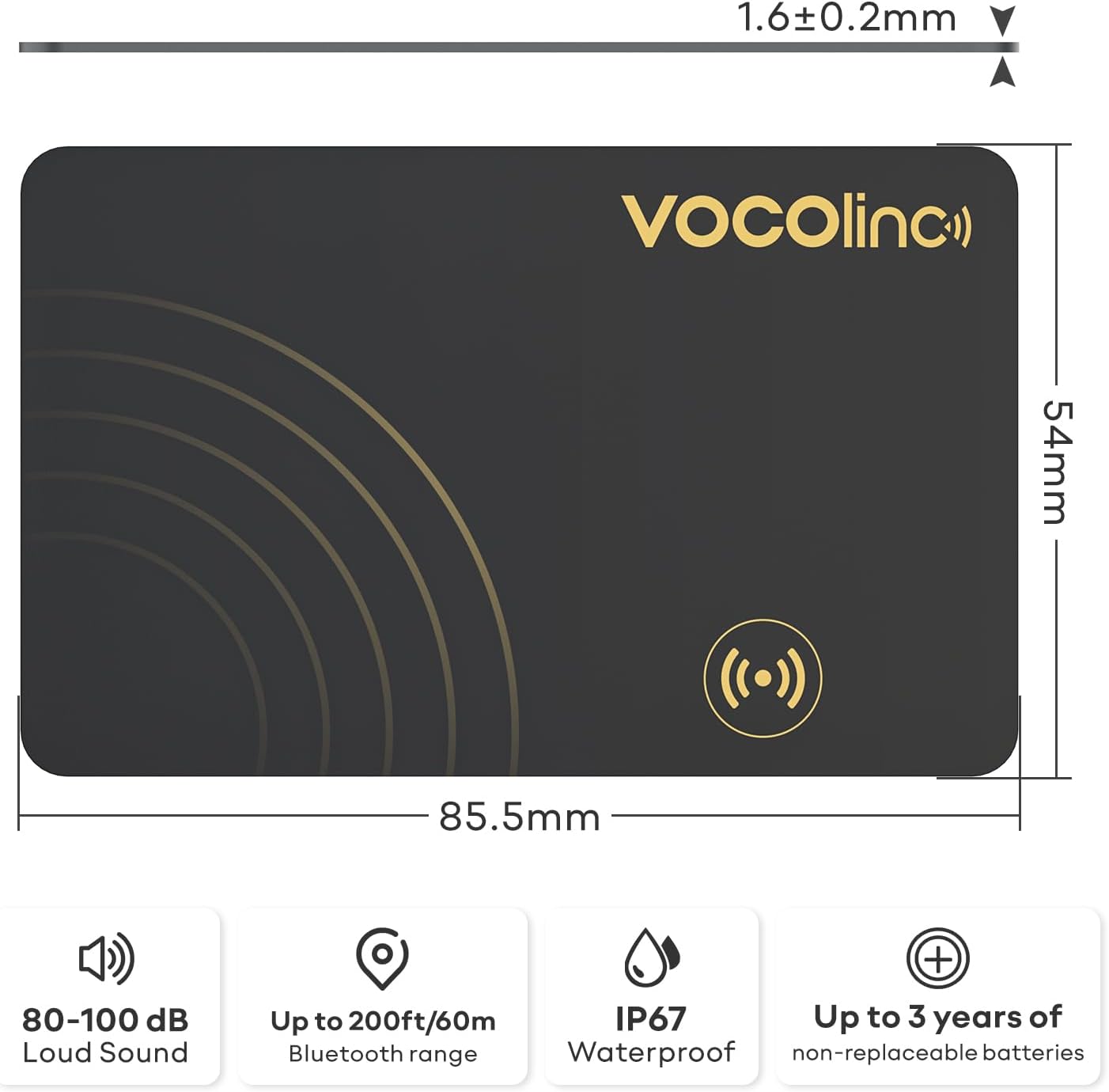
Image 7.1: Diagram showing the dimensions (1.6mm thickness, 85.5mm length, 54mm width) and key specifications of the VOCOlinc Air Card, including sound level, Bluetooth range, water resistance, and battery life.
8. Garanti ak sipò
8.1. Enfòmasyon sou Garanti
The VOCOlinc Air Card Tag Wallet Tracker (Model VT2202T-1P) comes with a 2-ane garanti apati dat acha a. Garanti sa a kouvri domaj fabrikasyon ak fonksyònman ki pa kòrèk nan itilizasyon nòmal. Tanpri konsève prèv acha ou pou reklamasyon garanti.
8.2. Sipò pou Kliyan
For technical assistance, troubleshooting, or warranty inquiries, please contact VOCOlinc customer support. You can find contact information on the official VOCOlinc websit la oubyen atravè platfòm acha ou a.
Resous sou entènèt: For additional information and FAQs, visit the VOCOlinc Store on Amazon.