
1. Entwodiksyon
Mèsi pou acha aasing the Audizio Genua DAB Radio. This manual provides essential information for the safe and efficient operation of your device. Please read it thoroughly before use and retain it for future reference. The Audizio Genua is a versatile DAB+/FM stereo radio featuring Bluetooth connectivity, USB playback, and an alarm function, designed for both home and portable use.
2. Enfòmasyon sou Sekirite
- Sous pouvwa: Sèvi ak adaptè kouran ki vini ak li a sèlman. Asire w ke vòl latage matche ak kondisyon rejyon ou an.
- Dlo ak imidite: Pa ekspoze aparèy la anba lapli, imidite, oswa likid k ap degoute/pwojeksyon. Pa mete objè ki plen likid, tankou vaz, sou aparèy la.
- Vantilasyon: Asire bon jan vantilasyon. Pa bloke ouvèti vantilasyon yo.
- Chalè: Kenbe aparèy la lwen sous chalè tankou radyatè, recho, recho, oswa lòt aparèy (ki gen ladan amplifiers) ki pwodui chalè.
- Netwayaj: Netwaye sèlman ak yon twal sèk.
- Sèvis: Pa eseye fè sèvis pwodui sa a tèt ou. Refere tout sèvis yo bay pèsonèl sèvis kalifye.
- Antèn: Do not bend or force the antenna.
3. Pake kontni
Tanpri verifye ke tout atik yo prezan epi yo an bon kondisyon lè w ap debale yo:
- Audizio Genua DAB Radio
- Kontwòl Remote
- Adaptè pouvwa
- Quick Start Guide (language not guaranteed)
4. Pwodwi souview
4.1 Kontwòl Panel devan ak ekspozisyon

Figi 4.1: Devan view of the Audizio Genua DAB Radio.
The front panel features a clear color TFT display, two speaker grilles, and an array of control buttons and a central rotary knob. The display shows station information, track details, time, and menu options. Buttons include Menu, Preset, Scan, Dimmer, Alarm, and playback controls (Play/Pause, Skip). The central knob is used for volume adjustment, tuning, and selection.
4.2 Koneksyon Panèl Dèyè
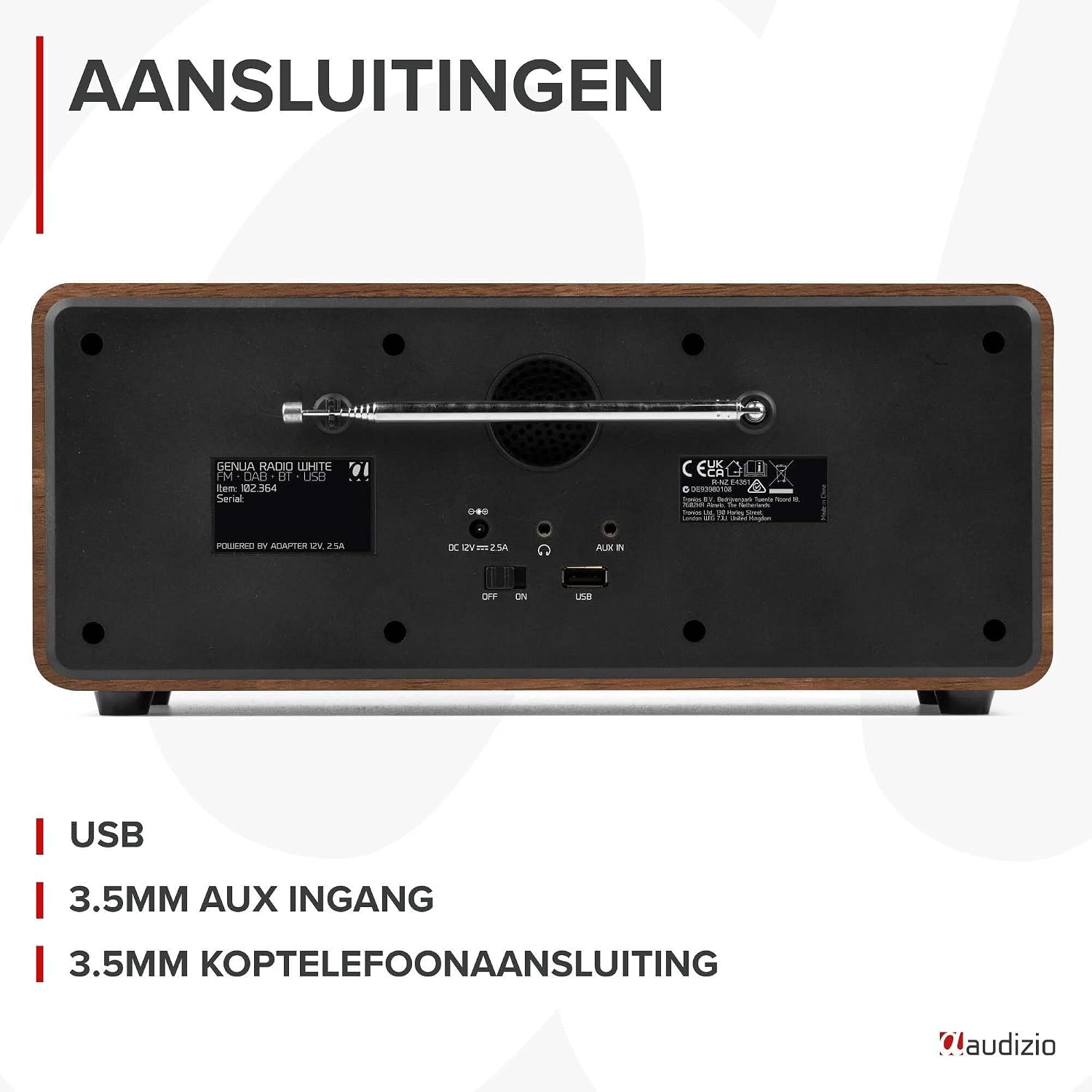
Figi 4.2: Dèyè view of the Audizio Genua DAB Radio with connections.
The rear panel includes the telescopic antenna for radio reception, a USB port for media playback, a 3.5mm AUX input for external audio devices, a 3.5mm headphone output, a DC 12V power input, and a main power ON/OFF switch.
4.3 Kontwòl Remote

Figure 4.3: Remote control for the Audizio Genua DAB Radio.
The included remote control provides full functionality, allowing you to power on/off, adjust volume, change modes, navigate menus, set alarms, and control playback from a distance.
5. Enstalasyon
5.1 Koneksyon pouvwa
- Connect the power adapter to the DC 12V input on the rear of the radio.
- Branche adaptè kouran an nan yon priz miray ki apwopriye.
- Flip the main power switch on the rear panel to the 'ON' position.
5.2 Ajisteman Antèn
Lonje antèn teleskopik la nèt pou yon resepsyon radyo DAB+ ak FM optimal. Ajiste pozisyon li pou pi bon kalite siyal la.
5.3 Initial Setup and Auto Scan
- Upon first power-on, the radio may prompt you to perform an auto-scan for DAB+ stations. Select 'Yes' or press the 'Scan' button.
- The radio will scan for available DAB+ stations and store them. This process may take a few minutes.
- Yon fwa eskanè a fini, radyo a pral branche sou premye estasyon ki disponib la.
6. Operasyon Enstriksyon
6.1 Seleksyon mòd
Press the 'Mode' button on the remote control or the 'Menu' button on the unit to cycle through available modes: DAB+, FM, Bluetooth, USB, and AUX In.
6.2 Operasyon Radyo DAB+
- Select DAB+ mode.
- If no stations are found or you wish to rescan, press the 'Scan' button to perform a full scan.
- Use the 'Tune/Select' knob or the navigation buttons on the remote to browse through the list of available stations.
- Press the 'OK' button (on remote) or push the 'Tune/Select' knob to select a station.
- Estoke Prereglaj: To store a favorite station, press and hold the 'Preset' button until the preset menu appears. Use the knob/navigation to select a preset number (1-30) and press 'OK' to confirm.
- Rapèl Prereglaj: Briefly press the 'Preset' button, then use the knob/navigation to select the desired preset and press 'OK'.
6.3 Operasyon Radyo FM
- Chwazi mòd FM.
- Oto Scan: Press the 'Scan' button to automatically scan for and store available FM stations.
- Manyèl akor: Use the 'Tune/Select' knob to manually tune to a specific frequency.
- Estoke Prereglaj: Similar to DAB+ mode, press and hold 'Preset', select a number, and confirm.
- Rapèl Prereglaj: Briefly press 'Preset', select the desired preset, and confirm.
6.4 Koneksyon Bluetooth
- Select Bluetooth mode. The display will show "Pairing" or "Waiting for connection".
- Sou telefòn entelijan ou oswa lòt aparèy ki gen Bluetooth, aktive Bluetooth epi chèche aparèy ki disponib yo.
- Select "Audizio Genua" from the list of devices.
- Once paired, the radio will confirm the connection, and you can start playing audio from your device.
6.5 Lekti USB
- Mete yon kondwi flash USB ki gen MP3 files nan pò USB ki sou panèl dèyè a.
- Select USB mode. The radio will automatically detect the USB drive and begin playing the first compatible audio file.
- Use the playback control buttons (Play/Pause, Skip Forward/Backward) on the unit or remote to manage your music.
6.6 Antre AUX
- Connect an external audio device (e.g., MP3 player, smartphone) to the 3.5mm AUX IN port on the rear panel using an audio cable (not included).
- Chwazi mòd AUX.
- Kontwole lekti ak volim nan soti nan aparèy ekstèn ou an.
6.7 Alam ak revèy pou dòmi
- Mete Alam: Press the 'Alarm' button on the unit or remote. Follow the on-screen prompts to set Alarm 1 and Alarm 2, including time, source (DAB/FM/Buzzer), and volume.
- Fonksyon Snooze: When the alarm sounds, press any button (except Power) to activate snooze. The alarm will sound again after a set interval.
- Revèy dòmi: Press the 'Sleep' button on the remote to set a sleep timer (e.g., 15, 30, 60 minutes). The radio will automatically turn off after the selected time.
6.8 Gradatè ekspozisyon
Press the 'Dimmer' button on the unit or remote to adjust the brightness of the display. This is useful for different lighting conditions or for use in a bedroom.
7. Antretyen
- Netwayaj: Sèvi ak yon twal mou epi sèk pou netwaye deyò radyo a. Pa sèvi ak pwodui netwayaj abrazif, sir, oswa solvan.
- Antèn: Manyen antèn teleskopik la avèk prekosyon pou evite domaj.
- Depo: Si w ap sere radyo a pou yon bon bout tan, dekonekte li nan ekipman pou kouran an.
NAN. Depanaj
| Pwoblèm | Kòz posib | Solisyon |
|---|---|---|
| Pa gen pouvwa | Power adapter not connected; Main power switch off | Ensure power adapter is securely connected and plugged in; Turn main power switch to 'ON' |
| Resepsyon radyo ki pa bon (DAB+/FM) | Antèn pa pwolonje; Zòn siyal fèb; Entèferans | Fully extend and adjust the telescopic antenna; Try repositioning the radio; Move away from other electronic devices |
| Bluetooth pa asosye | Radio not in Bluetooth mode; Device not discoverable; Already paired with another device | Select Bluetooth mode on the radio; Ensure Bluetooth is enabled on your device and it's in pairing mode; Disconnect from other Bluetooth devices |
| Lektur USB pa travay | Kle USB a pa byen mete; Enkonpatib file format; USB drive corrupted | Ensure USB drive is fully inserted; Check if files are in MP3 format; Try a different USB drive |
| Pa gen son | Volim twò ba; Mizik aktive; Sous ki pa kòrèk la chwazi | Increase volume; Check if mute is active; Ensure correct input source (DAB/FM/BT/USB/AUX) is selected |
9. Espesifikasyon

Figure 9.1: Audizio Genua DAB Radio dimensions.
- Mak: Odisyon
- Nimewo Modèl: Genua
- Koulè: Blan
- Karakteristik espesyal: Bluetooth Connectivity, DAB+ Radio
- Koneksyon Teknoloji: Aux, Bluetooth, USB
- Dimansyon pwodwi (L x W x H): 13.5 x 31 x 13.3 cm
- Teknoloji sentonizè: DAB +
- Style: Modèn
- Sous pouvwa: Fil elektrik
- Gwoup Radyo Sipòte: FM, DAB +
- Aparèy konpatib: Smartphone, Tablet, Laptop, MP3 Player, Headphones, Speaker
- Voltage: 220 Volts
- Max Speaker Output Power: 50 Watts
- Kantite pil: 1 Non-standard battery (Type of battery required)
- Kalite ekran: TFT
- Pwa atik: 2.25 Kilogram
10. Garanti ak sipò
This product is covered by a standard manufacturer's warranty. For detailed warranty terms and conditions, please refer to the documentation provided at the time of purchase or contact your retailer. For technical support or service inquiries, please contact the Audizio customer support team through their official websit la oswa pwen acha ou a.