
ieGeek S3
ieGeek S3 2K Wireless Outdoor Security Camera User Manual
Modèl: S3
1. Entwodiksyon
This manual provides detailed instructions for the installation, operation, and maintenance of your ieGeek S3 2K Wireless Outdoor Security Camera. Please read this manual thoroughly before using the product to ensure proper function and safety. Keep this manual for future reference.
2. Pwodwi souview
The ieGeek S3 is a 2K battery-powered wireless security camera designed for both indoor and outdoor use. It features 180° pan rotation, smart motion detection, color night vision, and two-way audio communication.
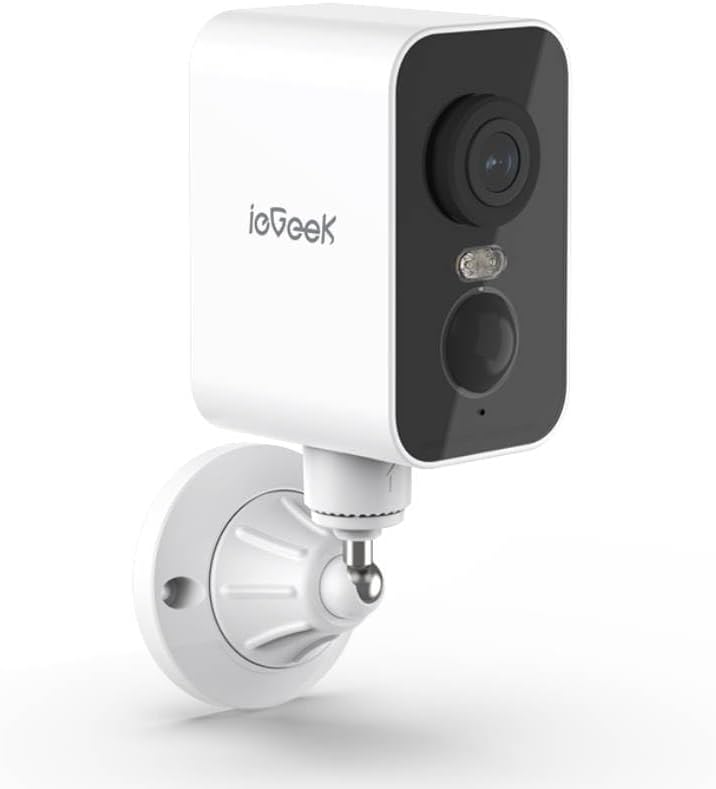
Figi 2.1: ieGeek S3 2K Wireless Outdoor Security Camera. This image displays the white rectangular camera body with a black front panel housing the lens, an LED light, and a motion sensor. The camera is attached to a white wall-mount bracket.
2.1 Sa ki nan bwat la
- ieGeek S3 Battery Security Camera
- Bracket Screw Pack (for wall mounting)
- Fichye enstalasyon
- Chaje kab
- Manyèl Enstriksyon (dokiman sa a)
3. Enstalasyon
3.1 Chaje Kamera a
Before initial use, fully charge the camera's built-in 5200 mAh lithium-ion battery using the provided charging cable. Connect the cable to the camera's charging port and a standard USB power adapter (not included). The charging indicator light will provide status.
3.2 Telechaje Aplikasyon an ak Kreye yon Kont
- Download the 'CloudEdge' or 'ieGeek Cam' app from your smartphone's app store (iOS or Android).
- Louvri aplikasyon an epi swiv enstriksyon ki sou ekran an pou kreye yon nouvo kont oubyen konekte si ou deja genyen youn.
3.3 Physical Installation (Wall Mount)
The ieGeek S3 camera is designed for wall mounting and has an IP65 waterproof rating, making it suitable for outdoor environments.
- Choose a suitable location for installation. Ensure the camera has a clear field of view and good Wi-Fi signal strength.
- Use the provided installation sticker to mark the drill holes on the wall.
- Fè twou epi mete lank miray yo.
- Attach the mounting bracket to the wall using the screws from the bracket screw pack.
- Secure the camera to the mounting bracket. Adjust the camera angle as needed.
3.4 Device Pairing with App
- Asire w telefòn entelijan ou an konekte ak yon rezo Wi-Fi 2.4GHz. Kamera a sèlman sipòte Wi-Fi 2.4GHz.
- Open the 'CloudEdge' or 'ieGeek Cam' app and tap the '+' icon to add a new device.
- Chwazi modèl kamera ou nan lis la.
- Follow the in-app instructions to power on the camera and reset it if necessary (usually by pressing a reset button until an indicator light flashes).
- Scan the QR code displayed on your phone screen with the camera lens. Hold the phone approximately 4-8 inches (10-20 cm) from the camera.
- Once the camera confirms successful scanning (e.g., with an audible prompt), proceed in the app to complete the connection.
- Name your camera and set its location.
4. Itilizasyon Kamera a
4.1 Viv View and Pan Rotation
Sou ekran prensipal aplikasyon an, tape sou kamera ou pou jwenn aksè nan emisyon an dirèk. view. You can use the on-screen controls to pan the camera 180° horizontally to adjust the viewang ang.
4.2 Deteksyon Mouvman ak Alèt
The camera features AI motion detection. When motion is detected, the camera will record a video clip and send an alert to your smartphone. You can customize motion detection sensitivity and alert settings within the app.
4.3 Odyo De-fason
Sèvi ak mikwofòn ak oratè entegre a pou kominikasyon bidireksyonèl. Tape ikòn mikwofòn nan an dirèk view pou pale atravè kamera a, epi koute odyo ki soti kote kamera a ye a.
4.4 Vizyon lannwit
The camera automatically switches to color night vision in low-light conditions, providing clear surveillance up to 33 feet (10 meters) using its infrared LEDs.
4.5 Depo Videyo
Anrejistre videyo footage ka estoke nan de fason:
- TF Card (MicroSD): Insert a TF card (up to 128GB, not included) into the camera's designated slot for local storage.
- Depo nwaj: Optional cloud storage services may be available through the app for remote access and backup of recordings.
4.6 Entegrasyon Alexa
The ieGeek S3 camera is compatible with Amazon Alexa. Follow the instructions in the 'CloudEdge' or 'ieGeek Cam' app to link your camera with your Alexa account for voice control and viewing live feeds on compatible Alexa devices.
5. Antretyen
5.1 Batri Chaje
The camera is battery-powered. When the battery level is low, you will receive an alert via the app. Recharge the camera using the provided charging cable. Battery life varies based on usage and environmental factors.
5.2 Netwayaj
To maintain optimal performance, periodically clean the camera lens and housing with a soft, dry cloth. Avoid using harsh chemicals or abrasive materials that could damage the camera's surface or lens.
NAN. Depanaj
- Kamera a pa konekte ak Wi-Fi a: Ensure your Wi-Fi network is 2.4GHz. Check Wi-Fi signal strength at the camera's location. Try resetting the camera and repeating the pairing process.
- Move kalite imaj: Netwaye lantiy kamera a. Asire w pa gen okenn obstak nan chan mayetik kamera a. view. Check your internet connection speed.
- Deteksyon mouvman an pa fonksyone: Verify motion detection is enabled in the app settings. Adjust sensitivity levels. Ensure the camera is positioned correctly to capture motion in the desired area.
- Batri a vide byen vit: Evènman deteksyon mouvman souvan, an dirèk view access, and two-way audio use can consume battery faster. Reduce motion detection sensitivity or frequency if possible. Ensure the camera is fully charged.
- Pwoblèm aplikasyon yo: Ensure the app is updated to the latest version. Try restarting the app or your smartphone.
7. Espesifikasyon
| Non modèl | ieGeek Battery Cam S3 |
| Rezolisyon Capture Videyo | 2K (3 MP Effective Still Resolution) |
| Itilizasyon Andedan kay la / Deyò | Andedan kay la, deyò |
| Sous pouvwa | Battery Powered (5200 mAh Lithium Ion) |
| Koneksyon Teknoloji | 2.4GHz Wi-Fi (Wi-Fi 6 Technology) |
| Kalite kontwolè | CloudEdge, Amazon Alexa, ieGeek Cam App |
| Kalite aliye | Mi mòn |
| Karakteristik espesyal | Pan Rotating 180°, AI Motion Detection, Color Night Vision, 2-Way Audio |
| Viewing Ang | 180 Degre (Panoramik) |
| Vizyon lannwit Range | 33 pye (10 mèt) |
| To Frame | 15 ankadreman pou chak segonn |
| Nivo rezistans dlo | Ki enpèmeyab (IP65) |
| Opsyon Depo | TF Card (MicroSD) up to 128 GB, Cloud Storage (optional) |
| Dimansyon (L x W x H) | 3.9 x 1 x 3.9 pous |
| Pwa atik | 11.2 ons |
| Aparèy konpatib | Alexa, Smartphone, Smartwatch, Tablet |
8. Garanti ak sipò
For warranty information, please refer to the specific terms provided at the time of purchase or contact ieGeek customer support directly. If you encounter any issues or have questions regarding your ieGeek S3 camera, please visit the official ieGeek websit la oubyen kontakte ekip sèvis kliyan yo pou jwenn asistans.
Sipò sou entènèt: Visit the ieGeek Store on Amazon
Ask a question about this manual
Ask about setup, troubleshooting, compatibility, parts, safety, or missing instructions. Manuals+ will review the question and use this page’s manual context to help answer it.