
1. Entwodiksyon
Welcome to the user manual for your new SVITOO P10 Android 16 Tablet. This guide provides detailed instructions on how to set up, operate, and maintain your device, ensuring you get the most out of its advanced features. Please read this manual carefully before using your tablet.
2. Pwodwi souview
The SVITOO P10 is a high-performance Android 16 tablet designed for both entertainment and productivity. It features a vibrant 10.1-inch IPS display, a powerful 8-core processor, and extensive storage options.
Karakteristik kle:
- Sistèm operasyon: Latest Android 16 with enhanced customization, privacy protection, and user assistance.
- Processeur: UNISOC T615 8-core CPU (1.8GHz) for fast and smooth multitasking.
- Memwa ak Depo: Up to 20GB RAM (4GB + 16GB expansion) and 128GB internal storage, expandable up to 1TB via microSD card.
- Ekspozisyon: 10.1-inch IPS in-cell display with 1280x800 resolution, 6mm narrow bezels, and a 16:10 aspect ratio for vivid visuals and wide viewang ing.
- Difizyon: Widevine L1 support for 1080P HD streaming on platforms like YouTube, Netflix, Amazon Prime Video, Disney+, and Hulu.
- Navigasyon: Built-in GPS positioning system, ideal for maps and in-car navigation.
- Kamera: 8MP main camera with autofocus and AI sub-camera, 2MP front camera for video calls and online classes.
- Koneksyon: 2.4G/5G Wi-Fi (IEEE 802.11b/g/n/ac) and Bluetooth 5.0 for stable and high-speed connections.
- Batri: Large-capacity 6600mAh battery for extended usage.
- Karakteristik adisyonèl: Multi-screen connection, split-screen, floating window, wireless projection, face recognition unlock, and parental control functions.
Imaj pwodwi:

Figi 2.1: Devan view of the SVITOO P10 tablet, showcasing ekran 10.1 pous li a.

Figure 2.2: The SVITOO P10 tablet with on-screen graphics highlighting its 10.1-inch display, Android 16 OS, Bluetooth 5.0, 128GB storage, 20GB RAM expansion, 2.4G/5G Wi-Fi, 6600mAh battery, and Widevine L1 support.
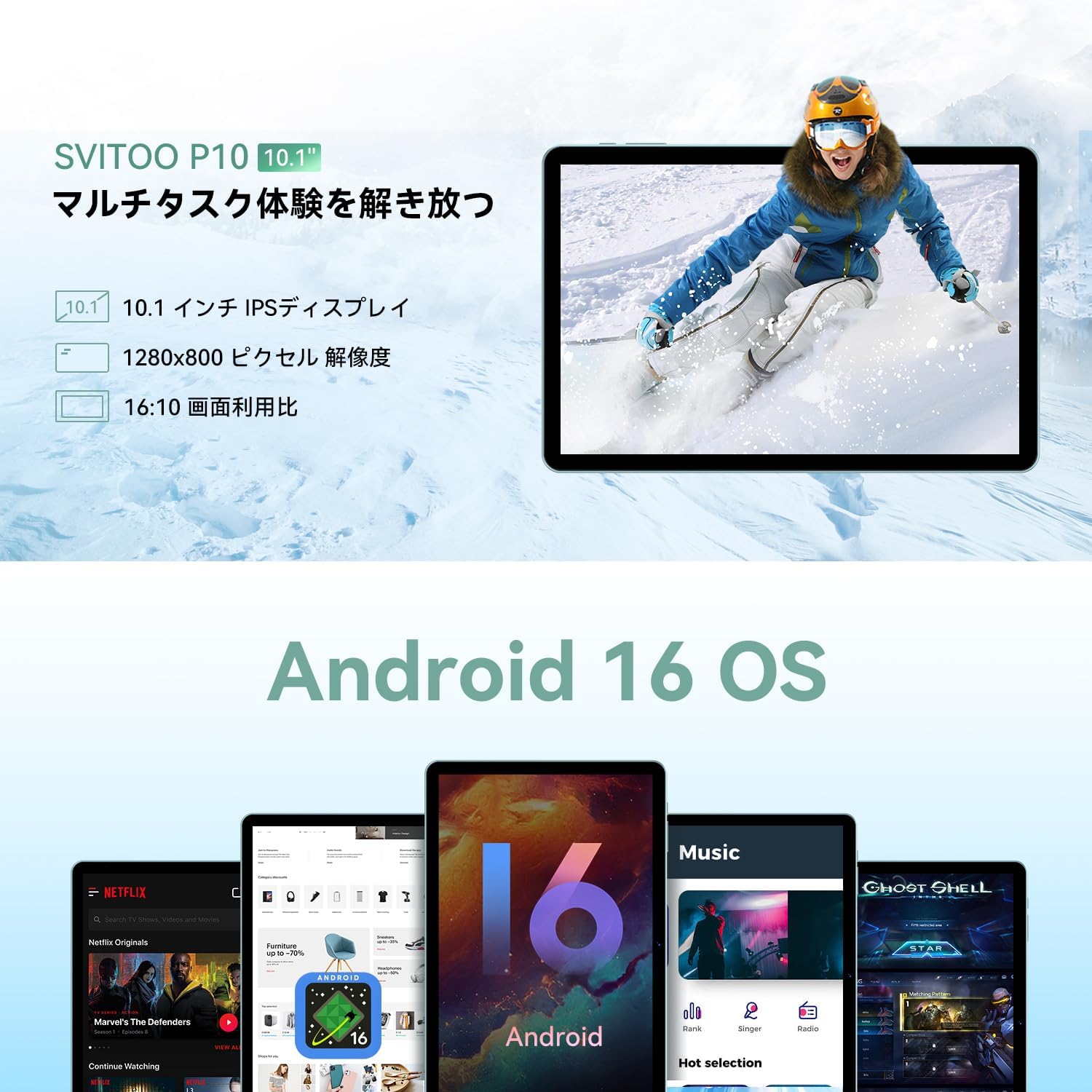
Figure 2.3: The SVITOO P10 tablet displaying a vibrant image, emphasizing its 10.1-inch IPS display, 1280x800 pixel resolution, and 16:10 aspect ratio.

Figure 2.4: Internal components of the SVITOO P10, illustrating the 20GB RAM (4GB + 16GB expandable), 128GB ROM, 1TB microSD card support, and the efficient 8-core CPU (UNISOC T7250 shown in diagram, actual is T615).
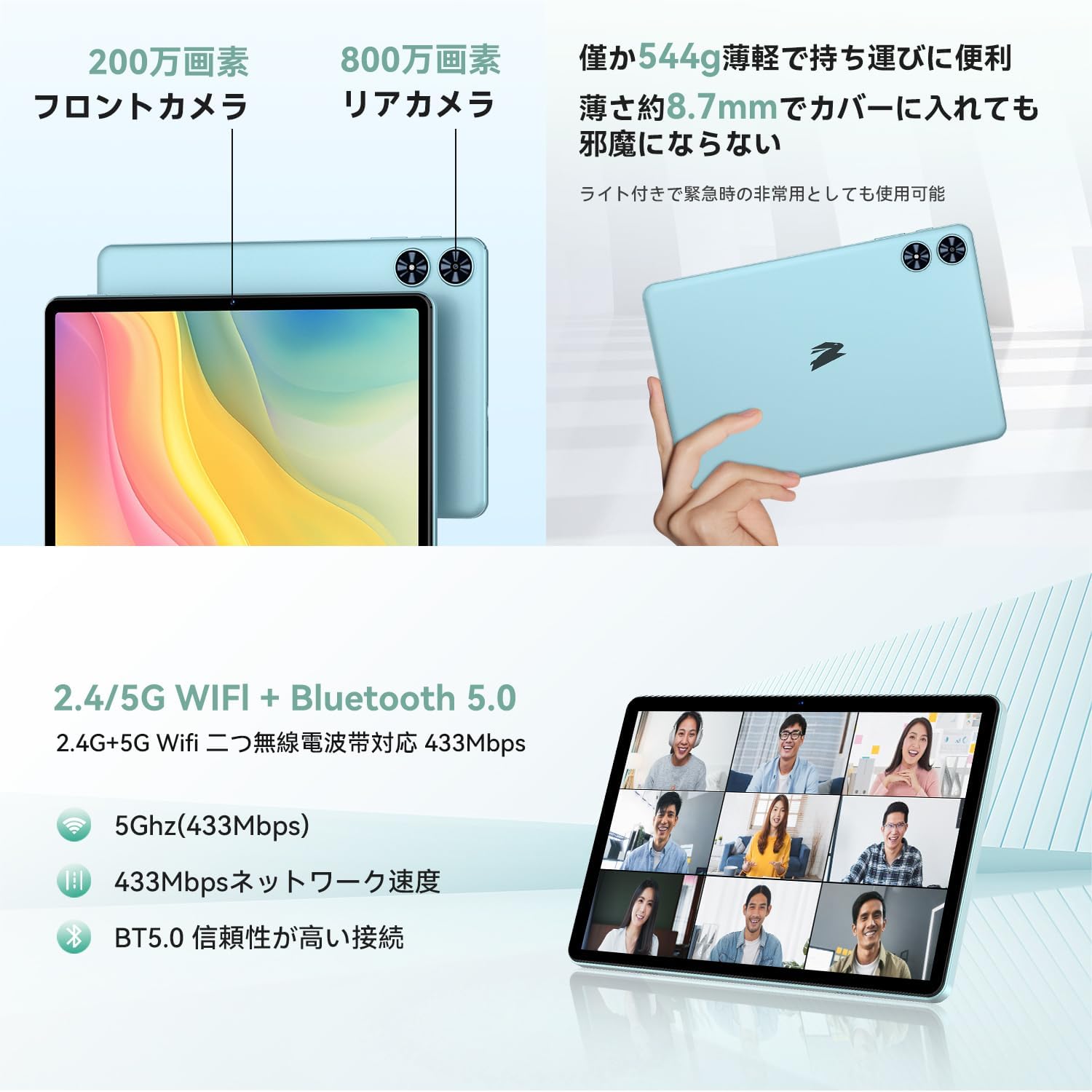
Figi 2.5: Dèyè ak devan views of the SVITOO P10 tablet, highlighting the 2MP front camera, 8MP rear camera, 2.4G/5G WiFi, and Bluetooth 5.0. An example of a video conference is shown on the screen.

Figure 2.6: Demonstrates the SVITOO P10's software capabilities, including convenient multi-window, wireless projection, face recognition unlock, and eye protection screen modes (reading mode, blue light reduction).
Videyo pwodwi:
Video 2.1: This video demonstrates how the Android 16 OS on the SVITOO P10 tablet enhances both entertainment and work tasks, showcasing its smooth performance and user-friendly interface.
3. Enstalasyon
3.1. Unboxing ak Inisyal Enspeksyon
Upon receiving your SVITOO P10 tablet, carefully open the package and ensure all components are present:
- SVITOO P10 Tablet
- USB-C Chaje Kab
- Adaptè pouvwa
- USB-C pou 3.5mm adaptè odyo
- Manyèl itilizatè
- SIM Ejector Pin (for microSD card slot)
Inspect the tablet for any physical damage. The screen comes with a pre-applied protective film.
3.2. Powering On / Off
- Pou limen: Press and hold the Power button (located on the side) until the SVITOO logo appears on the screen.
- Pou etenn: Press and hold the Power button, then select 'Power off' from the options that appear.
- Pou rekòmanse: Peze epi kenbe bouton Pouvwa a, answit chwazi 'Rekòmanse' nan opsyon yo.
3.3. Inisyal Enstalasyon Sòsye
Premye fwa ou limen tablèt ou a, y ap gide w nan yon pwosesis konfigirasyon inisyal:
- Chwazi lang ou pi pito.
- Konekte nan yon rezo Wi-Fi.
- Konekte avèk kont Google ou a oubyen kreye yon nouvo.
- Swiv envit ki sou ekran yo pou konplete konfigirasyon an.
3.4. Mete yon Kat MicroSD
Pou ogmante espas depo tablèt ou a:
- Jwenn plato kat SIM/microSD a sou kote tablèt la.
- Insert the provided SIM ejector pin into the small hole next to the tray to open it.
- Place your microSD card (up to 1TB, sold separately) into the designated slot on the tray.
- Dousman pouse plato a tounen nan tablèt la jiskaske li fè yon klik.
4. Operasyon Enstriksyon
4.1. Navigasyon debaz
The SVITOO P10 uses standard Android touch gestures:
- Tape: Chwazi yon atik oubyen louvri yon aplikasyon.
- Glise: Defile nan ekran yo oswa lis yo.
- Zongle: Agrandi oswa diminye foto yo epi web paj.
- Long Press: Jwenn aksè nan meni kontèks yo oubyen deplase ikòn yo.
4.2. Display Anviwònman
Ajiste ou vieweksperyans nan:
- Klate: Swipe down from the top of the screen to access Quick Settings, then adjust the brightness slider.
- Mòd nwa: Ale nan Settings > Display > Dark theme to enable or disable dark mode for a more comfortable vieweksperyans nan fèb limyè.
- Mòd lekti: Activate reading mode (often found in Quick Settings or Display settings) to reduce eye strain during prolonged reading.
4.3. Koneksyon
- Wi-Fi: Ale nan Anviwònman > Rezo ak entènèt > Wi-Fi to connect to available networks. The tablet supports 2.4G and 5G bands.
- Bluetooth: Ale nan Anviwònman > Aparèy konekte > Bluetooth to pair with Bluetooth 5.0 devices like headphones, speakers, or keyboards.
- GPS: The built-in GPS allows for accurate location tracking and navigation using map applications.
4.4. Miltimedya
- Videyo difizyon: With Widevine L1 support, enjoy high-definition content from popular streaming services.
- Odyo: The tablet features quad speakers for immersive sound. A 3.5mm headphone jack is also available via the included adapter.
4.5. Itilizasyon kamera
The SVITOO P10 is equipped with an 8MP rear camera and a 2MP front camera.
- Louvri a Kamera aplikasyon an nan ekran prensipal la oswa nan tiwa aplikasyon an.
- Chanje ant kamera devan ak dèyè a avèk ikòn kamera a.
- Tape bouton deklanchè a pou pran yon foto oswa anrejistre yon videyo.
4.6. Karakteristik Pwodiktivite
- Fann ekran: Use the split-screen function to run two apps side-by-side for enhanced multitasking.
- Pwojeksyon san fil: Easily connect your tablet to a larger TV or display wirelessly for a broader visual experience.
4.7. Security and Parental Controls
- Rekonesans figi: Enstale rekonesans figi nan Anviwònman > Sekirite ak vi prive > Deblokaj figi to quickly and conveniently unlock your device.
- Kontwòl paran yo: Utilize the parental control features to manage screen time, app access, and prevent unauthorized purchases when children use the tablet.
5. Antretyen
5.1. Chaje batri
Charge your SVITOO P10 tablet using the provided USB-C cable and power adapter. The durable Type-C port ensures reliable charging. Avoid using damaged cables or chargers.
5.2. Jesyon Depo
Regularly manage your tablet's storage to maintain optimal performance. Delete unnecessary files and apps, or offload large media files to your microSD card (up to 1TB) or cloud storage.
5.3. Netwaye Aparèy la
Use a soft, lint-free cloth to clean the screen and body of your tablet. Avoid using harsh chemicals or abrasive materials that could damage the device.
NAN. Depanaj
If you encounter issues with your SVITOO P10 tablet, refer to the following common solutions:
6.1. Aparèy la pa limen
- Asire w batri a chaje. Konekte tablèt la nan plato a pou omwen 30 minit.
- Peze epi kenbe bouton Pouvwa a pandan 10-15 segonn pou fòse yon rekòmanse.
6.2. Pwoblèm Koneksyon Wi-Fi
- Tcheke si Wi-Fi a aktive nan Anviwònman > Rezo ak entènèt > Wi-Fi.
- Rekòmanse routeur Wi-Fi ou a.
- Bliye rezo a epi rekonekte l lè w antre modpas la ankò.
6.3. Apps Crashing or Slow Performance
- Fèmen aplikasyon ki an background.
- Clear the cache of problematic apps (Anviwònman > Aplikasyon > [Non aplikasyon an] > Depo ak kach > Efase kach).
- Ensure your tablet's software is up to date (Anviwònman > Sistèm > Mizajou sistèm).
- Si pwoblèm yo pèsiste, konsidere yon reset faktori (Anviwònman> Sistèm> Opsyon Reyajiste> Efase tout done (reset faktori)). Warning: This will delete all data on your tablet. Back up important information first.
7. Espesifikasyon
| Karakteristik | Spesifikasyon |
|---|---|
| Mak | SVITOO |
| Non modèl | P10 |
| Sistèm operasyon | Android 16 (GMS certified) |
| Mak CPU | Unisoc |
| CPU vitès | 1.8 GHz |
| Graphics Accelerator | Mali-G57 |
| Gwosè ekspozisyon | 10.1 pous |
| Rezolisyon ekspozisyon | 1280x800 piksèl |
| Kapasite Depo memwa | 128 GB |
| Depo dilatabl | Jiska 1TB atravè kat microSD |
| Kamera devan | 2MP |
| Kamera dèyè | 8MP |
| Kalite san fil | 802.11a/g/n/ac (2.4G/5G Wi-Fi) |
| Kalite koneksyon | Bluetooth 5.0, GPS |
| Kapasite batri | 6600mAh |
| Port chaje | USB-C |
| Audio Port | 3.5mm Headphone Jack (via adapter) |
| Pwa atik | 1.05 Kilogram |
| Dimansyon pake | 32.4 x 20.3 x 2.9 cm |
8. Garanti ak sipò
8.1. Garanti manifakti a
Tablèt SVITOO P10 la vini ak yon Garanti manifakti 1 zan. Garanti sa a kouvri domaj nan materyèl ak atizan konn fè nan itilizasyon nòmal.
Returns or exchanges are accepted for defects found before use (after unboxing) or for initial defects discovered after use.
8.2. Sipò pou Kliyan
For any inquiries, technical support, or warranty claims, please contact SVITOO customer service through your Amazon account:
- Konekte nan kont Amazon ou.
- Ale nan 'Istwa Kòmand'.
- Locate your SVITOO P10 tablet order.
- Click 'Contact Seller' to reach our support team.