
Entwodiksyon
The MICRO-AIR EasyStart FLEX 398 is an advanced and versatile soft starter designed to optimize the performance and extend the lifespan of your air conditioning system. This device provides a controlled and gentle startup, significantly reducing the initial power surge (up to 75%) experienced by AC units. It is ideal for a wide range of applications, including residential homes, RVs, and commercial spaces, and is compatible with generators and inverters, ensuring smooth operation even with limited or unstable power sources.

Figure 1: MICRO-AIR EasyStart FLEX 398 unit with retail packaging, highlighting Bluetooth connectivity and compatibility up to 6 tons.
Karakteristik kle
- Advanced MicroAir Technology: Provides controlled, gentle startup for AC units up to 6 tons (72,000 BTUs), reducing mechanical stress and extending system lifespan.
- Ideal for Home and Commercial Use: Supports various applications, including residential and commercial settings, optimizing performance in areas with limited power.
- Compatibility with Generators: Reduces startup current by up to 75% when used with generators, inverters, or limited utility power, ensuring smooth AC operation in off-grid locations. Compatible with 2-stage compressors and heat pump units.
- Quiet and Smart Protection: Minimizes startup noise and prevents light flickering. Features intelligent fault detection and a short-cycle delay timer to protect the compressor motor from low-voltage damage and excessive wear.
- Compact Design for Easy Installation: 50% smaller enclosure size allows for installation in tight spaces. Simplified setup suitable for both DIY enthusiasts and professionals.
Enstalasyon ak Enstalasyon
Installation of the EasyStart FLEX 398 is designed to be straightforward. However, it involves working with electrical components. If you are not comfortable with electrical wiring, it is highly recommended to consult a qualified HVAC technician.
Prekosyon Sekirite
- TOUJOU disconnect power to the AC unit at the breaker before beginning any installation or maintenance.
- Discharge the run capacitor using an insulated screwdriver to prevent electrical shock.
- Wear appropriate personal protective equipment (PPE), including safety glasses and electrical gloves.
Etap enstalasyon yo
- Prepare the AC Unit: Disconnect power and remove the access panel to the control board and capacitor.
- Idantifye fil elektrik yo: Locate the compressor wires (Run, Start, Common) and the contactor. Refer to your AC unit's wiring diagram, usually found on the inside of the access panel.
- Mount EasyStart FLEX: Choose a suitable location within or near the AC unit's control compartment. The compact design allows for flexible placement. Secure the unit using screws.
- Konekte fil yo: Follow the detailed wiring instructions provided with your EasyStart FLEX kit. Typically, this involves connecting the EasyStart's wires to the compressor's start and run terminals, and to the contactor. Use the provided Wago connectors for secure connections.
- Activate and Learn Sequence: Once wired, restore power to the AC unit. The EasyStart FLEX will initiate a learning sequence during the first few startups to optimize its operation for your specific AC unit.

Figure 2: Visual guide to the installation process, including removing the cover, connecting wires, and activating the learning sequence.

Figure 3: The compact dimensions of the EasyStart FLEX 398 (3.58" W x 7.64" L x 2.50" H) facilitate installation in confined spaces.
Videyo Enstalasyon Ofisyèl la
Video 1: Detailed step-by-step guide on how to install the EasyStart Flex Residential Soft Starter. This video is provided by the seller, Hutch Mountain, and offers comprehensive visual instructions for a successful setup.
Enstriksyon Operasyon
Once installed, the MICRO-AIR EasyStart FLEX 398 operates automatically with your AC unit. It intelligently manages the compressor's startup cycle to reduce current draw.
Initial Learning Cycles
The EasyStart FLEX requires a few initial startup cycles (typically 5) to 'learn' the unique characteristics of your AC compressor. During these cycles, the unit will optimize its soft-start profile. You may observe slightly higher startup currents during these initial cycles, which will progressively decrease as the learning process completes.
Koneksyon Bluetooth
The EasyStart FLEX 398 features Bluetooth connectivity, allowing you to monitor its performance and real-time data via a compatible smartphone application. This provides insights into current draw, learned starts, and fault detection, enhancing your control and understanding of your HVAC system's operation.
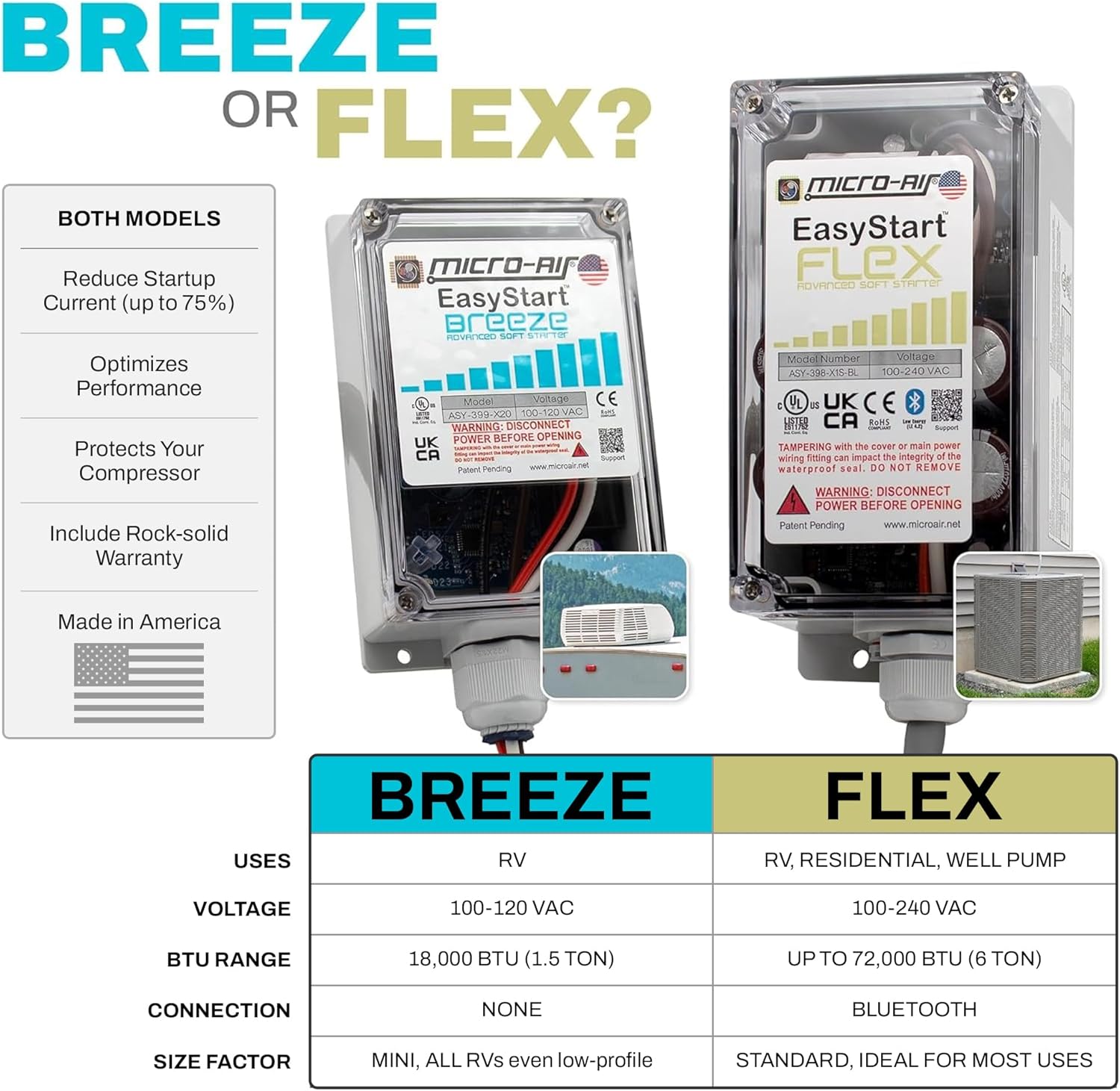
Figure 4: The EasyStart FLEX is user-friendly, designed for home use, compatible with generator power, and helps maintain comfort.
Antretyen
The MICRO-AIR EasyStart FLEX 398 is designed for minimal maintenance. However, periodic checks can ensure its continued optimal performance and longevity.
- Enspeksyon vizyèl: Annually inspect the unit and its wiring connections for any signs of wear, corrosion, or damage. Ensure all connections remain secure.
- Lapwòpte: Keep the exterior of the EasyStart unit and the surrounding area of your AC condenser clean and free from debris, leaves, or dirt that could obstruct airflow or cause overheating.
- Tcheke pwofesyonèl: During routine HVAC system maintenance by a qualified technician, ask them to briefly inspect the EasyStart unit and its connections.
Depanaj
The EasyStart FLEX 398 is equipped with intelligent fault detection to protect your system. If you encounter issues, consider the following:
- Flickering Lights/Breakers Tripping: While the EasyStart significantly reduces startup current, if flickering lights or tripped breakers persist, especially during the initial learning cycles, ensure your electrical system (including generator capacity if applicable) is adequately sized for your AC unit's full load. The EasyStart is designed to mitigate, not eliminate, all electrical strain.
- Inite pa kòmanse: Verify that power is supplied to the AC unit and the EasyStart. Check all wiring connections for tightness and proper placement according to the installation guide.
- Bwi ki pa nòmal: The EasyStart is designed to reduce startup noise. If new or unusual noises occur, disconnect power and inspect the AC unit and EasyStart for any loose components or obstructions.
- Pwoblèm koneksyon Bluetooth: Ensure your smartphone's Bluetooth is enabled and within range of the EasyStart unit. Refer to the app's troubleshooting section for specific connection problems.
For persistent issues or complex electrical problems, it is recommended to contact a qualified HVAC technician or MICRO-AIR customer support.
Espesifikasyon
| Karakteristik | Spesifikasyon |
|---|---|
| Non mak | MICRO-AIR |
| Enfòmasyon sou modèl | 398 KIT |
| Pwa atik | 2.48 liv |
| Dimansyon pwodwi | 9 x 4 x 3 pous |
| Kapasite | Up to 6 Tons (72,000 BTUs) |
| Kalite enstalasyon | DIY (Professional installation recommended if unsure) |
| Voltage | 100-240 vòlt |
| Karakteristik espesyal | Bluetooth Connectivity, Portable |
Garanti ak sipò
The MICRO-AIR EasyStart FLEX 398 comes with a Limited Warranty. For specific details regarding warranty coverage and duration, please refer to the documentation included with your product or contact MICRO-AIR customer service.
For any installation assistance, technical questions, or support needs, you can contact Hutch Mountain, the seller of this product. They are available to provide guidance and help with your EasyStart FLEX installation and operation.
Enfòmasyon pou kontakte: Please refer to the contact details provided on the product packaging or the official Hutch Mountain websit la pou jwenn enfòmasyon sipò ki pi resan yo.