
Entwodiksyon
This manual provides comprehensive instructions for the setup, operation, maintenance, and troubleshooting of your HUAYU RM-DS909 Replacement TV Remote Control. Designed for seamless compatibility with DSTV LCD/LED televisions, this remote offers intuitive control and reliable performance. Please read this manual carefully to ensure optimal use of your new remote control.
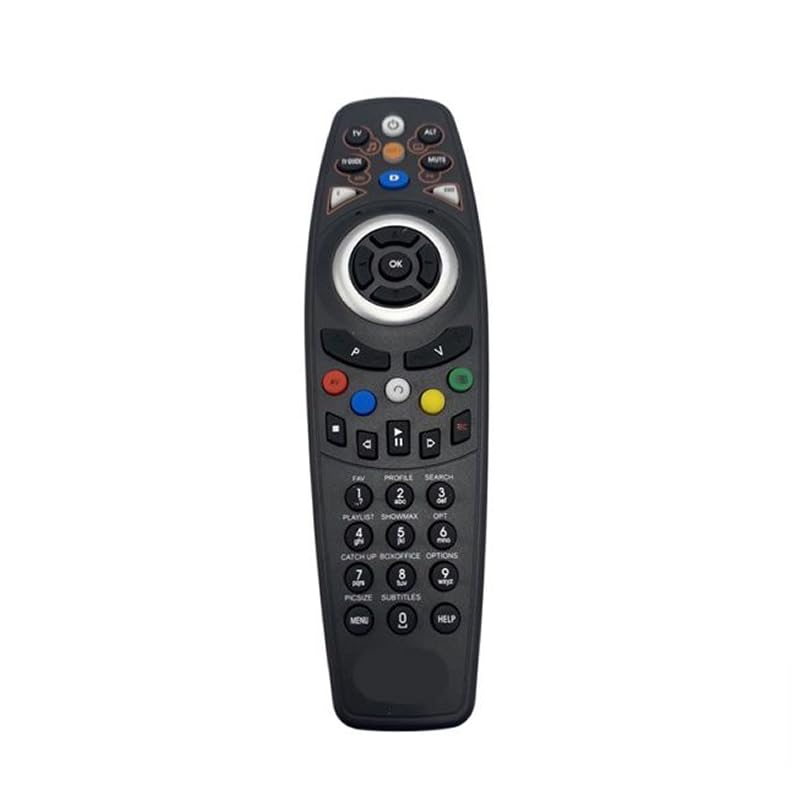
Imaj: Devan view of the HUAYU RM-DS909 Replacement TV Remote Control.
Enstalasyon
1. Enstalasyon batri
- Jwenn lòj batri a sou do a nan kontwòl remote la.
- Glise kouvèti konpatiman batri a anba epi retire li.
- Insert two (2) AAA batteries (not included) into the compartment, ensuring the positive (+) and negative (-) terminals align correctly with the indicators inside.
- Remèt kouvèti konpatiman batri a lè w glise l tounen nan plas li jiskaske li fè yon klik byen fèm.

Image: Battery compartment with cover removed, showing AAA battery slots.
2. Premye Itilizasyon
The HUAYU RM-DS909 remote control is designed for direct use with compatible DSTV LCD/LED televisions. No complex programming or pairing is required. Once batteries are installed, the remote is ready to operate your television.
Enstriksyon Operasyon
This remote control provides access to all standard functions of your DSTV LCD/LED television. Below is a general guide to common button functions:
- Bouton pouvwa: Limen oswa etenn televizyon an.
- Chèn monte/desann: Chanje chèn televizyon an.
- Volim monte/desann: Ajiste volim odyo a.
- Bouton bèbè: Silences or restores the audio.
- Navigation (Arrow) Buttons & OK: Itilize pou navige nan meni yo epi konfime seleksyon yo.
- Menu/Home Button: Accesses the TV's main menu or smart features.
- TV Guide Button: Montre gid pwogram elektwonik la.
- Bouton ki gen koulè (wouj, vèt, jòn, ble): These buttons typically correspond to specific functions within menus or interactive services, as indicated on your TV screen.
- Kontwòl Lektur (Jwe, Pòz, Sispann, Remonte, Avanse rapid, Anrejistre): Used for media playback functions, often with PVR or connected devices.
- Klavye nimerik (0-9): Pou antre dirèk sou chanèl la.
For specific functions related to your DSTV decoder or TV model, refer to your television's or decoder's user manual.
Antretyen
- Netwayaj: Siye kontwòl remote la avèk yon twal mou epi sèk. Pa sèvi ak pwodui netwayaj likid oswa materyèl abrazif, paske yo ka domaje sifas la oswa konpozan entèn yo.
- Ranplasman batri: Replace batteries when the remote's response becomes sluggish or stops working. Always replace both batteries simultaneously with new AAA batteries. Do not mix old and new batteries, or different types of batteries.
- Depo: Si ou p ap itilize telekòmand lan pou yon bon bout tan, retire pil yo pou anpeche yo koule epi domaje li. Sere telekòmand lan nan yon kote ki fre epi sèk, lwen limyè solèy dirèk ak tanperati ekstrèm.
Depanaj
- Remote pa reponn:
- Asire w ke pil yo byen mete ak polarite ki kòrèk la.
- Ranplase pil fin vye yo ak pil AAA nèf.
- Tcheke pou nenpòt obstak ant telekòmand lan ak detèktè enfrawouj televizyon an.
- Ensure you are within the effective operating range and pointing the remote towards the TV.
- Ranje operasyon limite:
- Weak batteries can reduce the remote's range. Replace them if necessary.
- Bright light sources (e.g., direct sunlight, fluorescent lights) can interfere with the infrared signal.
- Bouton espesifik ki pa fonksyone:
- Asire w ke telekòmand lan pwòp epi pa gen okenn debri ki bloke bouton yo.
- If only certain buttons fail, it might indicate internal damage. Consider replacing the remote.
Espesifikasyon
| Nimewo Modèl | RM-DS909 (Internal Model: 930) |
| Mak | HUAYU |
| Koneksyon Teknoloji | Enfrawouj (IR) |
| Aparèy konpatib | DSTV LCD/LED Televisions |
| Kalite batri | 2 x AAA (pa enkli) |
| Materyèl | ABS |
| Koulè | Nwa |
| Karakteristik espesyal | Fonksyonalite entelijan |
| Max Kantite Aparèy Sipòte | 1 |
Garanti ak sipò
Garanti manifakti a
This HUAYU remote control comes with a Garanti manifakti 1 an from the date of purchase. This warranty covers defects in materials and workmanship under normal use. It does not cover damage caused by misuse, accidents, unauthorized modifications, or battery leakage.
Sipò pou Kliyan
For further assistance, troubleshooting not covered in this manual, or warranty claims, please contact your retailer or the point of purchase. Please have your purchase receipt and product model number (RM-DS909) available when seeking support.