
Entwodiksyon
This instruction manual provides detailed guidance for the Anderic RR787T Replacement Remote Control. Designed as a direct replacement for RH787T and UC787T remotes, it offers comprehensive control for Casablanca DC motor ceiling fans and other compatible high-end models. Features include six fan speeds, reverse airflow, and dimmable light control (for incandescent bulbs). This remote is specifically engineered for ceiling fans utilizing receivers with 4 dip switches, including those originally paired with the RH786R receiver.
Kontni pake
Verifye ke tout atik yo prezan nan pakè ou a:
- Kontwòl remote Anderic RR787T
- Mi Mount Support
- Vis pou monte ak lank miray
- Note: Two AAA batteries are required and not included.

Image: Anderic RR787T remote control securely placed in its wall mount holder.
Enstalasyon
Follow these steps to set up your new remote control:
- Enstale pil: Louvri konpatiman pil ki dèyè telekòmand lan. Mete de pil AAA (pa enkli), asire w polarite a kòrèk.
- Mete switch DIP yo: Locate the 4 dip switches inside the battery compartment. Match the dip switch settings on your new Anderic RR787T remote to the settings on your existing ceiling fan receiver or old remote. This step is crucial for proper communication between the remote and the fan.
- Sipò miray pou monte: Use the provided screws and wall anchors to securely mount the wall bracket in a convenient location.
- Insert Remote: Slide the remote control into the mounted wall bracket.

Imaj: Dèyè view of the Anderic RR787T remote, highlighting the battery compartment and dip switches for configuration.
Videyo Demonstrasyon Enstalasyon
Video: A demonstration of a similar Anderic remote (UC7225T) showing its features and operation, which can provide general guidance for setup and use. Note that this video is for a different model (UC7225T) but from the same brand.
Enstriksyon Operasyon
The Anderic RR787T remote offers intuitive control over your ceiling fan and light:
- Limen/Etenyen: Peze bouton pouvwa a pou limen oswa etenn vantilatè a ak limyè a.
- Kontwòl vitès fanatik: Use the fan speed buttons (typically marked I, II, III, IV, V, VI or Low, Med, High) to adjust the fan's rotation speed. The RR787T supports 6 fan speeds.
- Ranvèse Airflow: Press the reverse button to change the direction of the fan blades, allowing for seasonal comfort (downward airflow for cooling, upward for circulating warm air).
- Kontwòl limyè:
- Peze bouton limyè a pou limen oswa etenn limyè a.
- To dim the light (with incandescent bulbs), press and hold the light button. Release when the desired brightness is reached.
- Note: For LED, CFL, or other non-incandescent bulbs, the dimming function can be disabled inside the battery compartment to prevent issues.
- Fonksyon revèy: The remote includes timer buttons (e.g., 1H, 2H, 4H, 8H) to set the fan to operate for a specific duration before automatically turning off.
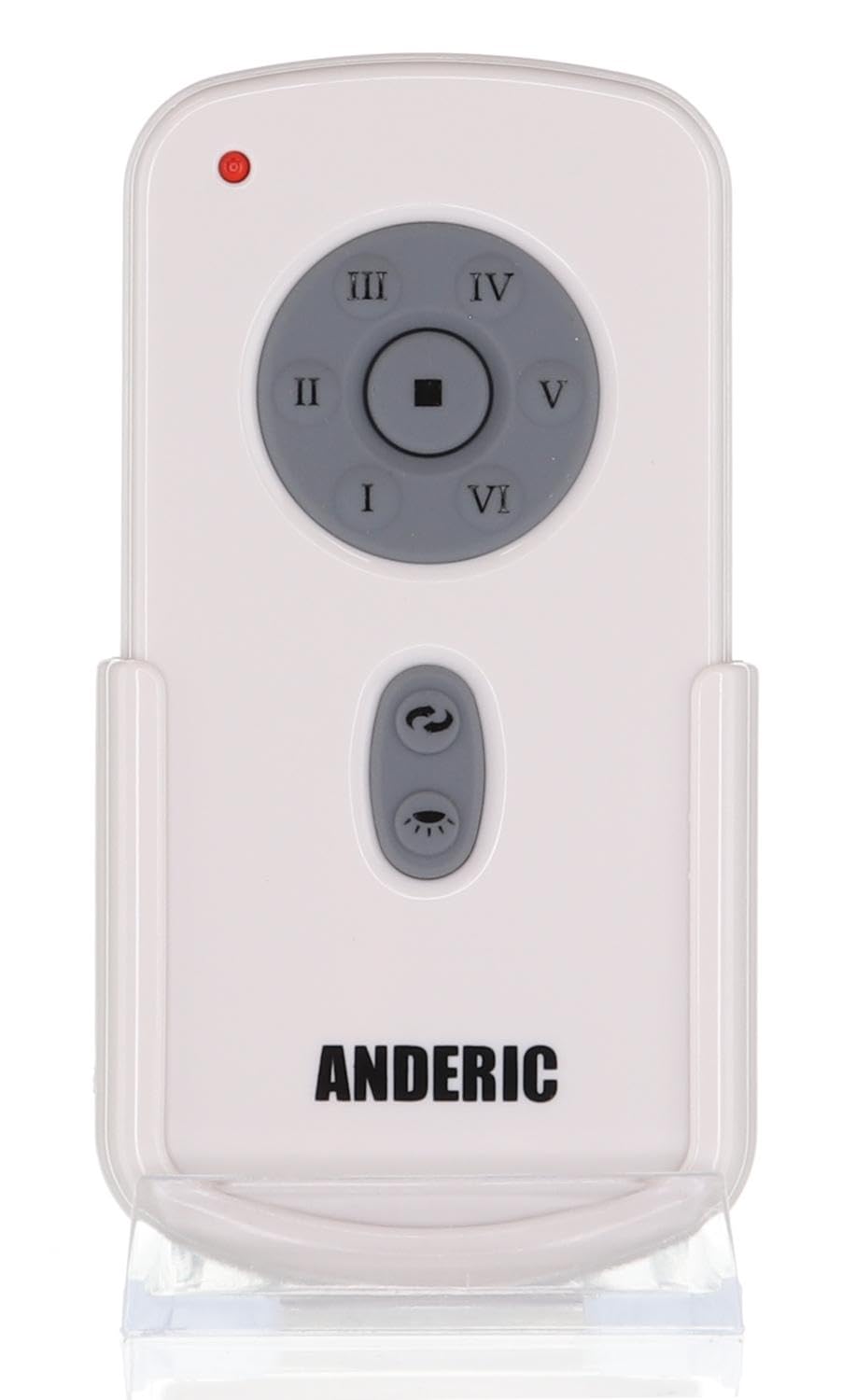
Imaj: Devan view of the Anderic RR787T remote control, displaying its intuitive button layout for easy operation.
Konpatibilite
The Anderic RR787T is designed for broad compatibility with specific ceiling fan systems:
- Reseptè: Designed for ceiling fans that use receivers with 4 dip switches, including models originally paired with RH786R, RH787T, and UC787T remotes.
- Fan Brands: Compatible with high-end ceiling fans from brands such as Casablanca, Monte Carlo, Fanimation, Regency, and Home Decorators Collection.
- Modèl Sipòte: Includes Casablanca Panama, Stealth, Stingray, Fellini, and Monte Carlo Vision, Arcade, Hicks, and Dover series.
- Nòt enpòtan: Not compatible with Fanimation Slinger fans (especially newer models), fans requiring 5 dip switch receivers, or 315 MHz systems like Harbor Breeze ZJF-HH-YK-A008. Always verify your fan's receiver type before purchase.
Antretyen
Pou asire lonjevite ak pèfòmans optimal kontwòl remote ou a, swiv gid antretyen sa yo:
- Ranplasman batri: Replace batteries when the remote's performance diminishes. Ensure correct battery type (2 AAA) and polarity.
- Netwayaj: Siye telekòmand lan avèk yon twal mou epi sèk. Evite itilize pwodui chimik ki agresif oswa pwodui netwayaj abrazif.
- Depo: Sere telekòmand lan nan yon kote ki fre epi sèk, lwen limyè solèy dirèk ak tanperati ekstrèm.
Depanaj
Si ou rankontre pwoblèm ak kontwòl remote ou a, gade solisyon komen sa yo:
- Remote pa reponn:
- Tcheke nivo batri a epi ranplase si sa nesesè.
- Ensure the dip switch settings on the remote match the receiver.
- Verify the fan's power supply is active.
- Light Not Dimming:
- Confirm that incandescent bulbs are being used.
- Check if the dimming function is enabled inside the battery compartment.
- Fan Not Changing Speed/Direction:
- Ensure the remote is within range of the receiver.
- Re-check dip switch settings.
Espesifikasyon
| Mak | Anderik |
| Nimewo Modèl | RR787T (replaces RH787T) |
| Dimansyon pake | 4.96 x 4.92 x 2.8 pous |
| Pwa atik | 3.2 ons |
| Batri | 2 pil AAA (pa enkli) |
| Karakteristik espesyal | Mi Mount Enkli |
| Koulè | Blan |
| Max Kantite Aparèy Sipòte | 1 |
| Aparèy konpatib | Fanatik |
Garanti ak sipò
For warranty information or technical support, please refer to the product packaging or contact Anderic customer service directly. Keep your proof of purchase for any warranty claims.