
Entwodiksyon
Thank you for choosing the KLIM K7 Cassette Tape Player and MP3 Converter. This device allows you to enjoy your classic cassette tapes and convert them into digital MP3 files for modern playback. It features a built-in microphone for recording, an integrated speaker, and a rechargeable battery for portability. This manual provides detailed instructions for setup, operation, and maintenance of your KLIM K7.
Pwodwi souview
Karakteristik kle
- Cassette to MP3 Converter: Effortlessly convert cassette tapes to digital MP3 files directly onto an SD card.
- Konsepsyon pòtab: Lightweight and compact for on-the-go listening.
- Mikwofòn entegre: Record audio directly to the SD card.
- Oratè entegre: Share your audio without external devices.
- Batri rechargeable: Integrated 1000mAh battery provides extended playback.
- SD Card Player: Jwe MP3 files ki estoke sou kat la SD.
- 3.5mm Jack ekoutè: For private listening with included earphones.
Konpozan aparèy ak kontwòl
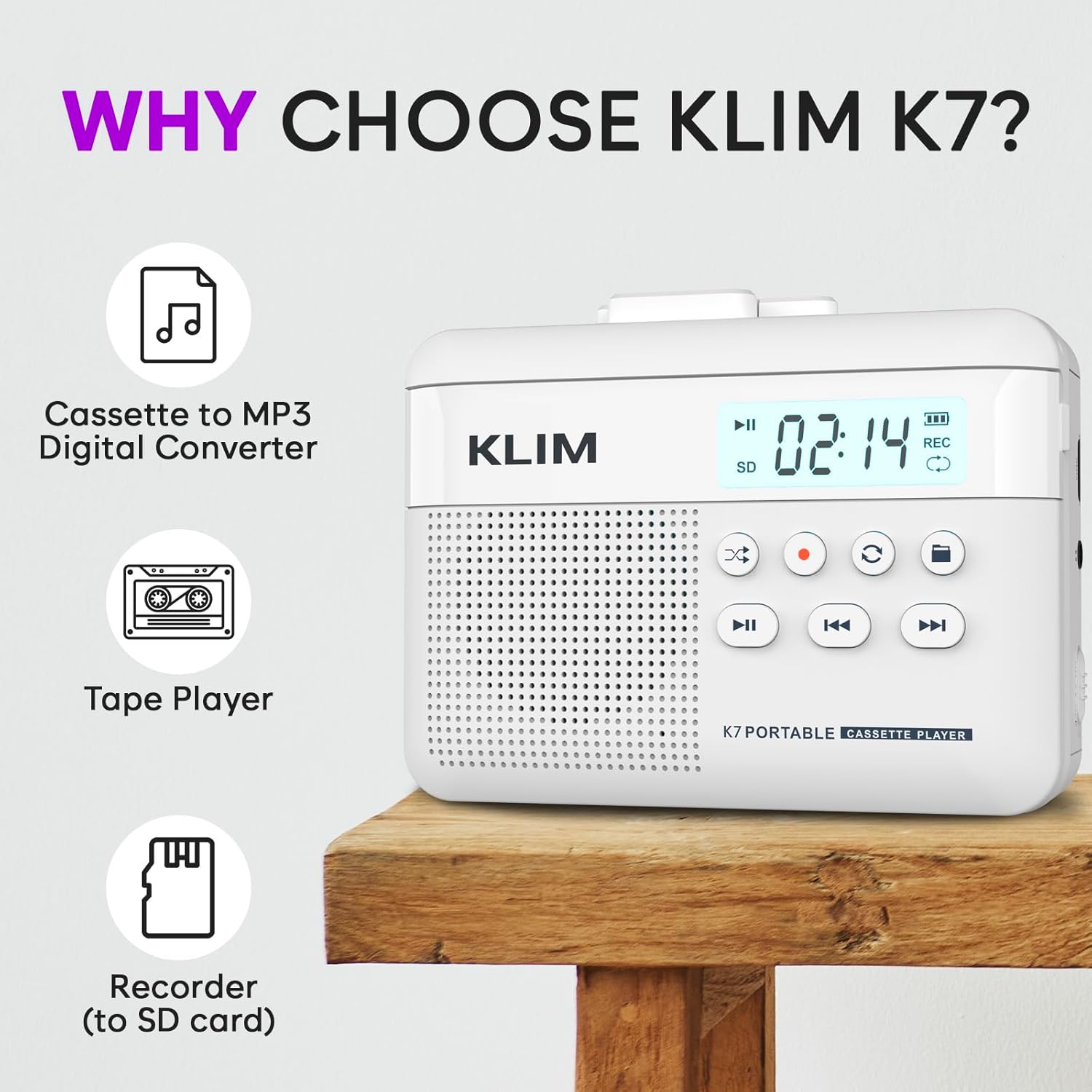
Figi 1: Devan view of the KLIM K7 Cassette Player, showing the speaker grille, LCD display, and control buttons (Play/Pause, Rewind, Fast Forward, Stop, Record, Mode, Folder, Loop).
- Ekspozisyon LCD: Shows track number, recording status, and battery level.
- Oratè: Oratè entegre pou lèktur odyo.
- Play/Pause Button (►▮): Kòmanse oswa poz lèktur.
- Rewind Button (◀◀): Rewinds the cassette tape or navigates backward through MP3 tracks.
- Fast Forward Button (►►): Fast forwards the cassette tape or navigates forward through MP3 tracks.
- Stop Button (■): Sispann lekti oswa anrejistreman.
- Record Button (●): Initiates or stops recording.
- Mode Button (↻): Switches between cassette playback and SD card MP3 playback.
- Folder Button (🖿): Navigates through folders on the SD card.
- Loop Button (⟳): Repete tras aktyèl la oswa tout tras yo.

Figi 2: Side view of the KLIM K7 Cassette Player, highlighting the SD card slot, 3.5mm headphone jack, and On/Off switch.
- Plas kat SD: Insert your Micro SD card here for recording and MP3 playback.
- Jack ekoutè 3.5mm: Connect the included earphones or other standard headphones.
- Bouton On/Off: Limen oswa etenn aparèy la.
- Kontwòl Volim: Ajiste nivo pwodiksyon odyo a.

Figi 3: Top view of the KLIM K7 Cassette Player with the cassette compartment open, showing the tape mechanism.
- Konpatiman kasèt: Insert your cassette tapes here.
- Cassette Door Release: Opens the cassette compartment.
Enstalasyon
1. Chaje batri a
Before first use, fully charge the KLIM K7. The device comes with a 1000mAh rechargeable battery.
- Locate the Type-C USB charging port on the side of the device.
- Connect the included Type-C USB cable to the charging port and the other end to a USB power adapter (not included) or a computer's USB port.
- The charging indicator on the LCD display will show charging status. A full charge typically takes approximately 2 hours.

Figi 4: The KLIM K7 connected to a Type-C USB cable for charging.
2. Mete yon kat SD
An SD card (16GB included) is required for converting tapes to MP3 and for recording with the built-in microphone.
- Locate the SD card slot on the side of the device (refer to Figure 2).
- Gently insert the Micro SD card into the slot with the gold contacts facing down until it clicks into place.
- To remove, push the SD card inward until it clicks, then release, and it will eject.

Figi 5: Inserting the Micro SD card into the KLIM K7.
3. Mete yon kasèt
- Press the Cassette Door Release button to open the cassette compartment.
- Insert your cassette tape with the open side facing upwards and the tape reels aligned with the player's mechanism.
- Fèmen pòt konpatiman kasèt la byen fèm jiskaske li fè yon klik.
Enstriksyon Operasyon
1. Jwe kasèt kasèt
- Ensure the device is powered on using the On/Off switch.
- Insert a cassette tape as described in the Setup section.
- Peze a Play/Pause (►▮) bouton pou kòmanse lecture.
- Ajiste volim nan lè l sèvi avèk kontwòl volim.
- Sèvi ak la Rewind (◀◀) epi Avanse rapid (►►) bouton pou navige sou kasèt la.
- Peze a Rete (■) bouton pou fini lekti a.
2. Konvèti kasèt an MP3
The KLIM K7 allows direct conversion of cassette audio to MP3 files on the inserted SD card, without needing a computer or additional software.
- Ensure an SD card is inserted and the device is powered on.
- Mete kasèt ou vle konvèti a.
- Peze a Play/Pause (►▮) bouton pou kòmanse jwe kasèt la.
- Long peze la Record (●) button. The 'REC' indicator on the LCD display will illuminate, indicating that recording has started.
- Pou sispann anrejistreman, peze la Record (●) button again. The 'REC' indicator will turn off. The recorded audio will be saved as an MP3 file sou kat SD la.
- You can then remove the SD card and use the included SD card reader to transfer the MP3 files to a computer or other device.

Figi 6: Visual guide for converting cassette audio to MP3 files.
3. Using the Built-in Microphone for Recording
The KLIM K7 can also record audio directly from its built-in microphone to the SD card.
- Ensure an SD card is inserted and the device is powered on.
- Peze a Mode (↻) button until the device is in SD card mode (no cassette playing).
- Long peze la Record (●) button. The 'REC' indicator will light up, and the device will start recording audio from its microphone.
- Pou sispann anrejistreman, peze la Record (●) button again. The 'REC' indicator will turn off, and the recording will be saved as an MP3 file.

Figi 7: Using the KLIM K7's built-in microphone for recording.
4. Playing MP3 Files from SD Card
- Ensure an SD card with MP3 files is inserted and the device is powered on.
- Peze a Mode (↻) button to switch to SD card playback mode. The LCD display will show track information.
- Peze a Play/Pause (►▮) bouton pou kòmanse lecture.
- Sèvi ak la Rewind (◀◀) epi Avanse rapid (►►) bouton pou sote tras.
- La Folder (🖿) button allows navigation through different folders on the SD card.
- La Loop (⟳) button can be used to repeat the current track or all tracks.
- Ajiste volim nan lè l sèvi avèk kontwòl volim.
- Peze a Rete (■) bouton pou fini lekti a.

Figi 8: Enjoying audio with the KLIM K7 and included earphones.
Antretyen
Proper maintenance ensures the longevity and optimal performance of your KLIM K7.
- Netwayaj: Sèvi ak yon twal mou epi sèk pou netwaye deyò aparèy la. Pa sèvi ak pwodui netwayaj likid oswa solvan.
- Konpatiman kasèt: Periodically clean the tape heads and pinch rollers with a cotton swab lightly dampened with isopropyl alcohol to prevent audio quality degradation. Ensure the device is off and dry before use.
- Depo: Sere aparèy la nan yon kote ki fre epi sèk, lwen limyè solèy dirèk ak tanperati ekstrèm.
- Swen batri: For long-term storage, charge the battery to about 50% every few months to maintain battery health.
Depanaj
If you encounter any issues with your KLIM K7, please refer to the following common solutions:
| Pwoblèm | Kòz posib | Solisyon |
|---|---|---|
| Aparèy pa limen. | Batri ap vide. | Charge the device using the provided Type-C USB cable. |
| No sound during cassette playback. | Volume is too low or headphones are not connected properly. | Increase the volume. Ensure headphones are fully plugged into the 3.5mm jack. |
| Recording to MP3 fails or produces no file. | SD card is full, not inserted correctly, or corrupted. | Check SD card insertion. Ensure sufficient space on the SD card. Try reformatting the SD card (this will erase all data). |
| Poor audio quality from cassette. | Dirty tape heads or worn-out cassette tape. | Clean the tape heads and pinch rollers. Try a different cassette tape to determine if the issue is with the tape itself. |
| Aparèy la bloke oswa li vin pa reponn. | Pwoblèm lojisyèl tanporè. | Turn the device off and then on again. If the issue persists, allow the battery to fully discharge and then recharge. |
Espesifikasyon
- Dimansyon pwodwi: 4.76 x 3.61 x 1.56 pous
- Pwa atik: 9.9 ons
- Batri: 1 pil ityòm-ion (enkli), 1000mAh
- Tan pou chaje: Apeprè 2 èdtan
- Depo: Supports Micro SD card (16GB included)
- Sòti odyo: Built-in speaker, 3.5mm headphone jack
- Fòma anrejistreman: MP3

Figi 9: Dimensions of the KLIM K7 Cassette Player.
Garanti ak sipò
KLIM is committed to producing quality electronics. The KLIM K7 Cassette Tape Player comes with a Asirans 5 an. If you encounter any problems with your device, please contact KLIM customer support for assistance.
Lòt plan pwoteksyon ka disponib pou achte:
- Plan Pwoteksyon 2 Ane: $3.99 (one-time)
- Plan Pwoteksyon 3 Ane: $5.99 (one-time)
- NEW Complete Protect: $16.99 (monthly)
For further support, visit the KLIM Store on Amazon.