
1. Entwodiksyon
This manual provides essential information for the safe and efficient operation of your elecsung 43-inch Smart Mirror Bathroom TV. This device integrates a 4K UHD television with a mirror, designed for environments such as bathrooms and kitchens due to its IPX6 waterproof rating. It features ATSC DTV, voice control, Wi-Fi, and Bluetooth connectivity, running on Android 11.0.
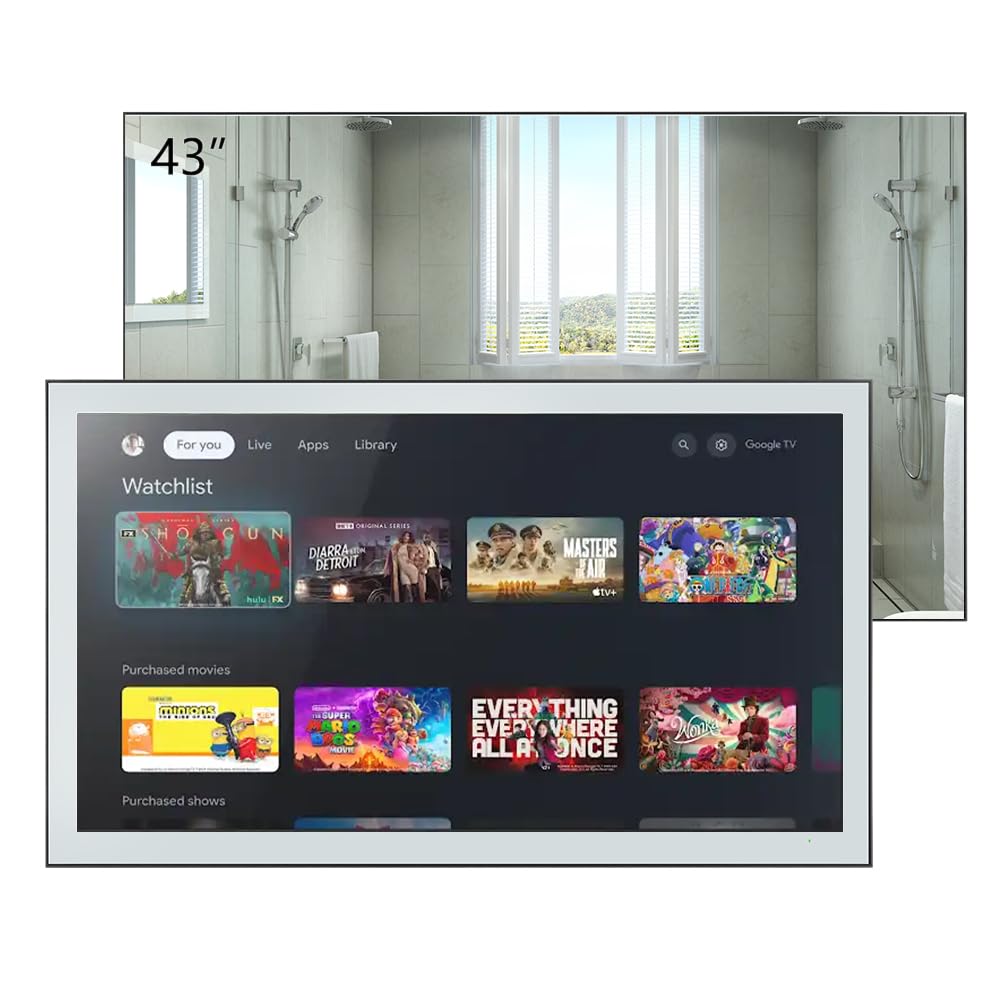
Figure 1.1: elecsung 43-inch Smart Mirror Bathroom TV with its smart interface.
2. Enfòmasyon sou Sekirite
- Sekirite elektrik: Asire ke ekipman pou pouvwa a matche ak voltage requirements (100-240 VAC, 50-60 Hz). Do not expose the power cord to excessive heat or moisture.
- Rezistans dlo: The TV is IPX6 waterproof, meaning it is protected against powerful water jets. However, it is not designed for submersion. Do not spray water directly onto the connections.
- Enstalasyon: Professional installation is recommended for wall mounting to ensure stability and safety. Follow all mounting instructions carefully.
- Netwayaj: Dekonekte kouran an anvan ou netwaye. Sèvi ak yon twal mou.amp twal. Evite pwodui netwayaj abrazif oswa solvan.
- Vantilasyon: Asire w ke gen ase vantilasyon toutotou aparèy la. Pa bloke ouvèti vantilasyon yo.
3. Pake kontni
Verifye ke tout atik yo prezan nan pakè a:
- elecsung 43-inch Smart Mirror Bathroom TV
- Kontwòl Remote
- Mi-mòn Sipò
- Adaptè/Kab kouran
- Manyèl Itilizatè (dokiman sa a)
- Blu-ray (as listed in included components, may refer to Blu-ray playback capability rather than a physical disc)
4. Pwodwi souview
4.1 Karakteristik kle
- Ekspozisyon: 43-inch 4K Ultra HD (3840x2160) LED display with 75 Hz refresh rate.
- Evalyasyon ki enpèmeyab: IPX6 for protection against powerful water jets.
- Odyo: Dolby Vision & Atmos support, 2.0 channel, 10W x 2 speakers.
- Koneksyon: Dual-band Wi-Fi (2.4G/5G), Bluetooth 5.0, HDMI, USB, Ethernet.
- Kontwòl: Voice control and remote control.
- Sistèm operasyon: Android 11.0 for smart TV functionality and app access.
- Tuner: ATSC DTV tuner.

Figure 4.1: Product features and included remote control.
4.2 Physical Description and Dimensions
The TV features a sleek design with a mirror finish. When off, it functions as a mirror. The unit dimensions are 994.8mm (39.2") W x 580.1mm (22.8") H x 62.2mm (2.5") D. Recessed dimensions for in-wall installation are 521mm (20.5") W x 476mm (18.7") H x 35mm (1.4") D.

Figure 4.2: Product dimensions with bracket.
4.3 Pò ak Koneksyon
The rear panel of the TV provides various input and output ports:
- Pò HDMI (x4): For connecting external devices like Blu-ray players, gaming consoles, or set-top boxes. Supports CEC, ARC, eARC.
- Pò USB (x2): Pou konekte aparèy depo USB yo.
- Ethernet (RJ45): Pou koneksyon rezo filaire.
- Soti odyo optik: Pou konekte ak sistèm odyo ekstèn.
- Antre AV: Pou konekte ansyen aparèy analòg yo.
- Antre Antre: For connecting an ATSC antenna.
- Antre satelit: For connecting satellite dish.
- AC Socket: Pou koneksyon pouvwa.

Figi 4.3: Koneksyon panèl dèyè a.
5. Enstalasyon
5.1 Enstalasyon televizyon an
The TV can be mounted on or in a wall using the supplied wall-mount bracket or a compatible VESA bracket. The VESA mount standard is 400 x 400 mm for the 43-inch model, requiring M6 x 12mm screws.
- Chwazi Kote: Select a suitable wall location, ensuring it can support the TV's weight and has access to power and necessary connections.
- Enstale bracket: Securely attach the wall-mount bracket to the wall according to the bracket's specific instructions. Use appropriate wall anchors for your wall type.
- Attach TV: Carefully lift the TV and attach it to the installed wall bracket. Ensure it is securely fastened.
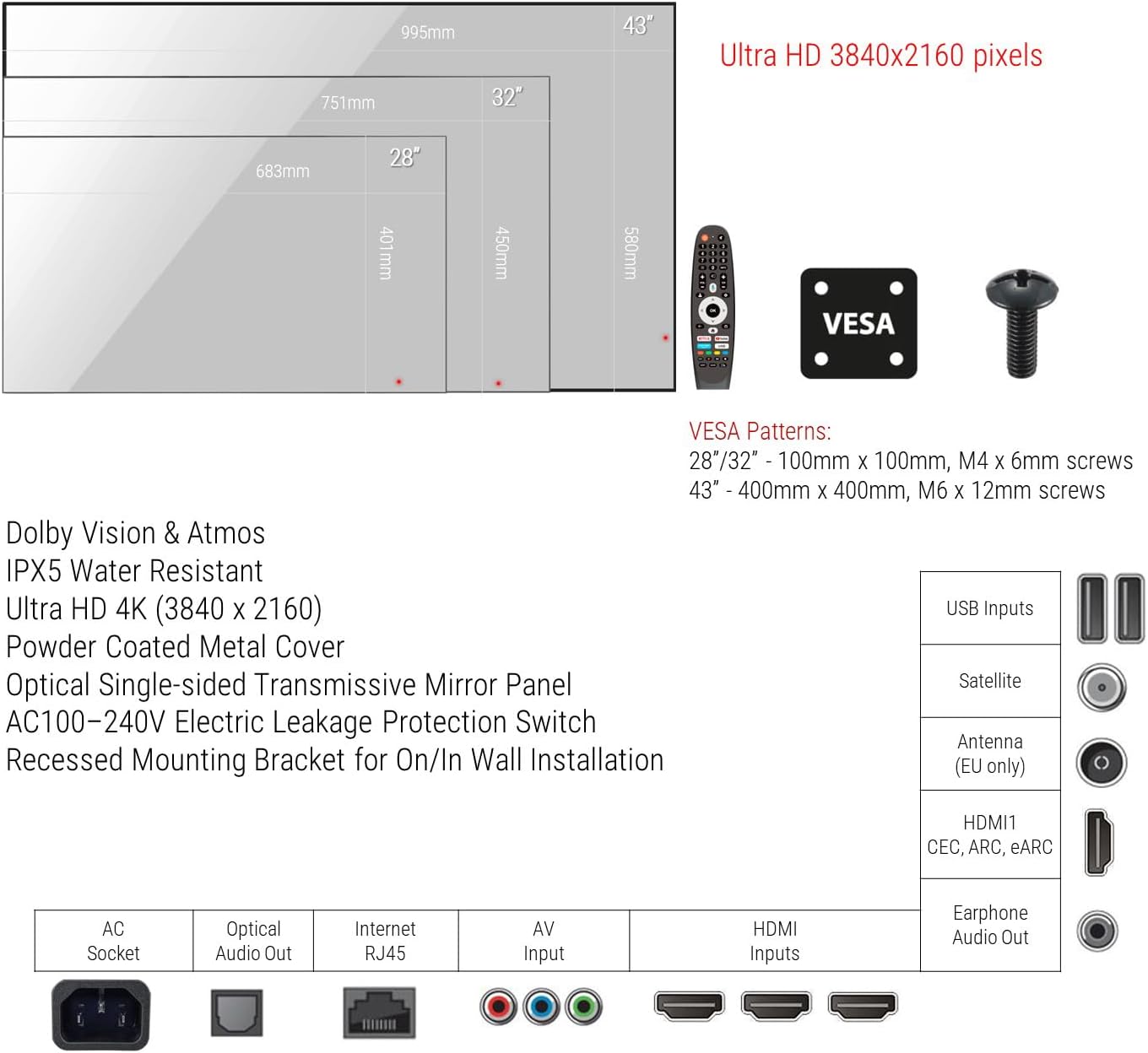
Figure 5.1: VESA mounting patterns and port overview.
5.2 Koneksyon Inisyal yo
- Pouvwa: Connect the power cable to the AC socket on the TV and then to a power outlet.
- Antèn/Kab: Connect your ATSC antenna or cable TV feed to the Antenna input.
- Aparèy ekstèn: Connect any external devices (e.g., Blu-ray player, game console) to the HDMI ports.
- Rezo: For wired internet, connect an Ethernet cable to the RJ45 port. For wireless, you will configure Wi-Fi during initial setup.
6. Operasyon Enstriksyon
6.1 Power On/Off
Press the power button on the remote control to turn the TV on or off. The TV will display the smart interface when powered on.
6.2 Kontwòl Remote
Use the provided remote control to navigate the TV's interface, adjust volume, change channels, and access smart features. Refer to the remote control diagram for specific button functions.
6.3 Kontwòl vwa
The TV supports voice control for hands-free operation. Activate voice control by pressing the dedicated voice button on your remote or by saying the wake word (if configured). You can then issue commands such as "Change channel to CNN," "Open Netflix," or "Chèche pou action movies."
6.4 Smart TV Functions (Android 11.0)
Your TV runs on Android 11.0, providing access to a wide range of applications and streaming services. Navigate the home screen to find installed apps, browse content, and customize settings.
- Aksè Aplikasyon: Download and install apps from the integrated app store.
- Difizyon: Access popular streaming platforms for movies, TV shows, and videos.
- Anviwònman: Adjust network settings, display options, audio preferences, and more through the settings menu.
6.5 Distribisyon Kontni
Stream content from your smartphone, tablet, or laptop directly to the TV using its casting feature. Ensure your device and the TV are connected to the same Wi-Fi network. Look for the casting icon within compatible apps on your mobile device to initiate screen mirroring.
7. Antretyen
Proper maintenance ensures the longevity and performance of your Smart Mirror TV.
- Cleaning the Screen/Mirror: Disconnect the TV from power. Use a soft, lint-free cloth slightly dampened with water or a non-abrasive, ammonia-free glass cleaner. Spray cleaner onto the cloth, not directly onto the screen. Wipe gently to avoid streaks.
- Netwaye ankadreman an: Use a soft, dry cloth to wipe the frame. Avoid harsh chemicals.
- Vantilasyon: Periodically check that the ventilation openings are free from dust and debris.
NAN. Depanaj
Si ou rankontre pwoblèm, gade etap depanaj komen sa yo:
| Pwoblèm | Kòz posib | Solisyon |
|---|---|---|
| Pa gen pouvwa | Kab kouran an dekonekte; Priz kouran an gen pwoblèm. | Asire w kab kouran an byen konekte. Teste priz la ak yon lòt aparèy. |
| Pa gen imaj/son | Sous opinyon ki pa kòrèk; Kab HDMI/AV ki lach; Aparèy la pa limen. | Select correct input source. Check cable connections. Power on external device. |
| Pa gen koneksyon Wi-Fi | Router issue; Incorrect password; Out of range. | Restart router. Re-enter Wi-Fi password. Move TV closer to router or use Ethernet. |
| Kontwòl vwa pa reponn | Microphone blocked; Feature disabled; Remote battery low. | Ensure microphone is clear. Check voice control settings. Replace remote batteries. |
Si pwoblèm nan pèsiste apre ou fin eseye solisyon sa yo, kontakte sèvis kliyan.
9. Espesifikasyon
| Karakteristik | Spesifikasyon |
|---|---|
| Gwosè ekran | 43 pous |
| Teknoloji ekspozisyon | dirije |
| Rezolisyon | 4K (3840x2160) |
| Rafrechisman pousantaj | 75 Hz |
| Evalyasyon ki enpèmeyab | IPX6 |
| Sistèm operasyon | Android 11.0 |
| Koneksyon | Wi-Fi (Dual-band), Bluetooth 5.0, HDMI (x4), USB (x2), Ethernet, Optical Audio Out, AV Input, Antenna, Satellite |
| Karakteristik odyo | Dolby Vision & Atmos, 2.0 channel, 10W x 2 speakers |
| Metòd kontwòl | Kontwòl Remote, Kontwòl Vwa |
| Dimansyon pwodwi (D x W x H) | 2.5"P x 39.2"L x 22.8"H (62.2mm x 994.8mm x 580.1mm) |
| Recessed Dimensions (D x W x H) | 1.4"P x 20.5"L x 18.7"H (35mm x 521mm x 476mm) |
| Estanda Mòn VESA | 400 x 400 mm |
| Konsomasyon pouvwa | 46 Watts |
| Liy Voltage | 100-240 VAC 50-60 Hz |
| Non modèl | HYM43A-0BLS11052 |
10. Garanti ak sipò
This product comes with a Full Warranty. For specific warranty terms and conditions, please refer to the documentation included with your purchase or visit the elecsung official website. For technical support, troubleshooting assistance, or service inquiries, please contact elecsung customer support through their official channels.
Sipò sou entènèt: Vizite la elecsung Store on Amazon pou enfòmasyon sou pwodwi ak resous sipò.