
Entwodiksyon
This manual provides detailed instructions for the Cillso H97 Wireless Earbuds. Please read this manual carefully before using the product to ensure proper operation and to maximize your user experience. Keep this manual for future reference.

Image: The Cillso H97 Wireless Earbuds in their charging case, displaying the digital battery indicator.
Kontni pake
- Cillso H97 Wireless Earbuds (Left and Right)
- Ka chaje
- USB-C Chaje Kab
- Manyèl itilizatè
Enstalasyon
1. Chaje ekoutè yo ak bwat la
Before first use, fully charge the earbuds and the charging case. Connect the provided USB-C cable to the charging port on the case and to a 5V/1A or 5V/2A power adapter. The digital display on the case will indicate the charging status.
- Tan pou chaje: Apeprè 1.5 èdtan pou yon chaj konplè.
- Lavi batri: Up to 8 hours of playback per charge, and up to 40 hours total with the charging case.
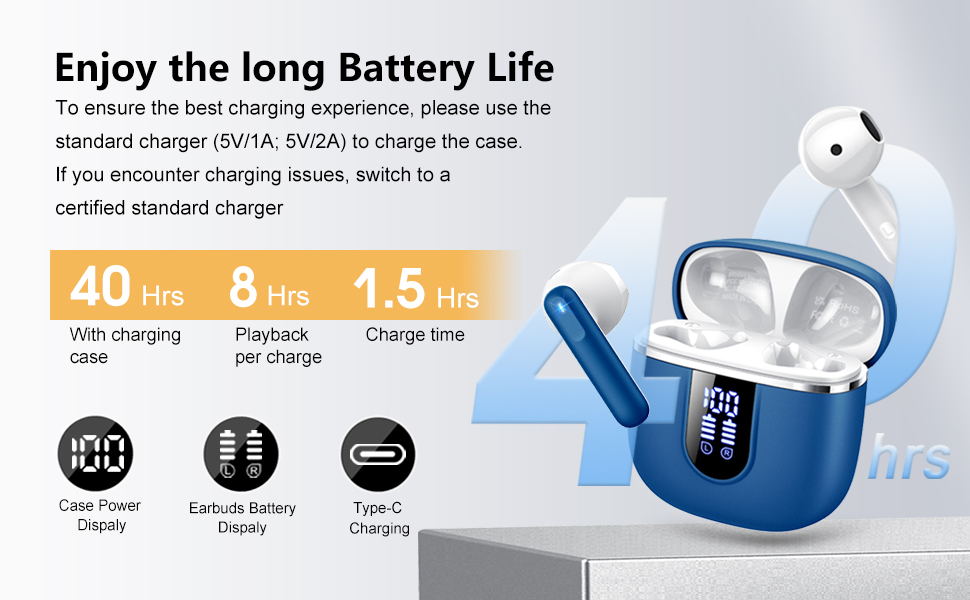
Image: Diagram illustrating the 40-hour total battery life, 8-hour single playback, and 1.5-hour charge time, along with the USB-C charging port and digital display.
The charging case is equipped with Over Current Protection (OCP) technology to prevent damage from prolonged high current. If the current exceeds the power limit, the power source will be cut off to protect the circuitry and device.

Image: Illustration explaining Over Current Protection (OCP) technology in the charging case.
2. Pairing ak yon Aparèy Bluetooth
- Louvri bwat chaje a. Ekoutè yo ap antre otomatikman nan mòd koneksyon.
- Sou aparèy ou an (telefòn entelijan, tablèt, òdinatè pòtab), aktive Bluetooth.
- Chèche pou "H97" in the list of available Bluetooth devices and select it to connect.
- Yon fwa konekte, w ap tande yon konfimasyon sonab, epi ekoutè yo ap pare pou itilize.
The H97 earbuds feature Bluetooth 5.4 for a more stable connection, longer transmission range, lower power consumption, and reduced latency.

Image: Visual representation of Bluetooth 5.4 technology, highlighting benefits like stable connection, longer range, lower power consumption, and lower latency.
3. Mete ekoutè yo
Gently insert the earbuds into your ears, ensuring a comfortable and secure fit. The rounded tips are designed for in-ear comfort. Adjust them until the sound quality is optimal and they feel stable.

Image: Diagram showing the recommended angle for inserting the earbud into the ear for a secure fit.
Enstriksyon Operasyon
Kontwòl manyen
The H97 earbuds feature sensitive touch sensors for easy control of various functions:
| Aksyon | Fonksyon |
|---|---|
| Double tap the left/right MFB button | Jwe/Poz mizik |
| One tap the left/right MFB button | Reponn/Fen apèl |
| Long press the right/left MFB button for 2s | Track Next/Previous |
| One tap the left/right MFB button (during call) | Volume Up/Down (specific mapping not detailed, typical for single tap) |
| Triple tap MFB button | Activate Voice Assistant (common function) |

Image: Visual guide to the smart touch controls on the earbuds for playback and call management.
Karakteristik odyo
The H97 earbuds deliver a high-quality audio experience:
- Son Stereo Hi-Fi: Featuring 13mm diameter speakers with crystal clear treble, vibrant mid-range, and powerful bass.
- 3D Bass Stereo: Enhanced bass for an immersive listening experience.
- Apèl klè: Equipped with 4 ENC (Environmental Noise Cancelling) microphones to filter out background noise and suppress wind noise, ensuring clear communication.

Image: Diagram illustrating the 13mm speaker driver and triple-layer composite diaphragm for enhanced bass and sound quality.

Image: Illustration detailing the 4-microphone design for crystal-clear calls, including feedback and talk mics, and anti-wind noise features.
Konpatibilite
The Cillso H97 Wireless Earbuds are compatible with a wide range of Bluetooth-enabled devices, including:
- Telefòn entelijan (Android, iOS)
- Tablèt
- Laptops
- Desktop Computers (with Bluetooth adapter)

Image: Icons representing compatibility with phones, tablets, laptops, and desktops, shown alongside the earbuds and a smartphone playing music.
Antretyen
Netwayaj ak Swen
The H97 earbuds are IP7 waterproof, offering protection against water, sweat, and rain. However, proper care is still recommended:
- Wipe the earbuds and charging case with a soft, dry cloth after each use, especially after workouts.
- Evite itilize pwodui netwayaj abrazif oswa solvang.
- Asire w pò chaje a sèk anvan ou konekte kab chaje a.
- Sere ekoutè yo nan ka chaje yo lè yo pa itilize pou pwoteje yo epi kenbe yo chaje.

Image: A person wearing the earbuds with water splashing, illustrating the IPX7 waterproof feature, along with icons for dust prevention, sweatproof, and nano material.
Pi bon pratik pou chaje
- Always use the provided USB-C cable or a certified standard charger (5V/1A or 5V/2A) to charge the case.
- If you encounter charging issues, try switching to a different certified standard charger.
- Do not expose the charging case or earbuds to extreme temperatures.
Depanaj
Pwoblèm komen ak solisyon yo
| Pwoblèm | Solisyon posib |
|---|---|
| Ekoutè yo pa konekte oswa konekte |
|
| Se yon sèl ekoutè k ap travay |
|
| Volim ki ba oswa kalite son ki pa bon |
|
| Ka chaje pa chaje |
|
Espesifikasyon
| Karakteristik | Detay |
|---|---|
| Nimewo Modèl | H97 |
| Mak | Cillso |
| Bluetooth vèsyon | 5.4 |
| Teknoloji Audio | 3D Bass Stereo, Hi-Fi Stereo Sound |
| Gwosè Oratè | 13mm dyamèt |
| Mikwofòn | 4 ENC Noise Cancelling Mics |
| Dire batri (ekoutè) | Jiska 8 èdtan (yon sèl chaj) |
| Total Playtime | Jiska 40 èdtan (avèk chaje ka) |
| Port chaje | USB-C |
| Chaje Antre | 5V/1A or 5V/2A recommended |
| Evalyasyon ki enpèmeyab | IP7 |
| Aparèy konpatib | Smartphones, Tablets, Laptops, Bluetooth Devices |
| Gamme frekans | 20 Hz - 20,000 Hz |
| Fòm ekoutè | Konsèy awondi |
| Dimansyon pwodwi | 0.79 x 0.79 x 0.79 inches (earbud dimensions, case dimensions are 48.9mm x 53.4mm) |
| Pwa atik | 0.352 ons |

Image: Visual representation of the earbuds and charging case dimensions, emphasizing their lightweight and pocket-sized design.
Garanti ak sipò
Enfòmasyon konsènan garanti pwodwi a ak sipò kliyan pa te disponib nan done yo te bay yo. Tanpri gade anbalaj pwodwi a oswa dokiman ofisyèl manifakti a. website for details on warranty coverage and how to contact customer support.
Enfòmasyon sou Sekirite
- Pa demonte oswa modifye ekoutè yo oswa bwat chaje a.
- Keep the product away from extreme temperatures, direct sunlight, and moisture.
- Evite jete oswa soumèt pwodwi a nan gwo enpak.
- Kenbe lwen timoun ak bèt kay.
- Jete pwodwi a yon fason responsab dapre règleman lokal yo.


