
1. Pwodwi souview
The Machenike Machcreator Mini Desktop, Model 4762H, is a compact and powerful computing solution designed for various applications, from business to everyday use. It features a 13th Gen Intel Core i7-13620H processor, 16GB DDR5 RAM, and a 512GB PCIe M.2 SSD, providing high-speed performance and efficient multitasking capabilities. This mini PC supports 4K dual monitor output and comes pre-installed with Windows 11 Pro.
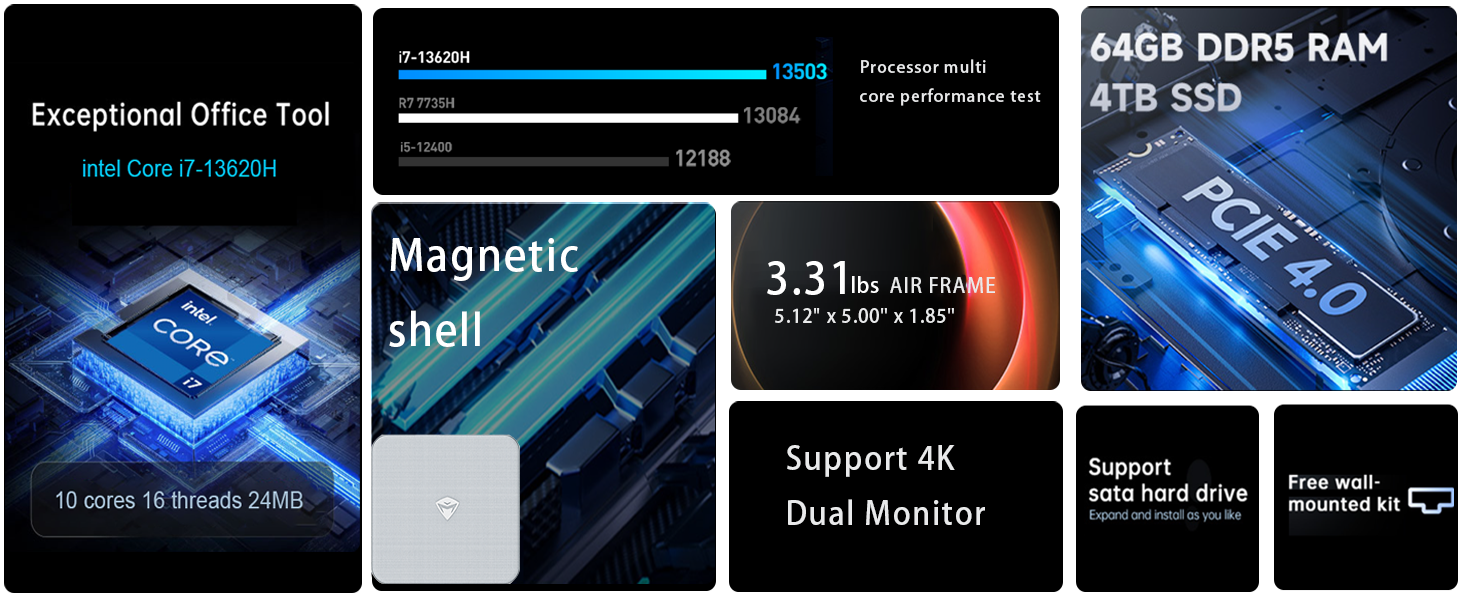
Imaj: Plis paseview of the Intel Core i7 processor, highlighting 10 Cores, 16 Threads, 4.90 GHz Max Turbo Frequency, and 24 MB L3 Cache.
Karakteristik kle:
- Processeur: Intel Core i7-13620H (10 Nwayo, 16 Fil, jiska 4.9 GHz)
- memwa: 16GB DDR5 SODIMM RAM (expandable up to 64GB)
- Depo: 512GB PCIe M.2 Solid State Drive (supports dual M.2 expansion)
- Sistèm operasyon: Windows 11 Pro
- Grafik: Integrated Intel UHD Graphics, supporting 4K dual monitor output via HDMI 2.0 and DisplayPort 1.4
- Koneksyon: Wi-Fi 6, Bluetooth, 2 x RJ45 Ethernet, USB 3.2 Gen2 Type-A, USB Type-C
- Sistèm refwadisman: Twin turbine cooling fan with deluxe all-copper radiator
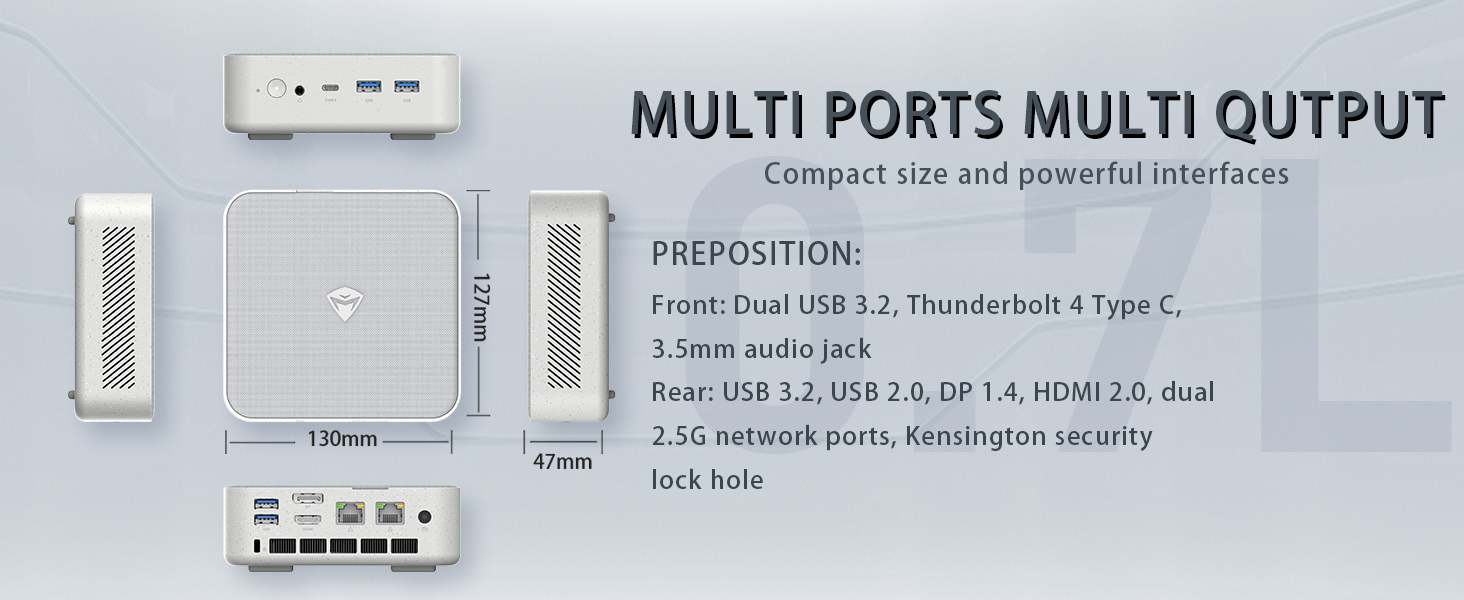
Image: Illustration of PCIe 4.0 SSD and memory slots, indicating support for up to 64GB DDR5 RAM and up to 4TB PCIe SSD expansion.
2. Gid Enstalasyon
2.1 Depake Aparèy la
Retire tout konpozan yo nan anbalaj la avèk prekosyon. Asire w ke atik sa yo la:
- Machenike Machcreator Mini Desktop (Model 4762H)
- Adaptè pouvwa
- Manyèl Itilizatè (dokiman sa a)
- (Opsyonèl) Twous Montaj VESA
2.2 Konekte periferik
Anvan ou limen l, konekte periferik esansyèl ou yo:
- Ekspozisyon: Connect your monitor(s) to the HDMI 2.0 or DisplayPort 1.4 ports on the rear of the mini PC. The USB Type-C port also supports video output.
- Klavye ak sourit: Connect your USB keyboard and mouse to any of the available USB 3.2 Gen2 Type-A ports.
- Rezo: For a wired connection, connect an Ethernet cable to one of the RJ45 ports. For wireless, ensure your Wi-Fi network is available.
- Pouvwa: Connect the power adapter to the DC-in port on the mini PC, then plug the adapter into a power outlet.
Imaj: Detaye view of the mini PC's front and rear ports, including USB 3.2 Gen2 Type-A, USB Type-C, 3.5mm Audio Jack, HDMI 2.0, DisplayPort 1.4, and RJ45 Ethernet ports. Dimensions are also shown.
2.3 Initial Boot-up and Windows 11 Pro Setup
- Peze bouton pouvwa a ki sitiye sou devan mini PC a.
- The system will boot into the Windows 11 Pro setup wizard. Follow the on-screen instructions to configure your language, region, network, and user account.
- Once setup is complete, your mini PC is ready for use.
3. Operasyon Enstriksyon
3.1 Power On/Off
- Pouvwa sou: Peze bouton pouvwa a yon fwa.
- Fèmen: Klike sou bouton Start la nan Windows, answit chwazi Power > Shut down.
- Rekòmanse: Klike sou bouton Start la nan Windows, answit chwazi Power > Restart.
- Dòmi: Klike sou bouton Start la nan Windows, answit chwazi Power > Sleep.
3.2 Konfigirasyon ekspozisyon
The mini PC supports up to two 4K displays simultaneously. To configure display settings:
- Right-click on the desktop and select "Display settings".
- Here you can detect multiple displays, arrange them, change resolution, and adjust scaling.
3.3 Koneksyon Rezo
- Wi-Fi: Click the network icon in the taskbar, select your Wi-Fi network, enter the password, and connect.
- Ethernet: If an Ethernet cable is connected, the system should automatically establish a wired network connection.
3.4 Cooling System Modes
The mini PC features an advanced cooling system with adjustable modes via the BIOS to optimize performance and noise levels. These modes include:
- Silans Mode: Prioritizes quiet operation, suitable for light tasks.
- Mòd balans: Offers a good balance between performance and noise.
- Mòd pèfòmans: Maximizes performance (up to 65W power release), ideal for demanding applications.
To change these settings, access the BIOS during startup (typically by pressing Del or F2 repeatedly after powering on) and navigate to the relevant power or performance settings.
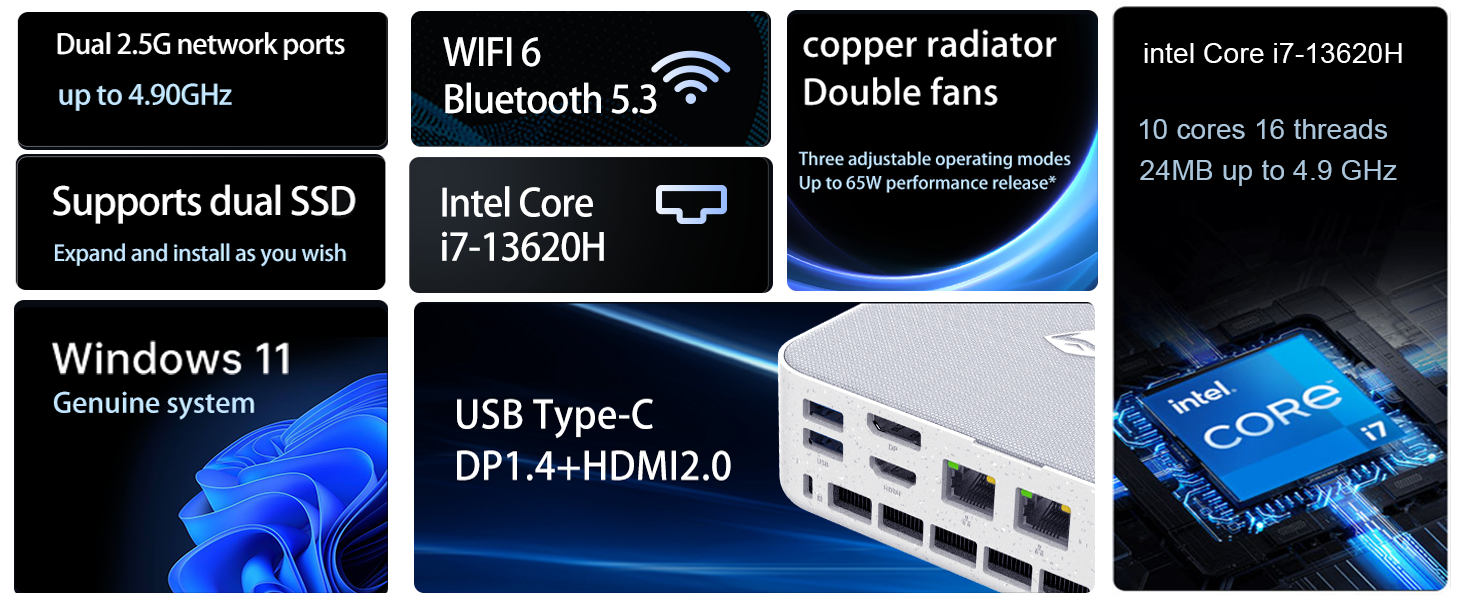
Image: Illustration of the twin turbine cooling fan and deluxe all-copper radiator, explaining how it prevents slowdowns due to overheating and offers silence, balance, and performance modes.
4. Antretyen
4.1 Netwaye Aparèy la
Pou asire pèfòmans optimal ak lonjevite, netwaye mini PC ou a regilyèman:
- Power off the device and disconnect it from the power outlet.
- Use a soft, dry cloth to wipe the exterior.
- Use compressed air to gently clear dust from ventilation openings. Do not insert any objects into the vents.
4.2 Mizajou lojisyèl
Keep your Windows 11 Pro operating system and drivers updated to ensure security and performance:
- Mizajou Windows yo: Go to Start > Settings > Windows Update and check for updates.
- Mizajou chofè: Visit the Machenike official websit la pou jwenn dènye chofè yo pou modèl espesifik ou a.
4.3 Depo ak Ekspansyon Memwa
The Machenike Machcreator Mini Desktop supports upgrades for both RAM and storage:
- RAM: The device has 2 SODIMM slots and supports up to 64GB DDR5 RAM.
- Depo: It supports dual PCIe M.2 SSDs, allowing for significant storage expansion up to 4TB.
Nòt: Opening the device for upgrades may void your warranty. Consult a qualified technician or refer to specific upgrade guides from Machenike if available.
NAN. Depanaj
Seksyon sa a adrese pwoblèm komen ou ka rankontre. Pou pwoblèm ki pi konplèks, tanpri kontakte sèvis kliyan.
5.1 Pa gen pouvwa
- Asire w ke adaptè kouran an byen konekte ak mini PC a ak yon priz kouran ki fonksyone.
- Verifye si priz kouran an fonksyone byen lè w branche yon lòt aparèy.
- Tcheke adaptè kouran an pou wè si li pa gen okenn domaj vizib.
5.2 Pa gen okenn pwodiksyon ekspozisyon
- Konfime ke monitè a limen epi ke sous opinyon ki kòrèk la chwazi.
- Ensure the HDMI or DisplayPort cable is securely connected to both the mini PC and the monitor.
- Eseye yon lòt kab ekran oswa monitè si ou genyen.
- If using multiple displays, try connecting only one display at a time.
5.3 Pwoblèm koneksyon rezo
- Filaire (Etènèt): Check if the Ethernet cable is properly connected to both the mini PC and the router/modem. Verify router/modem status.
- San fil (Wi-Fi): Ensure Wi-Fi is enabled in Windows settings. Restart your router/modem. Check if other devices can connect to the Wi-Fi network.
- Run Windows Network Troubleshooter (Start > Settings > Network & internet > Advanced network settings > Network troubleshooter).
6. Espesifikasyon
Detailed technical specifications for the Machenike Machcreator Mini Desktop, Model 4762H:
| Karakteristik | Spesifikasyon |
|---|---|
| Mak | Machenike |
| Nimewo Modèl | 4762H |
| Sistèm operasyon | Windows 11 Pro |
| Modèl CPU | Intel Nwayo i7-13620H |
| CPU vitès | Up to 4.9 GHz (Max Turbo Frequency) |
| Gwosè memwa RAM enstale | 16 GB DDR5 (Expandable to 64 GB) |
| Vitès revèy memwa | 4800 MHz |
| Fant memwa ki disponib | 2 |
| Kapasite Depo memwa | 512 GB PCIe M.2 SSD (Supports dual M.2, up to 4TB) |
| Koprosesè grafik | Grafik Intel UHD (Entegre) |
| Entèfas Sorti Videyo | HDMI 2.0, DisplayPort 1.4, USB Type-C |
| Montre Rezolisyon Maksimòm | 3840x2160 (4K) |
| Entèfas Materyèl | 3.5mm Audio, Bluetooth, DisplayPort, Ethernet (2x RJ45), HDMI, USB, USB Type C |
| Koneksyon san fil | Wi-Fi 6 (802.11ax), Bluetooth |
| Dimansyon atik (LxWxH) | 5.12 x 5 x 1.85 pous |
| Pwa atik | 49.8 liv (Note: This weight may be a data entry error; actual weight for a mini PC is typically much less.) |
| UPC | 193200587317 |
7. Garanti ak sipò
7.1 Enfòmasyon sou Garanti
Machenike products typically come with a limited manufacturer's warranty. Please refer to the warranty card included with your purchase or visit the official Machenike websit la pou wè kondisyon garanti detaye espesifik pou rejyon ou ak modèl pwodwi ou a. Kenbe prèv acha ou pou reklamasyon garanti.
7.2 Sipò pou Kliyan
For technical assistance, troubleshooting beyond this manual, or warranty inquiries, please contact Machenike customer support:
- Sipò sou entènèt: Visit the official Machenike websit (www.machenike.com - example link, actual link may vary) epi ale nan seksyon sipò a.
- Sipò Imèl: Refer to your product documentation for the specific support email address.
- Sipò telefòn: Check the Machenike websit pou nimewo telefòn sipò rejyonal yo.
When contacting support, please have your product model number (4762H) and serial number ready.