
1. Enstriksyon Sekirite Enpòtan
Tanpri li manyèl enstriksyon sa a avèk atansyon anvan ou itilize aparèy la epi konsève li pou referans pita. Si ou pa swiv enstriksyon sa yo, sa ka lakòz chòk elektrik, dife oswa blesi grav.
- Pa plonje aparèy la, kòd li, oswa ploge li nan dlo oswa nan okenn lòt likid.
- Aparèy sa a fèt pou itilizasyon domestik sèlman. Pa sèvi avè l deyò oswa pou rezon komèsyal.
- Kenbe aparèy la lwen timoun ak bèt kay.
- Pa sèvi ak aspiratè a si fil elektrik la oswa ploge a domaje.
- Ensure the dust tank and filters are correctly installed before use.
- Do not vacuum liquids, hot ashes, sharp objects, or flammable materials.
- Only use the original charger and battery provided with the appliance.
- Pa eseye repare oswa modifye aparèy la tèt ou. Kontakte pèsonèl sèvis ki kalifye.
2. Pwodwi souview
2.1 Eleman
The Taurus Homeland Ultimate Digital vacuum cleaner comes with several components designed for versatile cleaning.

Figure 2.1: Main unit, extension tube, motorized brush, and various accessories.
- Main Unit (with Digital Brushless Motor and Dust Tank)
- Tib ekstansyon
- Motorized Brush Head (with Optic LED)
- ALL ROAD Brush Roller (pre-installed in brush head)
- FUZZY Brush Roller (for delicate surfaces)
- Zouti Crevice 2-an-1
- Bwòs konbine
- Mi Mount Support
- Pouvwa adaptè/Charjeur
2.2 Karakteristik kle
- Digital Brushless Motor: Powerful 400W motor reaching 90,000 RPM for efficient cleaning.
- Gwo pouvwa aspirasyon: Delivers 21,000 Pa for deep cleaning on various surfaces.
- Removable Lithium-Ion Battery: 29.6V battery offering up to 55 minutes of autonomy in ECO mode.
- Advanced Triple Filtration System: Cyclonic, HEPA, and Mesh filters capture fine dust and purify air.
- Ekran LCD: Displays battery level (25% to 100%) and alerts for filter/brush blockages.
- Optic LED Lighting: Integrated into the motorized brush head for improved visibility in dark areas.
- Konsepsyon ki lejè: Weighs approximately 2 kg for comfortable handling and extended reach.
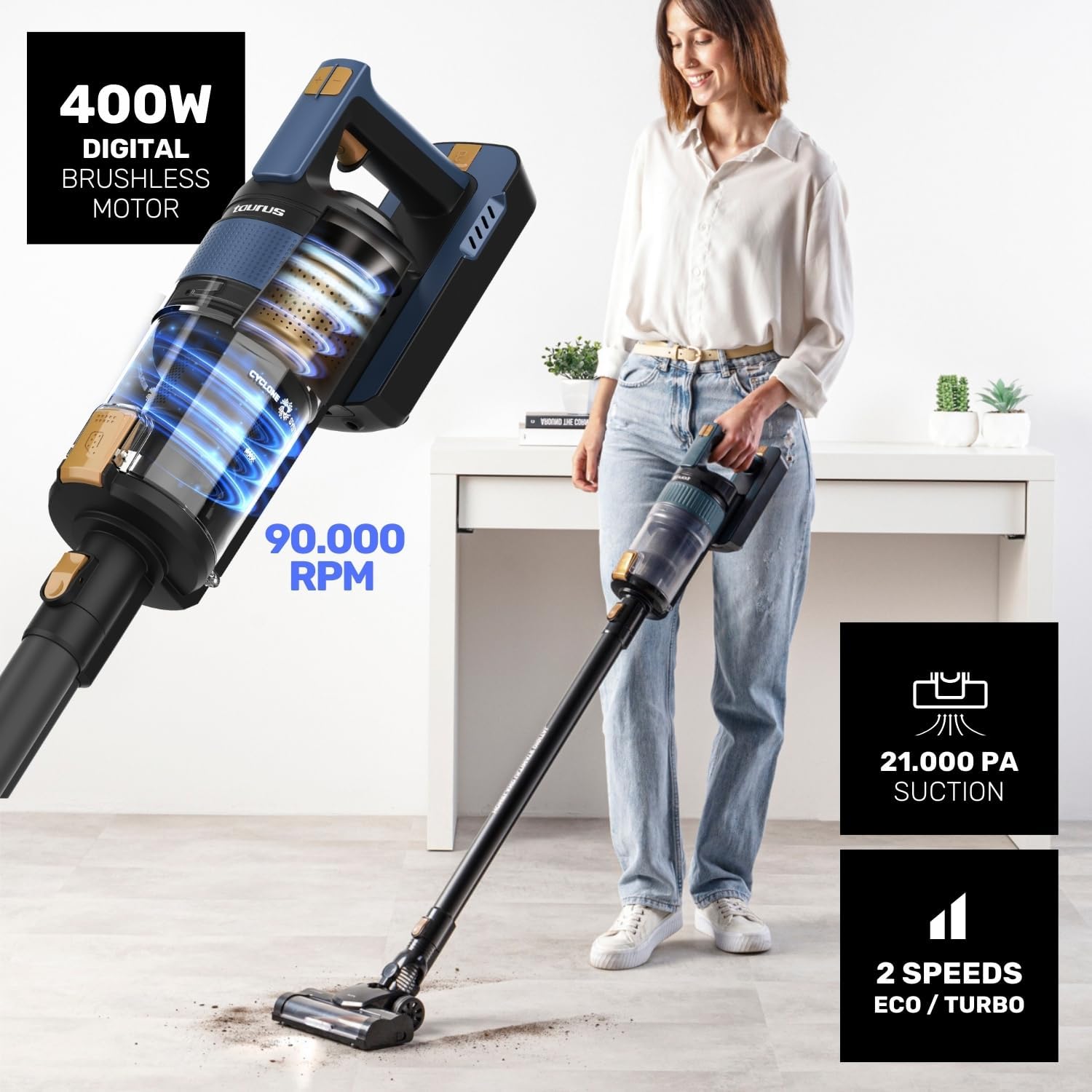
Figure 2.2: Powerful motor and suction capabilities.

Figure 2.3: Lightweight design for easy maneuverability.
3. Enstalasyon ak Asanble
3.1 Asanble
- Mete tib ekstansyon an nan inite prensipal la jiskaske li fè yon klik pou l antre nan plas li.
- Attach the motorized brush head to the other end of the extension tube, ensuring it clicks securely.
- Alternatively, attach accessories like the 2-in-1 crevice tool or combined brush directly to the main unit for handheld use.

Figure 3.1: One Touch System for easy accessory attachment.
3.2 Chaje batri a
Anvan premye itilizasyon an, chaje batri a nèt. Ou ka retire batri a pou ou ka chaje l fasilman.
- Remove the battery from the main unit by pressing the release button.
- Connect the power adapter to the charging port on the battery.
- Plug the adapter into a power outlet. The LCD screen will indicate charging status.
- Yon chaj konplè pran apeprè 4 èdtan.

Figure 3.2: Battery charging and autonomy details.
4. Operasyon Enstriksyon
4.1 Limen/Etenn ak Mòd Vitès
- Press the power button to turn the vacuum cleaner on. It will start in ECO mode.
- Press the mode button to switch between ECO and TURBO modes.
- Press the power button again to turn the appliance off.
4.2 Using the Motorized Brush Head
The motorized brush head is equipped with Optic LED lighting for enhanced visibility.
- ALL ROAD Brush: Suitable for all floor types, including carpets and hard floors.
- FUZZY Brush: Ideal for delicate surfaces like parquet and hardwood floors. To change brush rollers, refer to the maintenance section.

Figure 4.1: ALL ROAD motorized brush in action.

Figure 4.2: Optic LED and interchangeable brush rollers.
4.3 Itilizasyon Pwodui Akseswa yo
- Zouti fant 2-an-1: Pafe pou espas etwat, kwen, ak zòn ki difisil pou rive.
- Combined Brush: Apwopriye pou amebleman, rido, ak sifas delika.
5. Antretyen ak netwayaj
Antretyen regilye asire pèfòmans optimal epi pwolonje lavi aspiratè ou a.
5.1 Vide tank pousyè a
The 600 ml dust tank features a hygienic TOUCH & CLEAN emptying system.
- Hold the main unit over a waste bin.
- Press the dust tank release button to open the bottom flap and empty the contents.
- Fèmen kouvèti a byen fèm apre ou fin vide l.

Figure 5.1: Hygienic dust tank emptying.
5.2 Netwaye filtè yo
The Triple Filtration System (Cyclonic, HEPA, and Mesh filters) is washable.
- Twist and pull to remove the dust tank from the main unit.
- Separate the cyclonic, HEPA, and mesh filters from the dust tank.
- Rense tout konpozan filtè yo anba dlo k ap koule jiskaske yo pwòp. Pa sèvi ak savon.
- Allow all parts to air dry completely for at least 24 hours before reassembling.
- Reassemble the filters and dust tank, then reattach to the main unit.

Figure 5.2: Triple Filtration System components.

Figure 5.3: Washable filters for easy maintenance.
5.3 Cleaning Brush Rollers
Periodically check and clean the brush rollers to remove tangled hair or debris.
- Turn off the vacuum cleaner and detach the motorized brush head.
- Locate the brush roller release tab/lock on the side of the brush head.
- Remove the brush roller and use scissors or a brush to remove any tangled hair or fibers.
- Remete woulo bwòs pwòp la epi byen sere l nan plas li.
NAN. Depanaj
Si ou rankontre pwoblèm ak aspiratè ou a, gade tablo ki anba a pou pwoblèm ak solisyon komen yo.
| Pwoblèm | Kòz posib | Solisyon |
|---|---|---|
| Aspiratè pa limen. | Batri a pa chaje oswa li pa byen enstale. | Chaje batri a nèt. Asire w ke batri a byen klike nan plas li. |
| Ba pouvwa pou aspirasyon. | Dust tank is full, filters are clogged, or brush roller is blocked. | Empty the dust tank. Clean or replace filters. Remove any obstructions from the brush roller. |
| Woulo bwòs la sispann vire. | Hair or debris tangled around the brush roller. | Turn off the vacuum, remove the brush roller, and clear any obstructions. |
| LCD screen shows an error/alert. | Indicates filter blockage or brush blockage. | Refer to the maintenance section to clean filters or brush roller. |
7. Espesifikasyon
| Karakteristik | Detay |
|---|---|
| Nimewo Modèl | HVCA7300B |
| Pouvwa motè | 400W Digital Brushless |
| Pouvwa pou aspirasyon | 21,000 Pa |
| Kalite batri | 29.6V Lithium-Ion (Removable) |
| Max Autonomy | Jiska 55 minit (mòd ECO) |
| Tan pou chaje | Apeprè. 4 èdtan |
| Kapasite Tank Pousyè | 600 ml |
| Sistèm filtraj | Triple Advanced Filtration (Cyclonic, HEPA, Mesh) |
| Pwa | Apeprè. 2 kg |
| Dimansyon (L x W x H) | 12 x 23 x 120 cm (asanble) |
8. Garanti ak Sipò Kliyan
Taurus products are manufactured to the highest quality standards. For information regarding warranty coverage, technical support, or spare parts, please refer to the warranty card included with your purchase or visit the official Taurus website. You may also contact customer service through the retailer where you purchased the product.
Kenbe prèv acha ou pou nenpòt reklamasyon garanti.