
1. Entwodiksyon
Thank you for choosing the Kaschun CT-60S 6-Channel Professional Audio Mixer. This mixer is designed to provide versatile audio control for various applications, including live performances, studio recording, streaming, podcasting, and karaoke. It features 6 input channels, 48V phantom power, 3-band EQ, Bluetooth connectivity, and USB recording/playback capabilities. This manual provides detailed instructions for setup, operation, and maintenance to ensure optimal performance and longevity of your device.
2. Enfòmasyon enpòtan sou sekirite
Please read and understand all safety instructions before operating the device. Retain this manual for future reference.
- Sekirite elektrik: To reduce the risk of electric shock, do not open the casing. Konfye tout antretyen bay pèsonèl kalifye.
- Imidite: Do not expose this equipment to rain or moisture. Keep liquids away from the device.
- Vantilasyon: Asire bon jan vantilasyon. Pa bloke ouvèti vantilasyon yo.
- Sous pouvwa: Sèvi ak adaptè kouran ki vini ak li a sèlman. Asire w ke vòl latage matche ak ekipman pou kouran lokal ou a.
- Plasman: Place the mixer on a stable, flat surface. Avoid placing it near heat sources or in direct sunlight.
3. Pake kontni
Verifye ke tout atik ki nan lis anba a yo enkli nan pakè ou a:
- Kaschun CT-60S Audio Mixer
- Adaptè pouvwa
- Manyèl itilizatè

Image: Contents of the Kaschun CT-60S package, including the audio mixer, power adapter, and user manual.
Video: An unboxing demonstration of the Kaschun CT-60S mixer, showing the mixer, power adapter, and user manual being removed from the box.
4. Pwodwi souview
The Kaschun CT-60S mixer features a comprehensive layout for intuitive control over your audio. Below is a diagram highlighting the main components and their functions.
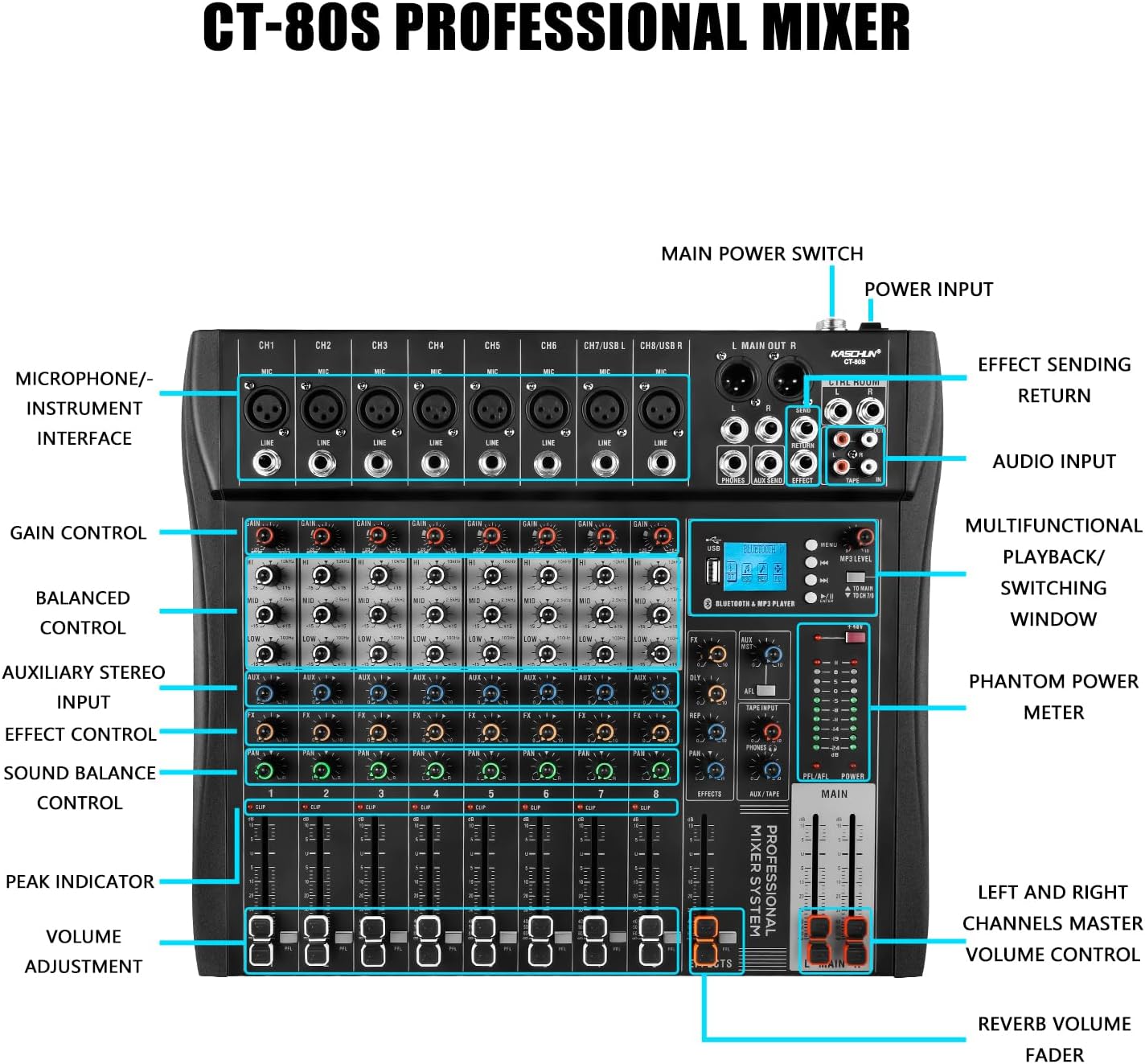
Image: Detailed diagram of the Kaschun CT-60S mixer, illustrating the location and labels of all input/output ports, control knobs, and faders.
4.1. Kontwòl Panel Front
- Channels 1-6 (CH1-CH6): Individual mono input channels with XLR (Mic) and 1/4" (Line) jacks. Channels 5/USB L and 6/USB R also serve as USB input channels.
- Kontwòl GAIN: Ajiste sansiblite antre a pou chak kanal.
- EQ (Segondè, Mid, Low): 3-band equalizer for adjusting the treble, midrange, and bass frequencies of each channel.
- Kontwòl AUX: Sends signal to an external effects processor or monitor mix.
- Kontwòl FX: Adjusts the level of the internal effects for each channel.
- Kontwòl PAN: Positions the channel's sound in the stereo field (left to right).
- Volume Fader: Kontwole nivo pwodiksyon chak kanal endividyèl.
- CLIP Indicator: Lights up when the input signal is too high, indicating potential distortion.
- +48V Entèriptè Pouvwa Fantom: Aktive pouvwa fantom pou mikwofòn kondansateur.
- Bluetooth & MP3 Player Section: Includes a display, USB port, and controls for Bluetooth pairing, MP3 playback, and recording functions.
- MAIN Faders: Kontwole nivo pwodiksyon jeneral melanj stereo prensipal la.
- EFFECTS Fader: Controls the overall level of the internal effects.
4.2. Koneksyon Panèl Dèyè
- L MAIN OUT R (XLR/1/4"): Main stereo outputs for connecting to power amplifiers oswa moun ki pale aktif.
- CTRL ROOM (1/4"): Control room outputs for connecting to studio monitors.
- PHONES (1/4"): Pwodiksyon kas ekoutè.
- AUX SEND (1/4"): Output for sending signals to external effects units.
- EFFECT RETURN (1/4"): Input for returning signals from external effects units.
- TAPE IN/OUT (RCA): Stereo RCA inputs and outputs for connecting to recording devices or playback sources.
- AC ENPUTT: Power input for the provided power adapter.
- Pouvwa switch: Vire mixer la sou oswa sou.
5. Gid Enstalasyon
5.1. Koneksyon pouvwa
- Ensure the mixer's POWER switch is in the OFF position.
- Connect the provided power adapter to the AC INPUT on the rear panel of the mixer.
- Ploge adaptè pouvwa a nan yon priz elektrik apwopriye.
- Flip the POWER switch to the ON position. The power indicator light will illuminate.

Image: The Kaschun CT-60S mixer with its power cable properly connected to the AC input.
5.2. Connecting Audio Inputs
The mixer supports various audio input sources:
- Mikwofòn: Connect microphones to the XLR (MIC) inputs on channels 1-6. For condenser microphones, ensure the +48V phantom power is activated (see Section 6.2).
- Aparèy Nivo Liy: Konekte enstriman yo (klavye, gita ak pre-amps), CD players, or other line-level devices to the 1/4" (LINE) inputs on channels 1-6.
- USB odyo: Connect a computer via USB to channels 5/USB L and 6/USB R for digital audio input/output.
- Tape/RCA Input: Use the TAPE IN RCA jacks for stereo input from devices like media players.

Image: An illustrative diagram detailing how to connect various audio sources such as microphones, instruments, and external devices to the mixer's input channels.
5.3. Konekte Sorti Audio
- Main Sòti: Konekte oratè prensipal ou yo oswa kouran an amplifier to the L MAIN OUT R XLR or 1/4" jacks.
- Sal Kontwòl: Connect studio monitors to the CTRL ROOM 1/4" outputs.
- kas ekoutè: Plug your headphones into the PHONES 1/4" jack.
- Recording Devices: Use the TAPE OUT RCA jacks to send the stereo mix to a recording device.
6. Operasyon Enstriksyon
6.1. Basic Channel Operation
- Ajisteman genyen: Set the GAIN knob for each active channel to an appropriate level. The CLIP indicator should only flash occasionally during the loudest parts of the signal.
- Egalizasyon (EQ): Use the HI, MID, and LOW knobs to shape the tone of each channel. Adjust to achieve desired clarity and balance.
- Kontwòl Volim: Use the channel faders to set the individual volume levels.
- Melanj prensipal: Adjust the MAIN faders to control the overall output volume.

Imaj: Yon gwo plan view of the mixer's 3-band EQ controls, demonstrating the adjustable frequency ranges for High, Mid, and Low tones.
6.2. Using 48V Phantom Power
The CT-60S provides +48V phantom power for condenser microphones. This power is supplied to all XLR inputs simultaneously.
- Connect your condenser microphone(s) to the XLR inputs.
- Locate the +48V PHANTOM POWER switch on the mixer.
- Press the switch to activate phantom power. The indicator light will turn on.
- Atansyon: Do not activate phantom power when dynamic microphones or other non-phantom powered devices are connected via XLR, as this may cause damage. Always ensure connections are secure before activating.

Image: A visual representation of the 48V phantom power switch on the mixer, indicating its function for powering condenser microphones.
6.3. Bluetooth Koneksyon
Mixer a gen Bluetooth entegre pou difizyon odyo san fil soti nan aparèy konpatib.
- On the mixer's display, navigate to the Bluetooth mode using the menu buttons.
- On your external device (e.g., smartphone, tablet), enable Bluetooth and search for available devices.
- Select "Kaschun CT-60S" (or similar name) from the list to pair.
- Once paired, you can stream audio wirelessly to the mixer. Adjust the MP3 LEVEL knob to control the Bluetooth audio volume.

Image: A visual demonstration of the mixer's Bluetooth playback feature, showing a smartphone wirelessly connected and streaming audio.
6.4. Lekti ak Anrejistreman USB
The USB port allows for MP3 playback from a USB drive and direct recording to a computer.
- USB lèktur: Insert a USB flash drive containing MP3, WAV, or WMA files into the USB port. Use the display and control buttons to navigate and play tracks.
- USB Recording (to PC): Connect the mixer to your computer via a USB cable. The mixer will be recognized as an audio interface. You can then use your preferred digital audio workstation (DAW) software to record the mixed audio.

Image: An illustration demonstrating the USB connectivity of the mixer, showing how it connects to a laptop for audio input and output, supporting lossless audio playback.
6.5. Chanjman Lang
The mixer's display supports multiple languages. To switch between Chinese and English:
- Press the 'MENU' button to access the system settings.
- Use the navigation buttons (left/right arrows) to scroll through the options until you find 'Language' or a similar setting.
- Press the 'ENTER' button (often the play/pause button) to select the language option.
- Use the navigation buttons to select your desired language (e.g., 'English').
- Press 'ENTER' to confirm your selection.
Video: A short demonstration showing the steps to change the display language on the mixer from Chinese to English using the menu buttons.
7. Antretyen
Bon antretyen asire lonjevite ak pèfòmans optimal mixer ou a.
- Netwayaj: Sèvi ak yon twal mou epi sèk pou netwaye deyò mixer la. Evite pwodui netwayaj abrazif oswa solvan. Pou pousyè tè ki difisil pou retire, yon ti kras twal mouye.amp Ou ka itilize yon twal, epi apre sa, yon twal sèk.
- Pwoteksyon pousyè: Lè w pa ap itilize mixer a, kouvri l pou pwoteje l kont pousyè ak debri.
- Depo: Store the mixer in a cool, dry place away from extreme temperatures and humidity.
- Jesyon kab: Ensure all cables are neatly organized and not under tension to prevent damage to connectors and ports.
NAN. Depanaj
If you encounter issues with your Kaschun CT-60S mixer, refer to the following common problems and solutions:
| Pwoblèm | Kòz posib | Solisyon |
|---|---|---|
| Pa gen pwodiksyon son | Power off, incorrect connections, faders down, mute engaged. | Check power, ensure all cables are correctly connected, raise channel and main faders, check for mute buttons. |
| Son defòme | Input gain too high, output level too high. | Reduce GAIN for individual channels or lower MAIN faders. Check CLIP indicators. |
| Microphone not working (condenser mic) | 48V phantom power not activated. | Activate the +48V phantom power switch. |
| Bluetooth pa konekte | Device not in pairing mode, out of range, interference. | Ensure mixer is in Bluetooth mode, device is discoverable, and within 15 ft range. Try re-pairing. |
| Kle USB a pa rekonèt | Pa sipòte file format, corrupted drive, incorrect mode. | Asire w files are MP3/WAV/WMA. Try a different USB drive. Check mixer's USB mode. |
Si pwoblèm nan pèsiste apre ou fin eseye solisyon sa yo, tanpri kontakte sèvis kliyan.
9. Espesifikasyon
| Karakteristik | Detay |
|---|---|
| Nimewo Modèl | CT-60S |
| Kantite Chanèl | 6 |
| Pwa atik | 10.12 liv (4.6 kilogram) |
| Dimansyon pwodwi | 3.5"D x 10.9"W x 14"H |
| Dimansyon pake | 17 x 15 x 4 pous |
| Sous pouvwa | Fil elektrik |
| Koneksyon Teknoloji | Bluetooth, USB |
| Phantom pouvwa | +48V (ka chanje) |
| EQ | 3-band (High, Mid, Low) per channel |
| MP3 Player | Built-in, supports MP3/WAV/WMA |
| Anrejistreman USB | Direct to computer |
10. Garanti ak Sipò Kliyan
Kaschun products are designed for reliability and performance. For warranty information, please refer to the documentation included with your purchase or visit the official Kaschun website. If you require technical assistance, have questions about your product, or need to report an issue, please contact Kaschun customer support through the retailer where you purchased the product or via the contact information provided on the official Kaschun websit.
Resous sou entènèt:
- Vizite la Kaschun Store on Amazon for product updates and additional information.