
1. Entwodiksyon
This manual provides detailed instructions for the installation, operation, and maintenance of the Aigo B760L D4 Motherboard. Please read this manual thoroughly before installing or using the product to ensure proper functionality and to prevent damage.
2. Enfòmasyon sou Sekirite
Toujou obsève prekosyon sekirite sa yo:
- Disconnect power before installing or removing any components.
- Manyen kat manman an nan kwen li yo pou evite touche konpozan sansib yo.
- Use an anti-static wrist strap to prevent electrostatic discharge (ESD) damage.
- Ensure proper ventilation within the computer case to prevent overheating.
- Pa ekspoze kat manman an nan imidite oswa tanperati ekstrèm.
3. Pake kontni
Verifye ke tout atik yo prezan nan pakè a:
- Aigo B760L D4 Motherboard
- Manyèl Itilizatè (dokiman sa a)
- Kab SATA (kantite a ka varye)
- I / O Shield
- CD/USB chofè (si enkli)
4. Pwodwi souview
The Aigo B760L D4 is an M-ATX motherboard designed for Intel LGA 1700 processors, featuring the Intel B760 chipset. It supports DDR4 memory and offers a range of connectivity options.
4.1 Layout mèr
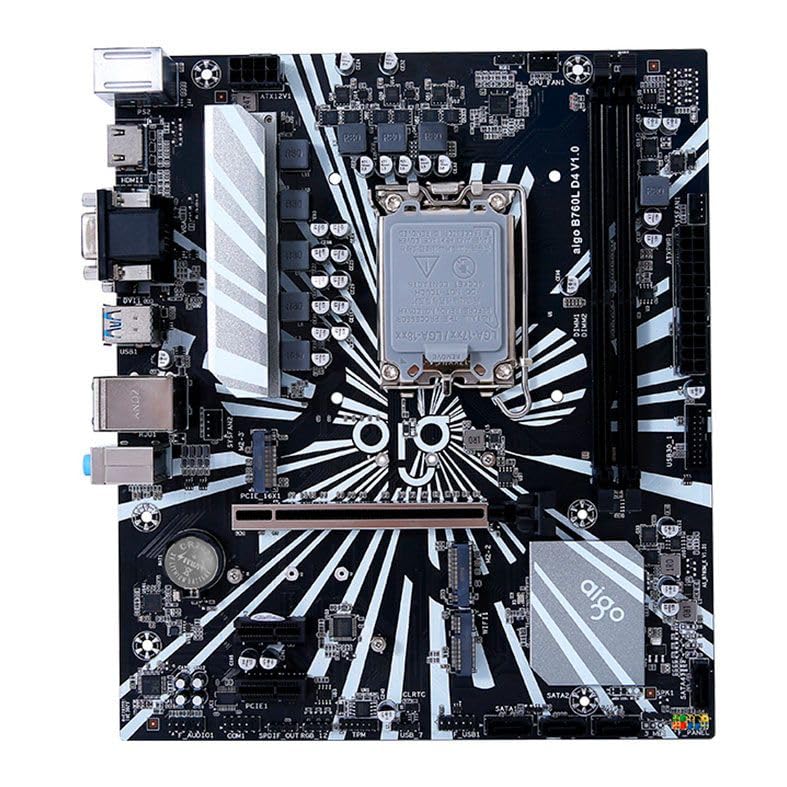
Figi 1: Plis paseview of the Aigo B760L D4 Motherboard alongside its retail packaging.

Figi 2: Anwo-anba view of the Aigo B760L D4 Motherboard, highlighting component placement.

Figi 3: Angle view of the Aigo B760L D4 Motherboard, showing the CPU socket and memory slots.
4.2 Panèl I/O dèyè

Figure 4: Rear I/O panel of the Aigo B760L D4 Motherboard, displaying various connectivity ports.
The rear I/O panel includes:
- 1 x PS/2 Keyboard and Mouse port
- 2 x pò USB 2.0
- 4 x pò USB 3.0
- 1 x HDMI pò
- 2 x DVI ports
- 1 x pò VGA
- 1 x RJ45 LAN port
- Audio jacks (Line In, Line Out, Mic In)
5. Enstalasyon
5.1 Enstale CPU a
- Jwenn priz CPU LGA 1700 la sou kat manman an.
- Louvri levye priz CPU a epi leve plak chajman an.
- Aliyen CPU a ak priz la ak anpil atansyon, pou asire mak triyangilè ki sou CPU a koresponn ak mak ki sou priz la.
- Mete CPU a dousman nan priz la san fòse li.
- Close the load plate and secure it with the lever.
5.2 Installing DDR4 Memory
The motherboard supports up to 64GB of DDR4 memory across two slots, with speeds from 2133 MHz to 3200 MHz in dual-channel configuration.
- Louvri klip yo nan tou de bout fant DIMM lan.
- Aliyen modil memwa a ak fant lan, asire w ke dan ki sou modil la koresponn ak kle ki nan fant lan.
- Peze byen fèm sou tou de bout modil memwa a jiskaske klip yo kase nan plas yo.
5.3 Enstale Aparèy Depo
The motherboard features 4 x SATA 3.0 ports and 2 x M.2 NVME Dual-Protocol slots.
5.3.1 Disques SATA
- Konekte yon bout kab done SATA a nan yon pò SATA sou kat manman an.
- Konekte lòt bout kab done SATA a ak dis lou SATA ou a oswa SSD ou a.
- Konekte yon kab pouvwa SATA soti nan ekipman pou pouvwa ou a nan disk la.
5.3.2 M.2 NVME Drives
- Locate an M.2 slot on the motherboard.
- Retire vis distans M.2 a.
- Insert the M.2 NVME drive into the slot at a 30-degree angle.
- Gently push the drive down and secure it with the standoff screw.
5.4 Konekte pouvwa
Konekte konektè pouvwa ATX 24-pin lan ak konektè pouvwa ATX 8-pin 12V ki soti nan ekipman pouvwa ou a nan pò ki koresponn yo sou kat manman an.
5.5 Enstale Kat Ekspansyon
The motherboard includes 1 x PCIe x16 slot and 1 x PCIe x1 slot.
- Align your expansion card (e.g., graphics card) with the appropriate PCIe slot.
- Press down firmly until the card is seated correctly in the slot.
- Fikse kat la ak yon vis sou bwat òdinatè a.
6. Opere
6.1 Premye Demaraj ak Enstalasyon BIOS
After assembling your system, connect a monitor, keyboard, and mouse. Power on the system. During startup, press the designated key (usually DEL or F2) to enter the BIOS/UEFI setup utility. Here you can configure boot order, system time, and other advanced settings.
6.2 Enstalasyon sistèm operasyon
The Aigo B760L D4 Motherboard supports Windows 10 and Windows 11 operating systems. Insert your OS installation media (USB drive or DVD) and follow the on-screen instructions to install the operating system.
6.3 Enstalasyon chofè
After OS installation, install the necessary drivers for the chipset, audio, LAN, and other integrated components. These drivers are typically provided on a CD/USB with the motherboard or can be downloaded from the manufacturer's websit.
7. Antretyen
- Kenbe li pwòp: Regularly clean dust from inside your computer case using compressed air. Dust accumulation can lead to overheating.
- Mizajou BIOS: Tcheke manifakti a regilyèman website for BIOS/UEFI updates. Updates can improve stability, compatibility, and performance. Follow update instructions carefully.
- Mizajou chofè: Kenbe chofè ou yo ajou pou asire pèfòmans optimal ak konpatibilite ak nouvo lojisyèl ak pyès ki nan konpitè.
- Kontwòl anviwònman: Operate the system in a cool, dry, and well-ventilated environment.
NAN. Depanaj
8.1 Pa gen pouvwa
- Ensure the power supply is connected correctly to the motherboard (24-pin and 8-pin ATX 12V).
- Check if the power supply switch is in the "ON" position.
- Verify that the power button on the case is correctly connected to the motherboard's front panel header.
8.2 Pa gen ekspozisyon
- Ensure the monitor is connected to the correct video output (either integrated graphics or a dedicated graphics card).
- Remete kat grafik la ak modil memwa yo.
- Eseye demarre ak yon sèl modil memwa enstale.
8.3 Enstabilite Sistèm / Aksidan
- Tcheke tanperati CPU ak GPU a pou asire w ke yo pa twò chofe.
- Verify that all power connectors are securely attached.
- Kouri zouti dyagnostik memwa pou tcheke si gen pwoblèm RAM.
- Ensure BIOS is updated to the latest stable version.
9. Espesifikasyon
| Karakteristik | Spesifikasyon |
|---|---|
| Mak | Aigo |
| Modèl | AIGO-B760L-D4 |
| Chipset | Intel B760 |
| CPU Socket | LGA 1700 |
| Memwa fant | 2 x DDR4 DIMM fant |
| Kapasite Memwa Maksimòm | 64GB |
| Memory Speed Support | 2133 ~ 3200 MHz (Dual Channel) |
| Entèfas odyo | 1 x HDMI, 2 x DVI, 1 x VGA |
| SATA Slots | 4 x SATA 3.0 |
| M.2 Fant | 2 x M.2 NVME Dual-Protocol |
| Pò USB (Dèyè) | XNX x USB NAN, X NAN X USB NAN |
| Fant ekspansyon | 1 x PCIe x1, 1 x PCIe x16 |
| Sistèm operasyon sipò | Windows 10/11 |
| PS/2 Port | 1 x PS/2 Keyboard and Mouse |
| Power Phase | 8-faz |
| Konektè pouvwa | 1 x 24-pin ATX, 1 x 8-pin ATX 12V |
| Entèfas WiFi | 1 x WiFi interface (PCIe compatible) |
| LAN Port | 1 x RJ45 |
| Dimansyon | 24.4 x 21 cm (M-ATX) |
10. Garanti ak sipò
For warranty information and technical support, please refer to the documentation provided with your purchase or visit the official Aigo websit la. Kenbe prèv acha ou pou reklamasyon garanti.