
Cinnado B6
Manyèl Itilizatè Kamera Sekirite San Fil Cinnado B6 2K
Modèl: B6
Mak: Cinnado
Entwodiksyon
The Cinnado B6 2K Wireless Security Camera is designed to provide comprehensive home surveillance with advanced features such as 2K resolution, color night vision, solar/battery power, 360-degree pan-tilt-zoom (PTZ) functionality, PIR human detection, and two-way audio. This manual provides essential information for setting up, operating, and maintaining your camera to ensure optimal performance and security.

Image: The Cinnado B6 2K Wireless Security Camera, showing the main camera unit and its accompanying solar panel.
Karakteristik pwodwi
- 2K Resolution and Color Night Vision: Equipped with 2K (2304x1296p) resolution for clear video. Features multiple night vision modes including Full Color Night, Intelligent Light, and Auto Infrared. Supports 2.4G WiFi only.
- Solar/Battery Power and True Wireless: Can be charged by the included solar panel, offering a truly wireless setup. A backup battery ensures continuous operation during low light or bad weather.
- IP65 Waterproof and 360 PTZ: Designed with an IP65 rating to withstand various weather conditions. The 360-degree Pan-Tilt-Zoom function allows remote control for comprehensive area monitoring.
- PIR Human Detection and Two-Way Audio: Advanced PIR and AI detection technology identifies human movement, sending alerts. Two-way audio enables real-time communication through the camera. PIR sensitivity is adjustable (16-29 feet).
- Local/Cloud Storage and Works with Alexa: Supports both Micro SD card (up to 128GB, not included) and cloud storage options. Integrates with Alexa for smart home compatibility.

Imaj: Yon plis paseview of the Cinnado B6 camera's key features, including 2K resolution, 2-way audio, motion alert, storage options, color night vision, IP65 waterproof rating, Alexa compatibility, and PIR human detection.
Ki sa ki nan bwat la
- Solar camera x 1
- Gid enstalasyon x 1
- Pake vis x 1
- Panèl solè x 1
- Type-C power cord x 1

Image: The retail packaging for the Cinnado B6 camera, displaying the product name and key features.
Gid Enstalasyon
1. Telechaje Aplikasyon an ak Kreye Kont
Before installing the camera, download the official application to your smartphone. The app is available on both the Apple App Store and Google Play Store. Chèche pou "Wansview Cloud" or scan the QR code provided on the product packaging.
Once downloaded, open the app and follow the on-screen instructions to create a new account or log in if you already have one. This app will be your primary interface for managing and viewing kamera ou.
Telechaje Wansview Cloud App
Image: Product packaging showing the QR code and app store icons for downloading the Wansview Cloud application.
2. Enstalasyon Kamera
The Cinnado B6 camera is designed for easy outdoor installation. Use the provided hole positioning stickers to mark the drilling points on your desired mounting surface. Drill holes, secure the base with the included screws, and then attach the camera. Ensure the solar panel is positioned to receive maximum sunlight for optimal charging.
Enpòtan: Do not drill into the camera unit itself. Ensure the camera is within range of your 2.4G WiFi network. 5G WiFi is not supported.

Image: Visual guide demonstrating the steps for mounting the Cinnado B6 camera using the provided screws and base plate.
Enstriksyon Operasyon
Viv View ak Kontwòl PTZ
Once connected, access the live feed through the Wansview Cloud app. You can remotely control the camera's pan (360 degrees) and tilt (60 degrees) functions to adjust the viewing angle and cover a wider surveillance area.

Image: The Cinnado B6 camera providing multi-angle viewing with its 360-degree pan and 60-degree tilt capabilities, covering a wide surveillance area.
De-fason odyo
The camera supports two-way audio, allowing you to speak and listen through the camera using your mobile device. This feature is useful for communicating with visitors or deterring unwanted guests.

Image: A person interacting with a delivery driver via the Cinnado B6 camera's two-way audio feature.
Deteksyon Mouvman ak Alèt
The camera utilizes PIR (Passive Infrared) and AI detection to accurately identify human movement. When motion is detected, you will receive instant notifications on your mobile device. The PIR detection sensitivity can be adjusted within the app, ranging from 16 to 29 feet.

Image: A mobile phone displaying an instant app notification for a motion alarm detected by the camera.
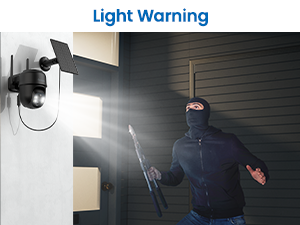
Image: The camera activating a bright light warning to deter an intruder.
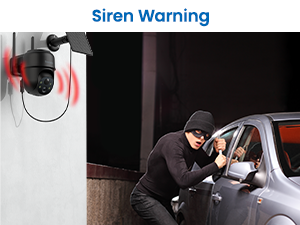
Image: The camera emitting a siren warning to alert and deter potential threats.
You can also configure the camera to trigger light and siren warnings upon detection, adding an active deterrent to your security system.
Mòd vizyon lannwit
The Cinnado B6 offers versatile night vision capabilities:
- Vizyon lannwit tout koulè: Bay imaj klè ak koulè menm nan kondisyon ki pa twò klere.
- Mòd Limyè Entelijan: Automatically adjusts lighting for optimal night viewing.
- Auto Infrared Mode: Vizyon lannwit enfrawouj nwa ak blan estanda.

Image: Comparison of 2K resolution clarity and different night vision modes (Night Vision without LED Light and Color Night Vision) provided by the Cinnado B6 camera.
Opsyon Depo
The camera supports two storage methods for recorded footage:
- Depo kat mikwo SD: Insert a Micro SD card (up to 128GB, not included) into the camera for local storage. Recordings can be accessed on a PC without an internet connection.
- Depo nwaj: Opt for cloud storage to securely store your footage online. A free 30-day trial is typically available.

Image: Illustration of the cloud and local storage options for the Cinnado B6 camera, showing the Micro SD card slot and app interface for playback.
Smart Home Integration (Works with Alexa)
The Cinnado B6 camera can be integrated with Amazon Alexa, allowing you to view your camera feed on compatible smart displays.

Image: A smart display showing the live feed from the Cinnado B6 camera, demonstrating its compatibility with Alexa.
Sharing Camera Access
You can share access to your camera's live feed and recordings with family members or trusted individuals through the Wansview Cloud app. This allows multiple users to monitor the property simultaneously.
Video: A demonstration on how to share camera access with family members using the Wansview Aplikasyon Cloud.
Video: A guide on setting up camera motion alerts within the Wansview Cloud application.
Antretyen
To ensure the longevity and optimal performance of your Cinnado B6 camera, regular maintenance is recommended:
- Netwayaj: Siye lantiy kamera a ak panèl solè a detanzantan avèk yon twal mou.amp cloth to remove dust, dirt, or debris that may obstruct the view or reduce charging efficiency. Avoid abrasive cleaners.
- Plasman Panèl Solè: Ensure the solar panel remains in a location that receives direct sunlight for several hours each day. Trim any overhanging branches or remove obstructions that might cast shadows.
- Mizajou mikrolojisyèl: Check the Wansview Cloud app regularly for firmware updates. Keeping your camera's firmware up-to-date ensures you have the latest features and security enhancements.
- Sante batri: While solar-powered, the camera relies on its internal battery. In prolonged periods of low sunlight or extreme cold, the battery might drain faster. Monitor battery levels via the app and consider temporary manual charging if necessary.

Image: The Cinnado B6 camera demonstrating its IP65 weather resistance, capable of operating in various conditions including sunlight, rain, and snow, within a temperature range of -10°C to 50°C (14°F to 120°F).
Depanaj
If you encounter issues with your Cinnado B6 camera, refer to the following common problems and solutions:
| Pwoblèm | Kòz posib / Solisyon |
|---|---|
| Camera doesn't connect to WiFi | Ensure your WiFi is 2.4Ghz (5Ghz is not supported). Check WiFi signal strength at the camera's location. Restart your router and the camera. Re-attempt the connection process in the app. |
| Camera image getting blurry | Clean the camera lens. Check for condensation inside the lens. Ensure sufficient lighting for clear images, especially at night. |
| Deteksyon mouvman pa travay | Check PIR sensitivity settings in the app. Ensure there are no obstructions in the detection zone. Verify that motion alerts are enabled in the app settings. |
| Batri vide byen vit | Ensure the solar panel receives adequate direct sunlight. Reduce the frequency of motion alerts or live view sessions. Extreme cold weather can affect battery performance. |
| Cannot access recordings | For local storage, ensure an SD card is properly inserted and formatted. For cloud storage, verify your subscription status and internet connection. |
For further assistance, please contact Cinnado customer support.
Espesifikasyon
| Karakteristik | Detay |
|---|---|
| Non modèl | B6 |
| Itilizasyon Andedan kay la / Deyò | Deyò |
| Rezolisyon Capture Videyo | 2K (2304x1296p) |
| Sous pouvwa | Mache ak pil, Mache ak enèji solè |
| Kapasite batri | 5000 Miliamp Orè |
| Pwotokòl Koneksyon | Wi-Fi (2.4Ghz sèlman) |
| PTZ Functionality | 360° Pan, 60° Panche |
| Evalyasyon ki enpèmeyab | IP65 |
| Deteksyon moun | PIR and AI Detection (Adjustable sensitivity 16-29 feet) |
| Odyo | 2-Way Audio |
| Opsyon Depo | Kat Micro SD (jiska 128GB, pa enkli), Depo nan nwaj la |
| Aparèy konpatib | Alexa, Google Home, Smartphone |
| Tanperati Fonksyònman | -10 ° C a 50 ° C (14 ° F a 120 ° F) |
| Dimansyon (L x W x H) | 5.08 x 3.82 x 5.79 pous |
| Pwa atik | 3.53 ons (100 gram) |
Garanti ak sipò
Specific warranty details for the Cinnado B6 camera are not provided in this manual. Please refer to the product packaging or the official Cinnado websit pou enfòmasyon garanti.
Sipò pou Kliyan
For technical support, troubleshooting, or any product-related inquiries, please contact Cinnado customer service via email:
- US Sipò: support.us@cinnado.com
- UK Sipò: support.uk@cinnado.com
- DE Support: support.de@cinnado.com
- FR Support: support.fr@cinnado.com
- ES Support: support.es@cinnado.com
- IT Support: support.it@cinnado.com
You may also find helpful information and FAQs on the Cinnado websit: www.cinnado.com

Image: Product packaging displaying various support email addresses for different regions.
Dokiman ki gen rapò - B6
 |
Gid Demaraj Rapid ak Enstalasyon Kamera Entelijan Cinnado B6 la Kòmanse byen vit ak Kamera Entelijan Cinnado B6 ou a. Gid sa a kouvri debalè, dyagram pwodwi a, konfigirasyon, enstalasyon, ak kesyon yo poze souvan sou koneksyon Wi-Fi ak depanaj. |
 |
Cinnado B6 屋外バッテリーカメラ ソーラーパネル付き クイック取扱説明書 Cinnado B6 屋外バッテリーカメラとソーラーパネルのクイック取扱説明書。セットアップ、Wi-Fi接続、充電方法、取り付け、高度な機能、よくある質問などを解説。 |
 |
Divulgation des données des caméras IP Amazon pour appareils connectés Ce document détaille la collecte, la génération, la transmission, le stockage et le traitement des données par les caméras IP Amazon, conformément aux exigences d'Amazon pour les appareils connectés. |
 |
Gid Demaraj Rapid pou Kamera Sekirite Andedan Kay Cinnado 2K Yon gid kout pou konfigirasyon ak itilizasyon Kamera Sekirite Andedan Cinnado 2K a, ki kouvri telechaje aplikasyon, koneksyon Wi-Fi, ak karakteristik debaz yo. |
 |
Gid Demaraj Rapid pou Kamera IP Cinnado D1 Gid sa a bay enstriksyon pou konfigirasyon ak itilizasyon Kamera IP Cinnado D1 la, ki gen ladan telechaje aplikasyon an, koneksyon aparèy la, ak depanaj. |
 |
Archivo de Divulgación de Datos de Cinnado IP Camera: Manejo de Información Este documento detalla cómo la IP Camera de Cinnado recopila, genera, transmite, almacena y procesa datos, cumpliendo con los requisitos de Amazon Marketplace. Incluye información sobre tipos de datos, volumen, formato, almacenamiento, acceso y eliminación. |
Ask a question about this manual
Ask about setup, troubleshooting, compatibility, parts, safety, or missing instructions. Manuals+ will review the question and use this page’s manual context to help answer it.