
1. Pwodwi souview
The CAPOXO Wired 1080p Full HD Video Recording Camera is designed for discreet surveillance and recording. This device captures high-definition video with audio, features motion detection, and includes a night lamp for low-light conditions. It operates without Wi-Fi, storing recordings directly onto a memory card for easy access.
This manual provides detailed instructions for setting up, operating, and maintaining your CAPOXO camera to ensure optimal performance.
2. Pake kontni
Verifye ke tout atik yo prezan nan pakè ou a:
- CAPOXO Wired 1080p Full HD Video Recording Camera
- USB kab
- Manyèl itilizatè
Nòt: A Micro SD card (16GB, 32GB, or 64GB Class 10 recommended) and a 5V/1A charger are not included and must be purchased separately.
3. Pwodwi Features
- Full HD 1080p Video Recording: Kaptire videyo klè ak definisyon wotage.
- Anrejistreman odyo: Anrejistre odyo ansanm ak videyo.
- Deteksyon Mouvman: Automatically triggers video recording when motion is detected.
- Lannwit Lamp Kapasite: Equipped with white LED lights for recording in low-light or dark conditions.
- Anrejistreman kontinyèl: Records directly to a Micro SD card (not included).
- Enstalasyon fasil: Wired operation, no complex Wi-Fi configuration required.
- Konsepsyon pòtab: Compact and easy to carry or clip.
- Lantiy wotasyon: 90° rotatable lens for wider viewang ing.

Image: The CAPOXO camera featuring its 90-degree rotatable lens, allowing for flexible recording angles.

Imaj: Gwo plan view of the CAPOXO camera's rotatable lens mechanism, highlighting its design for wider field of view.
4. Gid Enstalasyon
4.1 Chaje Kamera a
- Before first use, charge the camera for at least 1 hour.
- Connect the camera to a 5V/1A charger (not included) using the provided USB cable.
- Limyè endikatè chaj la ap limen pandan chaj la epi li ap etenn lè li fin chaje nèt.
- A full charge provides up to 3 hours of continuous operation. The camera can also be used while charging for extended recording.
4.2 Mete Micro SD Kat la
- Asire w ke kamera a etenn.
- Jwenn fant kat Micro SD a sou bò kamera a.
- Gently insert a Class 10 Micro SD card (16GB, 32GB, or 64GB) into the slot until it clicks into place.
- Pou retire li, pouse kat la dousman ankò jiskaske li soti.

Image: Diagram showing the CAPOXO camera's various components, including the Micro SD card slot, ON/OFF switch, and recording buttons.
5. Operasyon Enstriksyon
5.1 Limen/Etenyen
- Pou limen, glise ON/OFF switch to the "ON" position.
- Pou etenn, glise bouton an ON/OFF chanje nan pozisyon "OFF" la.

Image: A hand demonstrating how to operate the CAPOXO camera, highlighting the easy-to-use ON/OFF switch for one-button recording.
5.2 Anrejistreman videyo
- Ensure the camera is powered on and a Micro SD card is inserted.
- Slide the "SAVE -> VIDEO" switch to the "VIDEO" position to start recording.
- The indicator light will flash to confirm recording is in progress.
- To stop recording, slide the "SAVE -> VIDEO" switch back to the "SAVE" position. The video file pral sove sou kat Micro SD la.
5.3 Anrejistreman Deteksyon Mouvman
The camera automatically records 1080p HD videos when motion is detected. This feature is active when the camera is powered on and in recording mode.
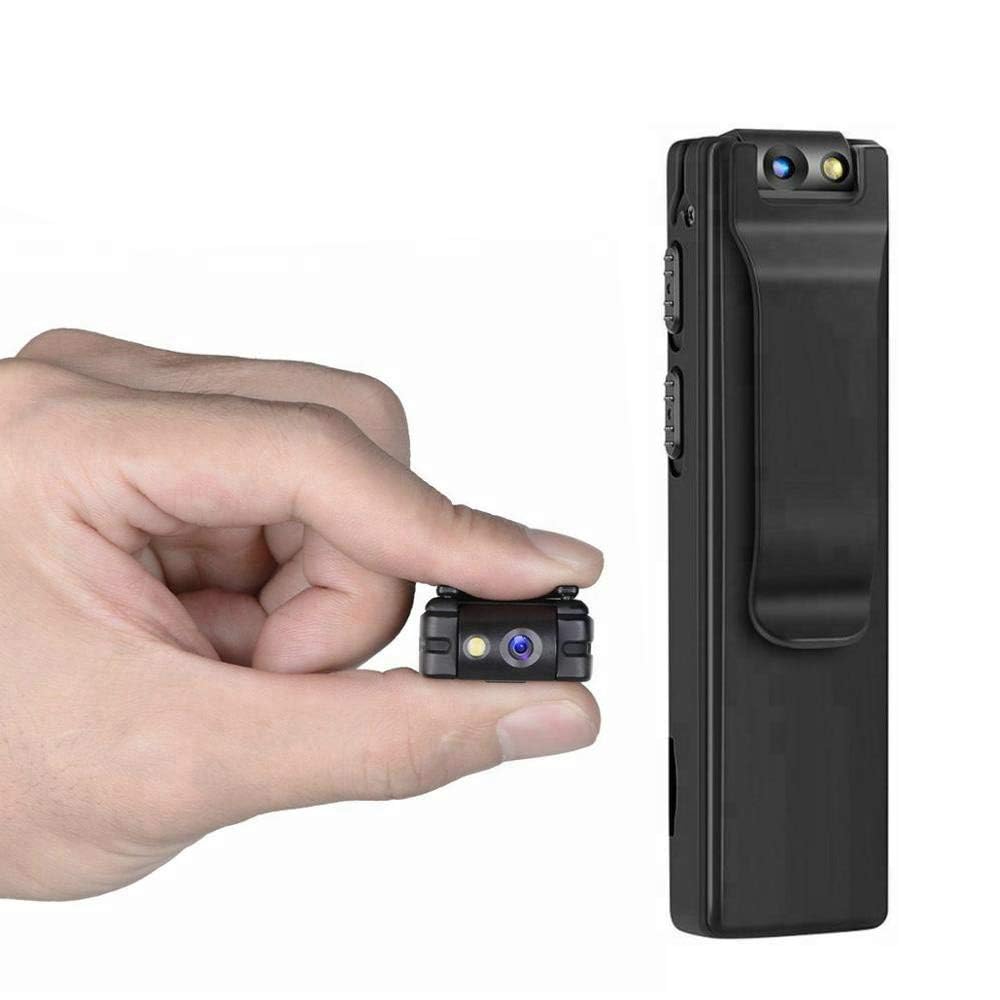
Image: Illustration of the CAPOXO camera's motion detection feature, showing it capturing activity in a room.
5.4 Night Lamp Mode
The camera is equipped with white LED lights to enhance visibility and recording quality in low-light or dark environments.
- To activate the night lamp, slide the "ON -> LAMP" switch to the "LAMP" position.
- To deactivate, slide the switch back to the "ON" position.
5.5 Pran Foto
- Asire w ke kamera a limen.
- Press the "PHOTO" button once to take a still image. The indicator light may flash briefly.
- Photos are saved to the Micro SD card.
5.6 Viewanrejistreman yo
- Pouvwa kamera a.
- Remove the Micro SD card from the camera.
- Insert the Micro SD card into a computer's card reader or a compatible device.
- Aksede a files on the Micro SD card to view your recorded videos and photos.

Image: The CAPOXO camera shown in different usage environments, including an office, car, laboratory, and home, demonstrating its versatility.

Image: The CAPOXO camera depicted in diverse settings such as business meetings, family gatherings, children playing, and outdoor adventures, illustrating its broad application.
6. Antretyen
- Netwayaj: Use a soft, dry cloth to clean the camera body. Do not use liquid cleaners or solvents.
- Swen Lantiy: Gently wipe the lens with a microfiber cloth designed for optics. Avoid touching the lens with bare fingers.
- Depo: Sere kamera a nan yon kote ki fre epi sèk, lwen limyè solèy dirèk ak tanperati ekstrèm.
- Lavi batri: Pou pwolonje lavi batri a, evite dechaje batri a nèt souvan. Chaje l regilyèman, menm si w pa itilize l pandan yon bon bout tan.
- SD Kat Jesyon: Regularly back up important recordings and format the Micro SD card periodically to maintain optimal performance and prevent data corruption.
NAN. Depanaj
Kamera pa Limen
- Ensure the battery is charged. Connect the camera to a charger for at least 1 hour.
- Verify the ON/OFF switch is in the "ON" position.
Pa ka anrejistre videyo
- Check if a Micro SD card is properly inserted.
- Asire w ke kat Micro SD a gen ase espas lib.
- Verify the Micro SD card is Class 10 and within the supported capacity (16GB, 32GB, 64GB).
- Format the Micro SD card if it's a new card or if you encounter issues.
Pòv Kalite Videyo
- Asire w ke lantiy kamera a pwòp epi li pa gen tach oswa pousyè.
- Check lighting conditions. Use the night lamp nan anviwònman ki pa gen anpil limyè.
Deteksyon Mouvman Pa Travay
- Ensure the camera is powered on and in recording mode.
- Verify there are no obstructions blocking the camera's view.
Camera Unresponsive (Reset)
- If the camera becomes unresponsive, locate the "RESET" button (often a small pinhole).
- Use a thin object (like a paperclip) to gently press and hold the reset button for a few seconds.
- The camera should restart.
8. Espesifikasyon
| Mak | CAPOXO |
| Nimewo Modèl | Capoxo-A-Cctv-Camera |
| Rezolisyon Capture Videyo | 1080p plen HD |
| Koneksyon Teknoloji | Wired (USB for charging/data transfer) |
| Kalite memwa flash | Micro SD (supports 16GB, 32GB, 64GB Class 10) |
| Fòma Capture Videyo | AVI |
| Sipòte fòma odyo | AAC |
| Karakteristik espesyal | Motion Detection, Night Lamp, HD Resolution, 90° Rotatable Lens |
| Lavi batri | Jiska 3 èdtan (apre chaj konplè) |
| Chaje Antre | 5V/1A (charger not included) |
| Dimansyon (LxWxH) | 9 x 2.5 x 1 santimèt |
| Pwa atik | 250 g |
| Konpozan ki enkli | Camera, USB Cable, Manual |
9. Garanti ak sipò
For warranty information or technical support, please refer to the contact details provided with your purchase documentation or visit the official CAPOXO websit.
Tanpri konsève prèv acha ou a pou nenpòt reklamasyon garanti.