
1. Entwodiksyon
This manual provides essential information for the proper use and care of your SUAAT S3 10-inch Android 14 Tablet. Please read this manual thoroughly before operating the device to ensure optimal performance and longevity. Keep this manual for future reference.
2. Pake kontni
Verifye ke tout atik ki nan lis anba a yo enkli nan pakè ou a. Si gen nenpòt atik ki manke oswa ki domaje, tanpri kontakte sèvis kliyan.
- Tablèt SUAAT S3
- Ka tablèt
- Film Pwoteksyon ekran
- Klavye
- Sourit
- Type-C to USB Adapter (OTG)
- Kalite-C Kab
- European Standard Charger
- SIM ejector PIN
- Manyèl itilizatè

Imaj 2.1: All items included in the SUAAT S3 Tablet package.
3. Pwodwi souview
The SUAAT S3 tablet features a sleek design with a 10-inch display and a robust set of accessories to enhance your user experience.

Imaj 3.1: SUAAT S3 Tablet and its accessories.
Karakteristik kle:
- Sistèm operasyon: Android 14
- Processeur: Octa-core 1.8 GHz (A523)
- RAM: 20GB (6GB fizik + 14GB ekspansyon)
- ROM: 128GB
- Ekspozisyon: IPS 10.1 pous, 1280 x 800 piksèl
- Koneksyon: Dual-band WiFi (2.4G/5G), Bluetooth 5.0
- Batri: 6000 mAh
- Sètifikasyon: GMS Certified, Widevine L1
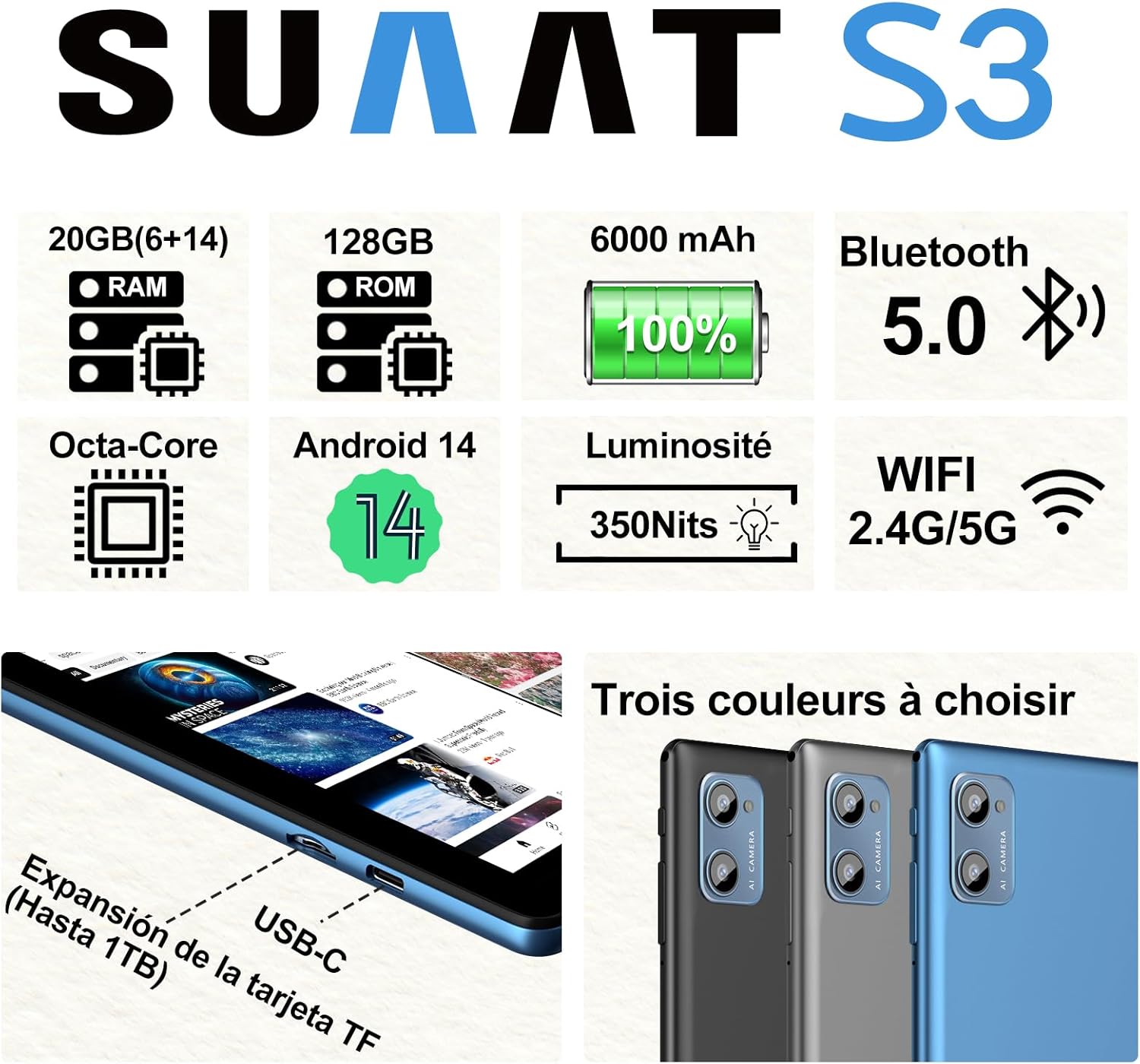
Imaj 3.2: SUAAT S3 Tablet key specifications.
4. Inisyal Enstalasyon
4.1 Chaje tablèt la
Before first use, fully charge the tablet using the provided Type-C cable and European standard charger. The charging port is located on the side of the tablet.

Imaj 4.1: Tablet charging via USB-C.
4.2 Limen/Etenyen
- Pou limen: Peze epi kenbe bouton pouvwa a jiskaske ekran an limen.
- Pou etenn: Peze epi kenbe bouton Pouvwa a, answit chwazi 'Etenn' nan opsyon ki sou ekran an.
- Pou rekòmanse: Peze epi kenbe bouton Pouvwa a, answit chwazi 'Rekòmanse' nan opsyon yo.
4.3 Inisyal Konfigirasyon
Upon first power-on, follow the on-screen prompts to set up your tablet. This includes selecting your language, connecting to a Wi-Fi network, setting up your Google account, and configuring security options.
5. Operasyon Enstriksyon
5.1 Karakteristik Android 14
Your SUAAT S3 tablet runs on Android 14, offering enhanced privacy, customization, and productivity features:
- Kontwòl paran yo: Manage screen time, app access, and content filters for children.
- Multi-Account Mode: Create separate user profiles for different users, each with their own apps, settings, and data.
- Mòd ekran divize: Use two applications simultaneously by dividing the screen.
- Tèm pèsonalize: Personalize your tablet's appearance with various themes and wallpapers.
- Widgets: Add calendar, weather, and other widgets to your home screen for quick information access.

Imaj 5.1: Tablet in split-screen mode.
5.2 Navigasyon debaz
- Ekran Kay: Glise agoch oswa adwat pou navige ant ekran prensipal yo.
- Tiwa aplikasyon: Glise anlè soti anba ekran an pou jwenn aksè a tout aplikasyon ki enstale yo.
- Notifikasyon ak Paramèt Rapid: Glise desann soti nan tèt ekran an pou view notifikasyon ak aksè rapid paramèt aktive.
- Aplikasyon ki sot pase yo: Tape bouton navigasyon kare a (oswa glise anlè epi kenbe l soti anba si w ap itilize navigasyon ak jès) pou wè aplikasyon ki fèk louvri yo.
6. Koneksyon
6.1 Koneksyon Wi-Fi
The tablet supports dual-band Wi-Fi (2.4G and 5G) for faster and more stable internet connectivity.
- Ale nan Anviwònman > Rezo ak entènèt > Wi-Fi.
- Aktive Wi-Fi a On.
- Chwazi rezo ou vle a nan lis la epi antre modpas la si sa nesesè.
6.2 Bluetooth Devices
Connect Bluetooth accessories like the included keyboard and mouse, or headphones, using Bluetooth 5.0.
- Ale nan Anviwònman > Aparèy ki konekte > Bluetooth.
- Aktive Bluetooth On.
- Asire w aparèy Bluetooth ou a nan mòd koneksyon.
- Select the device from the 'Available devices' list to pair.
6.3 Jack kas ekoutè
A 3.5mm headphone jack is provided for wired audio connections.
7. Display and Multimedia
7.1 10.1-inch IPS Display
The tablet features a 10.1-inch IPS display with a resolution of 1280 x 800 pixels, offering clear and vibrant visuals with wide viewang ing.

Imaj 7.1: 10.1-inch IPS Display.
7.2 Widevine L1 Support
With Widevine L1 support, the tablet can stream high-definition content from popular streaming services, providing a clear and immersive vieweksperyans nan.
7.3 GMS Certification
The tablet is GMS (Google Mobile Services) certified, ensuring full access to the Google Play Store and all Google applications, along with robust security and privacy features.
8. Depo ak Pèfòmans
8.1 RAM and ROM
The SUAAT S3 comes with 20GB of RAM (6GB physical + 14GB virtual expansion) and 128GB of internal storage (ROM). This ample memory allows for smooth multitasking and storage of numerous applications, videos, images, and files.

Imaj 8.1: Tablet showcasing large memory for apps and media.
8.2 Octa-Core Processor
Equipped with an Octa-core 1.8 GHz A523 processor, the tablet delivers stable and responsive performance for everyday tasks, gaming, and multimedia consumption.
8.3 Expandable Storage
The tablet supports expandable storage via a TF (microSD) card, allowing you to increase storage capacity up to 1TB for even more files ak medya yo.
9. Jesyon batri
9.1 Kapasite batri
The SUAAT S3 is powered by a 6000 mAh battery, providing extended usage time. Actual battery life may vary based on usage patterns and settings.
9.2 Gid pou chaje
- Use only the original charger and cable provided with the tablet.
- Avoid exposing the tablet to extreme temperatures during charging.
- Do not leave the tablet charging for excessively long periods after it has reached 100% to prolong battery health.
10. Antretyen
10.1 Netwaye Tablèt la
- Sèvi ak yon twal mou ki pa gen pousyè pou netwaye ekran an ak kò tablèt la.
- Pou tach ki difisil pou retire, yon ti kras dampRense twal la avèk dlo oswa yon pwodui netwayaj ekran. Evite pwodui chimik ki agresif.
- Asire w ke tablèt la etenn epi debranche anvan ou netwaye li.
10.2 Depo
When not in use for extended periods, store the tablet in a cool, dry place. Avoid direct sunlight and extreme temperatures.
10.3 Mizajou lojisyèl
Tcheke epi enstale mizajou lojisyèl regilyèman pou asire tablèt ou a gen dènye karakteristik yo, patch sekirite yo ak amelyorasyon pèfòmans yo. Ale nan Anviwònman > Sistèm > Aktyalizasyon sistèm lan.
NAN. Depanaj
If you encounter issues with your SUAAT S3 tablet, refer to the following common solutions:
| Pwoblèm | Solisyon posib |
|---|---|
| Tablèt la pa limen | Asire w batri a chaje. Konekte chajè a epi tann kèk minit anvan ou eseye limen l ankò. |
| Ekran an pa reponn | Rekòmanse tablèt la. Si pwoblèm nan pèsiste, fè yon reset faktori (done yo ap pèdi). |
| Pa ka konekte ak Wi-Fi | Check if Wi-Fi is enabled in settings. Restart your router. Ensure you are entering the correct password. |
| Aparèy Bluetooth pa asosye | Ensure Bluetooth is enabled on both devices and the accessory is in pairing mode. Try restarting both devices. |
| Aplikasyon yo ap plante oswa yo ralanti | Close background apps. Clear app cache (Settings > Apps > [App Name] > Storage > Clear cache). Ensure sufficient storage space. |
| Batri vide byen vit | Reduce screen brightness. Disable unused features like Wi-Fi or Bluetooth. Close background apps. Check for power-intensive apps. |
If these solutions do not resolve the issue, please contact SUAAT customer support.
12. Espesifikasyon
| Karakteristik | Detay |
|---|---|
| Mak | SUAT |
| Nimewo Modèl | S3 |
| Sistèm operasyon | Android 14 |
| Processeur | A523 Octa-core 1.8 GHz |
| RAM | 20 GB (6GB installed) |
| Depo (ROM) | 128 GB |
| Depo dilatabl | Jiska 1 TB atravè kat TF |
| Gwosè ekran | 10.1 pous |
| Rezolisyon ekran | 1280 x 800 piksèl |
| Koneksyon san fil | Wi-Fi (802.11n, 2.4G/5G Dual-band) |
| Bluetooth | Bluetooth 5.0 |
| Kalite Connector | USB-C |
| Jack kas ekoutè | 3.5mm |
| Kapasite batri | 6000 mAh |
| Dimansyon (L x W x H) | 17 x 12 x 0.8 cm |
| Pwa | 1.28 kilogram |
| Pwodwi pou Telefòn enkli | Keyboard, Mouse, Protective Case, Screen Protector |
13. Garanti ak sipò
SUAAT provides professional technical support and customer service for your S3 tablet. If you require assistance, have questions, or encounter any issues not covered in this manual, please contact our customer support team. Refer to your purchase documentation for specific warranty terms and contact information.