
CHEREEKI STK-4006L
CHEREEKI Wireless Gamepad for PS-4
Model: STK-4006L
Manyèl itilizatè
Entwodiksyon
Thank you for choosing the CHEREEKI Wireless Gamepad for PS-4. This controller is designed to enhance your gaming experience on PS-4, PS4 Slim, and PS4 Pro consoles, offering precise control, immersive feedback, and comfortable design. This manual provides detailed instructions on setting up, operating, maintaining, and troubleshooting your new gamepad.

Image: The CHEREEKI Wireless Gamepad in white, showcasing konsepsyon ergonomik li yo.
Pwodwi souview
Familiarize yourself with the various components and buttons of your CHEREEKI Wireless Gamepad.
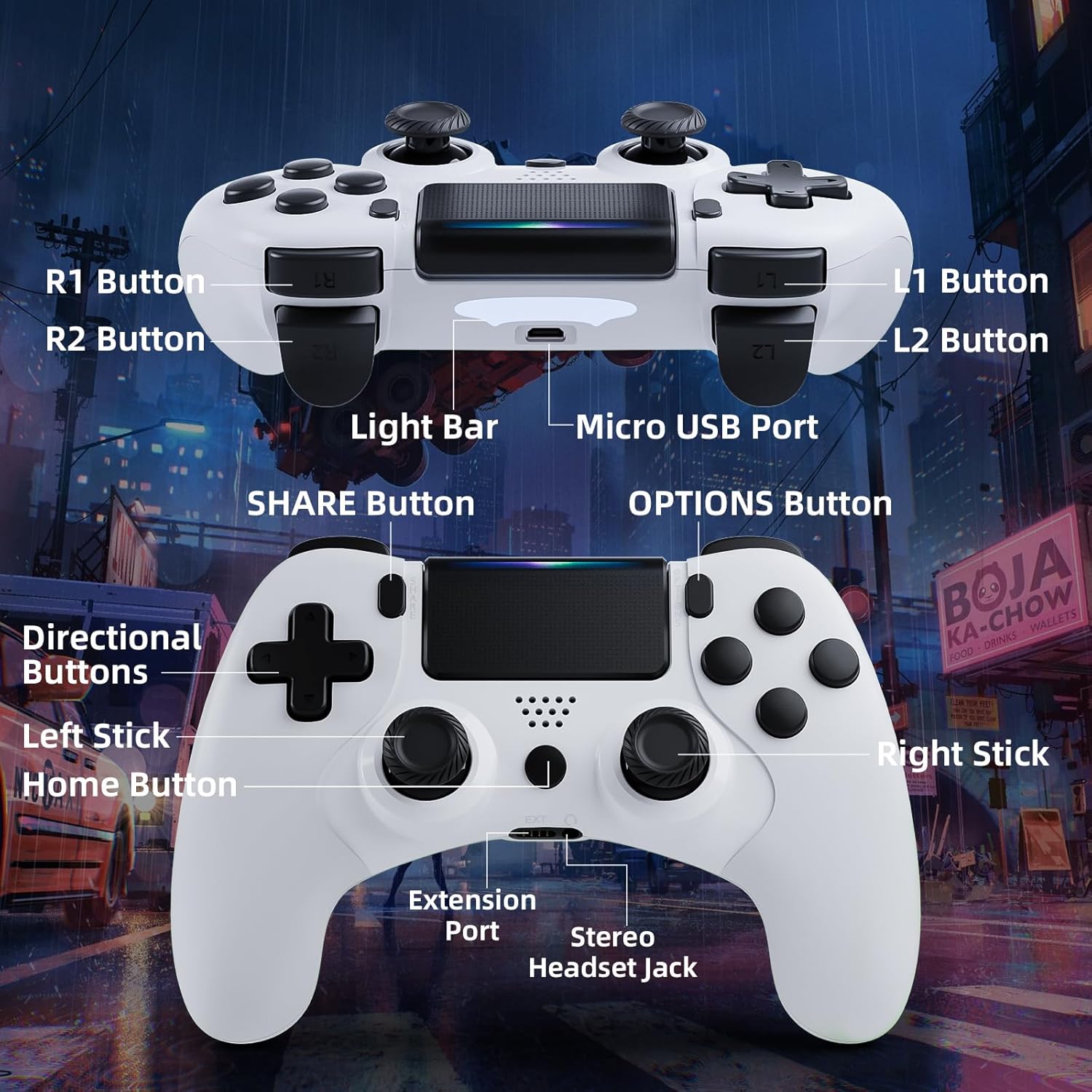
Image: Detailed diagram of the CHEREEKI Wireless Gamepad, highlighting its various buttons and ports for easy identification.
Konpozan Kontwolè:
- R1 Button: Right shoulder button.
- R2 Button: Right trigger button.
- L1 Button: Left shoulder button.
- L2 Button: Left trigger button.
- Ba limyè: Indicates controller status and player number.
- Mikwo USB Port: For charging and initial wired connection.
- Bouton PATAJE: For sharing gameplay videos and screenshots.
- Bouton OPSYON: Access in-game menus and options.
- Directional Buttons (D-Pad): Pou antre direksyonèl.
- Baton gòch: Analog stick for movement.
- Bouton Kay: PS button, for turning on/off the console and accessing the PS menu.
- Baton dwat: Analog stick for camera control or aiming.
- Pò ekstansyon: For compatible accessories.
- Stereo Headset Jack: For connecting a headset.
Enstalasyon
1. Initial Connection and Pairing
The controller must be connected via USB cable for the first time to pair with your PS-4 console. This establishes the connection for future wireless use.
- Ensure your PS-4 console is powered on.
- Connect the Micro USB cable to the controller's Micro USB Port and the other end to a USB port on your PS-4 console.
- Peze a Bouton Kay (PS button) on the controller. The light bar will flash and then glow steadily, indicating successful pairing.
- Once paired, you can disconnect the USB cable to use the controller wirelessly.
2. Chaje Gamepad la
The CHEREEKI Wireless Gamepad features a built-in 600 mAh rechargeable battery.
- Connect the controller to your PS-4 console or a standard USB charger using the Micro USB cable.
- The light bar will slowly pulse orange while charging.
- Anjeneral, li pran 2-3 èdtan pou chaje nèt.
- Once fully charged, the light bar will turn off.
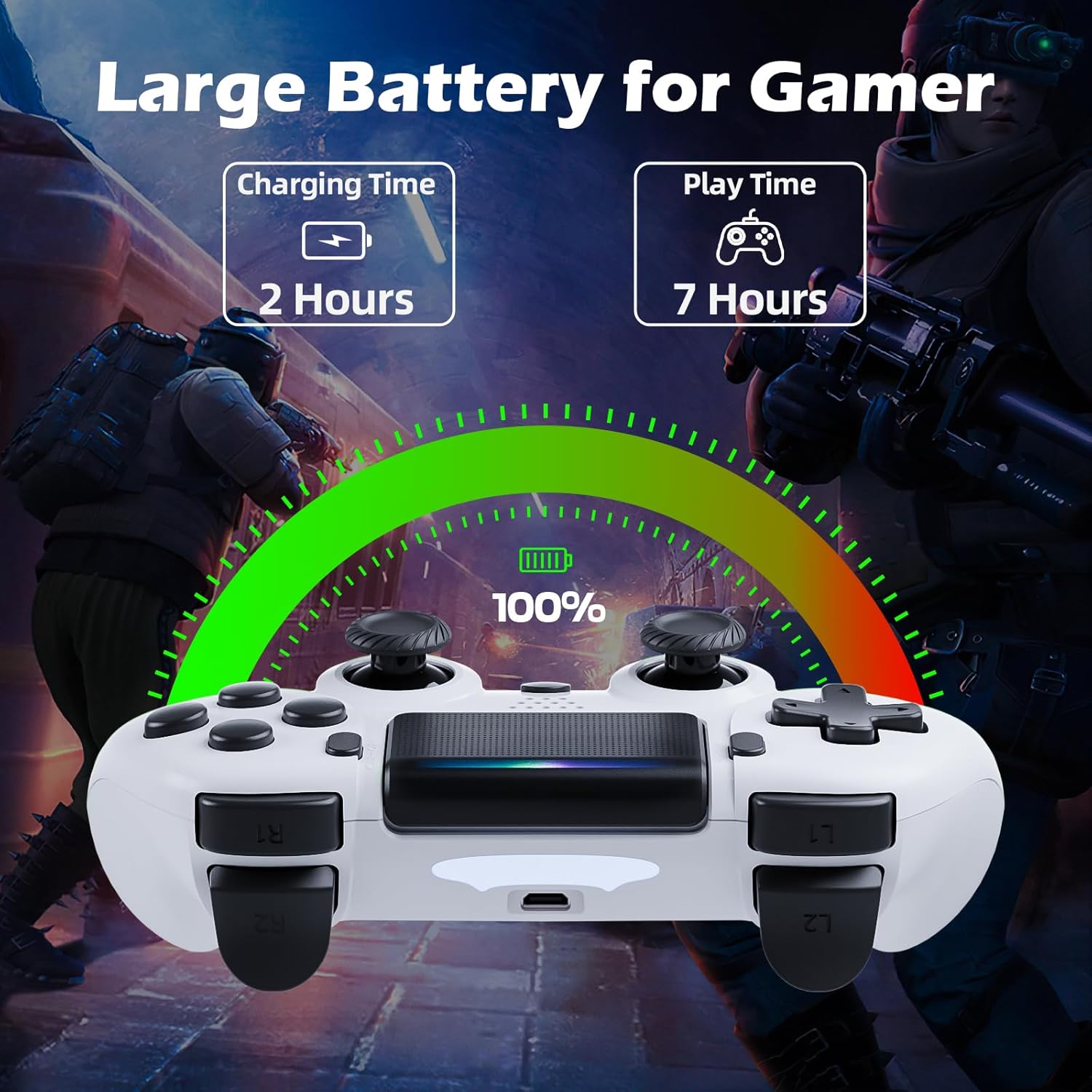
Image: Illustration showing the controller's charging time of 2 hours and play time of 7 hours on a full charge.
3. Konpatibilite
This controller is compatible with PS-4, PS4 Slim, and PS4 Pro consoles.

Image: Visual representation of the controller's wide compatibility with PS4, PS4 Slim, and PS4 Pro consoles.
Enstriksyon Operasyon
1. Kontwòl debaz yo
The gamepad features standard PS-4 button layouts for intuitive gameplay.
- Baton analòg: Use the Left Stick for character movement and the Right Stick for camera control or aiming.
- Directional Buttons (D-Pad): For precise directional input in menus or specific game actions.
- Bouton Aksyon (Triyang, Sèk, Kwa, Kare): Fè aksyon nan jwèt la jan jwèt la defini l.
- Shoulder and Trigger Buttons (L1, L2, R1, R2): Used for various actions like shooting, aiming, or interacting.
2. Motion Sensor (Gyro) Control
The built-in 6-axis motion sensor allows for intuitive control by tilting and rotating the controller.
- In supported games, you can use motion control for actions like steering, aiming, or adjusting viewang ing.
- Experiment with tilting the controller to achieve faster turns, adjust viewing angles, or aim more accurately.

Image: Illustration demonstrating the Gyro Motion Control feature, allowing for faster turning, viewing angle adjustment, and accurate aiming.
3. Double Vibration Feedback
Experience immersive gameplay with the dual motor vibration feature, providing tactile feedback for in-game events.
- The controller will vibrate to simulate impacts, explosions, and other in-game sensations.
- Vibration intensity may vary based on game design.

Image: Illustration of the Double Motor Vibration feature, showing the internal motors that provide immersive haptic feedback during gameplay.
4. Fonksyonalite Touchpad la
The integrated touchpad allows for new ways to interact with games and navigate menus.
- Tap, swipe, or click the touchpad as required by specific games or system functions.
5. Bouton PATAJE
The SHARE button allows you to easily share your gameplay moments.
- Peze a Pataje bouton to access the Share menu, where you can upload screenshots or video clips to social media, or start a broadcast.
6. Stereo Headset Jack
Connect your compatible 3.5mm headset to the Stereo Headset Jack for in-game audio and voice chat.
- Plug your headset into the port located at the bottom of the controller.
- Adjust audio settings via the PS-4 system menu.
7. Ergonomik konsepsyon
The controller is designed for comfort during extended gaming sessions.

Image: Depiction of the controller's ergonomic design, showing how it comfortably fits the shape of the hand for prolonged use.
Antretyen
Proper care will extend the life of your CHEREEKI Wireless Gamepad.
- Netwayaj: Sèvi ak yon twal mou epi sèk pou siye kontwolè a. Pou pousyè tè ki difisil pou retire, siye l yon ti kras.ampRense twal la avèk dlo. Evite pwodui chimik ki agresif oswa pwodui netwayaj abrazif.
- Depo: Sere kontwolè a nan yon kote ki fre epi sèk, lwen limyè solèy dirèk ak tanperati ekstrèm.
- Swen batri: To maintain battery health, avoid fully discharging the controller frequently. If storing for a long period, charge the battery to about 50% every few months.
- Manyen: Avoid dropping the controller or exposing it to excessive force, which can damage internal components.
Depanaj
Si ou rankontre pwoblèm ak gamepad ou a, gade pwoblèm ak solisyon komen sa yo.
| Pwoblèm | Kòz posib | Solisyon |
|---|---|---|
| Controller does not connect wirelessly or connection is unstable. | Not properly paired; too far from console; interference. |
|
| Controller does not charge or holds charge for a short time. | Faulty cable; power source issue; battery degradation. |
|
| Bouton yo pa reponn oswa yo kole. | Debris under buttons; physical damage. |
|
| Pa gen okenn fidbak vibrasyon. | Vibration disabled in game/system settings; game does not support vibration. |
|
Espesifikasyon
| Karakteristik | Detay |
|---|---|
| Nimewo Modèl | STK-4006L |
| Konpatibilite | PS-4, PS4 Slim, PS4 Pro |
| Koneksyon | Wireless (Bluetooth), Wired (Micro USB) |
| Wireless Range | Jiska 8 mèt |
| Kalite batri | Lityòm-ion entegre |
| Kapasite batri | 600 mAh |
| Tan pou chaje | Apeprè. 2-3 èdtan |
| Jwe Tan | Jiska 7 èdtan |
| Dimansyon (L x W x H) | 17.4 x 13 x 7.6 cm (apeprè 6.85 x 5.12 x 2.99 pous) |
| Pwa | 210 gram (apeprè 0.46 liv) |
| Detèktè | 6-axis motion sensor (gyroscope, accelerometer) |
| Vibration | Vibrasyon doub motè |
| Antre / Sòti | Touchpad, Stereo Headset Jack, Extension Port |
Garanti ak sipò
For warranty information, please refer to the documentation included with your purchase or visit the official CHEREEKI websit. Tèm ak kondisyon garanti yo ka varye selon rejyon an ak détayan an.
If you require technical support or have questions not covered in this manual, please contact the seller or CHEREEKI customer service through their official channels. Provide your model number (STK-4006L) and a detailed description of your issue for faster assistance.
Ask a question about this manual
Ask about setup, troubleshooting, compatibility, parts, safety, or missing instructions. Manuals+ will review the question and use this page’s manual context to help answer it.