
1. Entwodiksyon
Thank you for choosing the EZ EAR TRI Draco HiFi In-Ear Monitor Earbuds. These earbuds are engineered to deliver exceptional audio quality for musicians, gamers, and audio enthusiasts. Featuring a unique dual dynamic driver setup and a robust CNC aluminum alloy housing, the TRI Draco provides a balanced and immersive listening experience. This manual will guide you through the setup, operation, maintenance, and troubleshooting of your new earbuds to ensure optimal performance and longevity.
2. Pake kontni
Tanpri verifye ke tout atik ki nan lis anba a yo enkli nan pakè ou a:
- EZ EAR TRI Draco In-Ear Monitor Earbuds (Left and Right)
- Detachable 3.5mm Audio Kab
- TRI Horn-shaped Ear Tips (3 pairs for high frequencies)
- Balanced Ear Tips (3 pairs)
- Bass Ear Tips (3 pairs)
- Headphone Storage Pouch

Image: Package contents including earbuds, cable, and multiple ear tip sets.
3. Pwodwi souview
The TRI Draco earbuds feature a sophisticated design for superior audio performance:
- CNC Aluminum Alloy Metal Housing: Precision-crafted for acoustic structure and durability.
- Dual Dynamic Driver System: Incorporates an 8mm third-generation LCP diaphragm dynamic driver for consistent low frequencies and a 6mm titanium diaphragm dynamic driver for cohesive midrange and sparkling treble.
- Open-Back Rear Cavity: Designed for an expansive soundstage and airy feel with balanced tuning.
- 4-Core OFC Silver-Plated Copper Wire: Ensures stable and enduring audio transmission.

Imaj: Eksploze view diagram of the earbud's internal components, highlighting the dual dynamic drivers and CNC housing.

Image: Cross-section diagram of the earbud showing the open-back rear cavity and through-type front cavity design.
4. Enstalasyon
4.1 Konekte kab la
- Identify the left (L) and right (R) indicators on both the earbuds and the cable connectors.
- Align the 2-pin connector on the cable with the corresponding port on each earbud.
- Gently push the connectors firmly into place until they are secure.
4.2 Chwazi bouchon zòrèy
The TRI Draco comes with nine pairs of ear tips in three varieties (Horn-shaped for high frequencies, Balanced, and Bass) to suit different sound preferences and ear canal sizes. Experiment with different sizes and types to find the best fit for comfort and sound isolation.
- Gently remove the pre-installed ear tips by pulling them off.
- Select a new pair of ear tips and carefully push them onto the nozzle of the earbud until they are securely attached.
4.3 Mete ekoutè yo
For optimal sound quality and comfort, wear the earbuds with the cable routed over your ears.
- Mete earbud la nan kanal zòrèy ou.
- Loop the cable over the top of your ear, adjusting it for a snug and comfortable fit.
- Ensure a good seal in your ear canal for effective passive noise cancellation and full bass response.
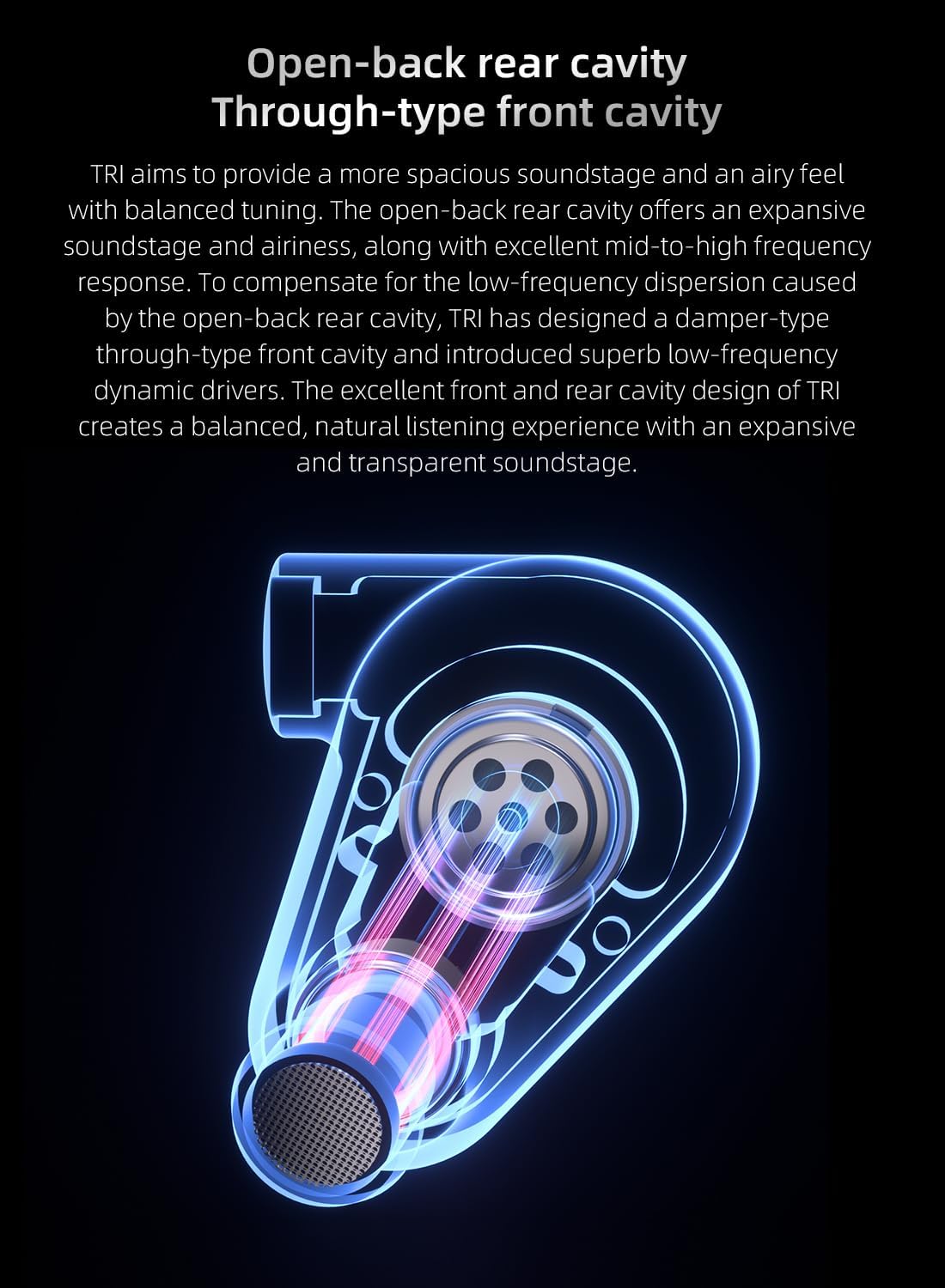
Image: Proper wearing technique for the earbuds, showing the cable routed over the ear for a secure fit.
5. Operasyon Enstriksyon
5.1 Konekte ak yon Sous Odyo
Connect the 3.5mm jack of the earbud cable to the audio output port of your device (e.g., smartphone, tablet, laptop, audio interface). The earbuds are compatible with devices featuring a standard 3.5mm audio jack.
5.2 Lekti Odyo
Once connected, begin audio playback from your device. Adjust the volume using your device's controls. The TRI Draco earbuds provide passive noise cancellation, which helps to reduce external distractions for a more focused listening experience.
Video: Official product video demonstrating the TRI Draco IEM Gaming Earbuds in use.
6. Antretyen
6.1 Netwayaj
Netwayaj regilye ede kenbe kalite son ak ijyèn:
- Konsèy zòrèy: Remove ear tips and clean them with a soft, damp cloth. Allow them to dry completely before reattaching.
- Earbud Housing: Wipe the earbud housing with a dry, soft cloth. Avoid using harsh chemicals or abrasive materials.
- Bouch: Gently remove any earwax or debris from the earbud nozzles using a small, soft brush or cleaning tool.
6.2 Depo
When not in use, store your TRI Draco earbuds in the provided storage pouch to protect them from dust, dirt, and physical damage. This will prolong their lifespan and maintain sound quality.
NAN. Depanaj
- Pa gen son:
- Asire w ke priz 3.5mm lan byen branche nan aparèy odyo w la.
- Tcheke nivo volim nan sou aparèy odyo ou a.
- Verify that the detachable cable connectors are securely attached to the earbuds.
- Test the earbuds with a different audio device to rule out device issues.
- Poor Sound Quality (e.g., muffled sound, weak bass):
- Ensure the ear tips create a proper seal in your ear canal. Try different sizes or types of ear tips.
- Clean the earbud nozzles to remove any obstructions.
- Tcheke sous odyo a pou wè si gen pwoblèm kalite.
- Earbuds Falling Out:
- Experiment with different ear tip sizes and types to find a more secure fit.
- Ensure the cable is properly looped over your ears for added stability.
8. Espesifikasyon
| Karakteristik | Detay |
|---|---|
| Non modèl | TRI Draco |
| Mak | EZ ZÒRÈ |
| Koneksyon Teknoloji | Branche |
| Ekoutè Jack | 3.5mm Jack |
| Kalite chofè odyo | Dual Dynamic Driver (8mm LCP, 6mm Titanium) |
| Enpedans | 18 Ohms |
| Sansiblite | 105 dB |
| Kontwòl bri | Anilasyon bri pasif |
| Materyèl | Aliminyòm |
| Pwa atik | 1.41 ons (40 gram) |
| Koulè | Blan |
| Style | without Mic |
9. Enfòmasyon sou Garanti
EZ EAR products are covered by a limited warranty against defects in materials and workmanship for a period of one (1) year from the original date of purchase. This warranty does not cover damage caused by accident, misuse, abuse, improper installation or operation, or unauthorized repairs. For warranty claims, please retain your proof of purchase.
10. Sipò
If you encounter any issues or have questions regarding your EZ EAR TRI Draco earbuds, please contact our customer support team:
- Imèl: support@ezear.com
- Websit: EZ EAR Official Store