
1. Entwodiksyon
This manual provides essential information for the safe and efficient operation of your VISION VP-621 4K Ultra HD Multimedia Projector. Please read this manual thoroughly before using the projector and retain it for future reference.
The VISION VP-621 is a versatile smart projector featuring 4K Ultra HD support, 11000 lumens brightness, 5G WiFi, Bluetooth 5.0, Auto Focus, Wireless Miracast, and an integrated Android 9.0 operating system. It is designed for various applications including home entertainment, business presentations, and educational purposes.
2. Enfòmasyon sou Sekirite
- Pa bloke ouvèti vantilasyon yo. Asire w ke gen ase lè k ap sikile toutotou pwojektè a pou anpeche l chofe twòp.
- Pa gade dirèkteman nan lantiy pwojektè a lè l ap limen.amp Limyè klere a ka lakòz domaj nan je yo.
- Mete pwojektè a sou yon sifas ki estab e plat pou anpeche l tonbe.
- Kenbe pwojektè a lwen dlo, imidite, ak tanperati ekstrèm.
- Sèvi sèlman ak adaptè kouran ki vini ak pwojektè a.
- Pa eseye ouvri oswa repare pwojektè a tèt ou. Konfye tout antretyen bay pèsonèl kalifye.
- Dekonekte pwojektè a pandan tanpèt zèklè oswa lè ou pa itilize li pou yon bon bout tan.
3. Pake kontni
Verifye ke tout atik ki nan lis anba a yo enkli nan pakè ou a:
- VISION VP-621 Projector
- Kòd pouvwa
- Adaptè
- Kontwòl Remote
- AV Kab
- Kouvri lantiy pwojektè
4. Pwodwi souview
Familiarize yourself with the main components and interfaces of your VISION VP-621 projector.

Imaj: Devan ak bò view of the VISION VP-621 projector, showcasing konsepsyon kontra enfòmèl ant li yo ak lantiy li yo.
4.1 Panèl Devan ak Anlè
- Lantiy pwojeksyon: Emèt imaj la.
- Reseptè enfrawouj: Pou siyal kontwòl remote.
- Bouton kontwòl: Power, Navigation (OK, Up, Down, Left, Right), Back.
- Griyaj vantilasyon: For cooling the internal components.

Imaj: Anlè view of the projector highlighting the integrated control buttons for power and navigation.
4.2 Rear Panel and Connectivity Ports
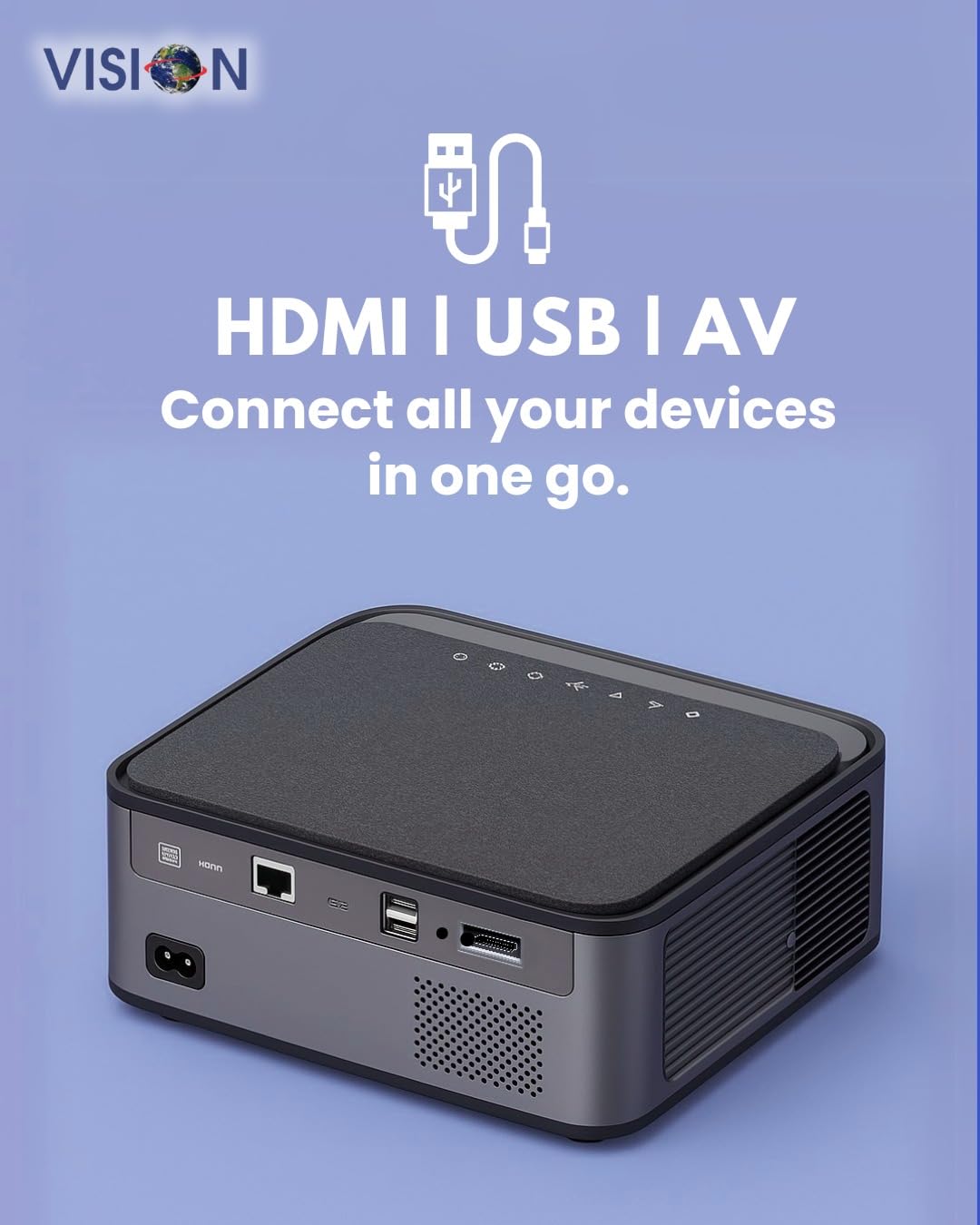
Imaj: Dèyè view of the projector displaying the various input and output ports, including HDMI, USB, and AV.
- Antre pouvwa: Konekte adaptè pouvwa a isit la.
- HDMI Port: Connect to HDMI-enabled devices (laptops, gaming consoles, streaming sticks).
- Pò USB (x2): Konekte kle USB pou lekti medya oswa aparèy ekstèn.
- Antre AV: Konekte ak ansyen aparèy yo lè l sèvi avèk kab AV ki vini ak yo a.
- Sòti Odyo (3.5mm): Konekte oratè ekstèn yo oswa kas ekoutè yo.
- Pò LAN: For wired internet connection (if available).
5. Enstalasyon
5.1 Plasman Pwojektè
Choose a flat, stable surface for the projector. Ensure there are no obstructions in front of the lens and that the ventilation grilles are clear.

Image: A projector positioned on a desk, illustrating a typical setup environment.
5.2 Koneksyon pouvwa
- Konekte adaptè kouran an nan pò antre kouran pwojektè a.
- Ploge fil elektrik la nan yon priz miray.
- Limyè endikatè pouvwa a sou pwojektè a ap limen.
5.3 Premye pouvwa sou
- Peze bouton pouvwa a sou pwojektè a oswa kontwòl remote la pou limen li.
- The projector will boot up and display the Android 9.0 home screen.
5.4 Ajisteman Fokus ak Keystone
The VISION VP-621 features automatic focus and 4D keystone correction for a clear and properly aligned image.

Image: Illustrates the projector's automatic focus and keystone correction capabilities, ensuring a sharp and aligned picture.
- Konsantre Auto: The projector will automatically adjust the focus for a sharp image upon startup or movement.
- Koreksyon Keystone 4D: The projector automatically corrects image distortion when placed at an angle. Manual adjustments may be available in the settings menu if needed.
6. Operasyon Enstriksyon
6.1 Android 9.0 Smart OS
The integrated Android 9.0 system allows direct access to streaming services and apps.
- Navigasyon: Use the remote control's directional buttons and "OK" button to navigate the interface.
- Enstalasyon aplikasyon an: Access the Google Play Store to download and install applications like YouTube, Netflix, and Prime Video.
- Rezo Koneksyon: Go to Settings > Network to connect to a 5G WiFi network or a wired LAN connection.
6.2 Konekte Aparèy Ekstèn yo
Koneksyon dmi
- Connect an HDMI cable from your device (laptop, gaming console, Fire TV Stick) to the HDMI port on the projector.
- On the projector's home screen, select the HDMI input source.
Koneksyon USB
- Insert a USB drive into one of the USB ports on the projector.
- The projector will typically prompt you to open the media player or file browser. If not, navigate to the file manager app on the Android home screen.
Koneksyon AV
- Connect the provided AV cable to the AV input port on the projector and to your external device.
- Select the AV input source on the projector.
Bluetooth 5.0 Audio Output
- Go to Settings > Bluetooth on the projector.
- Pèmèt Bluetooth epi chèche aparèy ki disponib.
- Select your Bluetooth speaker or headphones from the list to pair and connect.
Wireless Miracast (Screen Mirroring)
Miracast allows you to wirelessly mirror the screen of your compatible smartphone, tablet, or laptop.
- On the projector's home screen, select the "Miracast" or "Screen Mirroring" application.
- On your mobile device, enable screen mirroring (often found in quick settings or display settings, named "Cast," "Smart View," "Wireless Display," etc.).
- Select the projector from the list of available devices to establish the connection.
7. Antretyen
7.1 Netwayaj Pwojektè a
- Lantiy: Sèvi ak yon twal mou ki pa gen pousyè, espesyalman fèt pou lantiy optik. Pa sèvi ak pwodui netwayaj abrazif.
- Casing: Siye pwojektè a casinG ak yon twal mou epi sèk. Pou pousyè tè ki difisil pou netwaye, yon ti kras siye.ampRense twal la avèk dlo epi siye l sèk.
- Vantilasyon: Regularly check and clean the ventilation grilles to ensure proper airflow and prevent dust buildup. Use a soft brush or compressed air.
7.2 Lamp Lavi
The VISION VP-621 utilizes advanced LED technology, providing an estimated lamp life of up to 50,000 hours. This significantly reduces the need for lamp ranplasman konpare ak pwojektè tradisyonèl yo.
NAN. Depanaj
| Pwoblèm | Kòz posib | Solisyon |
|---|---|---|
| Pa gen imaj ki parèt |
|
|
| Imaj twoub |
|
|
| Pa gen son |
|
|
| Pa ka konekte ak Wi-Fi |
|
|
9. Espesifikasyon
| Mak | VIZYON |
| Non modèl | VP-621 AN |
| Teknoloji ekspozisyon | LCD |
| Kalite ekspozisyon | dirije |
| Klète | 11000 Lumen |
| Pwopòsyon Imaj Kontrèman | 18000:1 Pixels |
| Rezolisyon natif natal | 1920 x 1280 (Full HD) |
| Rezolisyon sipòte | Jiska 4K Ultra HD |
| Aspè rapò | 16:9, 4:3 |
| Sistèm operasyon | Android 9.0 |
| Koneksyon Teknoloji | Bluetooth 5.0, HDMI, USB, Wi-Fi (5G) |
| Entèfas Materyèl | Bluetooth 5, HDMI, USB 3.0 |
| Karakteristik espesyal | Built-In 3D, Built-In Cooling System, Built-In Speaker, Electric Focus, Wi-Fi Ready, Auto Focus, 4D Keystone Correction, Wireless Miracast |
| Dimansyon pwodwi | 30 x 18 x 7 cm |
| Pwa atik | 8 kg |
| Lamp Lavi | Jiska 50,000 èdtan |

Image: Illustrates the projector's Full HD (1920x1080) resolution capability for crisp visuals.

Image: Highlights the projector's 11000 lumens brightness, ensuring clear visuals in various lighting conditions.
10. Garanti ak sipò
For warranty information and technical support, please contact the manufacturer:
- Manifakti: Scorpio Infosolutions
- Kote: Delhi, India
- Telefòn: +91-7982647130
- Websit: visionsheen.in
Please have your product model (VP-621) and purchase details ready when contacting support.