
1. Entwodiksyon
The Nitecore NB20000 Gen III is a high-capacity, lightweight portable power bank designed for reliable power on the go. This manual provides essential information for the safe and efficient operation of your device, including features, setup, usage, and maintenance.
2. Karakteristik kle
- Portabilite amelyore: The NB20000 Gen III is 13% shorter and significantly lighter than its predecessor, making it ideal for outdoor activities such as hiking, cycling, and climbing.
- Kapasite segondè: Equipped with a 20,000mAh battery, providing extended power for smartphones, tablets, headlamps, and other compatible devices.
- Konstriksyon dirab: Crafted from woven carbon fiber material with a carbon fiber reinforced polymer frame, ensuring lightweight strength and durability. Features four corner cushions for impact resistance and a secure grip.
- Doub pò USB-C: Offers simultaneous output from two USB-C ports, with up to 18W input and a maximum output of 22.5W.
- Chaje pasaj: Allows charging of the power bank and connected devices concurrently.
- Konpatibilite milti-pwotokòl: Supports popular fast charging protocols including QC, PD, FCP, and SCP for efficient device charging.
- Low Kouran Mode: Capable of charging low-current devices such as wireless headphones and wearables (minimum output: 60mA).
- Vwayaje pare: Certified for airline travel and features an IPX5 water resistance rating, suitable for various weather conditions.
3. Pwodwi souview
Familiarize yourself with the components of your Nitecore NB20000 Gen III Power Bank.
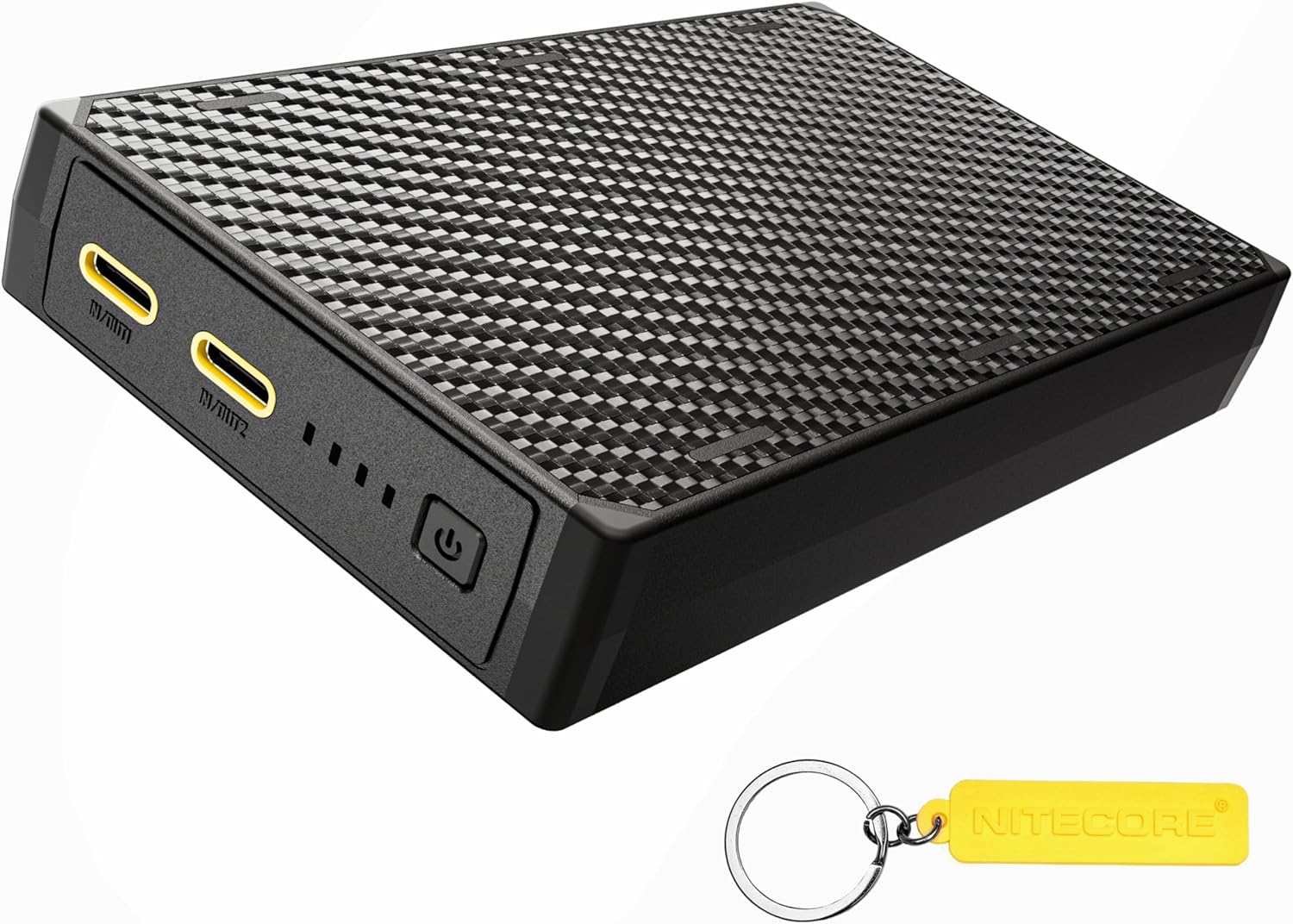
- USB-C Ports (IN/OUT1, IN/OUT2): Used for both charging the power bank and charging external devices.
- Bouton pouvwa: Activates the power bank and checks the battery level.
- Endikatè ki ap dirije: Four blue LED lights display the current power level and charging status.
4. Premye enstalasyon ak chaje Power Bank la
Before first use, it is recommended to fully charge your NB20000 Gen III Power Bank.
- Connect a USB-C charging cable to either of the USB-C ports (IN/OUT1 or IN/OUT2) on the power bank.
- Konekte lòt bout kab la nan yon adaptè kouran USB konpatib (pa enkli).
- The LED indicators will illuminate and flash to show the charging progress. Once all four LEDs are constant-on, the power bank is fully charged.
The NB20000 Gen III supports up to 18W input for fast recharging.
5. Operasyon Enstriksyon
5.1 Chaje Aparèy Ekstèn yo

- Connect your device's charging cable to one of the USB-C ports (IN/OUT1 or IN/OUT2) on the power bank.
- Konekte lòt bout kab la sou aparèy ou an.
- Bank pouvwa a ap kòmanse chaje aparèy ou an otomatikman. Endikatè LED yo ap montre nivo pouvwa ki rete a.
The NB20000 Gen III can output up to 22.5W and supports various fast charging protocols for efficient charging.
5.2 Chaje pas-a-travè
The power bank supports pass-through charging, allowing it to be recharged while simultaneously charging external devices.
- Connect the power bank to a power adapter for recharging (as described in Section 4).
- Connect your external device to the other available USB-C port on the power bank.
- Tou de bank pouvwa a ak aparèy ou an ap chaje an menm tan.
5.3 Low Current Mode
To charge low-current devices (e.g., wireless headphones, smartwatches) that may not be detected by standard charging modes:
- With the power bank on, press and hold the power button for approximately 2 seconds until the first LED indicator starts flashing. This indicates entry into low current mode.
- Connect your low-current device to the power bank.
- To exit low current mode, press and hold the power button again for approximately 2 seconds. The LED indicator will stop flashing.
6. Power Level Display
The four blue LED indicators provide a clear indication of the power bank's remaining battery level.

| Endikatè ki ap dirije | Nivo pouvwa |
|---|---|
| 4 konstan-sou | 75% - 100% |
| 3 konstan-sou | 50% - 75% |
| 2 konstan-sou | 25% - 50% |
| 1 konstan-sou | 10% - 25% |
| 1 kap flache | < 10% (Nearly depleted, recharge promptly) |
7. Espesifikasyon
| Karakteristik | Detay |
|---|---|
| Mak | Nitecore |
| Modèl | NB20000 Gen III |
| Kapasite batri | 20000 Miliamp Orè (mAh) |
| Kalite Connector | USB Kalite C |
| Antre | Jiska 18W (USB-C) |
| Sòti | Max 22.5W (Dual USB-C) |
| Karakteristik espesyal | Fast Charging, Slim Design, IPX5 Water Resistance, Low Current Mode |
| Voltage | 3.6V (Nominal) |
| Dansite enèji | 247mWh/g |
8. Antretyen
8.1 Netwayaj
Wipe the power bank with a soft, dry cloth. Avoid using abrasive cleaners, solvents, or harsh chemicals.
8.2 Depo
Store the power bank in a cool, dry place away from direct sunlight and extreme temperatures. For long-term storage, it is recommended to charge the power bank to approximately 50-75% every three months to maintain battery health.
9. Enfòmasyon sou Sekirite
- Pa ekspoze bank pouvwa a nan dlo, dife, oswa tanperati ekstrèm.
- Evite lage l, pike l, oswa demonte l.
- Kenbe soti nan atenn timoun yo.
- Sèvi ak sèlman kab chaje konpatib ak adaptè.
- If the power bank swells, emits smoke, or shows other abnormalities, discontinue use immediately.
- Jete bank pouvwa a yon fason responsab dapre règleman lokal yo.
NAN. Depanaj
10.1 Bank pouvwa a pa chaje
- Asire w ke kab chaje a byen konekte ak tou de bank pouvwa a ak adaptè kouran an.
- Verify that the power adapter is functioning correctly and connected to a live power source.
- Eseye yon diferan USB-C kab oswa adaptè pouvwa.
10.2 Aparèy la pa chaje ak Power Bank la
- Asire w ke bank ekstèn lan gen ase chaj (tcheke endikatè LED yo).
- Verifye ke kab chaje a byen konekte ak bank pouvwa a ak aparèy ou an.
- Try a different charging cable or USB-C port on the power bank.
- If charging a low-current device, ensure Low Current Mode is activated (refer to Section 5.3).
- Restart the power bank by pressing the power button.
11. Garanti ak sipò
For warranty information and customer support, please refer to the documentation included with your purchase or visit the official Nitecore website. You can also find more information at the Nitecore Store on Amazon.