
1. Entwodiksyon
Mèsi pou acha aasing the RCA SP550BT Portable Speaker. This manual provides important information regarding the setup, operation, and maintenance of your new speaker. Please read it thoroughly before use and keep it for future reference.
The RCA SP550BT is a versatile portable speaker featuring 50W output, Bluetooth connectivity, USB playback, FM radio, AUX input, True Wireless Stereo (TWS) function, LED lights, and a microphone input for an enhanced audio experience.
2. Pake kontni
Tanpri tcheke pake a pou atik sa yo:
- RCA SP550BT Portable Speaker
- Kontwòl Remote
- Pouvwa kab
- Manyèl Itilizatè (dokiman sa a)
3. Pwodwi souview
Familiarize yourself with the main components and features of your RCA SP550BT speaker.

Figi 3.1: Devan view of the RCA SP550BT portable speaker. This image displays the speaker in an upright position, highlighting the top control panel and the three prominent speaker cones with red illumination.

Figi 3.2: Side view of the RCA SP550BT portable speaker. This perspective shows the depth of the speaker and the integrated handle for portability.

Figi 3.3: Orizontal view of the RCA SP550BT portable speaker. This image illustrates the speaker's design when placed on its side, emphasizing the speaker grille and LED lighting.
3.1 Kontwòl Remote
The included remote control allows for convenient operation of the speaker from a distance.
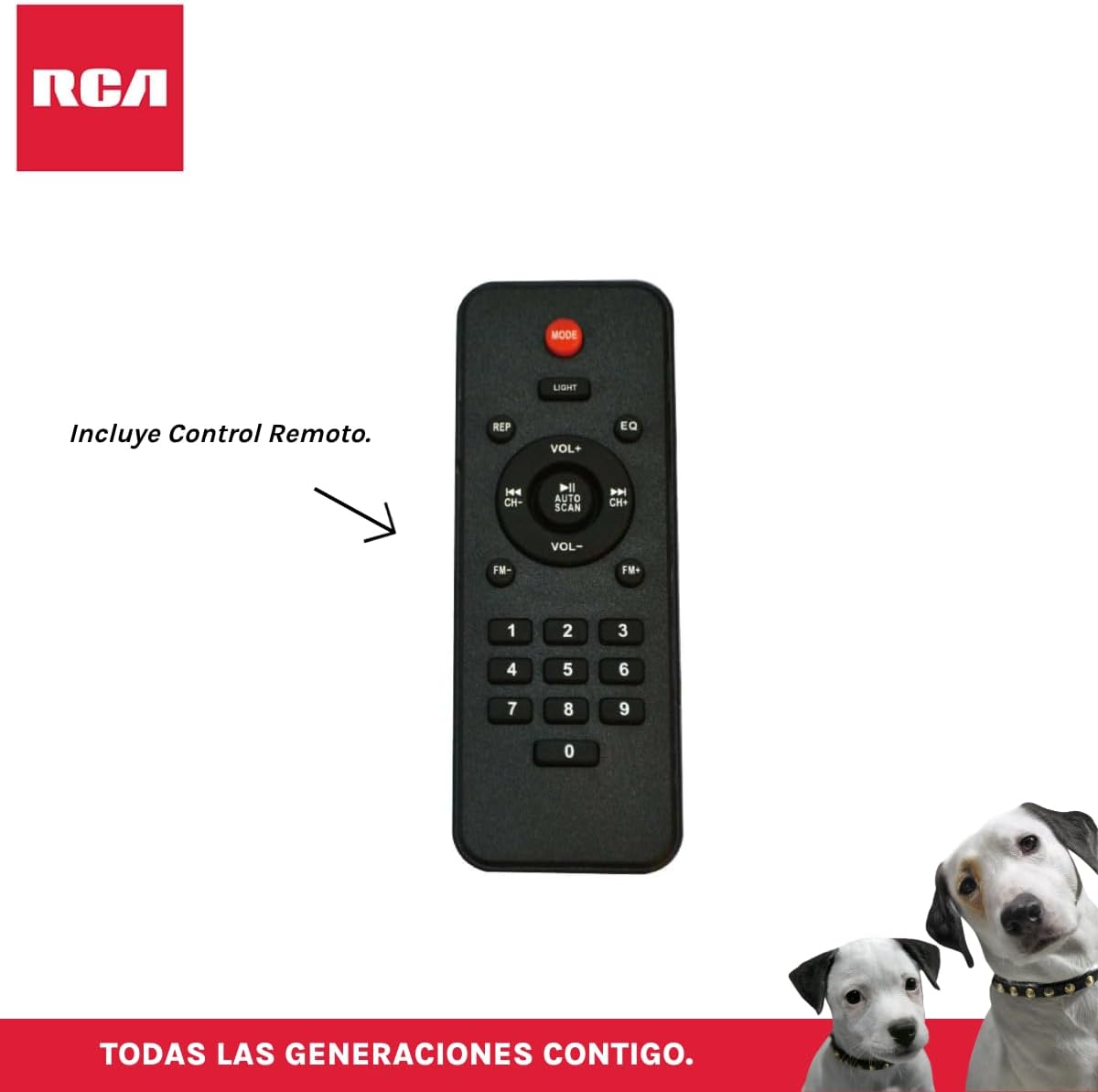
Figi 3.4: RCA SP550BT Remote Control. This image displays the full layout of the remote control, including buttons for power, mode selection, volume adjustment, track navigation, equalizer settings, and a numeric keypad.
4. Enstalasyon
4.1 Koneksyon pouvwa
- Ensure the speaker is placed on a stable, flat surface.
- Connect the power cable to the speaker's power input port.
- Plug the other end of the power cable into a standard electrical outlet (AC 100-240V, 50/60Hz).
- Press the power button on the speaker or remote control to turn it on.
5. Operasyon Enstriksyon
5.1 Power On/Off
- Pou limen oratè a, peze bouton an POUVWA button on the control panel or the remote control.
- Pou etenn oratè a, peze bouton an POUVWA bouton ankò.
5.2 Seleksyon mòd
Peze a MÒD button on the control panel or remote control to switch between Bluetooth, USB, FM, and AUX input modes.
5.3 Bluetooth Pairing
- Turn on the speaker and select Bluetooth mode using the MÒD button. The display will show "BLUE" and a pairing indicator will flash.
- Aktive Bluetooth sou aparèy mobil ou a (telefòn entelijan, tablèt, elatriye).
- Chèche pou "RCA SP550BT" in your device's Bluetooth list and select it to pair.
- Once paired, the speaker will emit a confirmation sound, and the Bluetooth indicator will stop flashing.
- Kounye a ou kapab jwe odyo soti nan aparèy ou an atravè oratè a.
5.4 Lekti USB
- Insert a USB flash drive (FAT32 format, max 32GB) containing MP3 audio files nan pò USB a.
- The speaker will automatically switch to USB mode and begin playing the first track. If not, press the MÒD bouton pou chwazi mòd USB.
- Sèvi ak la JWE/POZ, ANVAN, ak PWOCHÈ buttons on the control panel or remote to control playback.
5.5 FM Radyo
- Turn on the speaker and select FM mode using the MÒD bouton.
- Peze epi kenbe la JWE/POZ bouton (oswa OTO SKAN on remote) to automatically scan and save available FM stations.
- Sèvi ak la ANVAN epi PWOCHÈ bouton yo pou navige nan estasyon ki sove yo.
5.6 Antre AUX
- Konekte yon aparèy odyo ekstèn (pa egzanp, yon lektè MP3, yon laptop) nan pò antre AUX oratè a avèk yon kab odyo 3.5mm (pa enkli).
- Chwazi mòd AUX la avèk la MÒD bouton.
- Kontwole lekti ak volim nan depi aparèy konekte ou an.
Fonksyon 5.7 TWS (Vrè Stereo san fil)
The TWS function allows you to connect two RCA SP550BT speakers wirelessly for a stereo sound experience.
- Ensure both SP550BT speakers are powered on and in Bluetooth mode, but not yet paired with any device.
- Sou youn nan oratè yo, peze epi kenbe bouton an TWS button (if available, or a dedicated TWS pairing button) until you hear a confirmation tone. The speakers will attempt to pair with each other.
- Yon fwa yo byen konekte, youn nan oratè yo ap aji kòm mèt la (kanal gòch la) epi lòt la kòm esklav la (kanal dwat la).
- Now, pair your mobile device with the master speaker via Bluetooth as described in section 5.3.
5.8 dirije limyè
Peze a LIMYÈ button on the control panel or remote control to cycle through different LED light modes or to turn them off.
5.9 Itilizasyon Mikwofòn
Connect a wired microphone (not included) to the microphone input port on the speaker. Adjust the microphone volume using the dedicated knob (if available) or the main volume control.
6. Antretyen
- Netwayaj: Sèvi ak yon twal mou epi sèk pou netwaye deyò oratè a. Pa sèvi ak pwodui netwayaj abrazif oswa solvan.
- Depo: Lè w pa itilize oratè a pou yon bon bout tan, sere l nan yon kote ki fre epi sèk, lwen limyè solèy dirèk ak tanperati ekstrèm.
- Ekspozisyon dlo: Oratè sa a pa enpèmeyab. Evite ekspoze li nan dlo oswa imidite twòp.
NAN. Depanaj
Si ou rankontre pwoblèm ak oratè ou a, gade pwoblèm ak solisyon komen sa yo:
| Pwoblèm | Kòz posib | Solisyon |
|---|---|---|
| Pa gen pouvwa | Power cable not connected; Power outlet not working; Speaker off. | Check power cable connection; Try a different outlet; Press the POWER button. |
| Pa gen son | Volim twò ba; Mòd ki pa kòrèk la chwazi; Aparèy la pa byen konekte. | Increase volume; Select correct input mode (Bluetooth, USB, AUX); Reconnect device. |
| Aparèy Bluetooth echwe | Speaker not in pairing mode; Device Bluetooth off; Speaker already paired. | Ensure speaker is in Bluetooth pairing mode; Turn on device Bluetooth; Disconnect from other devices. |
| Lektur USB pa travay | USB drive format incompatible; Corrupt files; USB drive not inserted correctly. | Asire w ke USB a se fòma FAT32; Tcheke file integrity; Reinsert USB drive. |
| Radyo FM ki pa byen resevwa | Siyal fèb; Entèferans. | Relocate speaker; Extend antenna (if applicable). |
8. Espesifikasyon
| Karakteristik | Spesifikasyon |
|---|---|
| Modèl | SP550BT |
| Mak | RCA |
| Oratè Sorti pouvwa | 50 Watt (Maksimòm) |
| Koneksyon Teknoloji | Bluetooth, USB, AUX |
| Teknoloji san fil | Bluetooth |
| Audio Sòti Mode | Stereo |
| Kalite Oratè | Pòtab, Deyò |
| Kalite aliye | Tabletop mòn |
| Metòd kontwòl | Kontwòl Remote |
| Gwosè Oratè | 6.5 pous |
| Woofer Dyamèt | 6.5 pous |
| Kapasite batri | 4400 Miliamp Orè |
| Sous pouvwa | Kab elektrik |
| Aparèy konpatib | Odinatè pòtab, lektè MP3, telefòn entelijan, tablèt |
| GTIN / UPC | 044476152061 |
9. Garanti ak sipò
This product comes with a limited warranty. Please refer to the warranty card included in your package for specific terms and conditions. For technical support or service inquiries, please contact RCA customer service through their official websit oswa enfòmasyon kontak yo bay ak acha w la.
Note: Warranty terms may vary by region. Keep your proof of purchase for warranty claims.