
GODIYMODULES 10S 30A 36V
GODIYMODULES 10S 30A 36V Lithium Battery BMS Instruction Manual
Model: 10S 30A 36V
Entwodiksyon
This manual provides detailed instructions for the installation, operation, and maintenance of the GODIYMODULES 10S 30A 36V Lithium Battery Charge Board with Protection Balancer. This Battery Management System (BMS) is designed to protect 3.7V Ternary, Lithium Cobaltate, and Lithium Manganese Oxide battery packs, ensuring their safe and efficient operation.
Enfòmasyon sou Sekirite
WARNING: Improper installation or handling of lithium batteries and BMS boards can lead to serious injury, fire, or explosion. Always exercise extreme caution and follow all instructions carefully.
- Ensure all connections are correct before applying power. Incorrect wiring can damage the BMS and battery pack.
- Travay nan yon zòn ki byen vantile.
- Mete ekipman pwoteksyon pèsonèl (PPE) ki apwopriye, tankou linèt sekirite ak gan izole.
- Do not short-circuit the battery terminals or BMS connections.
- Keep the BMS away from moisture and extreme temperatures.
- Si ou pa sèten sou nenpòt etap, konsilte yon pwofesyonèl ki kalifye.
Pwodwi souview
Eleman enkli
Pake a anjeneral gen ladan:
- 1x GODIYMODULES 10S 30A 36V Lithium Battery BMS Board
- 1x Balance Wire Harness (11-pin connector)
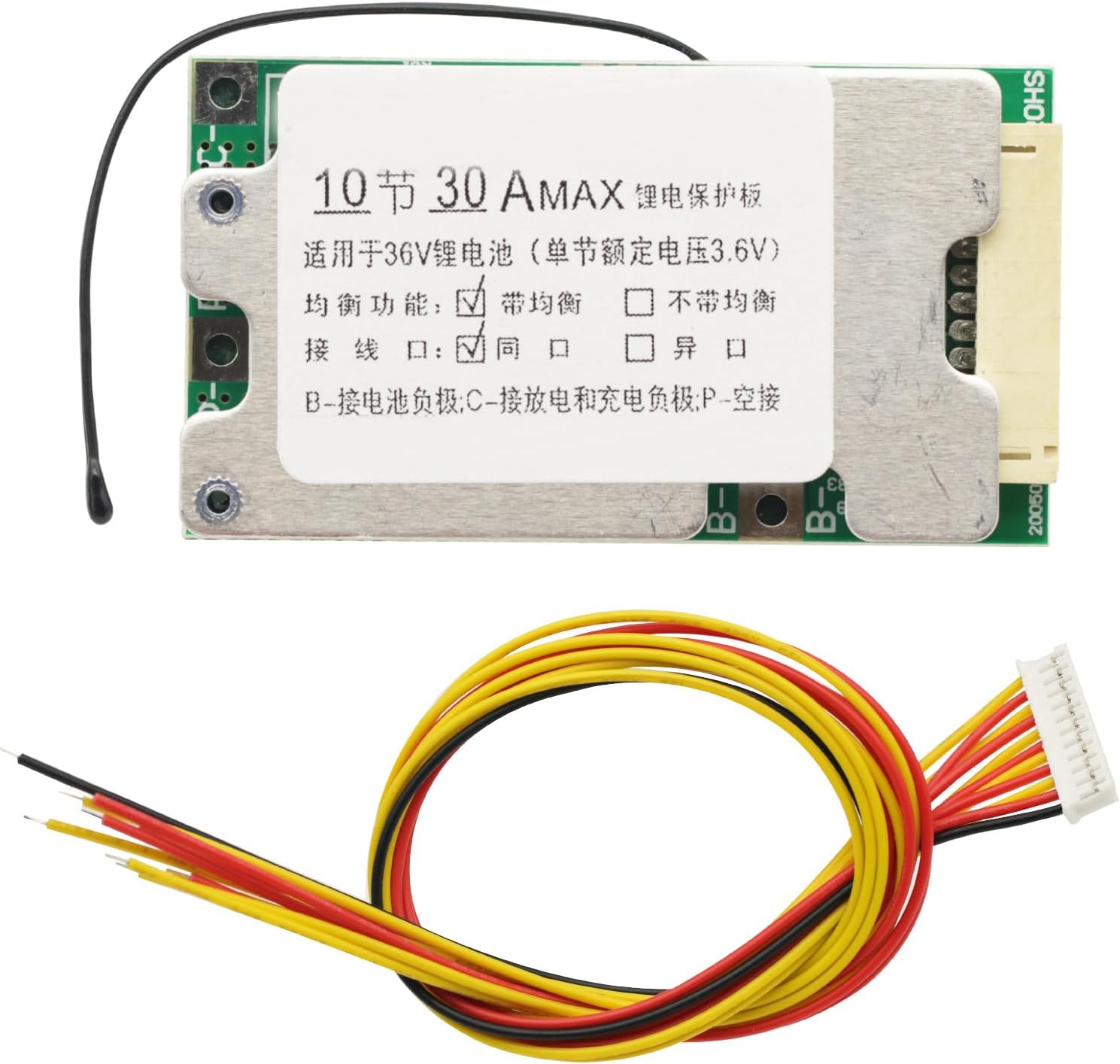
Figure 1: The GODIYMODULES 10S 30A 36V BMS board with its accompanying balance wire harness.
Karakteristik kle
- Designed for 3.7V Ternary, Lithium Cobaltate, Lithium Manganese Oxide battery types.
- Suitable for 36V battery packs with power less than 1000W.
- Integrated Over-charge Protection.
- Integrated Over-discharge Protection.
- Integrated Over-current Protection.
- Integrated Output Short-circuit Protection.
- Integrated Over-temperature Protection (Discharge max temperature 75°C, Charge min temperature -7°C).
- Balance charge function with 4.2V balance charge voltage.
Espesifikasyon
| Spesifikasyon | Valè |
|---|---|
| Travay aktyèl | 30A (max) |
| Continuous Working Current | 25A (max) |
| Over-discharge Protect Voltage | 2.6V pou chak selil |
| Over-charge Protect Voltage | 4.25V pou chak selil |
| Chaje aktyèl | 10A |
| Balance Charge Voltage | 4.2V pou chak selil |
| Sòti Voltage | 36 Vòlt (DC) |
| Antre Voltage (pa selil) | 3.7 Volts |
| Pwa atik | 0.04 Kilogram |
Enstalasyon ak Enstalasyon
Carefully follow these steps to connect the BMS to your 10S lithium battery pack. Incorrect wiring can cause damage to the BMS, battery, or connected devices.
Dyagram fil elektrik

Figure 2: Detailed wiring diagram for the 10S BMS, illustrating the "Same Port Connection" method for charging and discharging.
Connection Steps (Same Port)
- Connect B- to Battery Pack Negative: Solder the thick black wire labeled "B-" from the BMS directly to the main negative terminal of your 10S battery pack. This is the overall negative terminal of the entire series.
- Connect Balance Wires (B0 to B10):
- Connect the thinnest black wire (often labeled B0 or 0V) from the balance harness to the main negative terminal of the battery pack (the same point as B-).
- Connect B1 to the positive terminal of the first cell (Cell 1+).
- Connect B2 to the positive terminal of the second cell (Cell 2+).
- Continue this sequence, connecting each balance wire (B3, B4, ..., B10) to the positive terminal of its corresponding cell. B10 will connect to the main positive terminal of the entire 10S battery pack.
- Ensure the balance harness connector is securely plugged into the BMS board apre all individual balance wires are connected to the battery cells.
- Connect C- to Charge/Discharge Negative: Solder the thick wire labeled "C-" from the BMS to the negative terminal of your charger and the negative terminal of your load (device being powered). This is the common negative for both charging and discharging.
- Connect P- (Optional/Alternative): The diagram indicates a "Same port connection" where C- handles both charge and discharge negative. If your BMS has a separate P- terminal for discharge, it would connect to the load negative, while C- would connect to the charger negative. For this specific BMS, the diagram suggests C- is the common port.
- Connect Battery Pack Positive: The main positive terminal of the 10S battery pack (where B10 is connected) will serve as the positive connection for both the charger and the load.
Important: Always connect the balance wires to the battery cells first, then plug the balance connector into the BMS. When disconnecting, unplug the balance connector from the BMS first, then disconnect the balance wires from the cells.
Enstriksyon Operasyon
Once the BMS is correctly installed, it will automatically manage the charging and discharging of your battery pack, providing protection against various conditions.
- Chaje: Connect your 36V lithium battery charger to the main positive terminal of the battery pack and the C- terminal of the BMS. The BMS will monitor cell voltages and balance them during charging.
- Dechaje: Connect your load (e.g., motor, inverter) to the main positive terminal of the battery pack and the C- terminal of the BMS. The BMS will protect against over-discharge and over-current conditions.
- Aktivasyon Pwoteksyon: If any protection threshold is exceeded (e.g., over-charge, over-discharge, over-current, short-circuit), the BMS will temporarily cut off the output to protect the battery. Normal operation should resume once the condition is resolved.
Antretyen
The GODIYMODULES BMS is designed for reliable operation with minimal maintenance. However, following these guidelines can help ensure its longevity:
- Enspeksyon regilye: Periodically inspect all wiring connections for signs of corrosion, loose connections, or damage.
- Lapwòpte: Keep the BMS board clean and free from dust, dirt, and moisture. Use a soft, dry brush or compressed air for cleaning.
- Kondisyon anviwònman: Operate the BMS within its specified temperature range. Avoid exposing it to extreme heat, cold, or high humidity.
- Sante batri: Ensure the individual cells in your battery pack are of good quality and matched. A BMS cannot compensate for severely unbalanced or damaged cells.
Depanaj
| Pwoblèm | Kòz posib | Solisyon |
|---|---|---|
| No output from BMS |
|
|
| Batri pa chaje |
|
|
| Cells are unbalanced |
|
|
Garanti ak sipò
For warranty information or technical support, please refer to the seller's policies or contact GODIYMODULES directly through their official channels. Keep your purchase receipt as proof of purchase.
Pou plis asistans, ou ka vizite paj pwodwi sou Amazon or contact the seller "DIY-Module".
Ask a question about this manual
Ask about setup, troubleshooting, compatibility, parts, safety, or missing instructions. Manuals+ will review the question and use this page’s manual context to help answer it.