
Devoko 0457
Devoko L-Shaped Gaming Desk Instruction Manual
Modèl: 0457
1. Entwodiksyon
Thank you for choosing the Devoko L-Shaped Gaming Desk. This manual provides essential information for the safe assembly, proper use, and maintenance of your new desk. Please read these instructions carefully before beginning assembly and retain them for future reference.

Image 1.1: The Devoko L-Shaped Gaming Desk in a typical gaming setup.
2. Enfòmasyon sou Sekirite
Caution: Assembly required.
Ensure all tools and components are present before starting. Follow the instructions carefully to avoid injury or damage to the product. Keep small parts away from children. Do not stand or sit on the desk during assembly. Always place the desk on a flat, stable surface.
3. Pake kontni
The package includes all necessary accessories and hardware for assembly. Please verify that all components are present and undamaged before proceeding. If any parts are missing or damaged, please contact customer support.
- Desk panels (L-shaped sections)
- Leg frames (Z-shaped design)
- Connecting hardware (screws, bolts, washers)
- Zouti asanblaj (pa egzanp, kle Allen)
- Pads pye reglabl
4. Enstriksyon pou enstalasyon ak asanblaj
Assembly typically takes one person approximately 30 minutes. Follow these steps for a smooth installation:
- Depake epi idantifye pyès yo: Carefully remove all components from the packaging. Lay them out on a clean, soft surface to prevent scratches. Refer to the included parts list (if available) to identify each piece.
- Rasanble Ankadreman Janm yo: Attach the Z-shaped leg frames to the designated support beams using the provided screws and tools. Ensure all connections are secure but do not overtighten initially.
- Tache Panno Biwo yo: Position the L-shaped desk panels onto the assembled leg frames. Align the pre-drilled holes and secure the panels to the frames using the appropriate hardware.
- Connect L-Shape Sections: Join the two L-shaped desk sections together at the corner using the provided connectors and screws. Ensure a flush and stable connection.
- Sere tout Fastener: Once all parts are loosely assembled, carefully place the desk upright. Then, systematically tighten all screws and bolts to ensure maximum stability. Avoid overtightening to prevent damage.
- Enstale kousinen pye yo: Screw the adjustable foot pads into the bottom of each leg. These pads help level the desk on uneven floors and protect your flooring.
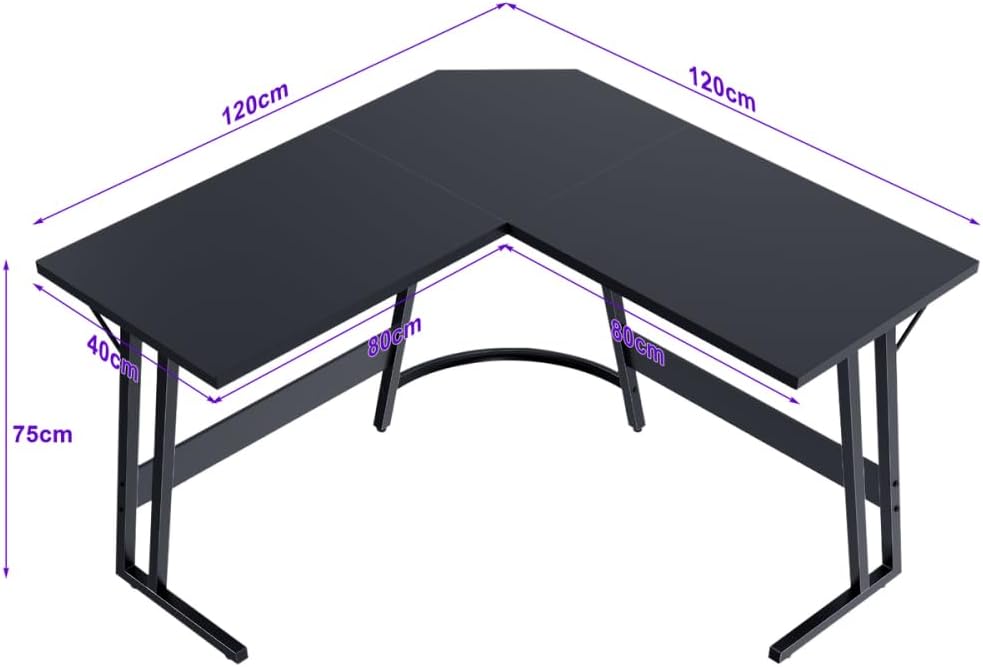
Imaj 4.1: Dimansyon biwo pou planifye espas ou.
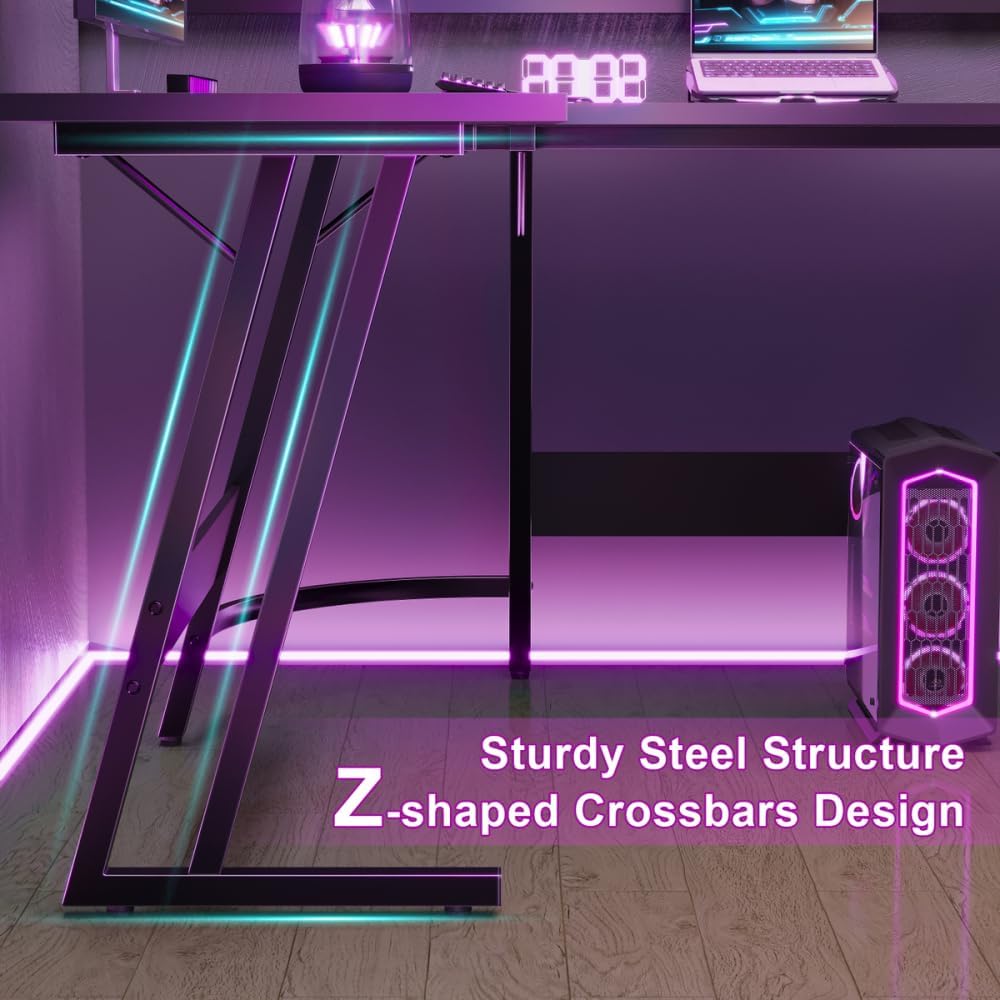
Image 4.2: Detail of the Z-shaped leg design for enhanced stability.
5. Operasyon Enstriksyon
The Devoko L-Shaped Gaming Desk is designed to provide a spacious and ergonomic workspace for various activities, including gaming, studying, and office work.
- Espas travay Spacious: The 120 x 120 x 75 cm dimensions offer ample surface area to accommodate multiple monitors, a keyboard, mouse, PC tower, laptop, and other peripherals.
- Konsepsyon ergonomique: The L-shape provides a comfortable setup, allowing for easy access to all your equipment and promoting better posture with generous legroom underneath.
- Itilizasyon versatile: Utilize one side for your main gaming or work setup and the other for secondary tasks, storage, or additional display space.

Image 5.1: The desk provides ampespas pou janm pou yon itilizasyon konfòtab.
6. Antretyen
To ensure the longevity and appearance of your Devoko L-Shaped Gaming Desk, follow these simple maintenance guidelines:
- Netwayaj: Siye sifas biwo a ak yon mou, damp cloth. Avoid abrasive cleaners or harsh chemicals that could damage the matt texture or finish.
- Devèsman: Clean up spills immediately to prevent staining or damage to the engineered wood tabletop.
- Tcheke Materyèl: Tcheke tout vis ak boulon yo detanzantan pou asire yo rete byen sere. Sere boulon yo ankò si sa nesesè pou kenbe estabilite.
- Evite twòp pwa: While sturdy, avoid placing excessively heavy items on the desk that could exceed its weight capacity.

Image 6.1: Detail of the matt texture and adjustable foot pads.
NAN. Depanaj
Si ou rankontre nenpòt pwoblèm ak biwo ou a, gade solisyon komen sa yo:
- Desk Wobbles:
- Asire w ke tout vis ak boulon asanblaj yo byen sere.
- Ajiste kousinen pye yo anba pye yo pou mete biwo a nivo sou planche inegal.
- Verify that the desk is placed on a flat and stable surface.
- Pyès ki manke/domaje: If you find any parts missing or damaged upon unboxing, do not proceed with assembly. Contact Devoko customer support immediately for assistance.
- Difikilte pou rasanble: Review the assembly instructions carefully. Ensure you are using the correct hardware for each step. If issues persist, consider seeking assistance from another person.
8. Espesifikasyon
| Karakteristik | Detay |
|---|---|
| Mak | Devoko |
| Nimewo Modèl | 0457 |
| Koulè | Nwa |
| Dimansyon pwodwi (L x W x H) | 120 x 120 x 75 cm |
| Materyèl | Metal (Base), Engineered Wood (Top) |
| Pwa atik | 19 Kilogram |
| Fòm | L-Fòm |
| Konsepsyon biwo | Biwo òdinatè |
| Style | Modèn |
| Fini Kalite | Frosted |
| Karakteristik espesyal | L-shaped, Z-shaped reinforced legs, Scratch-resistant tabletop |
9. Garanti ak sipò
Information regarding specific warranty terms and customer support contact details for the Devoko L-Shaped Gaming Desk Model 0457 is not provided in this manual. Please refer to the product packaging or the retailer's websit la pou enfòmasyon sou garanti a ak kontak pou sèvis kliyan.
Ask a question about this manual
Ask about setup, troubleshooting, compatibility, parts, safety, or missing instructions. Manuals+ will review the question and use this page’s manual context to help answer it.