
GRECELL HW02
Manyèl Itilizatè Estasyon Kouran Pòtab GRECELL 600
Modèl: HW02
1. Entwodiksyon
Thank you for choosing the GRECELL Portable Power Station 600. This user manual provides essential information for the safe and efficient operation of your device. Please read this manual thoroughly before use and keep it for future reference.
The GRECELL Portable Power Station 600 is a versatile and reliable power source designed for outdoor adventures, home backup, and emergency situations. Featuring a 460Wh LiFePO4 battery and 600W (1200W surge) output, it offers fast charging and multiple output ports to power a wide range of devices.
2. Enfòmasyon sou Sekirite
Pou asire operasyon an sekirite, tanpri obsève prekosyon sa yo:
- Pa demont, repare, oswa modifye inite a.
- Do not place the unit near fire or expose it to high temperatures.
- Pa sèvi ak oswa sere aparèy la nan yon twalèt oswa nan zòn ki ekspoze a dlo oswa lapli.
- Pa sèvi ak aparèy la si li domaje oswa si li tonbe.
- Kenbe lwen timoun ak bèt kay.
- Asire bon vantilasyon pandan w ap itilize pou anpeche surchof.
- Sèvi ak sèlman akseswa orijinal oswa sètifye.
- Jete aparèy la dapre règleman lokal yo.

This image illustrates the comprehensive protection features built into the GRECELL Portable Power Station, ensuring safe operation against various electrical hazards.
3. Pake kontni
Upon opening the package, please verify that all items listed below are included:
- 1 x Portable Power Station (PowerHouse 430Wh)
- 1 x XT60 Connector Cable
- 1 x AC Charger
- 1 x XT60-Y-branch Cable
- 1 x 12V Car Charger Cable
- 1 x manyèl itilizatè
- 1 x Cable Storage Bag
4. Pwodwi souview
Familiarize yourself with the various components and ports of your GRECELL Portable Power Station 600.
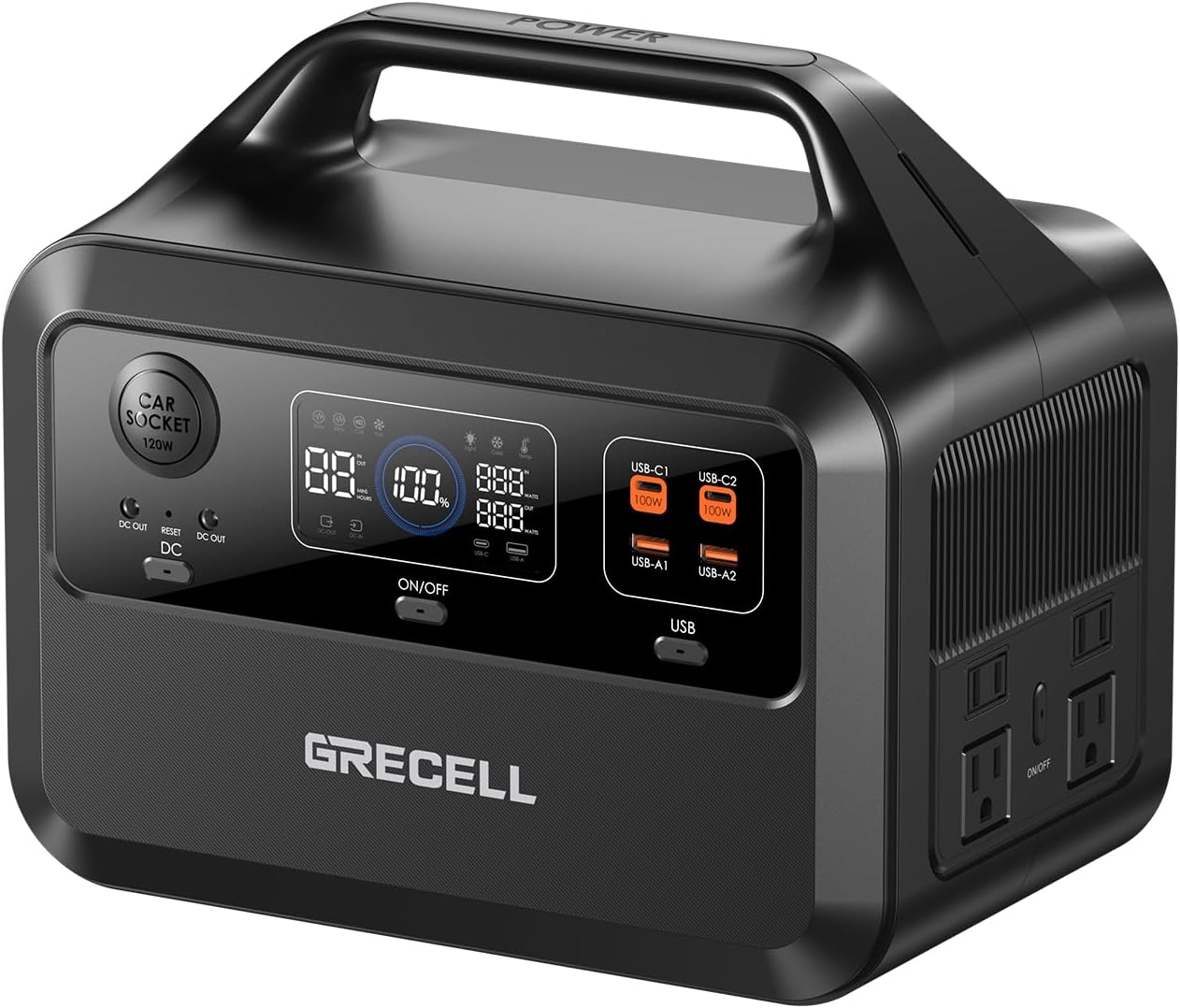
This image displays the overall design and layout of the GRECELL Portable Power Station 600, highlighting its compact form factor and integrated handle.
4.1. Pò ak Kontwòl

This image provides a detailed look at the various input and output ports available on the power station, including USB-A, USB-C, DC, Car Socket, and AC outlets.
- Car Socket (120W): Pou aparèy 12V DC.
- DC Sòti: Pou aparèy ki mache ak kouran dirèk.
- USB-A Output (USB-A1, USB-A2): Pou chaje smartphones, tablèt ak lòt aparèy USB.
- USB-C Output (USB-C1, USB-C2): Pou aparèy konpatib ak chaj rapid.
- AC Sòti: Standard household outlets for AC appliances.
- Ekspozisyon ekran: Montre nivo batri, dlo antre/sotitage, ak endikatè estati.
- Bouton pouvwa: Vire inite a sou / sou.
- Limyè bouton: Controls the built-in LED light with multiple modes (Yellow, Weak White, Strong White, SOS).
4.2. Montre Endikatè

This image highlights the detailed information provided on the power station's display screen, including battery level, output status, and various warning indicators.
- Endikatè nivo batri: Montre pousantaj batri ki rete atage.
- Estati Antre: Displays incoming power (e.g., from AC charger, solar panel, car charger).
- Estati Sòti: Shows power consumption for AC, DC, and USB outputs.
- Avètisman Tanperati: Indicates if the unit is operating outside safe temperature ranges.
- Fan Status: Shows when the cooling fan is active.
- SOS Mode & dirije limyè: Indicates the status of the built-in light.
5. Enstalasyon
Anvan premye itilizasyon an, li rekòmande pou chaje estasyon elektrik la nèt.
5.1. Premye Chajman
Connect the provided AC charger to the power station's input port and plug it into a wall outlet. The display will show the charging status. A full charge takes approximately 1.5 hours.

This image demonstrates the fast charging capability of the power station when connected to a standard AC wall outlet.
6. Operasyon Enstriksyon
6.1. Limen/Etenyen
Press and hold the Power button for 3 seconds to turn the unit on or off. The display screen will illuminate when the unit is on.
6.2. Chaje Aparèy
Once the power station is on, you can connect your devices to the appropriate output ports (AC, DC, USB-A, USB-C). Press the respective output button (e.g., AC button for AC outlets) to activate the port. The display will show the output wattage.

This image illustrates the versatility of the power station, showing it powering multiple essential devices simultaneously, such as a phone, laptop, lamp, and fan.
6.3. Rechaje Estasyon Elektrik la
The GRECELL Portable Power Station 600 can be recharged using multiple methods:
- AC miray priz: Chaj totalman nan apeprè 1.5 èdtan.
- Solar Panel (not included): Connect a compatible 100W or 200W solar panel. Charging time varies based on sunlight intensity, typically 2.5-3 hours.
- Chargeur machin: Fully charges in 2-2.5 hours using the 12V car charger cable.

This image demonstrates the flexible recharging options for the power station, including rapid charging from a wall outlet, solar charging for off-grid use, and convenient car charging.
6.4. Sèvi ak limyè LED la
Press the Light button to cycle through different lighting modes: Yellow Light, Weak White Light, Strong White Light, and SOS mode. Press and hold to turn off the light.

This image showcases the integrated LED light of the power station, highlighting its various illumination modes suitable for different outdoor and emergency scenarios.
7. Antretyen
Bon antretyen asire lonjevite ak pèfòmans optimal santral elektrik ou a.
- Depo: Sere aparèy la nan yon kote ki fre epi sèk, lwen limyè solèy dirèk ak tanperati ekstrèm. Pou depo alontèm, chaje aparèy la a 50-80% chak 3-6 mwa.
- Netwayaj: Sèvi ak yon twal sèk epi mou pou netwaye deyò aparèy la. Pa sèvi ak pwodui netwayaj abrazif oswa solvan.
- Swen batri: The LiFePO4 battery is designed for 3000+ charge cycles. Avoid fully discharging the battery frequently to extend its lifespan.

This image emphasizes the advanced LiFePO4 battery technology used in the power station, known for its extended lifespan of over 3000 charge cycles and robust safety features.
NAN. Depanaj
Si ou rankontre nenpòt pwoblèm, tanpri al gade pwoblèm ak solisyon komen sa yo:
| Pwoblèm | Kòz posib | Solisyon |
|---|---|---|
| Inite pa limen. | Batri a dechaje nèt. | Charge the unit using the AC charger. |
| Pa gen pwodiksyon nan pò AC/DC/USB yo. | Output port not activated; Overload protection triggered. | Press the corresponding output button to activate. Reduce load if overloaded. |
| Chaje a ap ralanti oswa li pa fonksyone. | Charger not properly connected; Solar panel not receiving enough sunlight; Car charger issue. | Ensure all connections are secure. Reposition solar panel for direct sunlight. Check car charger connection. |
| Inite a ap surchof. | Move vantilasyon; Twòp chay. | Ensure unit is in a well-ventilated area. Reduce connected load. |
9. Espesifikasyon
| Karakteristik | Detay |
|---|---|
| Non modèl | HW02 |
| Kalite batri | LiFePO4 |
| Kapasite | 460Wh |
| AC Sòti | 600W (1200W Onn) |
| Voltage | 110 Volts |
| Frekans | 60 Hz |
| USB-A Sòti | (Details not specified, assuming standard USB-A) |
| USB-C Sòti | (Details not specified, assuming 100W as per image) |
| DC Sòti | (Details not specified) |
| Sòti machin priz | 120W |
| Dimansyon (L x W x H) | 11.41"L x 7.48"L x 9.44"H |
| Pwa atik | 21.2 liv |
| Tan rechaje (AC) | Apeprè. 1.5 èdtan |
| Recharge Time (Car) | Apeprè. 2-2.5 èdtan |
| Tan Rechaje (Solè) | Approx. 2.5-3 hours (with compatible solar panel) |
10. Garanti ak sipò
GRECELL products come with a standard warranty. Please refer to the warranty card included in your package for specific terms and conditions. For technical support, troubleshooting assistance, or warranty claims, please contact GRECELL customer service through the following channels:
- Imèl: [Mete Imèl Sèvis Kliyan an Isit la, si li disponib]
- Websit: Visit the official GRECELL websit pou FAQ ak resous sipò.
- Magazen Amazon: Visit the GRECELL Store on Amazon
Please have your model number (HW02) and purchase information ready when contacting support.
Ask a question about this manual
Ask about setup, troubleshooting, compatibility, parts, safety, or missing instructions. Manuals+ will review the question and use this page’s manual context to help answer it.