
1. Entwodiksyon
This manual provides essential instructions for the safe and effective operation of your Fujifilm S4500 and S4530 Compact Digital Camera. Please read this manual thoroughly before using the camera and keep it in a safe place for future reference. The Fujifilm S4500/S4530 is equipped with a 14MP CCD sensor, a 30x optical zoom Fujinon lens, and is capable of recording 720p HD movies.
2. Pwodwi souview
Familyarize w ak konpozan prensipal kamera w la.
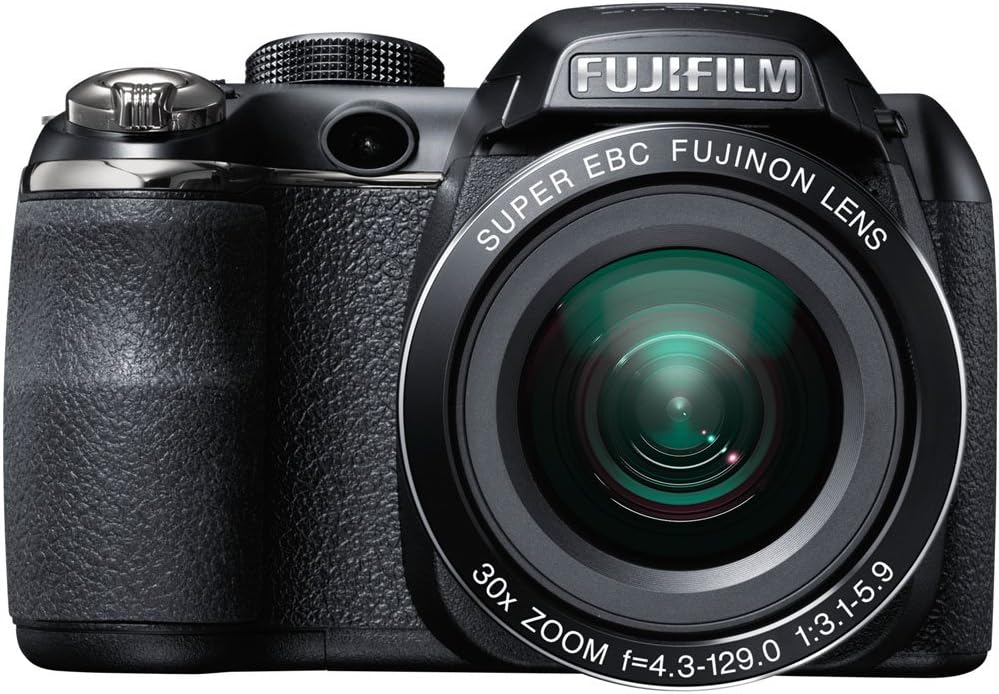
Figi 2.1: Devan view of the Fujifilm S4500/S4530 camera with the built-in flash in the raised position, showcasing the Fujinon 30x optical zoom lens.

Figi 2.2: Devan view of the Fujifilm S4500/S4530 camera with the built-in flash in the lowered position, highlighting the lens barrel and grip.

Figi 2.3: Side view of the Fujifilm S4500/S4530 camera, showing the ergonomic grip and control layout.
Konpozan kle:
- Lantiy: Fujinon 30x Optical Zoom Lens (24-720mm equivalent).
- Flash: Built-in pop-up flash.
- Ekspozisyon LCD: 3-inch, 230,000-dot screen for viewing ak navigasyon meni.
- ViewChèche: Elektwonik ViewChèche (EVF).
- Kontwole Dial: For selecting shooting modes.
- Bouton vole: Pou pran foto.
- Levier Zoom: Kontwole zoom optik ak dijital.
3. Enstalasyon
3.1. Mete pil
- Louvri kouvèti konpatiman batri a ki sitiye anba kamera a.
- Insert four (4) AA alkaline batteries, ensuring correct polarity (+/-) as indicated inside the compartment.
- Fèmen kouvèti lòj batri a byen.
3.2. Mete yon kat memwa
- Louvri kouvèti fant kat memwa a, ki anjeneral sitiye sou bò oswa anba kamera a.
- Insert an SD, SDHC, or SDXC memory card with the label facing the correct direction until it clicks into place.
- Fèmen kouvèti fant kat memwa a byen fèm.
3.3. Premye Limen ak Anrejistreman Dat/Lè
- Peze a ON/OFF bouton pou pouvwa sou kamera a.
- The first time you power on, you will be prompted to set the date and time. Use the directional buttons to navigate and the MENI / OK bouton pou konfime.
- Swiv enstriksyon ki sou ekran an pou konplete konfigirasyon inisyal la.
4. Operasyon Enstriksyon
4.1. Pran foto
- Limen kamera a.
- Select a shooting mode using the mode dial (e.g., OTO for automatic settings).
- Ankadre foto ou a lè l sèvi avèk monitè LCD a oswa elektwonik la viewChèche.
- Sèvi ak levye zoom nan pou ajiste longè fokal la.
- Peze bouton deklanchè a mwatye pou fè fokus. Kad fokus la ap vin vèt lè ou fin fè fokus la.
- Peze bouton deklanchè a nèt pou pran foto a.
4.2. Anrejistreman videyo
- Turn the mode dial to the movie recording setting (often indicated by a film camera icon).
- Ankadre sijè ou a.
- Peze bouton anrejistreman fim nan (si li disponib) oubyen bouton deklanche a pou kòmanse anrejistreman an.
- Press the button again to stop recording. The camera records in 720p HD resolution.
4.3. lèktur
- Peze a JWE bouton pou antre nan mòd lecture.
- Sèvi ak bouton direksyon yo pou defile nan foto ak videyo ou yo.
- Peze MENI / OK pou view options for the selected image/video.
4.4. Mòd Flash
The camera offers various flash modes, including Auto and Red Eye Reduction. To change the flash mode, press the flash button (often indicated by a lightning bolt icon) and use the directional buttons to select your desired mode from the on-screen menu.
5. Antretyen
5.1. Netwaye Kamera a
- Lantiy: Use a soft, lint-free cloth or a lens brush to gently remove dust. For smudges, use a specialized lens cleaning solution applied to the cloth, not directly to the lens.
- Ekspozisyon LCD: Siye dousman avèk yon twal mou epi sèk. Evite peze twò fò.
- Kò kamera: Use a soft, dry cloth to wipe away dust and fingerprints. Do not use organic solvents or strong cleaning agents.
5.2. Swen batri
- Retire pil yo lè ou pa pral itilize kamera a pou yon peryòd tan pwolonje pou anpeche flit.
- Sere pil yo nan yon kote ki fre, sèk.
- Replace all four AA batteries at the same time with new ones for optimal performance.
5.3. Depo
When storing the camera, ensure it is turned off, and the lens cap is attached. Store in a dry, well-ventilated area away from direct sunlight, high temperatures, and humidity.
NAN. Depanaj
| Pwoblèm | Solisyon |
|---|---|
| Kamera a pa limen. | Check if batteries are inserted correctly and are fully charged. Replace with new AA batteries if necessary. |
| Imaj yo flou. | Ensure the lens is clean. Press the shutter button halfway to allow the camera to focus before taking the shot. Check if the camera is in a suitable shooting mode for the lighting conditions. |
| Flash la pa tire. | Check the flash mode settings. Ensure the flash is raised if it is a pop-up type. The flash may not fire if the battery level is low. |
| Erè kat memwa. | Ensure the memory card is inserted correctly. Try formatting the card (this will erase all data). If the problem persists, try a different memory card. |
| Pa ka anrejistre videyo. | Ensure the camera is in video recording mode. Check if there is sufficient space on the memory card. |
7. Espesifikasyon
| Karakteristik | Detay |
|---|---|
| Non modèl | Fujifilm S4500 / S4530 |
| Capteur Imaj | 14 megapiksèl 1/2.3 pous CCD |
| Lantiy | Fujinon 30x Zoom optik (ekivalan a 24-720mm) |
| Zoom dijital | Jiska 6.7 fwa |
| Estabilizasyon Imaj | Stabilizasyon estati dijital |
| LCD Display | 3.0 pous, 230,000 pwen |
| Anrejistreman videyo | 720p HD (MP4 format) |
| Medya Depo | SD / SDHC / SDXC memory cards |
| ISO sansiblite | Auto, 100, 200, 400, 800, 1600, 3200, 6400 (expanded to 51200) |
| Vitès vole | 8 segonn pou rive 1/2000 segonn |
| Pwovizyon pou pouvwa | 4x AA pil alkalin |
| Koneksyon | HDMI, USB |
| Dimansyon (apeprè) | 1.2 Pounds (Item Weight) |
8. Garanti ak sipò
This Fujifilm S4500/S4530 camera typically comes with a 90-day limited warranty. Please refer to your purchase documentation for specific warranty terms and conditions. For technical support or service inquiries, please contact Fujifilm customer service or the retailer from whom the product was purchased.