
ALLIMITY RC45162
ALLIMITY RC45162 Voice Remote Control User Manual
Model: MME-RC45162-NP
Compatible with Panasonic TV models: TX-65MX700E, TX-65MX710E, TX-43MX700E, TX-55MX710E, TX-50MX710E, TX-55MX700E
1. Entwodiksyon
This manual provides instructions for the ALLIMITY RC45162 Voice Remote Control. This remote is designed to be fully compatible with various Panasonic TV models, offering a direct replacement experience without complex setup procedures. Its ergonomic design ensures comfortable handling and reliable performance for controlling your television.
2. Enstalasyon
2.1 Enstalasyon batri
The ALLIMITY RC45162 remote control requires batteries for operation. Please follow these steps to install them:
- Jwenn kouvèti lòj batri a sou do kontwòl remote la.
- Slide or press the latch to open the battery compartment.
- Insert the required Lithium batteries, ensuring the positive (+) and negative (-) terminals align correctly with the markings inside the compartment.
- Fèmen kouvèti lòj batri a byen.
Note: This remote control requires no programming or complex installation. Once batteries are correctly inserted, it is ready for use with compatible Panasonic TV models.

Imaj: Dèyè view of the remote control, highlighting the battery compartment for easy access and installation.
3. Operasyon Enstriksyon
The ALLIMITY RC45162 remote control is designed for intuitive use. Below are the primary functions:
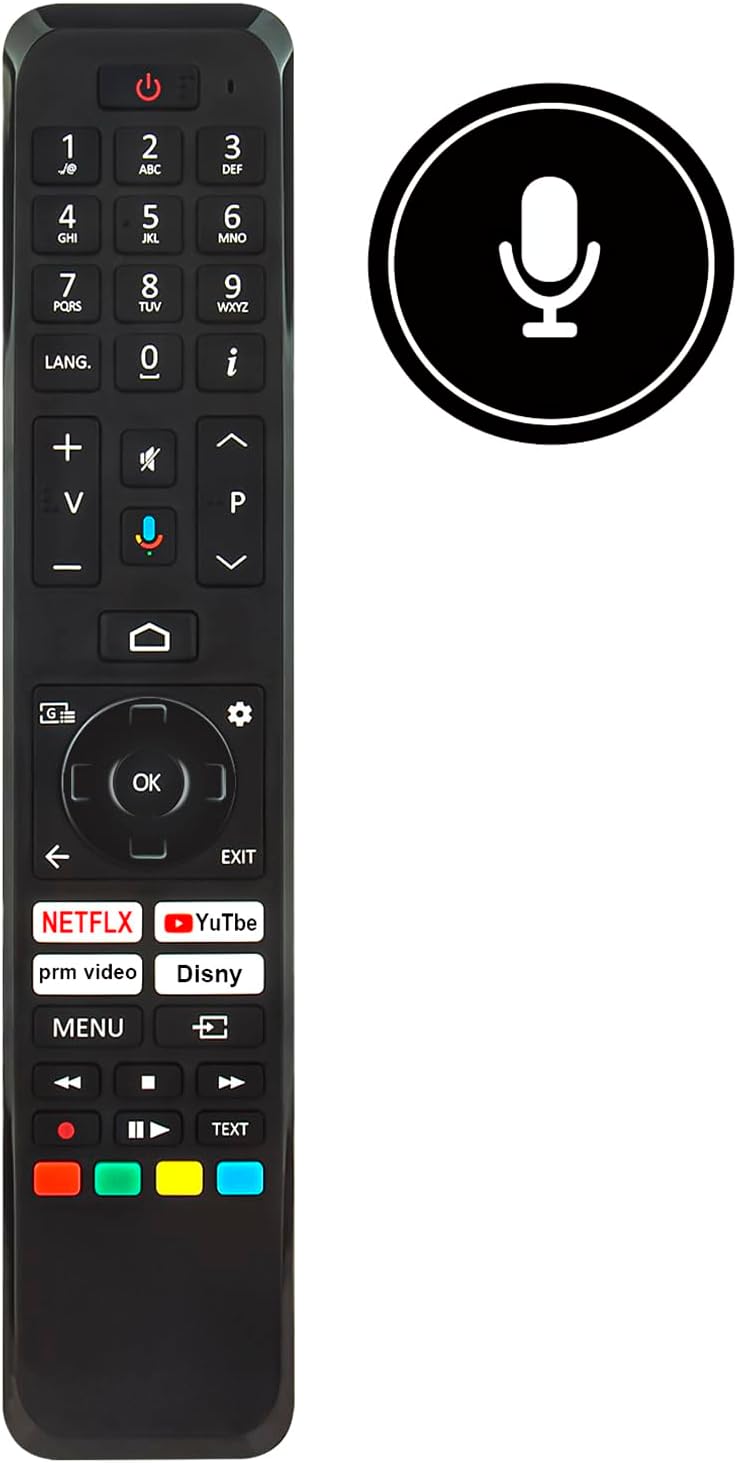
Imaj: Devan view of the ALLIMITY RC45162 remote control, displaying the full button layout.
3.1 Fonksyon debaz
- Bouton pouvwa (U): Limen oswa etenn televizyon an.
- Bouton nimewo (0-9): Chwazi chanèl yo dirèkteman.
- Volim monte/desann (+/-): Ajiste volim televizyon an.
- Channel Up/Down (P^/P<): Chanje chanèl televizyon yo.
- Bouton bèbè: Aktive oubyen dezaktive son televizyon an.
- Pavé navigasyon (Anwo, Anba, Agoch, Adwat, OK): Itilize pou navige nan meni yo epi konfime seleksyon yo.
- Back Button (<): Retounen nan meni oswa ekran anvan an.
- Bouton Sòti: Kite meni oswa aplikasyon aktyèl la.
- Bouton Kay: Aksè ekran prensipal televizyon an oswa koòdone televizyon entelijan an.
3.2 Karakteristik espesyal
- Voice Control Button (Microphone icon): Activates the voice control feature. Press and hold this button, then speak your command clearly into the remote. Release the button when finished.
- Bouton Aksè Rapid: Dedicated buttons for popular streaming services such as Netflix, YouTube, Prime Video, and Disney+ for direct access.
- LANG. Button: For language selection or audio track changes.
- Info Button (i): Montre enfòmasyon sou pwogram oswa antre aktyèl la.
- Bouton meni: Aksè nan meni prensipal paramèt televizyon an.
- Bouton ki gen koulè (wouj, vèt, jòn, ble): These buttons often correspond to specific functions within TV menus or applications, as indicated on the screen.
4. Antretyen
4.1 Netwayaj
Pou kenbe aparans ak fonksyonalite kontwòl remote la:
- Siye telekòmand lan ak yon twal mou epi sèk.
- Pou pousyè tè ki difisil pou retire, yon ti kras dampht twal la ak dlo oswa yon pwodui netwayaj dou, ki pa abrazif.
- Avoid using harsh chemicals, solvents, or abrasive materials, as these can damage the remote's surface or internal components.
4.2 Ranplasman batri
Replace batteries when the remote control's response becomes sluggish or stops working. Always replace all batteries at the same time with new ones of the same type. Do not mix old and new batteries or different types of batteries.
4.3 Depo
Si ou pa pral itilize kontwòl remote la pou yon peryòd tan pwolonje, retire pil yo pou evite flit ak domaj potansyèl nan aparèy la.
NAN. Depanaj
If you encounter issues with your ALLIMITY RC45162 remote control, please refer to the following common solutions:
- Remote pa reponn:
- Tcheke si pil yo byen mete epi yo gen ase chaj. Ranplase yo si sa nesesè.
- Asire w pa gen okenn obstak ant kontwòl remote la ak detèktè enfrawouj televizyon an.
- Dirije telekòmand lan dirèkteman nan direksyon televizyon an.
- Kontwòl vwa a pa fonksyone:
- Ensure you are pressing and holding the voice control button while speaking.
- Pale klè epi nan yon volim nòmal.
- Check your TV's settings to ensure voice control is enabled and configured correctly.
- Repons limite oswa tanzantan:
- Replace the batteries. Low battery power can affect signal strength.
- Ensure the remote is within the maximum operating range (up to 10 meters).
- Minimize sources of infrared interference, such as direct sunlight or strong artificial light.
6. Espesifikasyon

Imaj: Devan ak bò view of the remote control, illustrating its dimensions for reference.
| Mak | ALIMITE |
| Non / Nimewo Modèl | MME-RC45162-NP |
| Karakteristik espesyal | Ergonomik |
| Koulè | Nwa/Blan |
| Max Kantite Aparèy Sipòte | 10 |
| Aparèy konpatib | TX-65MX700E, TX-65MX710E, TX-43MX700E, TX-55MX710E, TX-50MX710E, TX-55MX700E |
| Koneksyon Teknoloji | Enfrawouj |
| Kalite kontwolè | Enfrawouj kontwòl |
| Maksimòm Range | 10 mèt |
| Kalite batri | Lityòm |
| Pwa atik | 59 gram |
7. Enfòmasyon sou Garanti
This product is typically covered by a standard manufacturer's warranty. For specific details regarding warranty duration, coverage, and claims, please refer to the documentation provided at the time of purchase or contact your retailer. Extended warranty options may be available from third-party providers.
8. Sipò
For further assistance or if you have questions not covered in this manual, please contact the seller or the manufacturer directly. You may find contact information on the product packaging or the retailer's websit.
Ask a question about this manual
Ask about setup, troubleshooting, compatibility, parts, safety, or missing instructions. Manuals+ will review the question and use this page’s manual context to help answer it.