
1. Entwodiksyon
This manual provides detailed instructions for the installation, operation, and maintenance of your Junsun 11.5-inch Touch Screen Car Radio Stereo. This unit is designed to enhance your in-car entertainment and navigation experience with features such as wireless CarPlay, Android Auto, GPS, and Bluetooth connectivity. Please read this manual thoroughly before installation and use to ensure proper function and safety.
Modèl machin ki aplikab yo:
- Jeep Wrangler: 2007-2018
- Jeep Compass: 2009-2016
- Jeep Patriot: 2009-2016
- Jeep Grand Cherokee: 2005-2011
- Jeep Liberty: 2008-2011
- Jeep Commander: 2008-2011
- Chrysler Sebring: 2007-2010
- Chrysler Town&Country: 2007-2010
- Dodge Grand Caravan: 2011-2014
- Dodge Charger: 2008-2010
- Dodge Ram Pickup 1500/2500/3500: 2009-2012

Image 1.1: The Junsun 11.5-inch Touch Screen Car Radio Stereo installed in a vehicle dashboard.
2. Enfòmasyon sou Sekirite
- Always operate the device responsibly. Distracted driving can lead to accidents.
- Ensure all wiring is correctly connected to prevent electrical shorts or damage.
- Pa eseye demonte oswa modifye aparèy la. Sa ka anile garanti a epi lakòz domaj.
- Kenbe ekran an pwòp epi san obstak pou yon vizibilite klè.
- Konsilte yon pwofesyonèl pou enstalasyon an si ou pa sèten sou nenpòt etap.
3. Pake kontni
Verifye ke tout konpozan yo prezan nan pake a anvan ou kòmanse enstalasyon an:
- 11.5-inch Car Radio Stereo Unit
- Mikwofòn
- GPS Modil
- USB kab (x2)
- 4G Antenna (for 4G-Model, if applicable)
- Can Bus Box
- Power Cable (Plug and Play harness)
- RCA Cable Set
- Reversing Line (for optional backup camera)
- Tournvis
- Crowbar (pou retire tay)
- Kab adaptè antèn
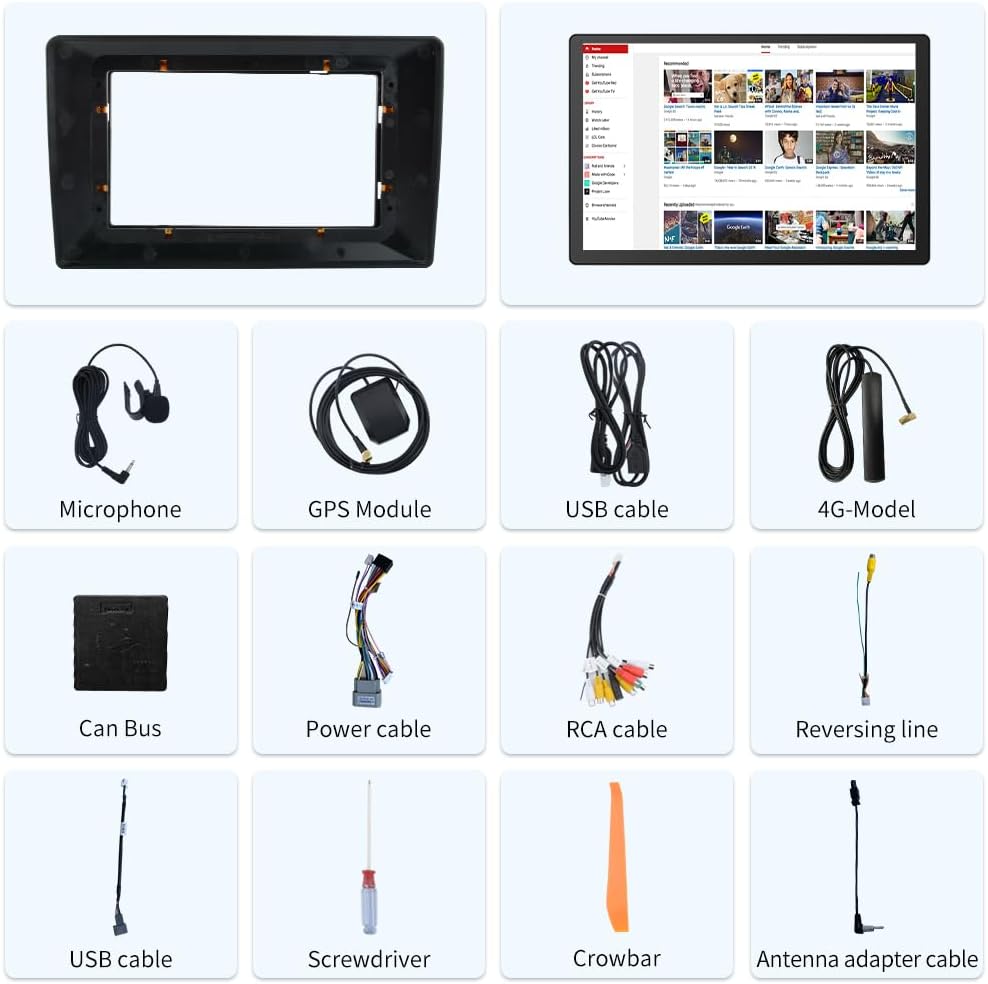
Image 3.1: Included components of the Junsun 11.5-inch Car Radio Stereo package.
4. Enstalasyon ak Enstalasyon
The Junsun car radio stereo is designed for dashboard mounting and features a plug-and-play power harness for simplified installation. It supports existing steering wheel controls and factory backup cameras in compatible vehicles.
4.1 Koneksyon fil elektrik
Refer to the wiring diagram below for proper connection of all cables. Ensure all connections are secure before powering on the unit.
- Fil elektrik: Connect the plug-and-play power harness to your vehicle's wiring.
- GPS Modil: Connect the GPS module and position it in a location with a clear view nan syèl la pou yon resepsyon siyal optimal.
- Câbles USB: Connect the provided USB cables for external device connectivity.
- Kab RCA: Use the RCA cable set for audio/video input/output connections, including front camera input, video output, auxiliary input, and subwoofer output.
- Mikwofòn: Connect the external microphone for improved call quality and voice commands.
- Adaptè Antèn: Connect your vehicle's radio antenna using the provided adapter.
- Can Bus Box: Connect the Can Bus box to enable integration with vehicle features like steering wheel controls.

Image 4.1: Wiring diagram for the Junsun 11.5-inch Car Radio Stereo.
4.2 Premye Limen ak Konfigirasyon
After installation, turn on your vehicle's ignition. The unit should power on automatically. Follow the on-screen prompts for initial setup, including language selection and time zone settings.
5. Operasyon Enstriksyon
5.1 Ekspozisyon ak Entèfas
The unit features an 11.5-inch touch screen with a resolution of 2000*1200 pixels, providing a clear and responsive interface.

Image 5.1: Display resolution comparison for the 11.5-inch screen.
5.2 CarPlay san fil ak Android Auto
Connect your smartphone wirelessly via Bluetooth to access CarPlay or Android Auto. This allows for voice control and integration of phone functions such as music, navigation, calls, and messages directly on the car stereo display.
- Peyaj: Enable Bluetooth on your smartphone and the car stereo. Select your phone from the stereo's Bluetooth menu to pair.
- Aktivasyon: Once paired, CarPlay or Android Auto should automatically launch or be selectable from the main menu.

Image 5.2: CarPlay and Android Auto interfaces.
5.3 Navigasyon GPS
The unit includes a built-in GPS module that supports both online and offline navigation applications from the Google Play app market. Ensure the GPS antenna is properly installed for accurate positioning.
- Navigasyon sou entènèt: Requires a Wi-Fi connection or mobile hotspot for real-time traffic data and map updates.
- Navigasyon Offline: Download maps for offline use to navigate without an internet connection.

Image 5.3: GPS Navigation interface.
5.4 Koneksyon Bluetooth
Utilize Bluetooth for hands-free calling and audio streaming. The built-in microphone allows for clear communication during calls.
- Apèl men lib: Pair your phone to make and receive calls directly from the stereo.
- Bluetooth Mizik: Stream audio from your paired device to the car stereo.

Image 5.4: Bluetooth phone and music interface.
5.5 Kontwòl Volan
The unit supports integration with your vehicle's existing steering wheel controls, allowing you to manage audio and calls without taking your hands off the wheel. Configuration may be required in the settings menu.

Image 5.5: Steering wheel control functionality.
5.6 FM Radyo
Access local radio stations with the built-in FM tuner. Scan for stations and save your favorites for quick access.

Image 5.6: FM Radio interface.
5.7 Fonksyonalite Ekran Fann
Fonksyon ekran divize a pèmèt ou egzekite de aplikasyon an menm tan sou ekran an, tankou navigasyon ak lekti mizik.

Image 5.7: Split Screen mode.
5.8 Audio Equalizer (DSP)
Adjust audio settings using the built-in Digital Sound Processor (DSP) and equalizer to customize your sound experience.

Image 5.8: Built-in DSP and Equalizer interface.
6. Antretyen
- Netwayaj ekran: Sèvi ak yon twal mou ki pa gen pousyè pou netwaye ekran taktil la. Pou tach ki difisil pou retire, siye l yon ti kras.ampLave twal la avèk dlo oswa yon pwodui netwayaj ki pa danjere pou ekran. Evite materyèl abrazif oswa pwodui chimik ki agresif.
- Netwayaj jeneral: Keep the unit and surrounding dashboard area free from dust and debris.
- Mizajou lojisyèl: Periodically check for available software updates to ensure optimal performance and access to new features. Updates can typically be found through the unit's settings menu or the manufacturer's websit.
NAN. Depanaj
If you encounter issues with your Junsun car radio stereo, refer to the following common troubleshooting steps:
| Pwoblèm | Kòz posib | Solisyon |
|---|---|---|
| Aparèy pa limen. | Incorrect wiring, blown fuse, vehicle ignition off. | Check power cable connections. Verify vehicle ignition is on. Inspect vehicle fuses. |
| Pa gen son. | Volim nan twò ba, silans aktive, fil elektrik oratè a pa kòrèk. | Increase volume. Check if mute is active. Verify speaker connections. |
| Siyal GPS la pèdi oswa li pa egzak. | Antèn GPS la mal plase oswa dekonekte. | Asire w ke antèn GPS la gen yon vizyon klè. view nan syèl la epi li konekte byen fèm. |
| Koneksyon Bluetooth la pa estab. | Interference, phone too far, software glitch. | Ensure phone is close to the unit. Re-pair the Bluetooth device. Restart both devices. |
| Kontwòl volan an pa fonksyone. | Can Bus box not connected, incorrect configuration. | Verify Can Bus box connection. Check steering wheel control settings in the unit's menu. Some vehicles may require specific configuration. |
| CarPlay/Android Auto pa konekte. | Bluetooth issue, phone compatibility, software glitch. | Ensure Bluetooth is active and paired. Restart phone and stereo. Check phone compatibility with CarPlay/Android Auto. |
8. Espesifikasyon
| Karakteristik | Detay |
|---|---|
| Gwosè ekspozisyon | 11.5 pous |
| Rezolisyon ekran | 2000 * 1200 |
| Sistèm operasyon | Android |
| Koneksyon Teknoloji | Bluetooth |
| Karakteristik espesyal | Touchscreen |
| Kalite aliye | Dach mòn |
| Audio Sòti Mode | Stereo |
| Kòmandman vwa | Mikwofòn, ekran taktil |
| Kalite kat jeyografik | Amerik di Nò |
| Pwa atik | 4.69 liv |
| Dimansyon pake | 13.58 x 11.42 x 6.57 pous |
9. Garanti ak sipò
9.1 Enfòmasyon sou Garanti
This Junsun car radio stereo comes with a 1-ane garanti from the date of purchase. Please retain your proof of purchase for warranty claims. The warranty covers manufacturing defects but does not cover damage caused by improper installation, misuse, accidents, or unauthorized modifications.
9.2 Sipò teknik
For technical assistance, installation questions, or troubleshooting beyond what is covered in this manual, please contact Junsun Car Electronics directly. You can typically find contact information on the seller's page where you purchased the product or through the official Junsun websit.

Image 9.1: How to contact Junsun Car Electronics for support.