
Entwodiksyon
Thank you for choosing the Enzemit G10 Z Smart Glasses. These audio sunglasses combine visual protection with integrated sound functionality, allowing for music playback, hands-free calls, and voice assistant access. This manual provides essential information for the proper setup, operation, and maintenance of your device.

Imaj: Yon ang devan view of the Enzemit G10 Z Smart Glasses, showcasing konsepsyon yo.
Kontni pake
Tanpri verifye ke tout atik yo prezan nan pakè ou a:
- 1 x Enzemit G10 Z Smart Glasses
- 1 x kab chaje
- 1 x twal pou netwaye linèt
- 1 x Glasses Storage Box
- 1 x Manyèl Itilizatè (dokiman sa a)
Enfòmasyon sou Sekirite
Read all safety instructions before using the product to prevent injury or damage. Keep this manual for future reference.
- Do not expose the glasses to extreme temperatures, moisture, or corrosive substances.
- Avoid disassembling or modifying the device, as this may void the warranty and cause damage.
- Sèvi sèlman ak kab chaje ki vini ak li a oswa yon kab ekivalan sètifye.
- Kenbe soti nan atenn timoun yo.
- Do not use the glasses in situations where reduced situational awareness could be dangerous (e.g., driving in complex traffic, operating heavy machinery).
Enstalasyon
1. Charging the Smart Glasses
Before first use, fully charge your Enzemit G10 Z Smart Glasses.
- Connect the provided charging cable to the magnetic charging port on the glasses.
- Konekte lòt bout kab la nan yon adaptè kouran USB (pa enkli) oubyen nan yon pò USB òdinatè.
- The charging indicator light will illuminate. Charging typically takes approximately 1.5 to 2 hours.
- Once fully charged, the indicator light may change or turn off. Disconnect the glasses from the charger.

Image: The magnetic charging connection point on the arm of the smart glasses.

Image: An illustration showing the internal battery and estimated usage times: 4 hours music play, 5 hours phone call, 1.5-2 hours recharging, and 100 hours standby.
2. Powering On / Off
- Pouvwa sou: Tap and hold the touch control area on the temple for approximately 2 seconds until you hear a power-on prompt.
- Pouvwa Off: Tap and hold the touch control area on the temple for approximately 5 seconds until you hear a power-off prompt.
3. Pè Bluetooth
To connect your smart glasses to a smartphone or other Bluetooth-enabled device:
- Ensure the glasses are powered on and in pairing mode (indicated by a flashing LED or audio prompt).
- Sou telefòn entelijan ou an, ale nan paramèt Bluetooth yo.
- Chèche pou available devices. The glasses should appear as "G10 Z" or similar.
- Select the glasses to pair. Once connected, you will hear a confirmation sound.

Image: An illustration showing the Enzemit G10 Z Smart Glasses wirelessly connected to a smartphone, indicating music playback and phone call functionality.
Enstriksyon Operasyon
Kontwòl manyen
The Enzemit G10 Z Smart Glasses feature intuitive touch controls located on the temples. Refer to the diagram below for specific functions:

Image: A diagram illustrating the touch control functions on the smart glasses: ON/OFF (tap for 2s to switch on, 5s to switch off), Voice Assistant (tap for 2s), Pause/Play (one tap), Phone Call (tap on right temple), Hang Off (one tap), Reject (tap on left temple).
- Limen/Etenyen: Tap and hold for 2 seconds to power on, tap and hold for 5 seconds to power off.
- Jwe/Poz Mizik: One tap on either temple.
- Reponn/Fen Apèl: One tap on the right temple to answer, one tap on either temple to hang off.
- Rejte apèl: Tap on the left temple.
- Aktive Asistan Vwa a (Siri/Asistan Google): Tape epi kenbe pou 2 segonn.
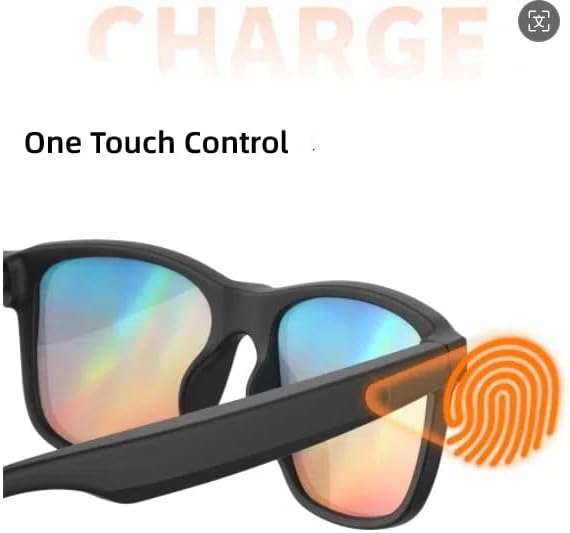
Image: An illustration highlighting the "One Touch Control" area on the temple of the smart glasses, indicated by a fingerprint icon.
Karakteristik odyo
The G10 Z Smart Glasses feature an open-ear audio design, allowing you to hear your surroundings while enjoying audio.
- Lektur Mizik: Stream audio from your connected device.
- Apèl men lib: The built-in microphone allows for clear communication during calls.
- Asistan vwa: Access your smartphone's voice assistant (e.g., Siri) for commands and information.
Karakteristik lantiy
- Lantiy polarize UV400: These lenses block harmful UVA/UVB rays, providing eye protection and reducing glare.
- Blokaj Limyè Ble: The lenses are designed to reduce exposure to blue light, which can help minimize eye strain.

Image: A collage showing various usage scenarios for the smart glasses (driving, running, hiking) and an exploded view of the lens layers demonstrating eye protection features.
Antretyen
Netwayaj
- Use the provided glasses cleaning cloth to gently wipe the lenses and frame.
- For stubborn smudges, use a lens cleaning spray specifically designed for eyewear. Do not use harsh chemicals or abrasive materials.
- Avoid getting water directly into the electronic components.
Depo
- When not in use, store the glasses in the provided protective case to prevent scratches and damage.
- Sere nan yon kote ki fre, sèk lwen limyè solèy la dirèk ak tanperati ekstrèm.
Swen batri
- Pou pwolonje lavi batri a, evite dechaje batri a nèt souvan.
- If storing for an extended period, charge the battery to about 50% every few months.
Depanaj
If you encounter issues with your Enzemit G10 Z Smart Glasses, please refer to the following common solutions:
| Pwoblèm | Solisyon posib |
|---|---|
| Pa ka limen | Asire w batri a chaje. Konekte l nan plato a epi eseye ankò. |
| Pa ka konekte via Bluetooth |
|
| Pa gen son oswa volim ki ba |
|
| Pwoblèm chaje |
|
Espesifikasyon
| Karakteristik | Detay |
|---|---|
| Modèl | G10 Z |
| Koneksyon | Bluetooth V5.3 + EDR |
| Pwotokòl Bluetooth | HFP, HSP, A2DP, AVRCP |
| Distans Koneksyon | Approx. 10-15 meters (32.81-49.21 ft) |
| Mikwofòn | Bati-an |
| Kalite batri | Bati-an 160mAh Lityòm-ion batri |
| Tan lèktur Klas Mizik | Apeprè 4 èdtan |
| Tan pale | Apeprè 5 èdtan |
| Tan pou chaje | Apeprè 1.5-2 èdtan |
| Tan sibstiti | Apeprè 100 èdtan |
| Karakteristik lantiy | UV400 Polarized, Blue Light Blocking |
| Materyèl ankadreman | TR (Thermoplastic Rubber) |

Image: A technical drawing showing the dimensions of the Enzemit G10 Z Smart Glasses, including front width (141mm), lens width (40mm), temple length (155mm), and total frame width (157mm).
Garanti ak sipò
Enzemit products are designed for quality and reliability. This product comes with a standard manufacturer's warranty against defects in materials and workmanship. Please refer to the warranty card included in your package or contact customer support for specific warranty terms and conditions.
For technical support, troubleshooting assistance, or warranty claims, please contact Enzemit customer service through the retailer where you purchased the product or visit the official Enzemit websit pou enfòmasyon kontak.
Manifakti: Shenzhen Gonbes Teknoloji Co., Ltd