
Iceman RJ56-CU-100
Iceman Commercial Ice Maker Machine User Manual
Modèl: RJ56-CU-100
1. Pwodwi souview
The Iceman Commercial Ice Maker Machine is designed to provide a consistent supply of ice for commercial and home use. It features a high daily ice production capacity and a substantial storage bin, making it suitable for restaurants, bars, offices, and large households. The unit is equipped with an intuitive control panel and a self-cleaning function for ease of use and maintenance.
Karakteristik kle:
- Produces up to 100 lbs of ice daily.
- 30 lbs ice storage bin capacity.
- Three selectable ice cube sizes.
- Intuitive control panel with LED alerts.
- Fonksyon pwòp tèt ou netwayaj.
- Durable stainless-steel finish.
- Includes ice scoop with interior mount.

2. Enstriksyon Sekirite
Please read all safety instructions carefully before operating the ice maker. Failure to follow these instructions may result in electric shock, fire, or property damage.
- Sekirite elektrik: Ensure the unit is connected to a grounded 120V/270W power outlet. Do not use extension cords.
- Pwovizyon dlo: A dedicated cold water supply line is required. Ensure all water connections are secure to prevent leaks.
- Drenaj: The unit requires a gravity (floor) drain. Ensure the drain hose is properly connected and positioned to allow for continuous drainage.
- Enstalasyon: Professional installation is required for this appliance to ensure proper water and drain connections and electrical safety.
- Vantilasyon: Asire w ke gen ase espas toutotou inite a pou bon vantilasyon pou anpeche li chofe twòp.
- Netwayaj: Toujou deploge aparèy la anvan ou netwaye oswa fè nenpòt antretyen.
- Timoun ak bèt kay: Kenbe timoun ak bèt kay lwen aparèy la pandan l ap opere epi pandan l ap fè antretyen.
3. Ki sa ki nan bwat la
Lè w ap debale l, tanpri verifye si tout konpozan ki nan lis anba a yo la epi yo pa domaje:
- Iceman Commercial Ice Maker Machine
- Gid itilizatè (dokiman sa a)
- Ice Scoop with Mount
- Kawoutchou Drenaj
4. Enstalasyon
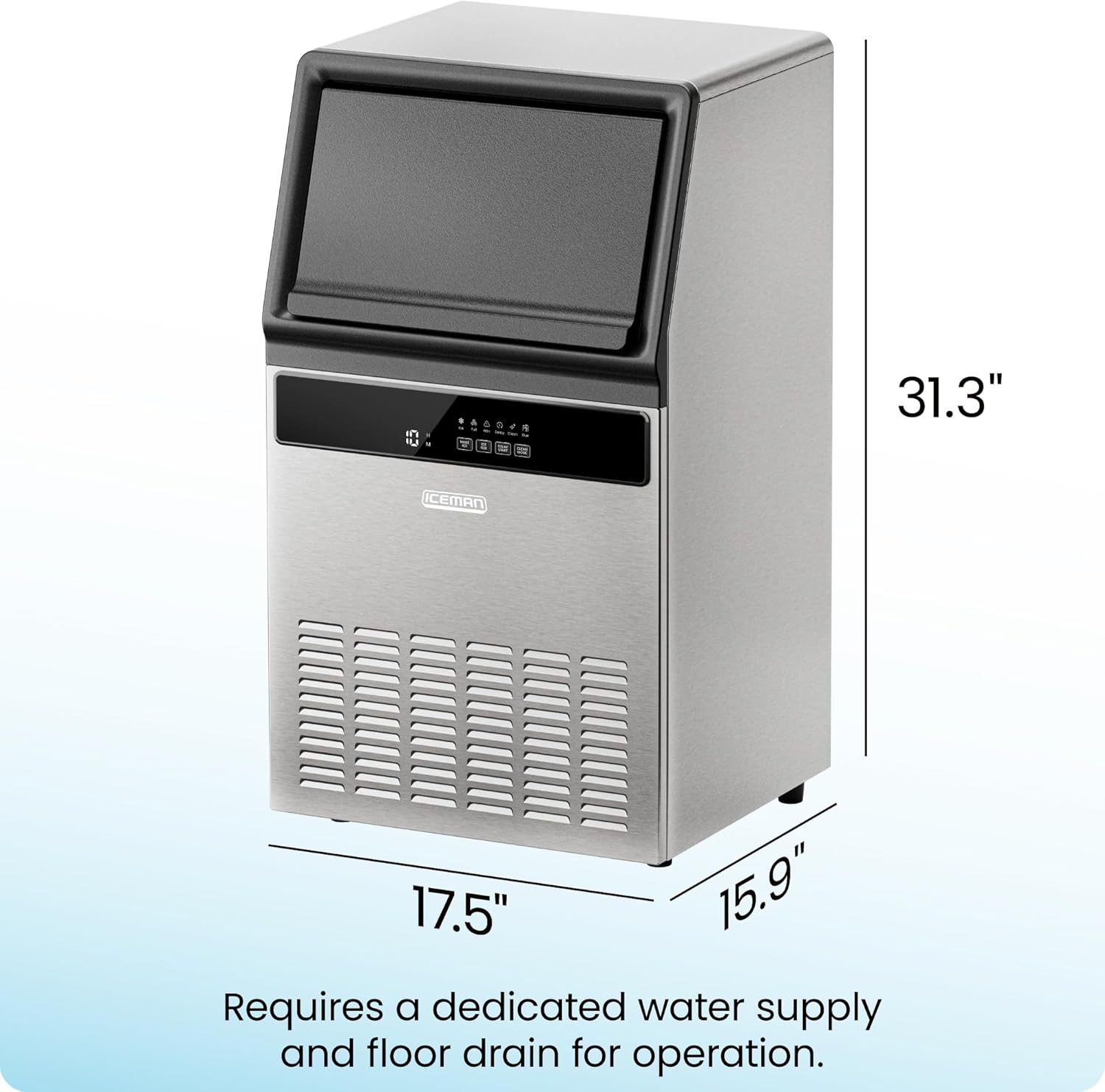
The Iceman Commercial Ice Maker Machine is designed for freestanding or undercounter installation. Due to the water and drain requirements, professional installation is recommended.
Kondisyon pou enstalasyon:
- Kote: Choose a stable, level surface capable of supporting the unit's weight. Ensure the location allows for proper ventilation and access to power, water, and drain connections.
- Pwovizyon dlo: A dedicated cold water supply line with a shut-off valve must be available within close proximity to the installation site.
- Drenaj: A gravity (floor) drain is essential for continuous operation. The included drain hose connects the ice maker to this drain.
- Elektrik: A grounded 120V/270W electrical outlet is required.
5. Operasyon Enstriksyon
Once properly installed and connected, the Iceman Commercial Ice Maker is ready for operation.
Pwodiksyon glas:
- The machine can produce up to 100 pounds of ice per day.
- The internal storage bin can hold up to 30 pounds of ice.
- Ice is produced approximately every 10-15 minutes.

Fonksyon panèl kontwòl:
The control panel features an LED display and several buttons for easy operation.

- MAKE ICE: Starts or stops the ice-making cycle.
- ICE SIZE: Allows selection from three different ice cube sizes (small, medium, large).
- RANSE K STARTMANSE: Initiates a timer before the ice-making process begins.
- MÒD CLEAN: Aktive fonksyon oto-netwayaj la.
Endikatè ki ap dirije: The control panel includes LED alerts for various statuses:
- Glas: Indicates ice production is active.
- Plen: Alerts when the ice storage bin is full.
- Attn: General attention/warning indicator.
- Reta: Indicates Delay Start mode is active.
- Netwaye: Indicates the unit is in cleaning mode.
- Due: Alerts when cleaning is due.
Ice Size Selection:
Press the "ICE SIZE" button to cycle through the available ice cube sizes. The selected size will be indicated on the display.

6. Antretyen
Antretyen regilye asire pèfòmans optimal ak lonjevite machin glas ou a.
Fonksyon pwòp tèt ou netwayaj:
- The unit features a one-touch self-cleaning function. Press the "CLEAN MODE" button to initiate the cleaning cycle.
- The machine will provide automatic notifications when cleaning is due, indicated by the "Due" LED alert.
- Refer to the detailed cleaning instructions in the full PDF User Guide for specific steps and recommended cleaning solutions.
Netwayaj jeneral:
- Regularly wipe down the exterior stainless-steel finish with a soft, damp twal.
- Clean the ice storage bin periodically to ensure hygiene.
NAN. Depanaj
If you encounter issues with your Iceman Commercial Ice Maker, refer to the following basic troubleshooting steps. For more complex problems, consult the full PDF User Guide or contact customer support.
- Pa gen pwodiksyon glas: Check if the unit is plugged in and powered on. Ensure the water supply is connected and the water valve is open. Verify that the ice bin is not full.
- Pwodiksyon glas ki ba: Ensure proper ventilation around the unit. Check that the ambient temperature is within the recommended operating range.
- Flit dlo: Inspect all water connections (inlet and drain hose) for proper sealing. Ensure the drain hose is not kinked or blocked.
- Error Codes/LED Alerts: Refer to the "Control Panel Functions" section for common LED alerts. For specific error codes, consult the detailed troubleshooting section in the PDF User Guide.
8. Espesifikasyon
| Atribi | Valè |
|---|---|
| Mak | Iceman |
| Non modèl | Komèsyal glas Maker |
| Nimewo Modèl | RJ56-CU-100 |
| Dimansyon pwodwi (D x W x H) | 15.9"D x 17.5"W x 31.29"H |
| Pwodiksyon glas chak jou | 100 liv |
| Kapasite depo glas | 30 liv |
| Wattage | 270 wat |
| Voltage | 120V |
| Refrijeran | R290a |
| Materyèl | Nerjaveèi asye |
| Kalite enstalasyon | Freestanding, Undercounter |
| Sètifikasyon | ETL Certified, CETL Approved |
| Pwa atik | 55.1 liv |
9. Garanti ak sipò
Iceman provides a 1-year assurance for this product, covering manufacturing defects and malfunctions under normal use.
Sipò Kliyan:
For technical assistance, warranty claims, or further inquiries, please refer to the official Iceman websit oswa kontakte depatman sèvis kliyan yo.
A comprehensive User Guide in PDF format is available for download, providing detailed instructions and troubleshooting information:
Ask a question about this manual
Ask about setup, troubleshooting, compatibility, parts, safety, or missing instructions. Manuals+ will review the question and use this page’s manual context to help answer it.