
1. Entwodiksyon
Mèsi pou acha aasing the Xiaomi Cordless Vacuum Cleaner G20 Lite. This manual provides essential information for the safe and efficient use, maintenance, and troubleshooting of your new vacuum cleaner. Please read this manual thoroughly before first use and keep it for future reference.
2. Enstriksyon Sekirite
Pou diminye risk dife, chòk elektrik, oswa blesi, toujou swiv prekosyon sekirite debaz yo lè w ap itilize aspiratè w la:
- Li tout enstriksyon yo anvan ou sèvi ak aparèy la.
- Pa itilize deyò oswa sou sifas mouye.
- Pa pèmèt yo itilize kòm yon jwèt. Li nesesè anpil atansyon lè yo itilize pa oswa tou pre timoun yo.
- Itilize sèlman jan sa dekri nan manyèl sa a. Sèvi ak sèlman atachman manifakti a rekòmande.
- Pa sèvi ak kòd oswa ploge ki domaje. Si aparèy la pa fonksyone jan li ta dwe, li te tonbe, andomaje, kite deyò, oswa tonbe nan dlo, retounen li nan yon sant sèvis.
- Pa rale oswa pote pa kòd, sèvi ak kòd kòm yon manch, fèmen yon pòt sou kòd, oswa rale kòd alantou kwen byen file oswa kwen. Pa pase aparèy la sou kòd. Kenbe kòd lwen sifas ki chofe.
- Pa deploge rale sou kòd. Pou deploge, atrab ploge a, pa kòd la.
- Pa okipe ploge oswa aparèy ak men mouye.
- Pa mete okenn objè nan ouvèti yo. Pa sèvi ak nenpòt ouvèti bloke; pa gen pousyè, pèl, cheve, ak nenpòt bagay ki ka diminye koule lè a.
- Kenbe cheve, rad ki lach, dwèt, ak tout pati nan kò a lwen ouvèti ak pati k ap deplase.
- Pa ranmase anyen k ap boule oswa fimen, tankou sigarèt, alimèt, oswa sann cho.
- Pa itilize pou ranmase likid ki ka pran dife oswa ki ka pran dife, tankou gazolin, oswa itilize nan zòn kote yo ka prezan.
- Pa ranmase materyèl toksik, tankou klowòks, amonyak, oswa pwodui pou netwaye drenaj.
- Pa itilize san gode pousyè tè ak/oswa filtè an plas.
- Fèmen tout kontwòl anvan debranche.
- Sèvi ak plis atansyon lè w ap netwaye sou eskalye.
- Sere aparèy la andedan kay la.
- Pa chaje inite a deyò.
- Sèvi ak sèlman chajè manifakti a espesifye a.
3. Pwodwi souview
The Xiaomi Cordless Vacuum Cleaner G20 Lite is designed for efficient cleaning with its powerful suction and versatile attachments. Key features include:
- Maximum 18,000Pa suction power for thorough cleaning.
- Integrated white LED light on the brush head to illuminate dark areas.
- Avanse 5-stage powerful filter system to prevent secondary pollution.
- Large capacity 2200mAh battery providing up to 45 minutes of runtime.
- One-touch dust disposal for easy and hygienic emptying.
- 2-way brush nozzle and extension rod for versatile cleaning.
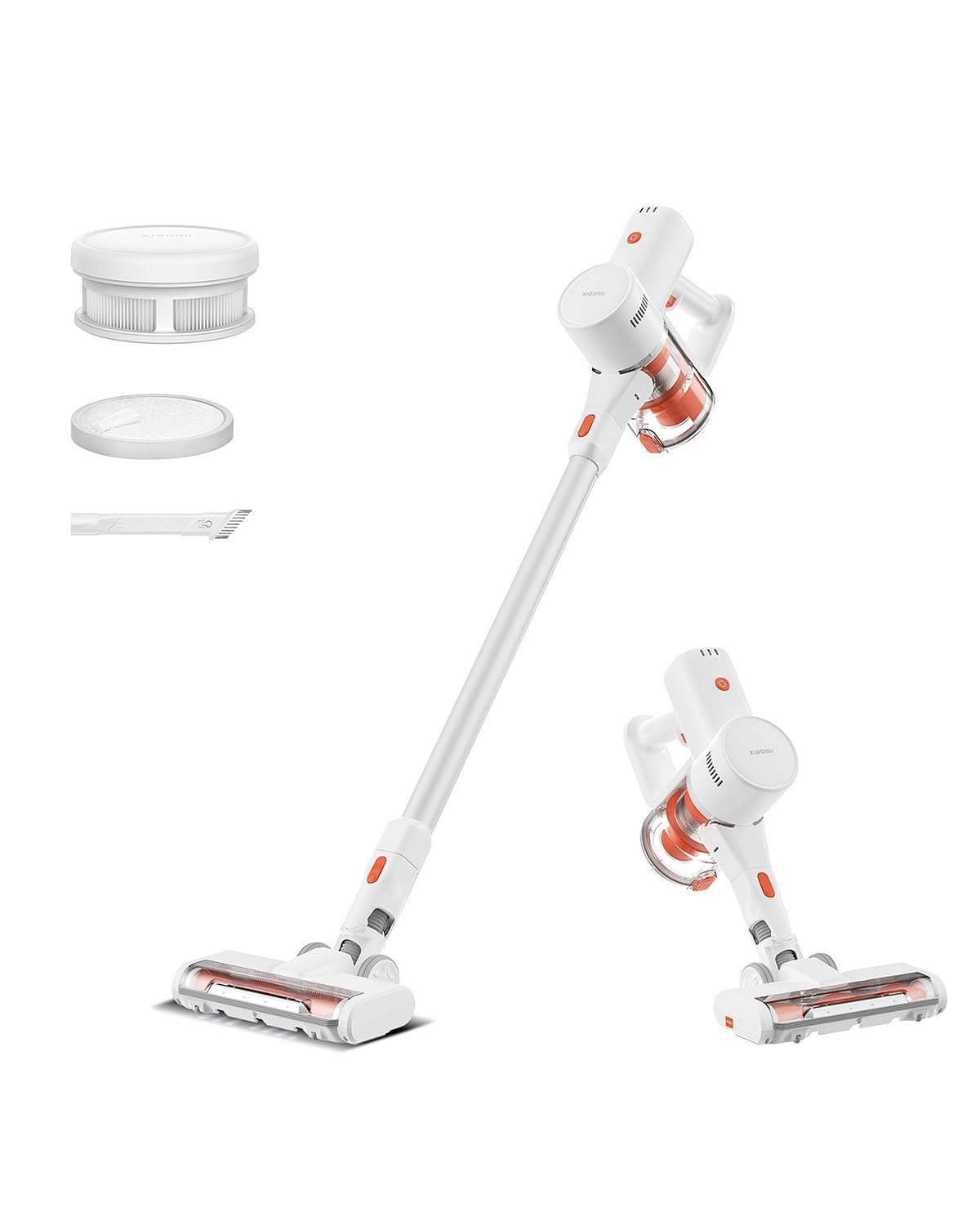
Image: Xiaomi Cordless Vacuum Cleaner G20 Lite, showing the full product assembly.

Image: Illustration of the vacuum cleaner's internal motor, highlighting its 18,000Pa suction power.
Imaj: Transparan view of the vacuum cleaner's handle, showing the internal large-capacity battery cells.
4. Enstalasyon
Swiv etap sa yo pou rasanble aspiratè ou a:
- Depake konpozan: Carefully remove all parts from the packaging. Ensure all accessories (main unit, extension rod, motorized brush head, 2-way brush nozzle, crevice nozzle, adapter) are present.
- Attach Extension Rod: Connect the extension rod to the main unit until it clicks into place.
- Tache tèt bwòs: Connect the desired brush head (motorized brush or 2-way brush nozzle) to the other end of the extension rod. For handheld use, attach the 2-way brush nozzle or crevice nozzle directly to the main unit.
- Chaje batri: Before first use, fully charge the vacuum cleaner. Connect the adapter to the charging port on the main unit and plug it into a power outlet. The power indicator lights will show the charging status.

Image: The vacuum cleaner being stored on a wall-mounted charging dock, illustrating convenient storage and charging.
5. Operasyon Enstriksyon
Your Xiaomi Cordless Vacuum Cleaner G20 Lite offers versatile cleaning options:
Mòd pou limen/etenn ak aspirasyon
Press the power button to turn the vacuum on. Press the mode button to cycle through different suction power levels (Standard, Turbo). The power indicator lights will show the current mode and battery level.
Video: A short demonstration of turning the vacuum cleaner on and cycling through its suction modes using the power and mode buttons.
Sèvi ak atachman
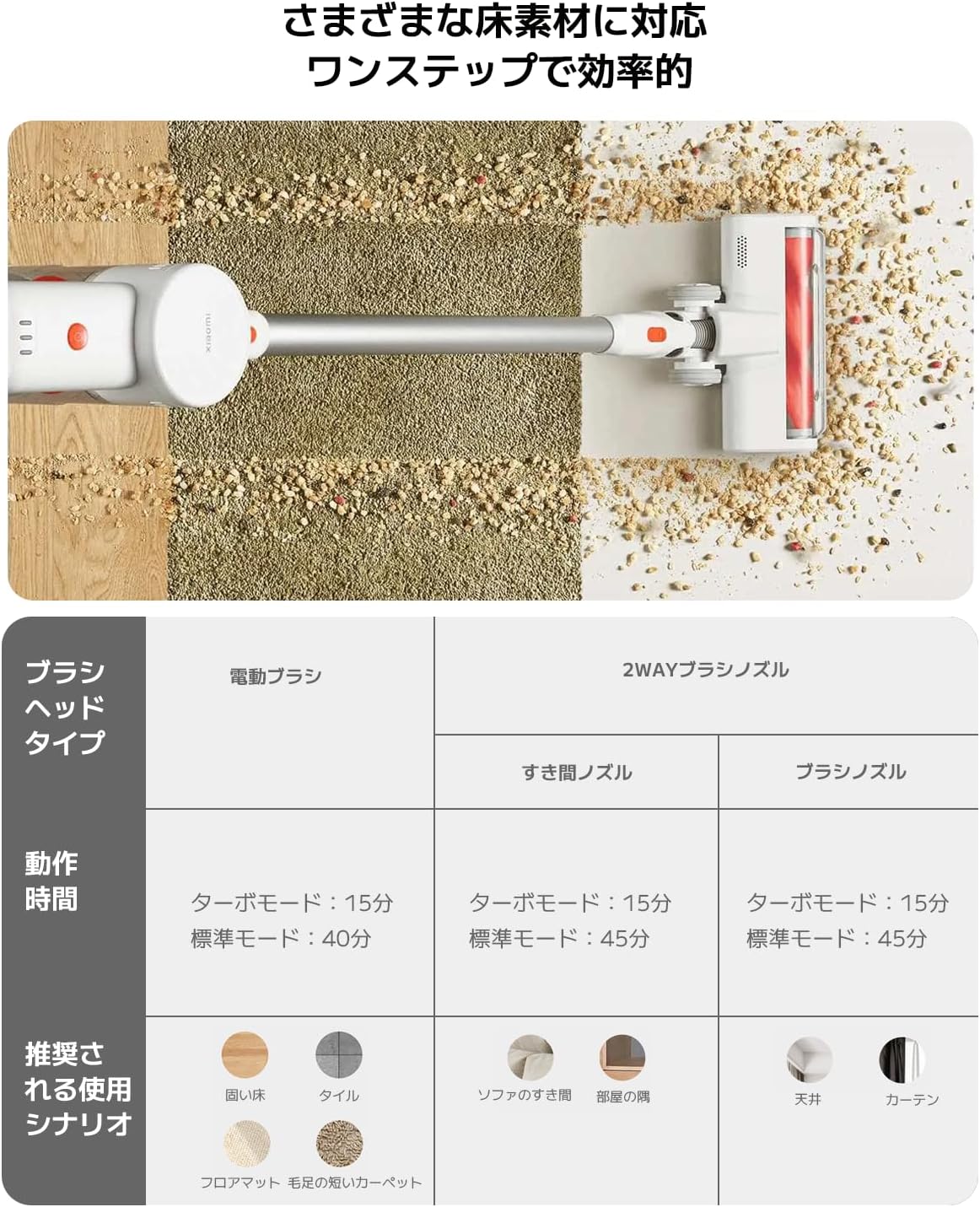
Select the appropriate brush head for your cleaning task:
| Kalite tèt bwòs | Operating Time (Standard/Turbo) | Recommended Use Scenario |
|---|---|---|
| Motè bwòs | 40 min / 15 min | Hard Floor, Tile, Floor Mat, Short Pile Carpet |
| 2-Way Brush Nozzle (Crevice) | 45 min / 15 min | Sofa Crevices, Room Corners |
| 2-Way Brush Nozzle (Brush) | 45 min / 15 min | Ceiling, Curtains |

Image: Close-up of the vacuum cleaner's motorized brush head, showing the integrated white LED lights illuminating the floor.

Image: A person using the vacuum cleaner with the extension rod to clean high areas, and with a specialized nozzle for narrow gaps and desk surfaces.
6. Antretyen
Antretyen regilye asire pèfòmans optimal epi pwolonje lavi aspiratè ou a.
Vide poubèl la
The vacuum cleaner features a one-touch dust disposal system. Simply press the release button on the dustbin to open the bottom flap and empty collected debris directly into a trash can. Empty the dustbin regularly to maintain suction power.

Image: A hand demonstrating the one-touch dust disposal mechanism, showing debris falling from the dustbin. Also visible is the power indicator light on the handle.
Netwaye filtè yo
5-s yotage powerful filter system requires periodic cleaning. Refer to the diagram below for filter components. Remove the dustbin and separate the filter components. Tap off loose dirt and rinse washable parts under running water. Ensure all filter components are completely dry before reassembling them into the vacuum cleaner.

Imaj: Eksploze view of the vacuum cleaner's main unit, illustrating the components of the 5-stage filter system.
Cleaning Brush Heads
Periodically check brush heads for tangled hair or debris. Use scissors to cut away any tangled hair and remove any obstructions to ensure smooth operation.
NAN. Depanaj
Si w rankontre pwoblèm ak aspiratè w la, gade pwoblèm ak solisyon komen sa yo:
- Pa gen pouvwa:
- Tcheke si batri a chaje. Rechaje li si sa nesesè.
- Asire w ke bouton pouvwa a peze byen fèm.
- Low Suction Power:
- Vide fatra a.
- Clean the filters. Ensure they are dry before reinstallation.
- Check for blockages in the brush head, extension rod, or main unit.
- Tèt bwòs la pa vire:
- Check for tangled hair or debris obstructing the brush roll.
- Ensure the brush head is correctly attached.
- bri ki pa nòmal:
- Check for any foreign objects caught in the brush head or suction path.
- Asire w ke tout pati yo byen reyini.
Si pwoblèm nan pèsiste, tanpri kontakte sèvis kliyan.
8. Espesifikasyon
| Spesifikasyon | Detay |
|---|---|
| Mak | Xiaomi |
| Nimewo Modèl | BHR8232US |
| Kalite pwodwi | Baton Cleaner |
| Karakteristik | San fil |
| Kalite filtre | Filtè HEPA |
| Itilizasyon Rekòmande | Carpet, Hard Floors, Sofa, Curtains, Beds, Tiles, Blankets |
| Sous pouvwa | Battery Powered (Charges via power cord) |
| Kapasite | 0.55 lit |
| Koulè | Blan |
| Pòtab | Wi |
| Andedan kay la / Deyò Itilizasyon | Andedan kay la |
| Opere Voltage | 21.6 Volts |
| Kapasite batri | 215 Watt-hours (2200mAh) |
| Kalite kontwolè | Kontwòl men |
| Koneksyon | Bluetooth (for potential smart features) |
| Konpozan ki enkli | Accessory kit, Adapter |
| Peyi orijin | Lachin |
| Pwa pwodwi | 2.4 Kilogram |
| Dimansyon atik (L x W x H) | 66.2 cm x 32 cm x 13.2 cm |
9. Garanti ak sipò
Xiaomi products are designed with quality and reliability in mind. For warranty information and customer support, please refer to the details below:
Enfòmasyon sou Garanti
This product comes with a standard manufacturer's warranty. Please retain your proof of purchase for warranty claims. For specific warranty terms and conditions, refer to the documentation included with your product or visit the official Xiaomi websit.
Sipò pou Kliyan
For technical assistance, troubleshooting, or service inquiries, please contact the Xiaomi Customer Service Center:
- Telefòn: 0120-767-378 (Reception hours: 9:00 - 18:00, excluding year-end and New Year holidays)
- Imèl: service.jp@support.mi.com
Xiaomi Service Center (Akihabara Store)
For in-person support or repairs, you may visit our service center:
- Adrès: 4-6-7 Kanda Sakumacho, Chiyoda-ku, Tokyo
- Orè biznis: 10:00 - 19:00
- Fèmen: Mèkredi
- Last Reception: 18:00