
1. Pwodwi souview
The Pxton S1 Walkie Talkie is a versatile two-way radio designed for reliable communication across various environments. It features 16 communication channels, 155 privacy codes, and a range of functions including VOX, TOT, emergency alarm, and an LED flashlight, making it suitable for both personal and professional use.
Karakteristik kle:
- 16 Chanèl kominikasyon
- 155 Kòd Konfidansyalite (CTCSS/DCS)
- 5-level VOX Sensitivity Adjustment for hands-free operation
- TOT (Time-Out Timer) to prevent accidental prolonged transmissions
- Fonksyon alam ijans
- Auto Squelch for clear audio
- Low Battery Alert and Power-Saving Mode
- Channel Scan and Monitoring functions
- Flach ki ap dirije entegre
- Custom Programming Support (programming cable sold separately)
- Durable 1500mAh Li-ion Battery

Image 1.1: Pxton S1 Walkie Talkies in use, highlighting key features.
2. Pake kontni
Verifye ke tout atik ki nan lis anba a yo enkli nan pakè ou a:
- 2 x Pxton S1 Walkie Talkies
- 2 x Baz Chaje
- 2 x Pil Lityòm 1500mAh
- 2 x Clips senti
- 2 x ekoutè
- 1 x manyèl itilizatè

Image 2.1: Included components in the Pxton S1 Walkie Talkie package.
3. Pwodwi Dyagram
Familiarize yourself with the various parts and controls of your Pxton S1 Walkie Talkie:

Image 3.1: Labeled diagram of the Pxton S1 Walkie Talkie components.
- Integrated Sensitive Antenna: Pou transmèt ak resevwa siyal.
- Flach: Built-in LED light for illumination.
- Endikatè ki ap dirije: Shows status (e.g., transmitting, receiving, low battery).
- Bouton PTT (Pouse-pou-Pale): Peze epi kenbe pou transmèt, lage pou resevwa.
- Clear Speaker: Pou pwodiksyon odyo.
- Mikwofòn entegre: Pou opinyon vwa.
- Pak SP/MIC: For connecting earpieces or external microphones.
- MONI Button (Monitor): Temporarily disables squelch to listen to weak signals.
- Bouton flach: Aktive flach LED la.
- Chanjman chanèl: Rotary knob to select communication channels.
- Chanjman pouvwa / Kontwòl Volim: Bouton rotary pou limen/etenn radyo a epi ajiste volim nan.
4. Enstalasyon
4.1 Enstalasyon ak Chaje Batri
Anvan premye itilizasyon an, chaje batri a nèt.
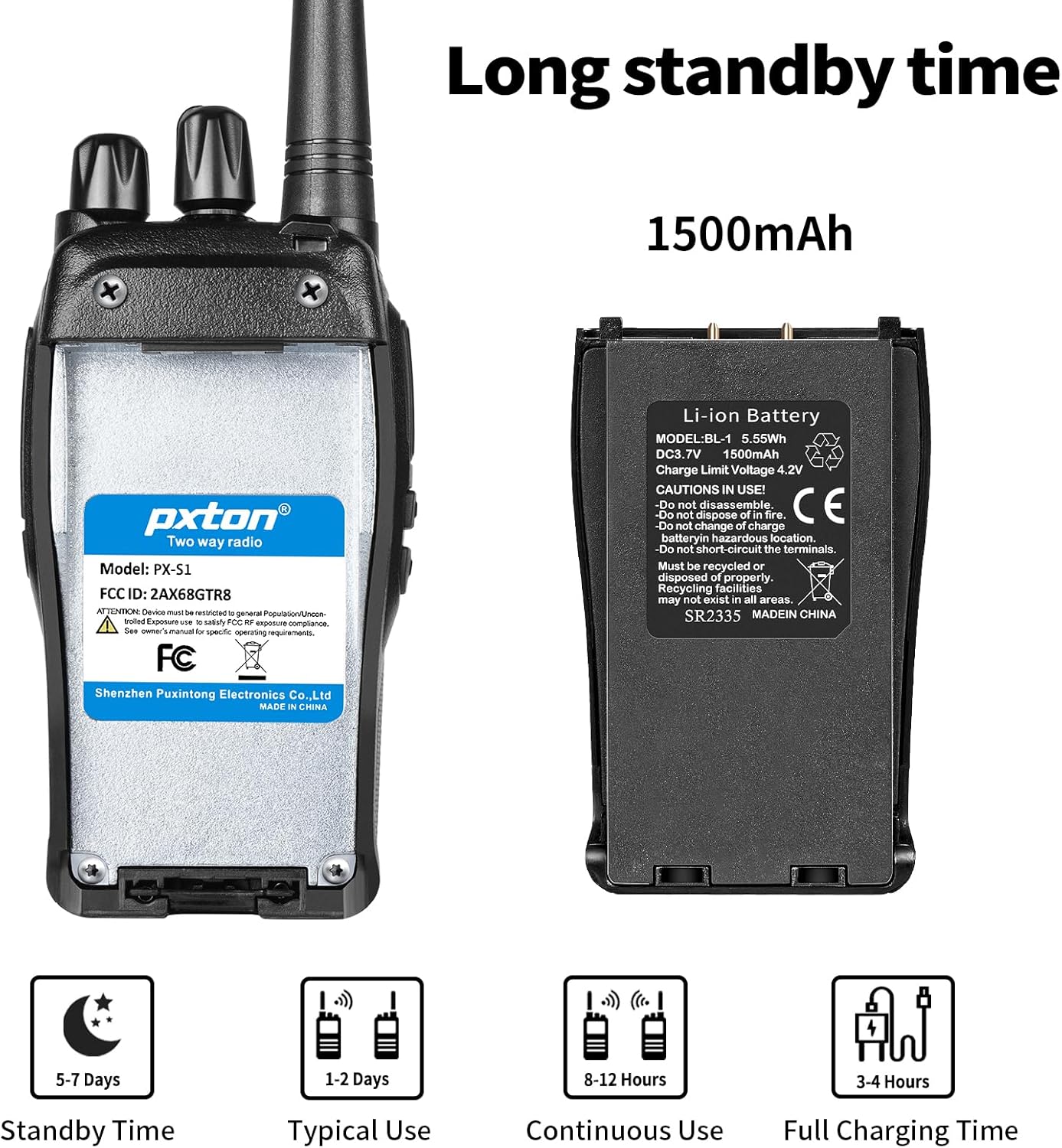
Image 4.1: Battery details and charging information.
- Enstale batri: Align the 1500mAh Li-ion battery with the battery compartment on the back of the walkie talkie and slide it into place until it clicks securely.
- Place in Charging Base: Insert the walkie talkie (with battery installed) into the charging base. Ensure the charging contacts on the radio align with those on the base.
- Konekte pouvwa: Plug the charging base's adapter into a standard wall outlet. The LED indicator on the charging base will typically show red while charging and turn green when fully charged.
- Tan pou chaje: Yon chaj konplè anjeneral pran 3-4 èdtan.
4.2 Attaching the Belt Clip and Earpiece
- Clip senti: Secure the belt clip to the designated slot on the back of the walkie talkie using the provided screws.
- Ekouteur: Insert the earpiece plug into the SP/MIC jacks on the side of the walkie talkie. Ensure it is fully inserted for proper connection.
5. Operasyon Enstriksyon
5.1 Pouvwa pou limen/etenn ak kontwòl volim
- Pouvwa sou: Rotate the Power Switch/Volume Control knob clockwise until you hear a click. The radio will emit a tone, and the LED indicator may flash.
- Ajiste Volim: Continue rotating the Power Switch/Volume Control knob clockwise to increase volume, or counter-clockwise to decrease volume.
- Pouvwa Off: Rotate the Power Switch/Volume Control knob counter-clockwise until you hear a click.
5.2 Seleksyon chanèl
The Pxton S1 has 16 channels. To select a channel:
- Vire bouton chanjman chanèl la pou chwazi chanèl ou vle a (1-16).
- Ensure all radios you wish to communicate with are set to the same channel and privacy code.
5.3 Transmèt ak Resevwa
- Pou Transmèt: Press and hold the PTT (Push-to-Talk) button on the side of the radio. Speak clearly into the microphone. The LED indicator will typically glow red.
- Pou resevwa: Release the PTT button. The radio will automatically switch to receive mode. The LED indicator will typically glow green when receiving a signal.
5.4 Fonksyon VOX (Echanj ki Opere pa Vwa)
VOX allows for hands-free transmission. When VOX is enabled, the radio will automatically transmit when it detects your voice, without needing to press the PTT button.

Image 5.1: Illustration of VOX/Hands-free function.
- VOX sensitivity can be adjusted (5 levels) to suit your environment and voice volume. This feature typically requires programming software to enable and adjust.
5.5 TOT (Time-Out Timer)
The TOT function limits the duration of a single transmission to prevent accidental prolonged transmissions and conserve battery life. If the PTT button is held down for longer than the preset time, the radio will stop transmitting and emit a warning tone.
5.6 Alam Ijans
The emergency alarm function can be activated to send out an alert signal. The method of activation may vary depending on programming, but it is typically assigned to a programmable side button.
5.7 Fonksyon eskane
The scan function allows the radio to automatically scan through all programmed channels to detect active conversations. When an active channel is found, the radio will stop on that channel until the transmission ends.
5.8 Flach
Lanp pòch LED entegre a bay yon ekleraj pratik.

Image 5.2: Walkie Talkie flashlight in use.
- Press the dedicated Flashlight Button (refer to Product Diagram) to turn the flashlight on or off.
6. Ranje Kominikasyon
The actual communication range of the Pxton S1 Walkie Talkie can vary significantly based on terrain, obstacles, and electromagnetic interference. General estimates are:
- Flat or Unobstructed Areas: Up to 3 miles (approximately 4.8 km)
- Suburban or Rural Areas: Approximately 1.2 miles (approximately 1.9 km)
- Urban Settings: Approximately 0.6 miles (approximately 1 km)

Image 6.1: Communication range in various environments.
7. Antretyen
7.1 Swen Batri
- Evite dechaje batri a nèt souvan pou pwolonje dire lavi li.
- Chaje batri a nan yon kote ki fre epi sèk.
- If storing the radio for an extended period, charge the battery to about 50% and remove it from the radio. Recharge every 3-6 months.
- Jete ansyen pil yo yon fason responsab selon règleman lokal yo.
7.2 Netwayaj
- Siye deyò radyo a ak yon twal mou,amp twal. Pa sèvi ak pwodui chimik piman bouk oswa pwodui netwayaj abrazif.
- Ensure the radio is powered off and the charging port cover is securely closed before cleaning.
NAN. Depanaj
| Pwoblèm | Kòz posib | Solisyon |
|---|---|---|
| Radyo a pa limen | Battery is dead or not installed correctly. | Charge the battery. Reinstall the battery ensuring proper contact. |
| Pa ka transmèt oswa resevwa | Incorrect channel or privacy code. Volume too low. Battery low. | Verify channel and privacy code settings. Increase volume. Charge battery. |
| Odyo ki pa bon kalite / Statik | Out of range. Interference. Squelch level too low. | Move closer to other radios. Avoid sources of interference. Adjust squelch level. |
| Batri vide byen vit | Frequent transmissions. VOX sensitivity too high. Battery nearing end of life. | Reduce transmission time. Adjust VOX sensitivity. Consider replacing battery if old. |
9. Espesifikasyon
| Karakteristik | Detay |
|---|---|
| Nimewo Modèl | PX-S1-0001 |
| Mak | pxton |
| Koulè | Nwa |
| Kantite Chanèl | 16 |
| Gamme frekans | UHF |
| Pale Range Maksimòm | 3 Miles (unobstructed) |
| Kalite batri | 1500mAh Lityòm Ion (enkli) |
| Voltage | 3.7 Vòlt (DC) |
| Lavi Mwayèn Batri | 7 days (standby) / 12 hours (continuous use) |
| Tan pou chaje | 3-4 èdtan |
| Nivo rezistans dlo | Dlo rezistan |
| Dimansyon pwodwi (D x W x H) | 9.9" x 2.2" x 6.9" (including antenna) |
| Pwa atik | 1.4 liv |
| Fonksyone Tanperati Range | -10 ° C a 40 ° C |
| ID FCC | 2AX68GTR8 |

Image 9.1: Pxton S1 Walkie Talkie dimensions.
10. Konpatibilite
The Pxton S1 walkie talkie is compatible with the following models:
- PX-888S
- PX-777S
- PX-666S
- PX-888S Pro
These models can work together and utilize the same programming tools and cables. Note that the programming cable must be purchased separately and is not included with the PX-S1.
11. Garanti ak sipò
11.1 Enfòmasyon sou Garanti
Pxton offers a 30-day unconditional exchange and refund policy from the date of purchase. Additionally, the product comes with lifetime after-sales service.
11.2 Sipò pou Kliyan
If you encounter any issues or have questions regarding your Pxton S1 Walkie Talkie, please contact Pxton customer support. You can reach us via Amazon messages for assistance.