
1. Entwodiksyon
This manual provides essential information for the proper installation, operation, and maintenance of your TouchWo 21.5-inch Capacitive Multi-Touch Industrial PC Monitor, model DM215NFWB. This industrial-grade monitor features a 10-point capacitive touchscreen, runs on Windows 10, and is designed for embedded applications requiring robust performance and durability.

Figure 1: TouchWo 21.5-inch Industrial PC Monitor highlighting key features.
2. Ki sa ki nan bwat la
Verifye ke tout atik yo prezan nan anbalaj la:
- 1 x Touchscreen Tablet
- 1 x Power Adapter, Power Line 1.5m
- 1 x Manyèl pwodwi
- 4 x Embedded snap
3. Enstalasyon ak Enstalasyon
The TouchWo industrial PC monitor is designed for embedded installation. Follow these steps to securely install the unit:
- Prepare zouti: You will need a screwdriver for installation. The accessory pack includes clamp plates, long screws, and short screws.
- Insert Monitor: Gently push the monitor from the outside into the designated cabinet opening.
- Tache Clamp Plates (Short Screws): Place a short screw into the hole of a clamp plate (the side without threads). Use the screwdriver to screw this short screw into an installation hole on the machine, ensuring it is secure.
- Tache Clamp Plates (Long Screws): Place a long screw into another hole on the clamp plate. Fix its position and then tighten it with the screwdriver.
- Repeat for all holes: Apply the same installation method to the other three holes to ensure the monitor is firmly secured.
- Tcheke final la: After installation, verify that all screws are secure and the monitor is stable within the cabinet.
Pou yon gid vizyèl, tanpri gade videyo enstalasyon ki anba a:
Video 1: Embedded Installation Instructions for TouchWo DMF Series. This video demonstrates the step-by-step process of embedding the monitor into a cabinet, including the use of clamp plates and screws for secure mounting.
The monitor features rich extensible interfaces for various industrial applications:
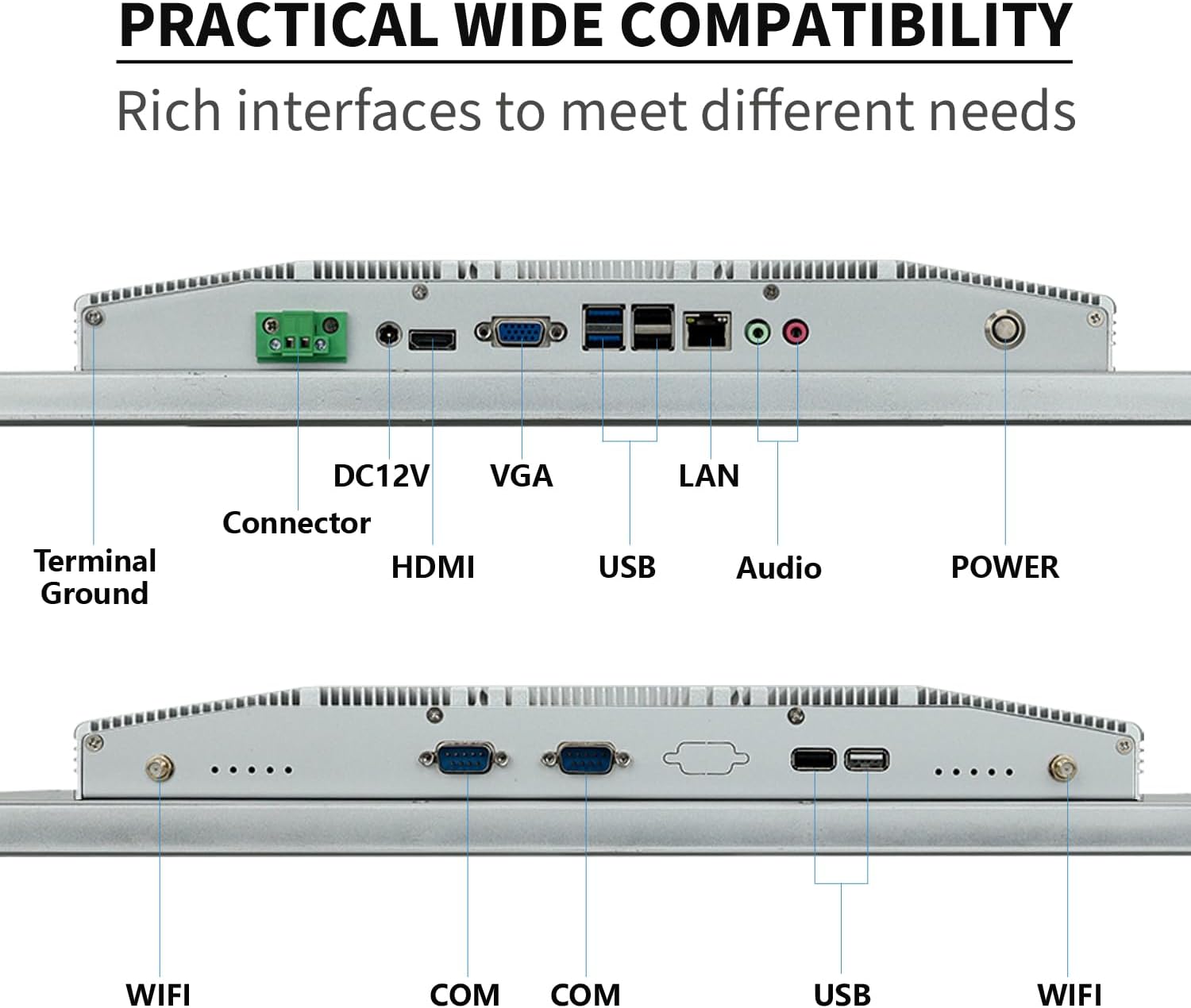
Figi 2: Dèyè view of the monitor displaying available ports.
Connect the power adapter to the DC12V port and other necessary peripherals (USB devices, HDMI-Out, LAN) as required by your application.
4. Operasyon
Your TouchWo industrial PC monitor comes pre-installed with Windows 10, providing a familiar operating environment. The capacitive multi-touch screen supports 10 points of touch, allowing for intuitive interaction.
4.1 Fonksyonalite ekran taktil
The 10-point touch display allows for various gestures without requiring additional drivers. You can use multiple fingers to zoom in and out of images, navigate interfaces, and perform other touch-based operations. The screen also supports operation with gloves, enhancing usability in industrial settings.

Figi 3: Egzamples of 10-point touch gestures.
4.2 Oratè Entegre
The monitor includes built-in speakers for audio output. Adjust volume settings through the Windows 10 operating system.
5. Antretyen ak Durabilite
The TouchWo industrial PC monitor is engineered for demanding environments, featuring robust construction and specialized design elements for durability and ease of maintenance.
5.1 IP65/IP67 Water and Dust Resistance
The front screen of the monitor boasts an IP65 rating, providing protection against dust ingress and low-pressure water jets from any direction. For enhanced protection, the front screen can also achieve IP67 water and dust resistance, making it suitable for environments where it may be exposed to more significant moisture or dust. The backshell may require customization for specific IP ratings.
Video 2: Demonstration of the front screen's IP67 water and dust resistance. This video shows the monitor's front panel being exposed to water, highlighting its protective capabilities.

Figure 4: Durability features including IP65 rating, explosion-proof glass, and operating temperature.
5.2 Fanless and Silent Design
The monitor features a fanless design, ensuring silent operation and eliminating the need for additional cooling devices. This design contributes to ultra-energy-efficient performance. The back shell is constructed from aluminum alloy to maximize heat dissipation, maintaining stable performance even in high-traffic work environments.
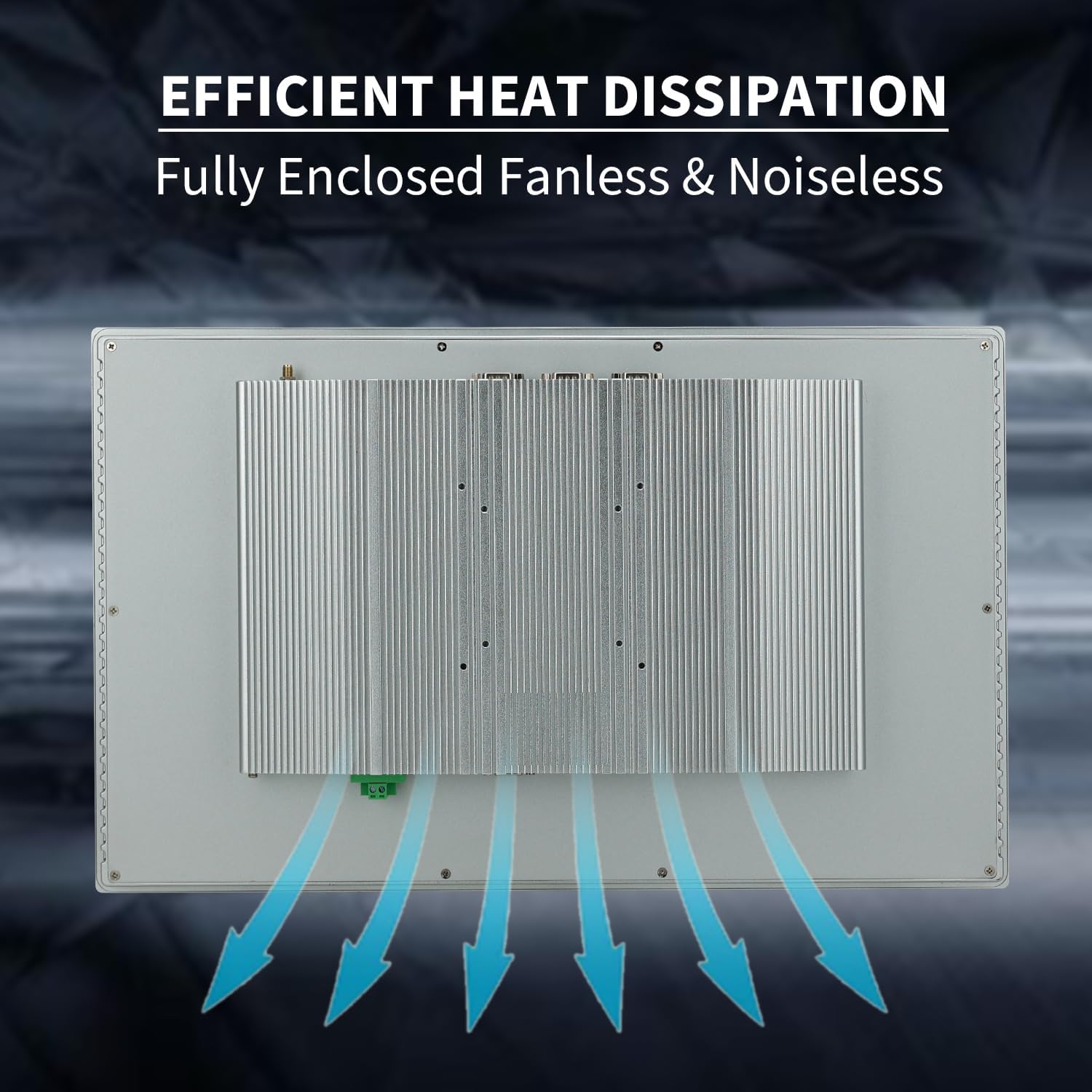
Figure 5: Efficient heat dissipation design of the monitor's back panel.
5.3 Enstriksyon netwayaj
Due to its waterproof and dustproof design, the monitor's screen is easy to clean. Use a soft, damp cloth to wipe the screen surface. Avoid abrasive cleaners or harsh chemicals that could damage the display.
NAN. Depanaj
If you encounter any issues with your TouchWo industrial PC monitor, please consider the following basic troubleshooting steps:
- Pa gen pouvwa: Ensure the power adapter is securely connected to both the monitor and a working power outlet. Verify the power line is not damaged.
- Pa gen ekspozisyon: Check the HDMI-Out connection to any external display. If using the integrated display, ensure the system is powered on and has booted correctly.
- Ekran taktil la pa reponn: Restart the monitor. Ensure no foreign objects are on the screen surface. If the issue persists, contact customer support.
- Pwoblèm periferik: Verify all USB and LAN connections are secure. Test peripherals on another device if possible to rule out device-specific issues.
For more complex issues or persistent problems, please refer to the Warranty and Support section for contact information.
7. Espesifikasyon teknik
Below are the detailed technical specifications for the TouchWo 21.5-inch Capacitive Multi-Touch Industrial PC Monitor (DM215NFWB):
| Karakteristik | Spesifikasyon |
|---|---|
| Dimansyon pwodwi | 2 x 21 x 12.9 pous |
| Pwa atik | 18.3 liv |
| Manifakti | Guangzhou Touchwo Electronics Co., Ltd |
| Nimewo Modèl Atik | DM215NFWB |
| Kanpe Screen Display Size | 21.5 pous |
| Aspè rapò | 16:9 |
| Voltage | 12 Vòlt (DC) |
| Rezolisyon | 1920 x 1080 piksèl (FHD 1080p) |
| Imaj klète | 250 lm |
| Total pò USB | 4 |
| Deskripsyon Sifas Ekran an | Briyan |

Figure 6: Monitor dimensions and VESA mounting details.
8. Garanti ak sipò
This TouchWo touchscreen monitor is FCC, CE, and RoHS certified, and the manufacturing facility holds ISO9001 quality management certification. We offer 24/7 online customer support for any inquiries or assistance you may need.
For support, please visit the official TouchWo website or contact our customer service team directly. Please have your model number (DM215NFWB) and purchase details ready when contacting support.