
Flashpoint R2 Nano
Flashpoint R2 Nano Touchscreen TTL Wireless Flash Trigger User Manual
For Panasonic and Olympus Cameras
1. Entwodiksyon
The Flashpoint R2 Nano Remote is a compact and advanced wireless flash trigger designed for Panasonic and Olympus camera systems. It offers precise control over your flash settings through an intuitive touchscreen interface and OLED display, enhancing your photography experience with seamless integration and reliable performance.
Karakteristik kle yo enkli:
- Entegrasyon san pwoblèm: Full TTL compatibility with Olympus/Panasonic cameras for optimal exposure.
- Ultimate Reliability: Stable 2.4 GHz radio frequency with 32 channels, ensuring consistent triggering up to 328 feet (100 meters).
- Senkronizasyon gwo vitès (HSS): Achieve sync speeds up to 1/8000s for creative effects and motion freezing.
- Kontwòl Touchscreen entwisyon: Responsive interface for quick and easy adjustments.
- Versatile Group Control: Manage up to 16 groups (A-F, 0-9) independently for complex lighting setups.
2. Ki sa ki nan bwat la
Upon unboxing your Flashpoint R2 Nano, please verify that all components are present:
- Flashpoint R2 Nano Remote
- USB-C Chaje Kab
- Sak Depo
- Manyèl Itilizatè (dokiman sa a)
3. Pwodwi souview
Familiarize yourself with the components and controls of your R2 Nano remote.
Figi 3.1: Devan ak sou kote View of the R2 Nano with Key Components Labeled.
- Ekran manyen: Main interface for settings and control.
- Chwazi Konpoze: For navigating menus and adjusting values.
- Pouvwa switch: Limen/éteint aparèy la.
- Bouton tès: Deklanche yon flash tès.
- Installing/Detaching Button: Releases the remote from the hotshoe.
- Fant pou monte: Connects to the camera's hotshoe.
- USB-C chaje pò: For battery charging.

Figure 3.2: R2 Nano Touchscreen Interface Details.
- Chanèl (CH): Displays the current wireless channel (e.g., CH6).
- Group (A, B, C, etc.): Indicates the active flash groups.
- Nivo pouvwa pwodiksyon: Shows the flash power setting (e.g., +0.0, 1/128).
- Parameters - / +: Touch controls for decreasing/ogmantasyonasinvalè g yo.
- Mòd senkronize: Icons indicating sync modes (e.g., HSS, front curtain, rear curtain).
- Modeling Lamp: Icon for modeling lamp estati.
- Endikatè batri: Montre nivo batri aktyèl la.
4. Enstalasyon
4.1 Chaje batri a
The R2 Nano is equipped with a built-in rechargeable lithium battery. Before first use, fully charge the device.
- Locate the USB-C charging port on the side of the R2 Nano.
- Konekte kab chaje USB-C ki vini ak li a nan pò a.
- Konekte lòt bout kab la nan yon adaptè kouran USB (pa enkli) oubyen nan yon pò USB òdinatè.
- The battery indicator on the screen will show charging status. A full charge from 0% to 100% typically takes approximately 2 hours.

Figure 4.1: Charging the R2 Nano via USB-C.
4.2 Monte sou Kamera a
The R2 Nano features an easy-mounting, durable hotshoe design for secure attachment to your camera.
- Asire w kamera w la etenn.
- Slide the R2 Nano's mounting slot onto your camera's hotshoe.
- Gently push until it clicks into place, ensuring a secure connection.
- To detach, press the Installing/Detaching Button and slide the remote off.

Figure 4.2: Mounting the R2 Nano on a Camera Hotshoe.
5. Operasyon Enstriksyon
5.1 Limen/Etenyen
- To power on, press and hold the Power Switch until the screen illuminates.
- To power off, press and hold the Power Switch until the screen turns off.
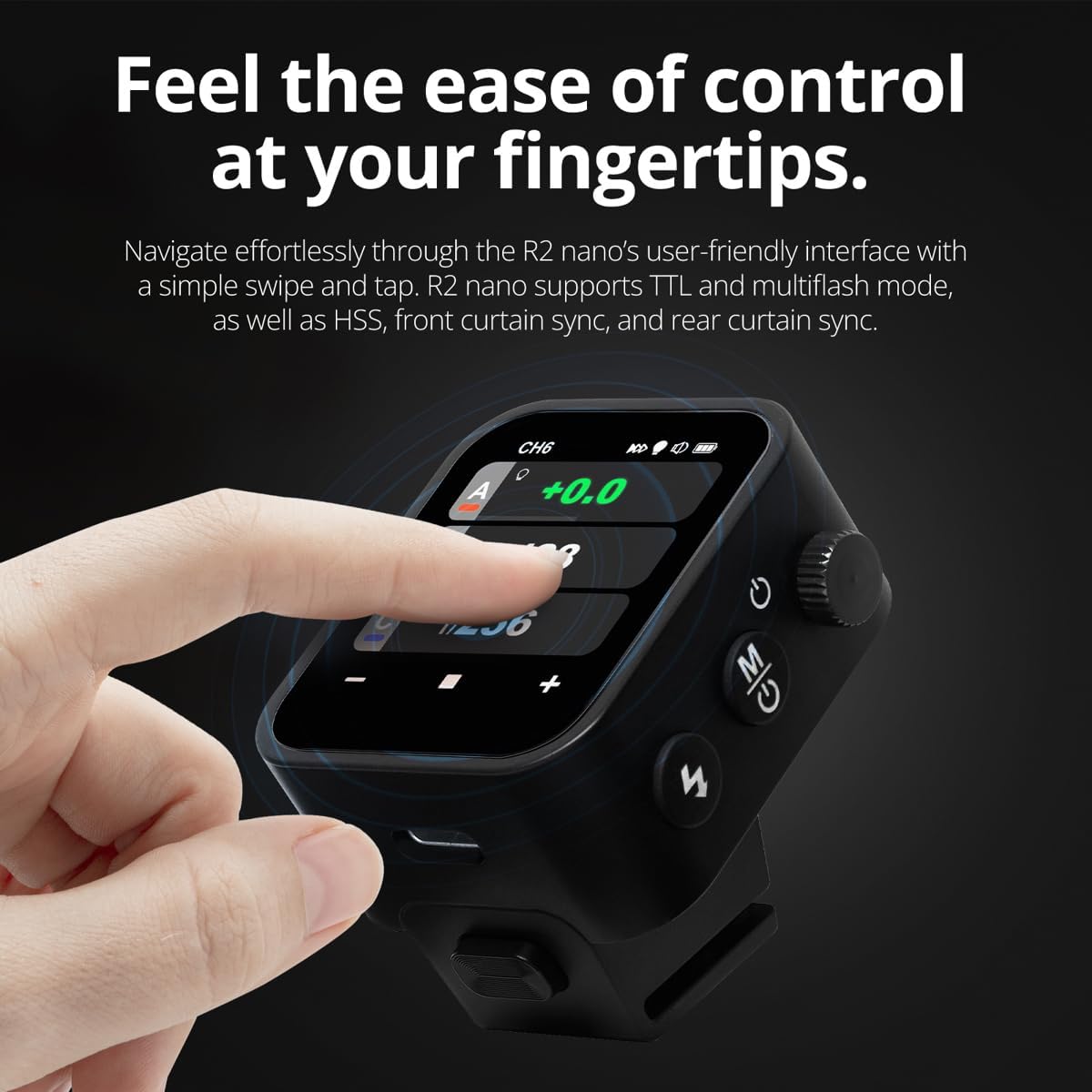
5.2 Navigating the Touchscreen Interface
The R2 Nano features a responsive touchscreen and a select dial for intuitive control.

Figure 5.1: High Definition OLED Screen Interface.
- Entèraksyon manyen: Tap on a group (A, B, C, etc.) to select it for adjustment. Tap on parameters like power level to modify them.
- Chwazi Konpoze: Rotate the dial to scroll through options or adjust values. Press the dial to confirm selections.
- Ajisteman paramèt: Use the on-screen '-' and '+' buttons or the Select Dial to change flash power, exposure compensation, or other settings.

Figure 5.2: Touchscreen Interaction for Settings Adjustment.
5.3 Setting Channels and Groups
To avoid interference and control multiple flashes, set appropriate channels and groups.
- Access the channel settings through the touchscreen menu. Select a channel from 1 to 32. Ensure your flash units are set to the same channel.
- Assign flash units to different groups (A-F, 0-9) to control them independently. The R2 Nano allows control of up to 16 groups.
5.4 Flash Modes (TTL, Manual, Multi-flash)
The R2 Nano supports various flash modes to suit different shooting scenarios.
- TTL (Atravè Lantiy la): Automatically adjusts flash output for correct exposure. Ideal for fast-paced shooting where lighting conditions change frequently.
- Manyèl (M): Allows precise control over flash power output (e.g., 1/1 to 1/256). Suitable for consistent lighting setups and creative control.
- Multi-flash (Stroboscopic): Tire yon seri flash rapid pandan yon sèl ekspozisyon pou kaptire plizyè mouvman yon sijè.
5.5 Sync Modes (HSS, Front Curtain, Rear Curtain)
Select the appropriate sync mode based on your shutter speed and desired effect.
- HSS (High-Speed Sync): Enables flash synchronization at shutter speeds faster than the camera's native sync speed (up to 1/8000s). Useful for overpowering ambient light or using wide apertures in bright conditions.
- Senkronizasyon rido devan: The flash fires at the beginning of the exposure. This is the standard sync mode.
- Senkronizasyon rido dèyè: The flash fires just before the second curtain closes. This creates a streaking effect behind moving subjects, giving a sense of motion.
6. Antretyen
Proper maintenance ensures the longevity and optimal performance of your R2 Nano remote.
- Netwayaj: Use a soft, dry cloth to clean the exterior of the device. For the touchscreen, use a microfiber cloth specifically designed for electronics. Avoid using harsh chemicals or abrasive materials.
- Depo: When not in use, store the R2 Nano in its provided storage bag to protect it from dust and scratches. Store in a cool, dry place away from direct sunlight and extreme temperatures.
- Swen batri: To maintain battery health, avoid fully discharging the battery frequently. If storing for extended periods, charge the battery to approximately 50% every few months.
- Kontak soulye cho: Keep the hotshoe contacts clean and free of debris to ensure reliable communication with your camera.
NAN. Depanaj
If you encounter issues with your Flashpoint R2 Nano, refer to the following common problems and solutions.
| Pwoblèm | Kòz posib | Solisyon |
|---|---|---|
| Aparèy pa limen. | Batri ap vide. | Chaje aparèy la avèk kab USB-C a. |
| Flach yo pa limen. | Paramèt chanèl oswa gwoup ki pa kòrèk. | Ensure the R2 Nano and flash units are set to the same channel and correct groups. |
| Flach yo pa limen. | Remote not securely mounted. | Ensure the R2 Nano is fully seated in the camera's hotshoe. |
| Inconsistent flash triggering. | Entèferans anviwònman. | Change the wireless channel to one with less interference. Ensure no obstructions between remote and flash. |
| Touchscreen pa reponn. | Pwoblèm lojisyèl tanporè. | Power off the device, wait a few seconds, then power it back on. |
| HSS not working. | Camera or flash not set to HSS mode. | Verify HSS is enabled on both the R2 Nano and your compatible flash unit. Ensure camera shutter speed is above sync speed. |
8. Espesifikasyon
| Karakteristik | Detay |
|---|---|
| Modèl | Flashpoint R2 Nano |
| Konpatibilite | Panasonic and Olympus Cameras |
| Frekans san fil | 2.4 GHz |
| Chanèl | 32 |
| Gwoup | 16 (AF, 0-9) |
| Wireless Range | Jiska 100 mèt (328 pye) |
| Vitès senkronize | Jiska 1/8000s (HSS) |
| Ekspozisyon | Touchscreen OLED |
| Batri | Bati-an rechargeable batri ityòm |
| Port chaje | USB-C |
| Dimansyon pwodwi | 5.25 x 4.25 x 2.5 pous |
| Pwa atik | 6.4 ons |
| Manifakti | Flashpoint |
| Dat Premye Disponib | 19 jen 2024 |
9. Garanti ak sipò
Flashpoint products are designed for reliability and performance. For warranty information, technical support, or service inquiries, please refer to the official Flashpoint websit la oubyen kontakte konsesyonè otorize ou a.
Tanpri konsève prèv acha ou a pou nenpòt reklamasyon garanti.
Ask a question about this manual
Ask about setup, troubleshooting, compatibility, parts, safety, or missing instructions. Manuals+ will review the question and use this page’s manual context to help answer it.