
Next YE-65GFSG8-QLED
Next YE-65GFSG8-QLED 65-inch UHD 4K QLED Google TV User Manual
Model: YE-65GFSG8-QLED
1. Entwodiksyon
Mèsi pou acha aasing the Next YE-65GFSG8-QLED 65-inch UHD 4K QLED Google TV. This manual provides essential information for setting up, operating, and maintaining your new television. Please read it thoroughly before use and keep it for future reference.

Imaj 1.1: Devan view of the Next YE-65GFSG8-QLED 65-inch QLED Google TV.
2. Enfòmasyon sou Sekirite
Please observe the following safety precautions to prevent damage and ensure safe operation:
- Pa ekspoze televizyon an ak lapli oswa imidite.
- Pa bloke ouvèti vantilasyon.
- Asire w ke koneksyon elektrik yo byen konekte atè.
- Keep the TV away from direct sunlight, heat sources, and open flames.
- Sèvi ak sèlman kòd kouran ki vini ak televizyon an.
- Pa eseye fè reparasyon televizyon an tèt ou. Konfye tout reparasyon bay pèsonèl kalifye.
- Mete televizyon an sou yon sifas ki estab e plat oubyen monte l byen fèm sou yon miray.
3. Pake kontni
Verifye ke tout atik yo prezan nan pakè a:
- Next YE-65GFSG8-QLED 65-inch UHD 4K QLED Google TV
- Kontwòl Remote
- Kòd pouvwa
- Manyèl Itilizatè (dokiman sa a)
- Konpozan Sipò Televizyon (si sa aplikab)
- Screws for Stand Assembly (if applicable)
4. Enstalasyon
4.1. Stand Assembly (Optional)
Si ou pa pral monte televizyon an sou miray la, tache sipò a jan sa a:
- Mete televizyon an fas anba ak anpil atansyon sou yon sifas mou epi pwòp pou evite domaje ekran an.
- Aliyen konpozan sipò yo ak twou montaj yo anba televizyon an.
- Fikse sipò a avèk vis yo bay yo. Pa sere l twòp.
- Leve televizyon an ak anpil atansyon pou l kanpe dwat sou yon sifas ki estab.
4.2. Konekte Aparèy
Konekte aparèy ekstèn ou yo nan pò ki apwopriye yo sou dèyè televizyon an.
Imaj 4.1: Dèyè view of the TV with connection ports labeled.
- HDMI (3 ports, one with ARC): Connect Blu-ray players, game consoles, set-top boxes, etc. Use the HDMI (ARC) port for audio return channel functionality with compatible sound systems.
- USB (2 pò): Konekte aparèy depo USB yo pou lekti medya oswa mizajou lojisyèl.
- DVB-S / DVB-T (TV 1, TV 2): Connect satellite (DVB-S) or terrestrial (DVB-T) antenna cables for broadcast TV reception.
- CI Module: Insert a Conditional Access Module (CAM) for encrypted digital TV services.
- Mini AV-IN: Connect older devices using an AV adapter cable (not always included).
- Soti optik: Konekte ak yon ba son oswa yon reseptè odyo pou yon pwodiksyon odyo dijital.
- Ethernet: Konekte yon kab Ethernet pou yon koneksyon entènèt filaire.
4.3. Koneksyon pouvwa
Plug the power cord into the TV's power input, then into a wall outlet. The TV will enter standby mode.
5. Operasyon Enstriksyon
5.1. Premye Enstalasyon
When you power on the TV for the first time, follow the on-screen instructions to:
- Chwazi lang ou ak rejyon ou.
- Konekte ak yon rezo Wi-Fi oubyen itilize koneksyon Ethernet filaire la.
- Sign in with your Google account to access Google TV features.
- Scan for available TV channels (if using antenna/satellite).

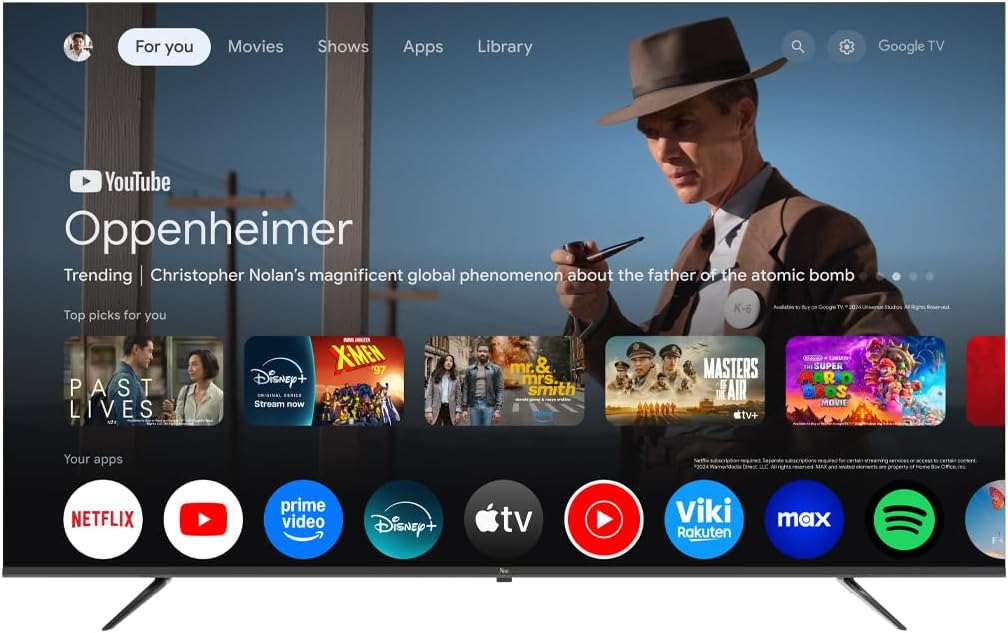
Image 5.1: Google TV interface on the Next QLED TV.
5.2. Karakteristik Google TV yo
Your TV runs on Google TV, providing access to a wide range of content and smart features:
- Rekòmandasyon pèsonalize: Get suggestions based on your viewing istwa.
- Kontwòl vwa: Use the built-in Google Assistant via the remote control to search for content, control smart home devices, and more.
- Aksè Aplikasyon: Download and stream from popular services like YouTube, Netflix, Disney+, and more via the Google Play Store.
- Chromecast entegre: Voye kontni ki soti nan aparèy mobil konpatib ou yo dirèkteman sou televizyon an.
5.3. Teknoloji ekspozisyon QLED
The QLED display technology in your TV offers enhanced picture quality:
- Koulè vibran: Quantum Dot technology produces a wider color gamut and higher color saturation.
- Segondè klète: Experience brighter images with improved contrast.
- Sipò HDR: High Dynamic Range (HDR) content delivers greater detail in both bright and dark scenes.

Image 5.2: Visual representation of QLED technology's enhanced color saturation.

Image 5.3: Visual representation of HDR technology's improved dynamic range.
5.4. Kontwòl Remote
The included remote control allows you to navigate the TV's interface, adjust settings, and access smart features. Refer to the remote control diagram (if available in the physical manual) for specific button functions.
5.5. Pwodwi souview Videyo
Gade videyo sa a pou yon ti pale souview of the Next QLED Google TV's key features, including QLED technology, Ultra HD quality, Google TV integration, and frameless design.
Videyo 5.1: Finiview of Next QLED Google TV features.
6. Antretyen
Pou asire lonjevite ak pèfòmans optimal televizyon ou an:
- Netwaye ekran an: Siye ekran an dousman avèk yon twal mou ki pa gen pousyè. Pou mak ki difisil pou retire, sèvi ak yon solisyon netwayaj espesifik pou ekran ki aplike sou twal la, pa dirèkteman sou ekran an.
- Netwaye kabinè a: Sèvi ak yon twal mou epi sèk pou siye kabinè televizyon an. Pa sèvi ak pwodui netwayaj abrazif oswa solvan.
- Vantilasyon: Asire w ouvèti vantilasyon yo pa gen pousyè ak obstak pou anpeche yo chofe twòp.
- Pouvwa Off: Disconnect the TV from the power outlet during electrical storms or when it will be unused for extended periods.
NAN. Depanaj
Si w rankontre pwoblèm ak televizyon w lan, gade solisyon komen sa yo:
| Pwoblèm | Solisyon posib |
|---|---|
| Pa gen pouvwa | Tcheke si kòd kouran an byen konekte nan televizyon an ak nan priz miray la. Asire w ke priz la fonksyone byen. |
| Pa gen imaj, men gen son | Verifye ke sous opinyon ki kòrèk la chwazi. Tcheke koneksyon kab yo ak aparèy ekstèn yo. |
| Pa gen son, men imaj la la | Tcheke nivo volim nan ak estati silans lan. Asire w ke kab odyo yo byen konekte. Tcheke paramèt pwodiksyon odyo televizyon an. |
| Remote kontwòl pa travay | Ranplase pil yo. Asire w pa gen okenn obstak ant telekòmand lan ak detèktè IR televizyon an. |
| Pòv bon jan kalite foto | Tcheke koneksyon antèn/kab yo. Ajiste paramèt imaj yo (klète, kontras, netteté). Asire w ke kontni sous la gen bon kalite. |
| Pa ka konekte ak Wi-Fi | Restart your router. Ensure the Wi-Fi password is correct. Move the TV closer to the router or use a wired Ethernet connection. |
Si pwoblèm nan pèsiste apre ou fin eseye solisyon sa yo, tanpri kontakte sèvis kliyan.
8. Espesifikasyon
Key technical specifications for the Next YE-65GFSG8-QLED 65-inch UHD 4K QLED Google TV:
| Karakteristik | Detay |
|---|---|
| Modèl | YE-65GFSG8-QLED |
| Gwosè ekran | 65 pous (165 cm) |
| Teknoloji ekspozisyon | QLED |
| Rezolisyon | 4K UHD (Ultra Definisyon Wo) |
| Rafrechisman pousantaj | 60 Hz |
| Sistèm operasyon | Google TV |
| Koneksyon | Bluetooth, Ethernet, HDMI (3 pò), USB (2 pò), Wi-Fi |
| Aspè rapò | 16:9 |
| Dimansyon pwodwi (D x W x H) | 27.8P x 144.6L x 88.9H cm |
| Pwa pwodwi | 16.3 Kilogram |
| Konpozan ki enkli | Kontwòl Remote |
| Karakteristik espesyal | Konsepsyon Frameless |
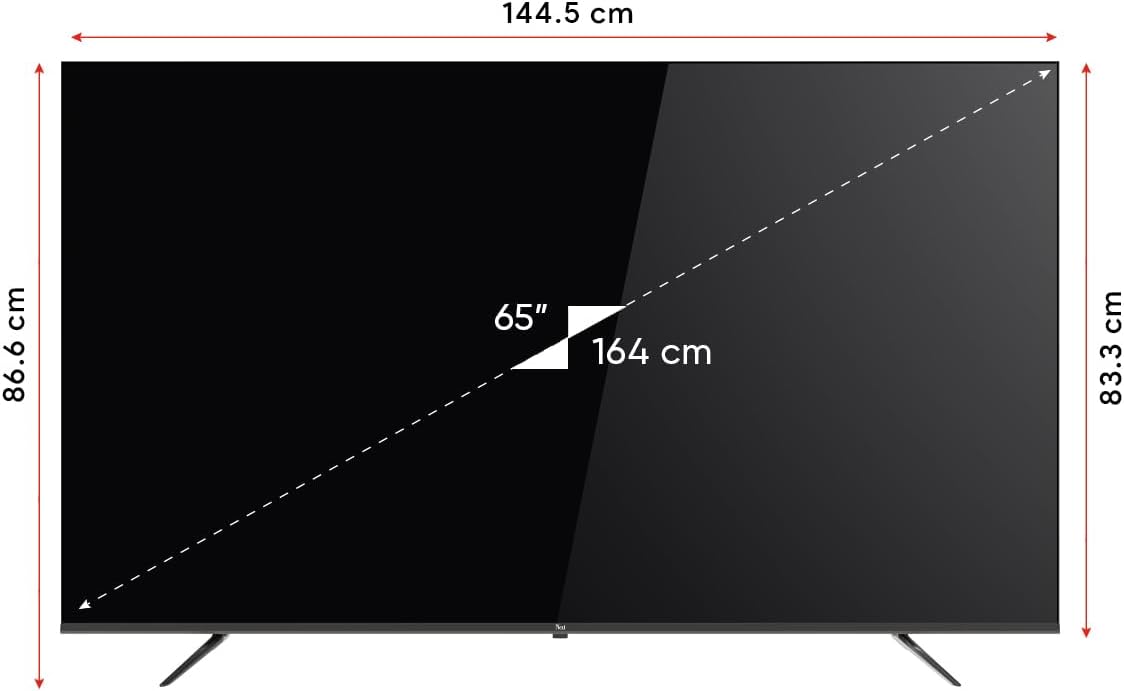
Image 8.1: TV dimensions (144.5 cm width, 86.6 cm height, 65" / 164 cm diagonal).
9. Garanti ak sipò
Your Next YE-65GFSG8-QLED TV comes with a manufacturer's warranty:
- Peryòd garanti: 2 Years Manufacturer Warranty.
- Sipò: For technical assistance, warranty claims, or further inquiries, please refer to the contact information provided in your warranty card or visit the official Next websit.
Ask a question about this manual
Ask about setup, troubleshooting, compatibility, parts, safety, or missing instructions. Manuals+ will review the question and use this page’s manual context to help answer it.