
SPC Discovery 2 ME
SPC Discovery 2 ME Smartphone User Manual
Modèl: 25246256D
1. Entwodiksyon
This manual provides essential information for the safe and efficient use of your SPC Discovery 2 ME smartphone. Please read this guide thoroughly before operating the device to ensure proper functionality and to prevent damage.
2. Enfòmasyon sou Sekirite
- Sekirite batri: Do not disassemble, puncture, or modify the battery. Use only approved chargers and cables. Avoid extreme temperatures.
- Rezistans dlo: Aparèy sa a pa reziste dlo. Evite kontak ak likid.
- Pwoteksyon pou tande: Evite koute mizik pandan lontan ak yon volim ki wo pou anpeche domaj nan zòrèy ou.
- Sekirite Kondwi: Do not use your phone while driving. Follow local laws and regulations regarding mobile device use.
- Aparèy medikal: Maintain a safe distance between the phone and medical implants like pacemakers. Consult your physician and medical device manufacturer for specific guidelines.
- Dispozisyon: Dispose of the device and battery responsibly according to local regulations. Do not dispose of with household waste.
3. Pake kontni
Verifye ke tout atik yo prezan nan pake pwodwi ou a:
- SPC Discovery 2 ME Smartphone
- USB-C pou USB-C kab
- Zouti èkstrè SIM
- Gid pou kòmanse rapidman (si sa aplikab)
Note: A power adapter is not included and must be purchased separately. For optimal charging, use an 18W USB Power Delivery (PD) compatible charger.
4. Layout aparèy
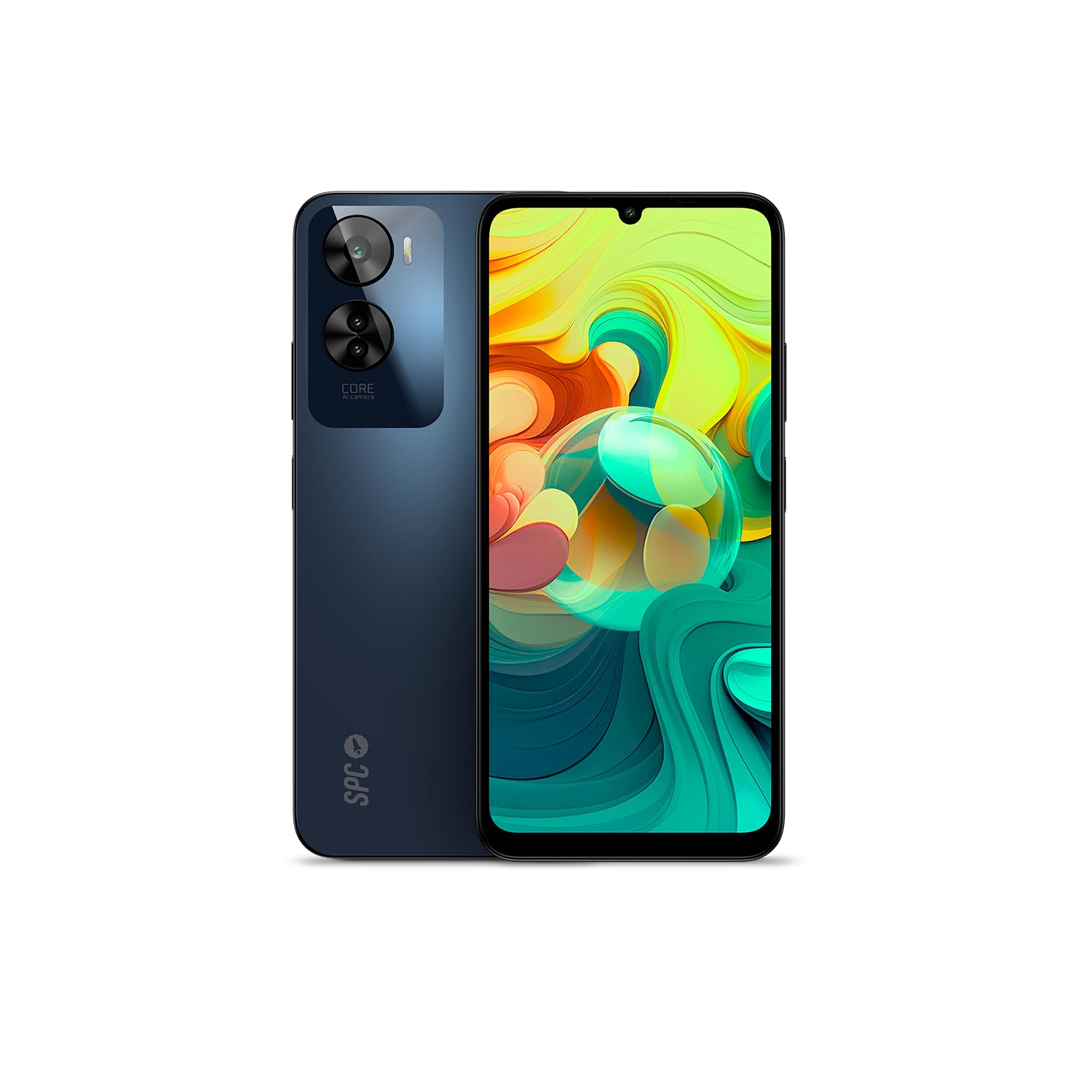
Figi 4.1: Devan view of the SPC Discovery 2 ME, showing the display and front camera.

Figi 4.2: Retounen view of the SPC Discovery 2 ME, highlighting the triple camera module and fingerprint sensor.

Figi 4.3: Angle view of the SPC Discovery 2 ME, showing both front and back, and side buttons.
- Kamera devan: Sitiye nan mitan anwo ekran an.
- Ekspozisyon: 6.75-inch HD+ IPS InCell screen.
- Bouton Volim: Sou bò dwat aparèy la.
- Bouton pouvwa/Capteur anprent: On the right side, below the volume buttons.
- USB-C pò: Anba a pou chaje ak transfè done.
- 3.5mm Audio Jack: Pou kas ekoutè.
- Plato kat SIM/MicroSD: Sou bò gòch aparèy la.
- Trip Kamera Dèyè: Located on the upper left of the back panel.
5. Enstalasyon
5.1. Mete kat SIM ak MicroSD
- Jwenn plato kat SIM/MicroSD a sou bò gòch telefòn nan.
- Mete zouti pou retire kat SIM lan nan ti twou ki sou plato a epi peze byen fèm jiskaske plato a soti.
- Place your Nano-SIM card(s) and/or MicroSD card into the designated slots on the tray. Ensure the gold contacts face downwards. The device supports dual SIM and MicroSD expansion up to 512GB.
- Remete plato a nan telefòn nan ak anpil atansyon jiskaske li fè yon klik.
5.2. Premye Limen ak Konfigirasyon Debaz
- Press and hold the Power button on the right side of the device until the SPC logo appears.
- Swiv enstriksyon ki parèt sou ekran an pou konplete konfigirasyon inisyal la:
- Chwazi lang ou.
- Konekte nan yon rezo Wi-Fi.
- Review epi aksepte tèm ak kondisyon yo.
- Konekte avèk kont Google ou a oubyen kreye yon nouvo.
- Set up screen lock (PIN, pattern, password) and biometric security (fingerprint, facial recognition).
6. Operasyon Enstriksyon
6.1. Navigasyon debaz
- Jès manyen: Tape pou chwazi, glise pou defile, pense pou agrandi.
- Ekran Kay: Jwenn aksè a aplikasyon, widjèt, ak notifikasyon.
- Panèl Notifikasyon: Glise desann soti nan tèt ekran an pou view notifikasyon ak paramèt rapid.
- Tiwa aplikasyon: Glise anlè soti anba ekran an pou jwenn aksè a tout aplikasyon ki enstale yo.
6.2. Fè apèl epi voye mesaj
- Apèl: Open the "Phone" app, enter the number, and tap the call icon.
- Mesaj: Open the "Messages" app, tap the new message icon, enter the recipient and your message.
- Doub SIM: If using two SIM cards, you can select which SIM to use for calls or messages from the respective app settings.
6.3. Itilizasyon kamera
The SPC Discovery 2 ME features a triple AI camera system, including a 50MP main sensor.
- Louvri aplikasyon "Kamera" a.
- Chwazi mòd ou vle a (Foto, Videyo, Pòtrè, Makro, elatriye).
- Tape bouton deklanchè a pou pran yon foto oswa pou kòmanse/sispann anrejistreman videyo.
- Use the AI scene detection for optimized settings.
- For close-up shots, switch to Macro mode.
6.4. NFC for Contactless Payments
Your device supports NFC (Near Field Communication) for secure contactless payments.
- Ensure NFC is enabled in your phone's settings (Settings > Connected devices > Connection preferences > NFC).
- Set up your preferred payment app (e.g., Google Pay) and add your credit/debit cards.
- To make a payment, unlock your phone and hold the back of the device near the contactless payment terminal.
6.5. Biometric Unlock
The device offers both fingerprint and facial recognition for secure unlocking.
- Capteur anprent: Located on the side power button. Register your fingerprints via Settings > Security & privacy > Device unlock > Fingerprint unlock.
- Rekonesans vizaj: Register your face via Settings > Security & privacy > Device unlock > Face unlock. Ensure good lighting when setting up and using this feature.
6.6. Jesyon batri
The 5000 mAh battery provides extended usage. For optimal battery life:
- Charge your device using the provided USB-C cable and an 18W PD compatible charger.
- Evite dechaje batri a nèt souvan.
- Aktive mòd ekonomize batri a lè batri a ba.
- Fèmen aplikasyon ki pa itilize yo kouri nan background nan.
7. Antretyen
- Netwayaj: Sèvi ak yon twal mou ki pa gen pousyè pou netwaye ekran an ak kò a. Evite materyèl abrazif oswa pwodui chimik ki agresif.
- Mizajou lojisyèl: Regularly check for and install system updates (Settings > System > System update) to ensure optimal performance and security. The device runs on Android 14.
- Depo: Manage your 256GB internal storage by regularly deleting unnecessary files or moving them to the expandable MicroSD card (up to 512GB).
NAN. Depanaj
| Pwoblèm | Solisyon posib |
|---|---|
| Aparèy la pa vire. | Asire w batri a chaje. Konekte l nan yon plato pou omwen 15 minit, epi eseye limen l ankò. |
| Batri vide byen vit. | Reduce screen brightness, close background apps, disable unused features like GPS or Bluetooth, or enable battery saver mode. |
| Aplikasyon yo ap plante oswa yo bloke. | Clear the app's cache (Settings > Apps > [App Name] > Storage & cache > Clear cache). If the issue persists, restart the device. |
| Pa ka konekte ak Wi-Fi. | Rekòmanse routeur ou ak telefòn ou. Bliye rezo a epi rekonekte li. Asire w ke Wi-Fi a aktive sou aparèy ou an. |
| Capteur anprent dwèt la pa fonksyone. | Asire w dwèt ou pwòp epi sèk. Anrejistre anprent ou yo ankò nan paramèt yo. |
9. Espesifikasyon
| Karakteristik | Detay |
|---|---|
| Non modèl | Discovery 2 ME |
| Nimewo Modèl | 25246256D |
| Sistèm operasyon | Android 14 |
| Gwosè ekspozisyon | 6.75 pous |
| Rezolisyon ekspozisyon | 1600 x 720 (HD+) |
| Rafrechisman pousantaj | 90 Hz |
| CPU vitès | 1.6 GHz (Octa-core) |
| RAM | 6 GB (expandable up to 14 GB virtual RAM) |
| Depo Entèn | 256 GB |
| Depo dilatabl | MicroSD jiska 512 GB |
| Rezolisyon kamera dèyè | 50 Megapixels (Main) |
| Kapasite batri | 5000 mAh (Ityòm-ion) |
| Chaje | 18W Fast Charge (USB PD) |
| Koneksyon | 4G, Bluetooth, Wi-Fi, NFC |
| Pò | USB Kalite-C, 3.5mm Jack |
| Karakteristik espesyal | Dual SIM, Integrated GPS, Expandable Memory, USB OTG Support, Biometric Unlock (Fingerprint, Facial Recognition) |
10. Garanti ak sipò
Your SPC Discovery 2 ME smartphone is covered by a standard manufacturer's warranty. For detailed warranty terms and conditions, please refer to the warranty card included in your package or visit the official SPC websit.
For technical support, troubleshooting assistance, or service requests, please contact SPC customer support through their official channels. Contact information can typically be found on the SPC websit la oubyen nan gid demaraj rapid la.
Ask a question about this manual
Ask about setup, troubleshooting, compatibility, parts, safety, or missing instructions. Manuals+ will review the question and use this page’s manual context to help answer it.