
1. Entwodiksyon
This manual provides detailed instructions for the installation, operation, and maintenance of the Yitouniu EWeLink 2-Channel Smart WiFi Switch Relay. This device enables remote control of household appliances and electronic devices via a mobile application, RF remote control, and voice commands through smart assistants like Alexa and Google Home. It supports various operating modes and timing functions to enhance smart home automation.
2. Enfòmasyon sou Sekirite
- Asire w ou dekonekte kouran an anvan enstalasyon oswa antretyen pou evite chòk elektrik.
- Installation should be performed by qualified personnel or under strict adherence to electrical safety guidelines.
- Pa depase maksimòm aktyèl la ak voltage ratings specified for the device.
- Kenbe aparèy la lwen dlo, imidite, ak tanperati ekstrèm.
- Verifye tout koneksyon fil yo byen fèm epi kòrèk anvan ou retabli kouran an.
3. Pwodwi souview
The Yitouniu EWeLink Smart WiFi Switch Relay is a compact, 2-channel device designed for integrating traditional appliances into a smart home system. It features WiFi and Bluetooth connectivity for app control and supports RF 433MHz for remote control.

Imaj 3.1: Devan view of the Yitouniu EWeLink Smart WiFi Switch Relay. The device is white with branding and connection labels visible.

Imaj 3.2: Gwo plan view of the Yitouniu EWeLink Smart WiFi Switch Relay, showing input terminals (N, L), output terminals (NO, COM, NC), and model information.

Image 3.3: The compact size of the Yitouniu EWeLink Smart WiFi Switch Relay, held in a hand for scale.
4. Espesifikasyon
| Paramèt | Valè |
|---|---|
| Antre Voltage | AC/DC 85-250V, Micro USB 5V input |
| Max Kouran | 10A |
| Max pouvwa | 2200W |
| Estanda WiFi | WiFi 2.4GHz b/n/g + Bluetooth (IEEE 802.11b/g/n) |
| Tanperati Fonksyònman | -20 ° C a 70 ° C |
| Materyèl | ABS flanm dife rezistan |
| Dimansyon pwodwi | 2.76 x 1.77 x 1.1 pous |
| Pwa atik | 1.76 ons |
| Kalite kontak | Nòmalman Louvri |
| Rating Pwoteksyon Entènasyonal | IP65 |
| Sètifikasyon | FCC |
5. Enstalasyon ak Enstalasyon
5.1 Enstriksyon fil elektrik
The device supports both AC/DC 85-250V input and Micro USB 5V input. Ensure correct wiring based on your application. The relay has Normally Open (NO), Common (COM), and Normally Closed (NC) contacts for controlling external devices.
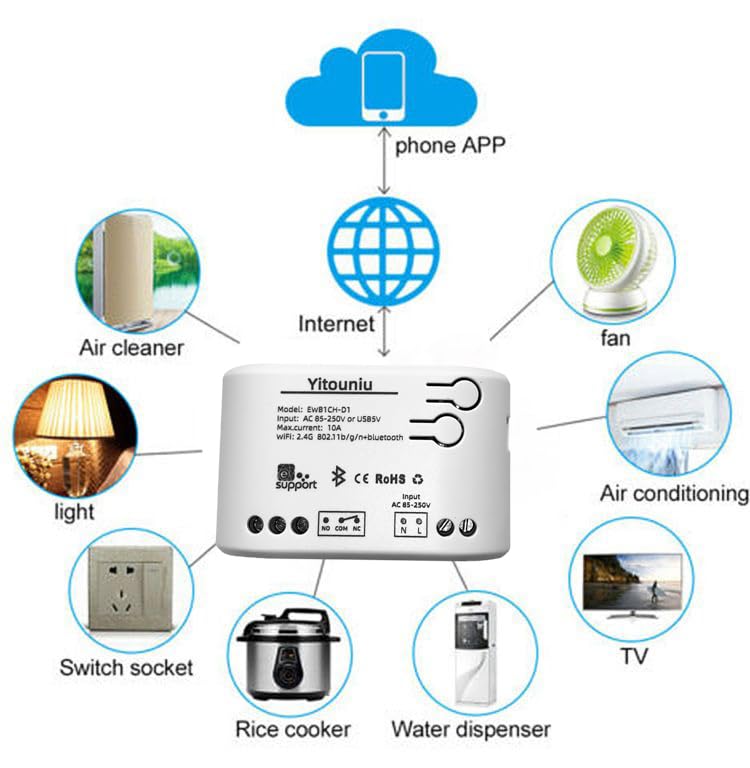
Image 5.1: Diagram illustrating the connectivity of the Yitouniu EWeLink Smart WiFi Switch Relay to various household appliances like lights, fans, and air conditioners, all controlled via a phone app and the internet.
5.2 Telechaje Aplikasyon an ak Koneksyon
- Telechaje la eWeLink app soti nan Apple App Store oswa Google Play Store.
- Anrejistre yon kont epi konekte.
- Power on the Smart WiFi Switch Relay.
- Open the eWeLink app, tap the '+' icon to add a device.
- Follow the on-screen instructions to connect the device to your 2.4GHz WiFi network.

Image 5.2: Screenshots of the eWeLink app interface, showing controls for a garage door (ON/OFF) and a scheduling function for setting specific times.
6. Operasyon Modes
The device supports three operating modes: self-locking, interlocking, and inching (micromotion). These modes can typically be configured within the eWeLink app or via physical buttons on the device, depending on the specific model variant.
- Mòd Oto-bloke: Each channel operates independently. Pressing the button (or app control) turns the relay ON, pressing it again turns it OFF.
- Interlocking Mode: When one channel is turned ON, all other channels are automatically turned OFF. This is useful for applications where only one device should be active at a time.
- Inching (Micromotion) Mode: The relay turns ON for a set duration (e.g., 0.5 seconds to 1 hour) and then automatically turns OFF. This is suitable for momentary actions like garage door openers or pulse controls.
7. App Control and Voice Control
7.1 eWeLink App Features
The eWeLink app provides comprehensive control over your Smart WiFi Switch Relay:
- Remote On/Off: Control connected devices from anywhere with an internet connection.
- Fonksyon distribisyon tan: Set schedules, countdowns, or recurring timers for automatic on/off operations.
- Kontwòl Endepandan: Each of the two channels can be controlled independently.
- Pataje Aparèy: Share control of your devices with family members.
- Kontwòl Gwoup: Organize multiple smart devices into groups for simultaneous control.

Image 7.1: A user remotely controlling home lighting via the eWeLink mobile application, demonstrating the convenience of app-based control.

Image 7.2: Illustration of the eWeLink app's group control and sharing functions, allowing multiple users to manage devices across different rooms.

Image 7.3: The timing function interface within the eWeLink app, enabling users to set specific on/off times for connected appliances.
7.2 Entegrasyon Kontwòl Vwa
The Yitouniu Smart WiFi Switch Relay is compatible with popular voice assistants, including Amazon Alexa and Google Home/Nest. To enable voice control:
- Ensure your Smart WiFi Switch Relay is successfully paired with the eWeLink app.
- Louvri aplikasyon Alexa a oswa Google Home la.
- Ale nan seksyon 'Konpetans' oswa 'Travay avèk Google'.
- Chèche pou and enable the 'eWeLink Smart Home' skill/service.
- Konekte kont eWeLink ou a lè yo mande w.
- Discover devices. Your Smart WiFi Switch Relay should now be controllable via voice commands.
Example komand:
- "Alexa, limen limyè salon an."
- "Hey Google, etenn vantilatè a."

Image 7.4: A user interacting with voice assistants like Amazon Alexa and Google Home to control smart devices, highlighting the voice control capability of the relay.
8. Antretyen
The Yitouniu Smart WiFi Switch Relay requires minimal maintenance. Follow these guidelines:
- Netwayaj: Wipe the device with a dry, soft cloth. Do not use liquid cleaners or solvents.
- Tcheke Koneksyon: Enspekte koneksyon fil elektrik yo detanzantan pou asire yo rete byen fèm.
- Mizajou mikrolojisyèl: Keep the eWeLink app updated to receive the latest firmware for the device, which may include performance improvements and new features.
NAN. Depanaj
- Aparèy la pa konekte ak WiFi a:
- Ensure your WiFi network is 2.4GHz. The device does not support 5GHz networks.
- Tcheke si modpas WiFi ou te antre nan aplikasyon an kòrèk.
- Deplase aparèy la pi pre routeur WiFi ou a.
- Restart the device and your router.
- Aparèy la pa konekte nan aplikasyon an:
- Verify your home internet connection is active.
- Tcheke si aparèy la gen kouran.
- Rekòmanse aparèy la.
- Kontwòl vwa a pa fonksyone:
- Confirm the eWeLink skill/service is enabled and linked in your Alexa or Google Home app.
- Ensure the device is named clearly in the eWeLink app and discovered by your voice assistant.
- Tcheke koneksyon entènèt ou an.
- Device not responding to RF remote:
- Ensure the RF remote is paired with the switch. Refer to the RF pairing instructions (if applicable to your specific remote).
- Check the battery in the RF remote.
10. Ki sa ki nan bwat la
Lè w fin ouvri anbalaj pwodwi a, ou ta dwe jwenn bagay sa yo:
- 1 x Yitouniu Wifi 2-Channel Relay Switch
- 1 x Manyèl Enstriksyon (dokiman sa a)
11. Garanti ak sipò
This product comes with a standard manufacturer's warranty. For specific warranty terms, conditions, and duration, please refer to the documentation included with your purchase or contact Yitouniu customer support. For technical assistance or further inquiries, please visit the official Yitouniu websit la oubyen kontakte chanèl sèvis kliyan yo.