
Entwodiksyon
This manual provides instructions for the safe and efficient use of your Nitecore Carbon Battery 6K. Please read this manual thoroughly before operating the device and retain it for future reference.
The Nitecore Carbon Battery 6K is a lightweight, portable power bank featuring a 6000mAh capacity, USB-C charging, and a durable carbon fiber shell. It is designed for outdoor use with an IP68 waterproof rating and can also function as a headlamp runtime extender.
Enstriksyon Sekirite
- Pa ekspoze bank pouvwa a nan tanperati ekstrèm, limyè solèy dirèk, oswa dife.
- Evite jete oswa sibi aparèy la nan gwo enpak.
- Do not disassemble, modify, or repair the device yourself. Contact authorized service personnel.
- Keep the power bank away from water and moisture, unless specifically designed for such conditions (this product is waterproof, but avoid intentional submersion beyond specified limits).
- Sèvi ak sèlman kab chaje konpatib ak adaptè.
- Kenbe soti nan atenn timoun yo.
- If the battery swells, leaks, or emits an unusual odor, discontinue use immediately.
Pwodwi souview
The Nitecore Carbon Battery 6K is a compact and robust power bank. Key features include:
- USB-C pò: For both charging the power bank and charging external devices.
- Bouton pouvwa: Activates power indicators and controls the red safety light.
- Endikatè pouvwa: Three red LED lights indicate the remaining battery level.
- Carbon Fiber Shell: Provides durability and keeps the device lightweight.
- Red Safety Rear Light: Integrated light for enhanced visibility.

Imaj: Devan view of the Nitecore Carbon Battery 6K, showing its carbon fiber texture and the power button with integrated indicator lights.
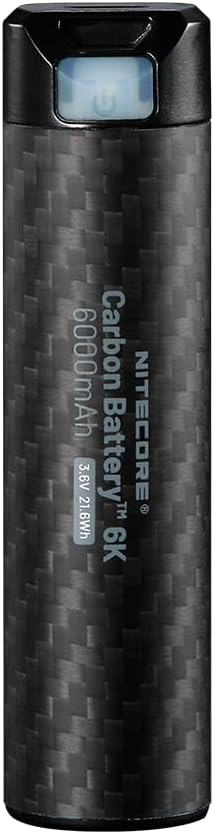
Image: Close-up of the Nitecore Carbon Battery 6K, highlighting the power button and USB-C port area.
Enstalasyon
Inisyal chaje
Before first use, fully charge your Nitecore Carbon Battery 6K. Connect the power bank to a USB power source (e.g., wall adapter, computer USB port) using a USB-C cable. The red power indicators will illuminate to show charging progress.

Image: The Carbon Battery 6K connected via USB-C, demonstrating its ability to charge both a smartphone and an action camera.
Enstriksyon Operasyon
Tcheke Nivo Batri
To check the remaining power, short-press the Power Button. The three red power indicators will illuminate to show the current battery level:
- 3 Constant-on: Approximately 100% charge.
- 2 Constant-on: Approximately 70% charge.
- 1 Constant-on: Approximately 30% charge.
- 1 Flashing: Mwens pase 10% chaj.

Image: The Nitecore Carbon Battery 6K with its red safety light illuminated, which also serves as a power indicator.
Chaje Aparèy Ekstèn yo
Connect your device to the USB-C port of the Nitecore Carbon Battery 6K using a compatible USB-C cable. The power bank will automatically begin charging your device. The power indicators will show the remaining battery level of the power bank during charging.
Wouj limyè dèyè sekirite
The Carbon Battery 6K features a red safety rear light for added visibility, especially useful during outdoor activities. To activate or deactivate this light, long-press the Power Button for 1 second. The red light will turn on or off accordingly.
Image: The Nitecore Carbon Battery 6K with its red safety light illuminated, demonstrating its visibility feature.
Headlamp Runtime Extender Function
The Nitecore Carbon Battery 6K can extend the runtime of compatible Nitecore headlamps, such as NU43, NU45, NU53, HC60 UHE, and HC65 HUE. Connect the power bank to the headlamp's charging port using a suitable cable to provide extended power during use.
Antretyen
- Netwaye bank pouvwa a avèk yon twal mou epi sèk. Pa sèvi ak pwodui netwayaj abrazif oswa solvan.
- Sere aparèy la nan yon kote ki fre epi sèk, lwen limyè solèy dirèk ak tanperati ekstrèm.
- Pou depo alontèm, chaje bank ekstèn lan apeprè 50% chak twa mwa pou kenbe batri a an bon eta.
Depanaj
Aparèy pa chaje
- Ensure the USB-C cable is securely connected to both the power bank and the power source/device.
- Verifye ke sous kouran an aktif epi l ap bay kouran.
- Tcheke si bank pouvwa a li menm gen ase chaj.
- Eseye yon diferan USB-C kab oswa adaptè pouvwa.
Power Indicators Not Working
- Short-press the Power Button to activate the indicators.
- If the issue persists, the battery may be fully depleted or require service.
Red Safety Light Not Activating
- Long-press the Power Button for 1 second to toggle the light.
- Asire w ke bank pouvwa a gen ase chaj.
Espesifikasyon
| Karakteristik | Detay |
|---|---|
| Kalite batri | Li-ion batri |
| Kapasite | 6,000mAh (3.6V, 21.6Wh) |
| Rated enèji | 3,700mAh 5V (TIP 1A) |
| Antre | USB-C: 5V-2A |
| Sòti | USB-C: 5V-2A |
| Evalyasyon IP | IP68 |
| Dimansyon | Ø22.8mm x 90.4mm (Ø0.90" x 3.56") |
| Pwa | 88g / 3.10 oz |
| Karakteristik espesyal | Fast Charging, Flashlight (Red Safety Light), LED Indicator Lights, Lightweight, Pocket Size |

Image: Visual representation of the Nitecore Carbon Battery 6K, highlighting its 6000mAh capacity and compact size.
Enfòmasyon sou Garanti
Nitecore products are covered by a warranty. For detailed warranty terms and conditions, please refer to the official Nitecore websit la oubyen kontakte distribitè lokal ou a. Kenbe resi acha ou kòm prèv acha pou reklamasyon garanti.
Sipò pou Kliyan
For technical assistance, troubleshooting, or product inquiries, please visit the official Nitecore websit la oubyen kontakte depatman sèvis kliyan yo. Anjeneral, ou ka jwenn enfòmasyon pou kontakte yo sou anbalaj pwodwi a oubyen sou dokiman ofisyèl la. websit.