
1. Entwodiksyon
This manual provides detailed instructions for the safe and effective operation, maintenance, and troubleshooting of your Nitecore HC65 UHE 2000 Lumens USB-C Rechargeable Headlamp with Carbon 6K Battery Runtime Extender Kit. Please read this manual thoroughly before use to ensure optimal performance and longevity of the product.
2. Pake kontni
- Tèt Nitecore HC65 UHEamp
- Nitecore Carbon Battery 6K
- 2 x Bando
- 2 x USB-C to USB-C Charging Cables
- Support
- Klip
- Ka Depo

Image: The Nitecore HC65 UHE headlamp and the Carbon 6K battery runtime extender kit, showing all components included in the package.
3. Enstalasyon
3.1. Ajisteman bann tèt
Tache headl laamp to the headband. Adjust the elastic straps to ensure a secure and comfortable fit on your head. The headband is designed for stability during various activities.
3.2. Premye Chajman
Anvan premye itilizasyon an, chaje tèt la nèt.amp. The HC65 UHE features a built-in USB-C charging port. Connect the provided USB-C cable to the headlamp's charging port and to a compatible USB power source. A full charge typically takes approximately 2 hours.

Image: The Nitecore HC65 UHE headlamp connected to a USB-C charging cable, illustrating the charging process.

Image: A diagram showing the power indication system with blue LEDs, indicating battery levels from 25% to 100% based on the number of constant-on lights.
3.3. Connecting the Carbon 6K Battery Runtime Extender
The Carbon 6K Battery Runtime Extender can be connected to the HC65 UHE headlamp to significantly extend its operational time. Securely attach the Carbon 6K battery to the headband using the provided bracket and clips. Connect the quick-release cable from the Carbon 6K to the headlamp's designated port.
- The Carbon 6K provides a well-balanced weight distribution for comfort.
- When connected, the headlamp will prioritize power from the Carbon 6K, preserving the internal battery.

Image: The Nitecore HC65 UHE headlamp shown with the Carbon 6K battery runtime extender attached to the headband, illustrating the complete setup.

Image: An illustration demonstrating how the Nitecore HC65 UHE headlamp draws power from the Carbon 6K battery first when connected, indicated by a glowing yellow power line.
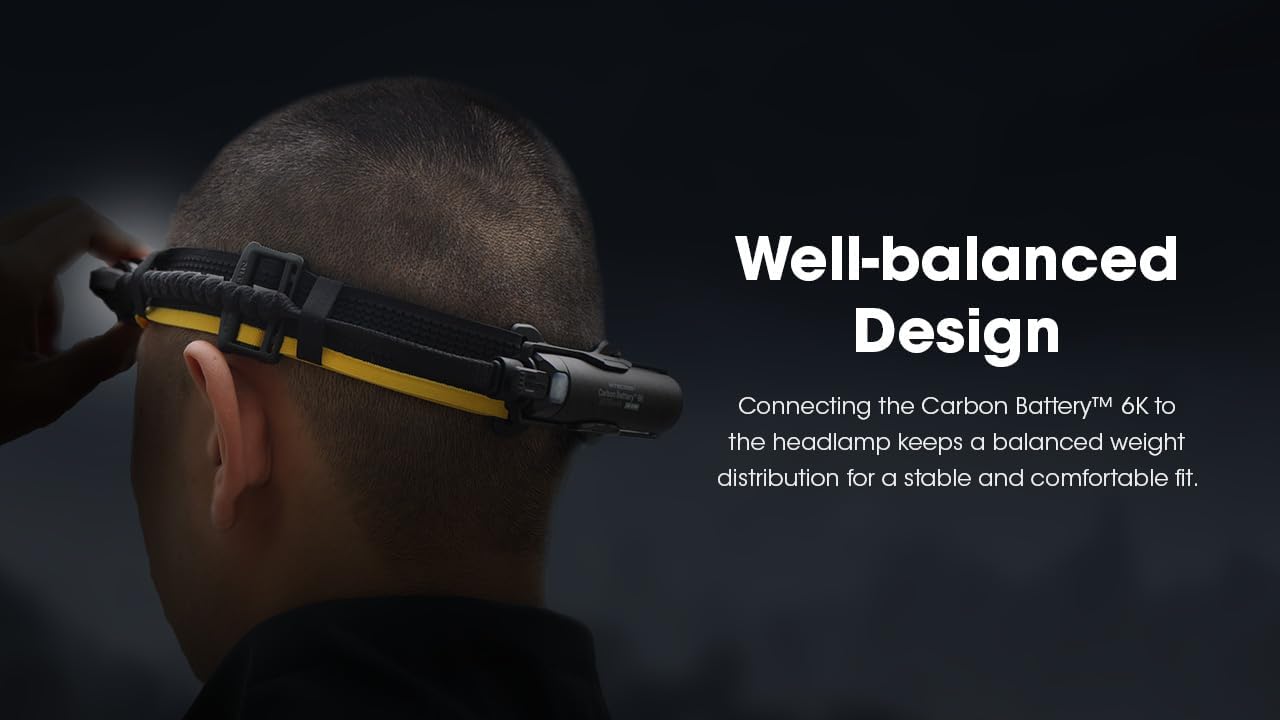
Image: A user wearing the Nitecore HC65 UHE headlamp with the Carbon 6K battery, highlighting the balanced weight distribution for comfortable wear.
4. Operasyon Enstriksyon
4.1. Power On/Off
- Pou limen headl laamp: Peze epi kenbe bouton pouvwa a pou 1 segonn.
- Pou fèmen headl laamp: Press and hold the Power Button for 1 second while it is on.
4.2. Mode Switching and Brightness Levels
The HC65 UHE offers a triple output system: Primary White Light, Auxiliary White Light (Reading Light), and Auxiliary Red Light.

Imaj: Yon gwo plan view of the Nitecore HC65 UHE headlamp's front, highlighting the primary white LEDs and the two auxiliary lights (High CRI White and Red Light).
Prensipal limyè blan
- Ak tèt laamp on, short press the Mode Button to cycle through brightness levels: ULTRALOW - LOW - MID - HIGH - TURBO.
- Special Modes (SOS, Beacon): Ak tèt laamp on, double-press the Mode Button to activate SOS. Double-press again for Beacon. Short press to return to the previous brightness level.
Auxiliary White Light (Reading Light)
- Ak tèt laamp off, press and hold the Mode Button for 1 second to activate the Auxiliary White Light.
- Short press the Mode Button to cycle between LOW and ULTRALOW.
Oksilyè limyè wouj
- Ak tèt laamp off, press and hold the Power Button for 1 second to activate the Auxiliary Red Light.
- Short press the Mode Button to cycle between LOW, HIGH, and SLOW FLASHING.
4.3. Red Safety Rear Light
The Carbon 6K Battery features a red safety rear light for enhanced visibility. To turn it on, long press the Power Button on the Carbon 6K for 1 second.

Image: A user wearing the Nitecore HC65 UHE headlamp with the Carbon 6K battery, clearly showing the illuminated red safety rear light on the back of the Carbon 6K unit.
5. Antretyen
5.1. Netwayaj
- Siye tèt laamp and headband with a soft, damp twal.
- Pa sèvi ak pwodui netwayaj abrazif oswa solvang.
- Ensure the USB-C port cover is securely closed to maintain water resistance.
5.2. Depo
- Sere tèt laamp nan yon kote ki fre, sèk lwen limyè solèy la dirèk.
- For long-term storage, charge the battery every three months to prolong its lifespan.
NAN. Depanaj
- Headlamp pa limen: Ensure the battery is charged. Check if the battery is properly connected.
- Dim pwodiksyon limyè: Batri a ka fèb. Rechaje tèt la.amp.
- Pwoblèm chaj: Verify the USB-C cable is securely connected to both the headlamp and the power source. Try a different USB-C cable or power adapter.
- Carbon 6K not extending runtime: Ensure the quick-release cable is firmly connected between the Carbon 6K and the headlamp.
If issues persist, please contact Nitecore customer support for further assistance.
7. Espesifikasyon

Image: A table detailing the technical specifications of the Nitecore HC65 UHE headlamp, including brightness levels, runtime, beam distance, impact resistance, and IP rating for Primary White Light, Auxiliary White Light, and Auxiliary Red Light.
| Karakteristik | Detay |
|---|---|
| Modèl | HC65 UHE |
| Maksimòm Klate | 2000 Lumens (Primary White Light) |
| Distans Maksimòm Gwo bout bwa | 222 mèt (243 yad) |
| Kalite sous limyè | LED (UHE LED) |
| Sous pouvwa | Batri Powered (Ityòm Ion) |
| Port chaje | USB-C (Waterproof) |
| Tan pou chaje | Apeprè. 2 èdtan |
| Max Runtime | Up to 82 hours (Auxiliary White Light, Ultralow) |
| Nivo rezistans dlo | IP68 (2 mèt submersible) |
| Rezistans enpak | 2 mèt |
| Pwa | Approx. 3 ounces (headlamp sèlman) |
| Karakteristik espesyal | Rechargeable, SOS, Beacon, Red Light, Reading Light, Carbon 6K Compatibility |
Carbon Battery 6K Specifications
- Pwa: 88g (3.10 oz)
- Batri entegre: 6000mAh
- Energy Density: 245.5Wh/kg
- Function: Runtime Extender, Red Safety Rear Light

Imaj: Yon imaj detaye view of the Nitecore Carbon Battery 6K, highlighting its lightweight design, 6000mAh capacity, and energy density.
8. Enfòmasyon sou Sekirite
- Pa klere limyè a dirèkteman nan je yo.
- Kenbe soti nan atenn timoun yo.
- Pa demonte oswa modifye headl laamp or battery.
- Avoid exposing the product to extreme temperatures or open flames.
- Ensure the USB-C port cover is sealed when not charging to maintain water resistance.
9. Garanti ak sipò
Nitecore products are covered by a warranty. For detailed warranty information, product registration, or technical support, please visit the official Nitecore websit la oubyen kontakte distribitè lokal ou a. Tanpri konsève resi acha ou a pou reklamasyon garanti.
Pou plis asistans, ou ka vizite Nitecore Store on Amazon.