
1. Entwodiksyon
This manual provides detailed instructions for the installation, operation, and maintenance of the Novastar TU15PRO LED Vision Controller. Please read this manual thoroughly before using the device to ensure proper and safe operation. The TU15PRO is designed for controlling LED displays, offering robust performance and versatile connectivity.
2. Enfòmasyon sou Sekirite
- Pwovizyon pou pouvwa: Use only the specified power adapter (AC100-240V 50/60Hz). Ensure the power source is stable and matches the device's requirements.
- Anviwònman: Operate the device in a dry, well-ventilated area. Avoid exposure to extreme temperatures, humidity, dust, or direct sunlight.
- Manyen: Do not drop, disassemble, or modify the device. Refer all servicing to qualified personnel.
- Câbles: Ensure all cables are securely connected. Avoid placing heavy objects on cables or bending them sharply.
- Netwayaj: Dekonekte kouran an anvan ou netwaye. Sèvi ak yon twal mou epi sèk. Pa sèvi ak pwodui netwayaj likid oswa ayewosòl.
3. Pake kontni
Please check the package contents upon unboxing. If any items are missing or damaged, contact your vendor immediately.
- Novastar TU15PRO LED Vision Controller
- Adaptè pouvwa
- USB kab
- Manyèl Itilizatè (dokiman sa a)
4. Pwodwi souview
The Novastar TU15PRO is a compact and powerful LED vision controller designed for various display applications. It features multiple input and output ports for flexible connectivity.
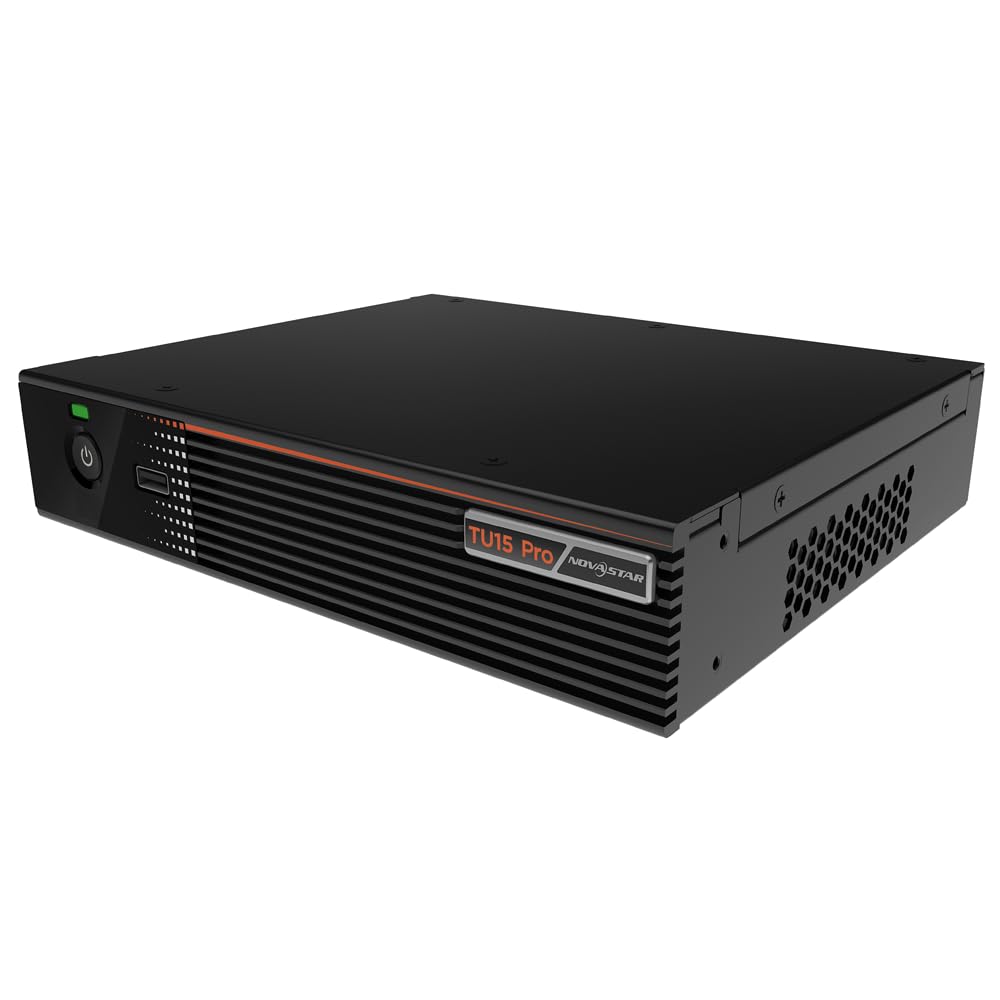
Figi 4.1: Angle view of the Novastar TU15PRO LED Vision Controller, highlighting the rear panel with various input and output ports.

Figi 4.2: Anwo-anba view of the Novastar TU15PRO, showing the front panel with power button and USB port, and a detailed view of the rear panel connections.
4.1. Front Panel
- Bouton pouvwa: Itilize pou limen oswa etenn aparèy la.
- USB 2.0 pò: For connecting USB devices, such as a mouse or keyboard for control, or for firmware updates.
4.2. Panel aryè
- WIFI-AP (1, 2): Wi-Fi Access Point antennas for wireless control or network extension.
- WIFI-STA: Wi-Fi Station antenna for connecting the device to an existing Wi-Fi network.
- CAPTEUR: Port for connecting an external sensor.
- IR / I/O G RELAY: Input/Output General Purpose Relay terminal block for external control signals.
- ETHERNET: Ethernet port for network connection and control.
- USB 2.0 (x2): Additional USB ports for peripherals or data transfer.
- ANTRE HDMI (x2): HDMI input ports for video sources.
- HDMI SOTI: HDMI output port for monitoring or cascading.
- SPDIF: Pwodiksyon odyo dijital.
- AUDIO 12V === 3A: Power input port (DC 12V, 3A).
5. Enstalasyon
- Dekonpoze: Carefully remove the TU15PRO controller from its packaging.
- Konekte antèn: Attach the Wi-Fi antennas to the WIFI-AP and WIFI-STA ports on the rear panel.
- Konekte sous videyo: Connect your video source (e.g., computer, media player) to one of the HDMI-AN ports using an HDMI cable.
- Connect to LED Display: Connect the controller's Network Ports (1-4) to your LED display receiving cards using Ethernet cables.
- Konekte pouvwa: Konekte adaptè kouran ki founi an nan AUDIO 12V === 3A port and then plug it into a power outlet.
- Pouvwa sou: Peze bouton pouvwa a sou panèl devan an pou limen aparèy la.
- Network Configuration (Optional): For network control, connect an Ethernet cable to the Ethernet port or configure Wi-Fi settings.
6. Operasyon Enstriksyon
Once the device is set up, you can begin operating it. Detailed operation typically involves using dedicated software on a connected computer or through a web koòdone.
- Enstalasyon lojisyèl: Install the Novastar control software on your computer. Refer to the software's documentation for installation and usage.
- Rekonesans aparèy: Ensure the software recognizes the TU15PRO controller. This may require network configuration or direct USB connection.
- Konfigirasyon ekran: Configure your LED screen parameters within the software, including resolution, cabinet layout, and connection method.
- Seleksyon sous Antre: Select the desired HDMI input source within the control software.
- Montre kontni: Use the software to manage and display content on your LED screen.
7. Antretyen
- Netwayaj regilye: Keep the device free from dust. Use a soft, dry cloth to wipe the exterior. Do not use harsh chemicals or abrasive materials.
- Vantilasyon: Asire ouvèti vantilasyon yo pa bloke pou anpeche surchof.
- Mizajou mikrolojisyèl: Periodically check the Novastar official website for firmware updates to ensure optimal performance and access to new features. Follow the update instructions carefully.
- Jesyon kab: Keep cables organized and free from kinks or damage to prevent signal loss or power issues.
NAN. Depanaj
- Pa gen pouvwa:
- Tcheke si adaptè kouran an byen konekte ak aparèy la ak priz kouran an.
- Verifye priz kouran an fonksyonèl.
- Pa gen okenn rezilta ekspozisyon:
- Ensure HDMI input source is active and correctly connected.
- Verify Ethernet cables to the LED display are properly connected.
- Check screen configuration in the control software.
- Device Not Recognized by Software:
- Confirm network settings (IP address, subnet mask) are correct if using Ethernet.
- Ensure USB cable is connected if using direct USB control.
- Dezaktive pare-feu a oswa lojisyèl antivirus la tanporèman pou tcheke entèferans.
- Siyal Entèmitan:
- Tcheke tout koneksyon kab yo pou wè si yo lach oswa domaje.
- Ensure cables are of appropriate quality and length for the signal type.
9. Espesifikasyon
| Karakteristik | Deskripsyon |
|---|---|
| Mak | Novastar |
| Modèl | TU15PRO |
| Antre pouvwa | AC100-240V 50 / 60Hz |
| Gwosè Kò (L × W × H) | 211.7mm × 185.0mm × 50.6mm |
| Control Dots | 2,600,000 |
| Output LAN | Network Port × 4 |
| Max Output Width | 4096 piksèl |
| Max Sòti Wotè | 1920 piksèl |
| ASIN | B0D791C3C7 |
10. Garanti ak sipò
For warranty information and technical support, please refer to the official Novastar websit la oubyen kontakte konsesyonè otorize ou a. Kenbe resi acha ou kòm prèv acha pou reklamasyon garanti.
Resous sou entènèt: For the latest drivers, software, and additional documentation, please visit the official Novastar support page.