
Entwodiksyon
The VTech KidiMagic Galaxy Light is a versatile 9-in-1 device designed for children aged 6 to 12 years. It functions as an alarm clock, FM radio, speaker, and features an aurora borealis projector, interactive light effects, and various games and activities. This manual provides instructions for proper setup, operation, and maintenance of your device.
Enfòmasyon sou Sekirite
- AVÈTISMAN: Pa apwopriye pou timoun ki poko gen 36 mwa akòz ti pati.
- Toujou sipèvize timoun yo pandan w ap itilize.
- Do not immerse the device in water. Clean with a dry cloth only.
- Use only the recommended batteries or VTech power adapter (sold separately).
- Kenbe lwen sous chalè ak limyè solèy la dirèk.
Kontni pake
- 1 KidiMagic Galaxy Light unit
- 4 LR6-AA batteries (for demonstration purposes)
- 1 Audio cable (for external music player connection)
Pwodwi souview
Familiarize yourself with the main components and controls of your KidiMagic Galaxy Light.

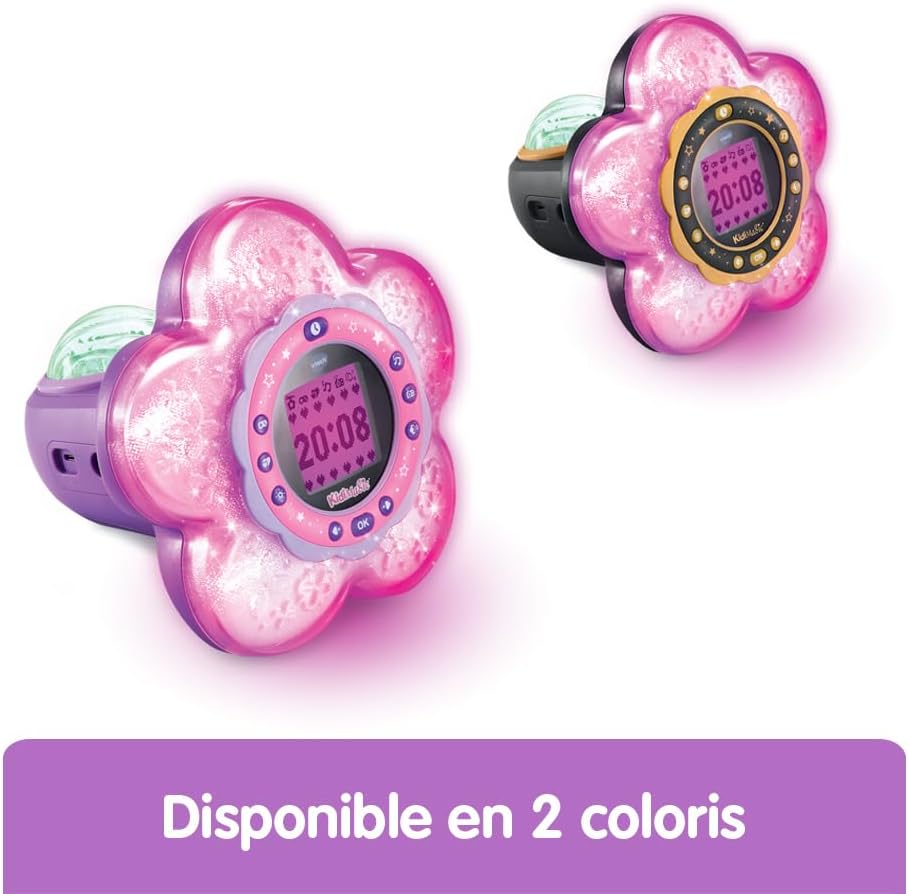
Imaj: Devan view of the KidiMagic Galaxy Light, illustrating the time display and the aurora borealis projection feature.

Imaj: Retounen view of the KidiMagic Galaxy Light, highlighting the battery compartment and various connection ports.
Kontwòl ak ekspozisyon:
- Ekran LCD: Displays time, game information, and settings.
- Capteur: Located on top, detects hand movements for light effects.
- Bouton: Various buttons for navigation, settings, and game control.
- Oratè: Integrated speaker for audio output.
- Jack Antre odyo: For connecting external music players.
- Lòj batri: Located at the back.
Enstalasyon
1. Enstalasyon batri
- Jwenn lòj batri a sou do inite a.
- Sèvi ak yon tournevis, louvri kouvèti lòj batri a.
- Insert 4 new LR6-AA batteries, ensuring correct polarity (+/-).
- Ranplase kouvèti a epi sere vis la.
Alternatively, the device can be powered by a VTech duo AC adapter (002181), sold separately.
2. Premye Limen
Press the Power button to turn on the device. The screen will light up, and you may be prompted to set the time.
Operasyon debaz
Mete tan an
- Access the 'Settings' menu using the navigation buttons.
- Select 'Time' and adjust the hour and minute using the arrow buttons.
- Confirm your selection with the 'OK' button.
Mete yon alam
- Navigate to the 'Alarm' menu.
- Choose an alarm slot and set the desired wake-up time.
- Select an alarm melody from the available options.
- Confirm to activate the alarm.
Ajisteman Volim
Use the dedicated volume buttons (usually marked with '+' and '-') to increase or decrease the sound level.
Otomatik fèmen
The device features an automatic shut-off timer to conserve battery life. You can set it to 60 minutes, 120 minutes, 240 minutes, or disable the sleep mode entirely through the settings menu.
Karakteristik
Aurora Borealis Projection
The KidiMagic Galaxy Light projects beautiful aurora borealis effects onto the ceiling, creating a celestial atmosphere in the room. This feature can be activated and customized through the light settings.

Imaj: A child interacting with the KidiMagic Galaxy Light, demonstrating the dynamic light effects and color changes.
Interactive Light Effects and Color Changes
Wave your hand over the magic sensor on the device to change its color and activate 12 different light effects and 7 color variations. This allows for personalized ambiance.
Radyo FM
Tune into your favorite FM radio stations. The device can store preferred stations for quick access.
External Music Player (MP3) Connection
Connect an external music player, such as an MP3 player, using the included audio cable. This transforms the KidiMagic Galaxy Light into a speaker, allowing you to play your own music.

Imaj: Side view of the KidiMagic Galaxy Light, emphasizing its capability to function as a musical speaker when connected to an external device.
Integrated Games
The device includes 4 enchanting games for entertainment:
- Buzzy Adventure
- Kache-ak-Chache
- Magic Mushroom
- Jwèt Magic Jaden
Imaj: A child engaged in playing one of the integrated games on the KidiMagic Galaxy Light's screen.
Magic Activities
Explore 6 magical activities designed for fun and relaxation:
- Crystal boul
- Magic Card
- Your Elf of the Day
- Emotion Management
- Positive Emotions
- Detant
Antretyen
- Netwayaj: Siye aparèy la ak yon ti kras damp twal. Pa sèvi ak pwodui chimik piman bouk oswa pwodui netwayaj abrazif.
- Ranplasman batri: Replace batteries when the device's performance diminishes or if the screen becomes dim. Follow the battery installation steps.
- Depo: Store the device in a cool, dry place away from direct sunlight when not in use for extended periods. Remove batteries if storing for several months.
Depanaj
Aparèy la pa limen:
- Tcheke si pil yo byen mete ak polarite ki kòrèk la.
- Ranplase ak pil fre.
- If using an AC adapter, ensure it is properly connected and functional.
Ekran an pa klere byen oswa li ap tranble:
- Pil yo ka fèb. Ranplase yo.
- Asire w ke aparèy la pa ekspoze a tanperati ekstrèm.
Pwoblèm son:
- Tcheke anviwònman volim yo.
- If using an external music player, ensure the audio cable is fully inserted and the external device's volume is up.
Espesifikasyon
| Nimewo Modèl | 572705 |
| Dimansyon (L x W x H) | 18.5 x 18 x 17.3 cm |
| Pwa | 635 gram |
| Laj Rekòmande | 6 - 10 years (Manufacturer's minimum: 72 months, maximum: 120 months) |
| Sous pouvwa | 4 x LR6-AA batteries (included for demo) or VTech AC adapter (sold separately) |
| Materyèl | Plastik |
| Lang | French (Product content) |
| Karakteristik | Alarm Clock, FM Radio, Speaker, Aurora Projection, 12 Light Effects, 7 Colors, 6 Magic Activities, 4 Games |
Garanti ak sipò
For warranty information and customer support, please refer to the documentation included with your purchase or visit the official VTech websit la. Kenbe prèv acha ou a pou nenpòt reklamasyon garanti.